
IOS UICollectionView基础+UICollectionViewFlowLayout基础
UICollectionView在众多控件中也算是比较常用的了,像淘宝在浏览宝贝时采用的就是UICollectionView,对于UICollectionView->UICollectionViewFlowLayout当然也是必不可少的了,还是老样子结合代码进行简单介绍,首先看一下UICollectionView实现结果:
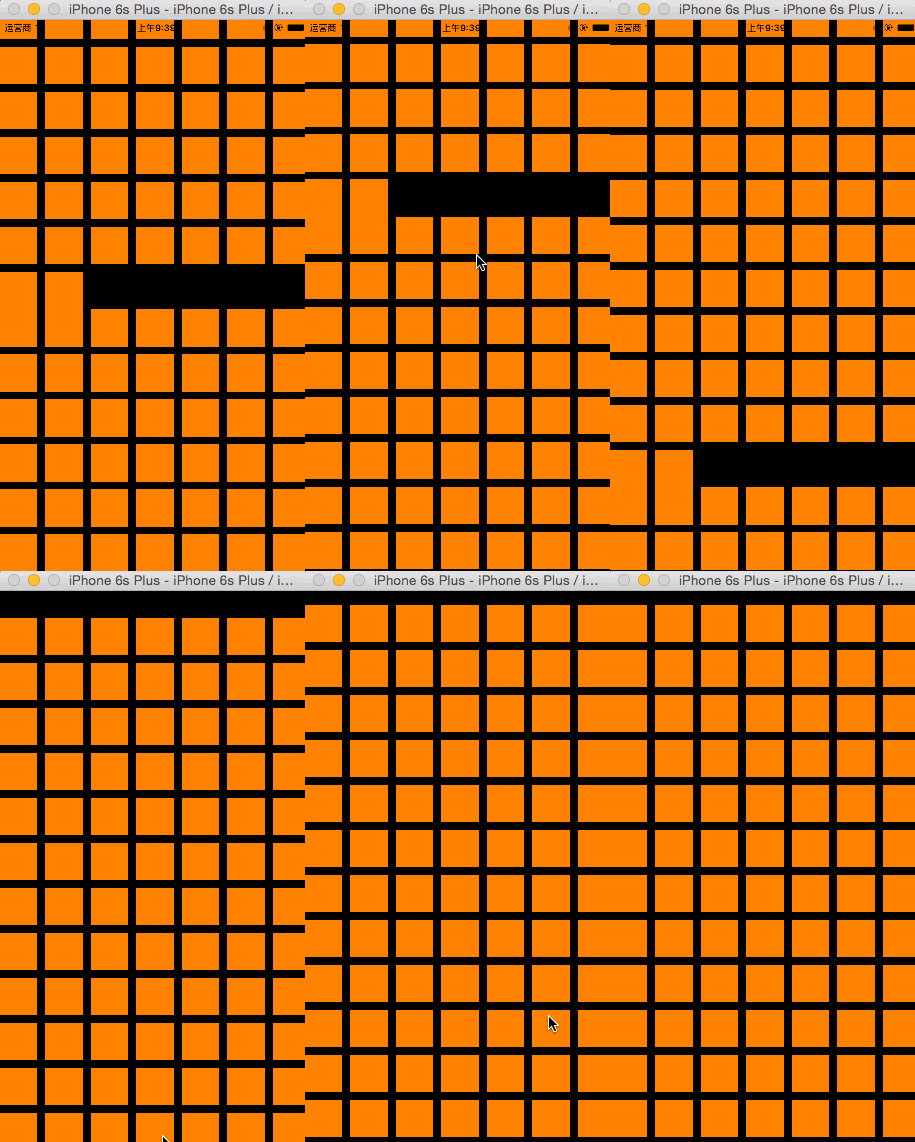
实现这些功能很简单,代码量极少,线看一下代码,然后进行深入了解:
//

//  ViewController.m

//  CX-UICollentionVIew基础

//

//  Created by ma c on 16/3/19.

//  Copyright © 2016年 xubaoaichiyu. All rights reserved.

//

#import "ViewController.h"

static NSString * identifier = @"cxCellID";

@interface ViewController ()<UICollectionViewDataSource>

@property (nonatomic, strong) UICollectionView * collectionView;

@end

@implementation ViewController

#pragma mark - set_and_get

-(UICollectionView *)collectionView{

    if (!_collectionView) {

        //自动网格布局

        UICollectionViewFlowLayout * flowLayout = [[UICollectionViewFlowLayout alloc]init];

        //网格布局

        _collectionView = [[UICollectionView alloc]initWithFrame:self.view.frame collectionViewLayout:flowLayout];

        //注册cell

        [_collectionView registerClass:[UICollectionViewCell class] forCellWithReuseIdentifier:identifier];

        //设置数据源代理

        _collectionView.dataSource = self;

    }

    return _collectionView;

}

#pragma mark - life

- (void)viewDidLoad {

    [super viewDidLoad];

    [self.view addSubview:self.collectionView];

}

#pragma mark - deleDate

//有多少的分组

-(NSInteger)numberOfSectionsInCollectionView:(UICollectionView *)collectionView{

    return ;

}

//每个分组里有多少个item

-(NSInteger)collectionView:(UICollectionView *)collectionView numberOfItemsInSection:(NSInteger)section{

    return ;

}

-(UICollectionViewCell *)collectionView:(UICollectionView *)collectionView cellForItemAtIndexPath:(NSIndexPath *)indexPath{

    //根据identifier从缓冲池里去出cell

    UICollectionViewCell * cell = [collectionView dequeueReusableCellWithReuseIdentifier:identifier forIndexPath:indexPath];

    cell.backgroundColor = [UIColor orangeColor];

    return cell;

}

@end
介绍过最最基本的知识点之后,按着步骤来,进行进一步介绍。
UICollectionViewFlowLayout的使用让UICollectionView更加丰富多彩,下面看一下使用UICollectionViewFlowLayout之后的效果吧->

代码->
//

//  ViewController.m

//  CX-UICollentionVIew基础

//

//  Created by ma c on 16/3/19.

//  Copyright © 2016年 xubaoaichiyu. All rights reserved.

//

#import "ViewController.h"

static NSString * identifier = @"cxCellID";

static CGFloat kMagin = .f;

static NSString * headIdentifier = @"cxHeadID";

@interface ViewController ()<UICollectionViewDataSource>

@property (nonatomic, strong) UICollectionView * collectionView;

@end

@implementation ViewController

#pragma mark - set_and_get

-(UICollectionView *)collectionView{

    if (!_collectionView) {

        //自动网格布局

        UICollectionViewFlowLayout * flowLayout = [[UICollectionViewFlowLayout alloc]init];

        CGFloat itemWidth = (self.view.frame.size.width -  * kMagin) / ;

        //设置单元格大小

        flowLayout.itemSize = CGSizeMake(itemWidth, itemWidth / 0.618);

        //最小行间距(默认为10)

        flowLayout.minimumLineSpacing = ;

        //最小item间距(默认为10)

        flowLayout.minimumInteritemSpacing = ;

        //设置senction的内边距

        flowLayout.sectionInset = UIEdgeInsetsMake(kMagin, kMagin, kMagin, kMagin);

        //设置UICollectionView的滑动方向

        flowLayout.scrollDirection = UICollectionViewScrollDirectionHorizontal;

        //sectionHeader的大小,如果是竖向滚动,只需设置Y值。如果是横向,只需设置X值。

        flowLayout.headerReferenceSize = CGSizeMake(,);

        //网格布局

        _collectionView = [[UICollectionView alloc]initWithFrame:self.view.frame collectionViewLayout:flowLayout];

        //注册cell

        [_collectionView registerClass:[UICollectionViewCell class] forCellWithReuseIdentifier:identifier];

        //注册header

        [_collectionView registerClass:[UICollectionReusableView class] forSupplementaryViewOfKind:UICollectionElementKindSectionHeader withReuseIdentifier:headIdentifier];

        //设置数据源代理

        _collectionView.dataSource = self;

    }

    return _collectionView;

}

#pragma mark - life

- (void)viewDidLoad {

    [super viewDidLoad];

    [self.view addSubview:self.collectionView];

}

#pragma mark - deleDate

//有多少的分组

-(NSInteger)numberOfSectionsInCollectionView:(UICollectionView *)collectionView{

    return ;

}

//每个分组里有多少个item

-(NSInteger)collectionView:(UICollectionView *)collectionView numberOfItemsInSection:(NSInteger)section{

    return ;

}

-(UICollectionViewCell *)collectionView:(UICollectionView *)collectionView cellForItemAtIndexPath:(NSIndexPath *)indexPath{

    //根据identifier从缓冲池里去出cell

    UICollectionViewCell * cell = [collectionView dequeueReusableCellWithReuseIdentifier:identifier forIndexPath:indexPath];

    cell.backgroundColor = [UIColor orangeColor];

    return cell;

}

-(UICollectionReusableView *)collectionView:(UICollectionView *)collectionView viewForSupplementaryElementOfKind:(NSString *)kind atIndexPath:(NSIndexPath *)indexPath{

    //kind有两种 一种时header 一种事footer

    if (kind == UICollectionElementKindSectionHeader) {

        UICollectionReusableView * header = [collectionView dequeueReusableSupplementaryViewOfKind:UICollectionElementKindSectionHeader withReuseIdentifier:headIdentifier forIndexPath:indexPath];

        header.backgroundColor = [UIColor yellowColor];

        return header;

    }

    return nil;

}

@end
灵活的是使用 UICollectionView+UICollectionViewFlowLayout 会带来更多的有趣的体验,随后我会介绍一些比较实用的实现。
IOS UICollectionView基础+UICollectionViewFlowLayout基础的更多相关文章
- iOS 9应用开发基础教程下册
iOS 9应用开发基础教程下册 介绍: 本教程是国内第一本iOS 9开发应用教程.本教程基于Xcode 7.0,使用Swift 2.0语言讲解如何开发iOS 9的应用App. 学习建议:本教程针对 ...
- iOS 开发之 GCD 基础
header{font-size:1em;padding-top:1.5em;padding-bottom:1.5em} .markdown-body{overflow:hidden} .markdo ...
- [.net 面向对象编程基础] (3) 基础中的基础——数据类型
[.net 面向对象编程基础] (3) 基础中的基础——数据类型 关于数据类型,这是基础中的基础. 基础..基础..基础.基本功必须要扎实. 首先,从使用电脑开始,再到编程,电脑要存储数据,就要按类型 ...
- [.net 面向对象编程基础] (4) 基础中的基础——数据类型转换
[.net面向对象编程基础] (4)基础中的基础——数据类型转换 1.为什么要进行数据转换? 首先,为什么要进行数据转换,拿值类型例子说明一下, 比如:我们要把23角零钱,换成2.30元,就需要把整形 ...
- [.net 面向对象编程基础] (5) 基础中的基础——变量和常量
[.net面向对象编程基础] (5) 基础中的基础——变量和常量 1.常量:在编译时其值能够确定,并且程序运行过程中值不发生变化的量. 通俗来说,就是定义一个不能改变值的量.既然不能变动值,那就必须 ...
- [.net 面向对象编程基础] (6) 基础中的基础——运算符和表达式
[.net 面向对象编程基础] (6) 基础中的基础——运算符和表达式 说起C#运算符和表达式,小伙伴们肯定以为很简单,其实要用好表达式,不是一件容易的事.一个好的表达式可以让你做事半功倍的效果,比如 ...
- [.net 面向对象编程基础] (7) 基础中的基础——流程控制语句
[.net 面向对象编程基础] (7) 基础中的基础——流程控制语句 本来没有这一节的内容,后来考虑到既然是一个系列文章,那么就尽可能写的详细一些,本节参考了网上朋友所写的例子,为的是让更多小伙伴学习 ...
- [.net 面向对象编程基础] (8) 基础中的基础——修饰符
[.net 面向对象编程基础] (8) 基础中的基础——修饰符 在进入C#面向对象核心之前,我们需要先对修饰符有所了解,其实我们在前面说到变量和常量的时候,已经使用了修饰符,并且说明了变量和常量的修改 ...
- JavaScript基础---语言基础(1)
写在前面: 通过四篇博客把JS基础中的基础整理一下,方便自己查阅,这些内容对于实际项目开发中也许并不会在意,但是作为JS的语言基础,自觉还是应该熟悉.在完成这三篇博客(JavaScript基础---语 ...
随机推荐
- Linux高级编程--05.文件读写
缓冲I/O和非缓冲I/O 文件读写主要牵涉到了如下五个操作:打开.关闭.读.写.定位.在Linux系统中,提供了两套API, 一套是C标准API:fopen.fclose.fread.fwrite.f ...
- Unity3D 角色(物体) 移动方法 合集
1. 简介 在Unity3D中,有多种方式可以改变物体的坐标,实现移动的目的,其本质是每帧修改物体的position. 2. 通过Transform组件移动物体 Transform 组件用于描述物体在 ...
- JS阻止鼠标滚动
var scrollFunc=function(e){ e=e || window.event; if (e.stopPropagation) e.stopPropagation(); else e. ...
- LeetCode——Gray Code
Description: The gray code is a binary numeral system where two successive values differ in only one ...
- 译:c#生成条码的web控件
译文:http://www.codeproject.com/Tips/846860/Csharp-Barcode-Generator-Web-Control 在asp.net的web页用c#的web控 ...
- ASP.NET获取IP的6种方法
服务端: //方法一 HttpContext.Current.Request.UserHostAddress; //方法二 HttpContext.Current.Request.ServerVari ...
- 【iOS】XcodeColors插件与CocoaLumberjack工具
工欲善其事必先利其器,好的开发者一定是懂得利用工具来提高自己的效率的,Xcode有很多第三方插件可以使用,最近发现一个可以给控制台着色的工具XcodeColors,结合CocoaLumberjack一 ...
- Studio for Winforms FlexGrid: 创建分类汇总
C1FlexGrid.Subtotal方法可以增加包含普通(非小计)行的汇总数据的分类汇总行. 分类汇总支持分层聚合.例如,如果你的表格包含销售数据,你可能会通过产品.地区和推销员来小计一下以得出总的 ...
- 一、PBNI环境搭建及初步使用
PowerBuilder Native Interface(PowerBuilder本机接口PBNI)允许将第3方程序转换为PowerBuilder对象,供PowerBuilder直接使用,也允许将P ...
- Hibernate之映射文件中索引及约束的使用
1.添加索引: 在一对多的关系中,在多的一方会产生一个外键,这个外键没有自动 添加索引,当存在从一的一端产生对多的一端的查询时,有可能会在多的一端造成全表查询问题,数据量巨大时会产生严重的性能问题.可 ...