
[ZZ]Android UI Automated Testing
Google Testing Blog最近发表了一篇Android UI Automated Testing,我把他转载过来,
墙外地址:http://googletesting.blogspot.com/2015/03/android-ui-automated-testing.html
译文见这里:http://testerhome.com/topics/2276
Android UI Automated Testing
by Mona El Mahdy
Overview
This post reviews four strategies for Android UI testing with the goal of creating UI tests that are fast, reliable, and easy to debug.
Before we begin, let’s not forget an import rule: whatever can be unit tested should be unit tested. Robolectric and gradle unit tests support are great examples of unit test frameworks for Android. UI tests, on the other hand, are used to verify that your application returns the correct UI output in response to a sequence of user actions on a device. Espresso is a great framework for running UI actions and verifications in the same process. For more details on the Espresso and UI Automator tools, please see: test support libraries.
The Google+ team has performed many iterations of UI testing. Below we discuss the lessons learned during each strategy of UI testing. Stay tuned for more posts with more details and code samples.
Strategy 1: Using an End-To-End Test as a UI Test
Let’s start with some definitions. A UI test ensures that your application returns the correct UI output in response to a sequence of user actions on a device. An end-to-end (E2E) test brings up the full system of your app including all backend servers and client app. E2E tests will guarantee that data is sent to the client app and that the entire system functions correctly.
Usually, in order to make the application UI functional, you need data from backend servers, so UI tests need to simulate the data but not necessarily the backend servers. In many cases UI tests are confused with E2E tests because E2E is very similar to manual test scenarios. However, debugging and stabilizing E2E tests is very difficult due to many variables like network flakiness, authentication against real servers, size of your system, etc.
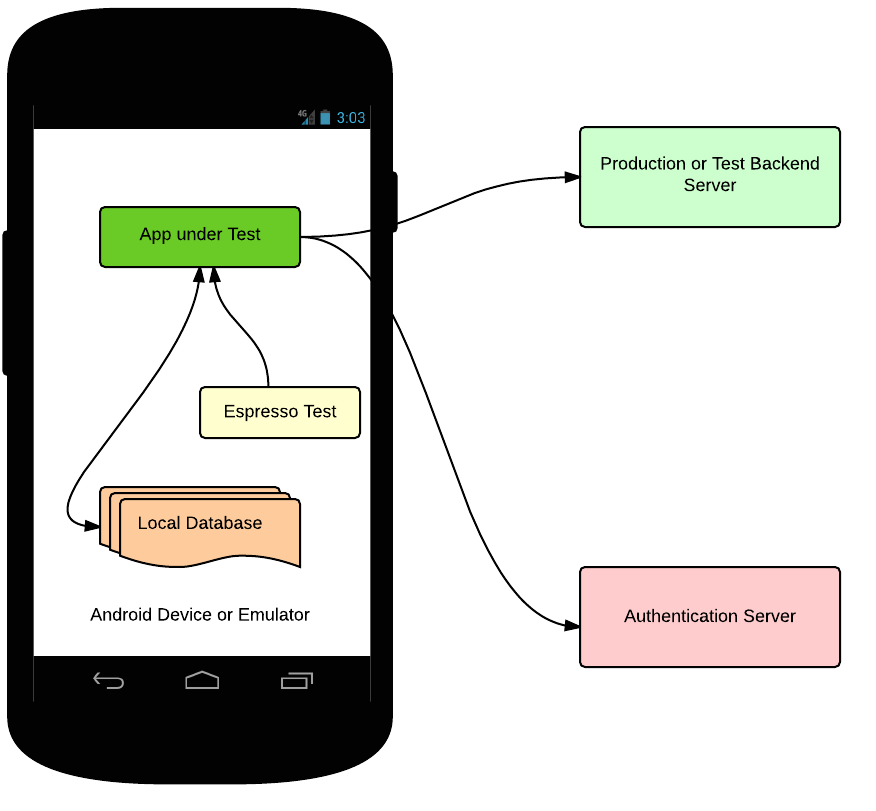
When you use UI tests as E2E tests, you face the following problems:
*Very large and slow tests.
*High flakiness rate due to timeouts and memory issues.
*Hard to debug/investigate failures.
*Authentication issues (ex: authentication from automated tests is very tricky).
Let’s see how these problems can be fixed using the following strategies.
Strategy 2: Hermetic UI Testing using Fake Servers
In this strategy, you avoid network calls and external dependencies, but you need to provide your application with data that drives the UI. Update your application to communicate to a local server rather than external one, and create a fake local server that provides data to your application. You then need a mechanism to generate the data needed by your application. This can be done using various approaches depending on your system design. One approach is to record server responses and replay them in your fake server.
Once you have hermetic UI tests talking to a local fake server, you should also have server hermetic tests. This way you split your E2E test into a server side test, a client side test, and an integration test to verify that the server and client are in sync (for more details on integration tests, see the backend testing section of blog).
Now, the client test flow looks like:

While this approach drastically reduces the test size and flakiness rate, you still need to maintain a separate fake server as well as your test. Debugging is still not easy as you have two moving parts: the test and the local server. While test stability will be largely improved by this approach, the local server will cause some flakes.
Let’s see how this could this be improved...
Strategy 3: Dependency Injection Design for Apps.
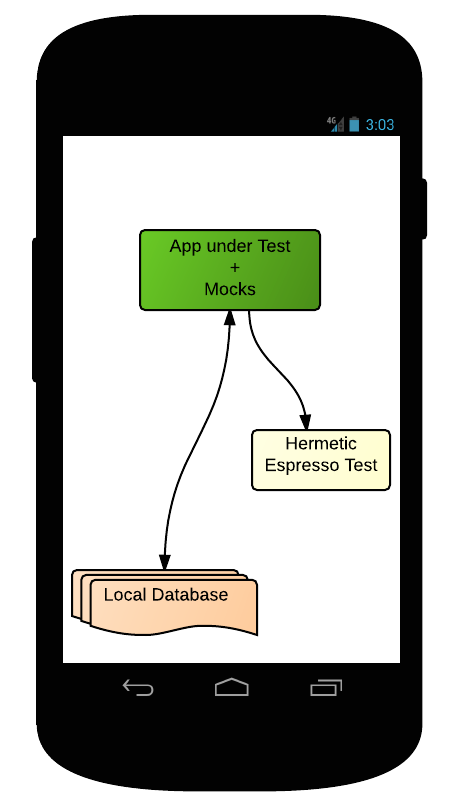
To remove the additional dependency of a fake server running on Android, you should use dependency injection in your application for swapping real module implementations with fake ones. One example is Dagger, or you can create your own dependency injection mechanism if needed.
This will improve the testability of your app for both unit testing and UI testing, providing your tests with the ability to mock dependencies. In instrumentation testing, the test apk and the app under test are loaded in the same process, so the test code has runtime access to the app code. Not only that, but you can also use classpath override (the fact that test classpath takes priority over app under test) to override a certain class and inject test fakes there. For example, To make your test hermetic, your app should support injection of the networking implementation. During testing, the test injects a fake networking implementation to your app, and this fake implementation will provide seeded data instead of communicating with backend servers.
Strategy 4: Building Apps into Smaller Libraries
If you want to scale your app into many modules and views, and plan to add more features while maintaining stable and fast builds/tests, then you should build your app into small components/libraries. Each library should have its own UI resources and user dependency management. This strategy not only enables mocking dependencies of your libraries for hermetic testing, but also serves as an experimentation platform for various components of your application.
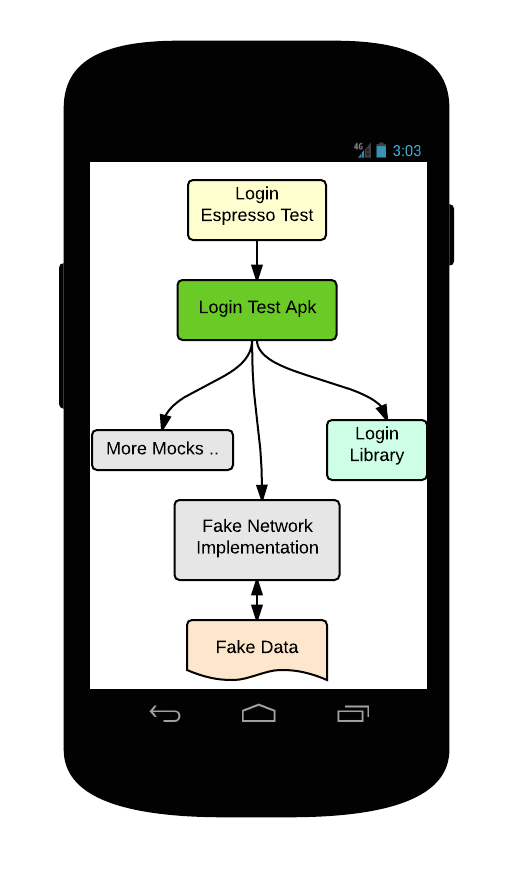
Once you have small components with dependency injection support, you can build a test app for each component.
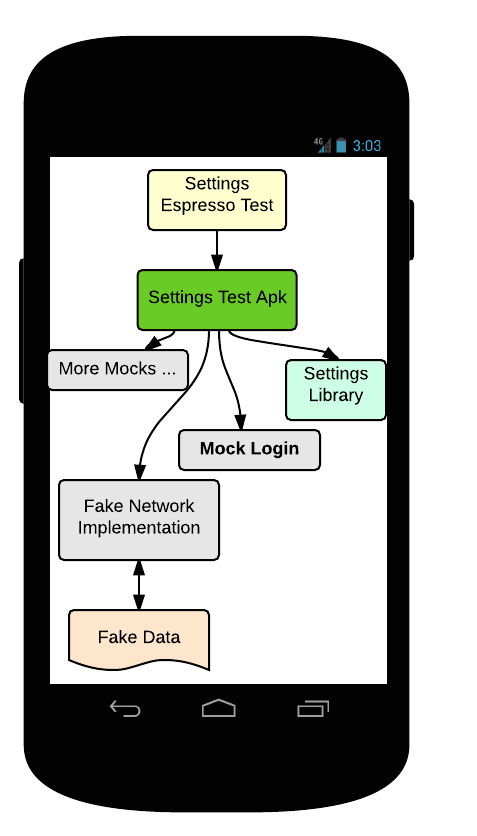
The test apps bring up the actual UI of your libraries, fake data needed, and mock dependencies. Espresso tests will run against these test apps. This enables testing of smaller libraries in isolation.
For example, let’s consider building smaller libraries for login and settings of your app.
The settings component test now looks like:
Conclusion
UI testing can be very challenging for rich apps on Android. Here are some UI testing lessons learned on the Google+ team:
1.Don’t write E2E tests instead of UI tests. Instead write unit tests and integration tests beside the UI tests.
2.Hermetic tests are the way to go.
3.Use dependency injection while designing your app.
4.Build your application into small libraries/modules, and test each one in isolation. You can then have a few integration tests to verify integration between components is correct .
5.Componentized UI tests have proven to be much faster than E2E and 99%+ stable. Fast and stable tests have proven to drastically improve developer productivity.
[ZZ]Android UI Automated Testing的更多相关文章
- Android UI性能测试——使用 Gfxinfo 衡量性能
Android官方文档翻译 原文地址:https://developer.android.com/training/testing/performance参考:https://www.jianshu. ...
- Android测试:Testing Apps on Android
原文:https://developer.android.com/training/testing/index.html 测试你的App是开发过程中的重要组成部分.通过对应用程序持续的运行测试,你可以 ...
- 【转】Automated Testing Detail Test Plan
Automated Testing Detail Test PlanAutomated Testing DTP Overview This Automated Testing Detail Test ...
- iPhone/iPad/Android UI尺寸规范 UI尺寸规范,UI图标尺寸,UI界面尺寸,iPhone6尺寸,iPhone6 Plus尺寸,安卓尺寸,iOS尺寸
iPhone/iPad/Android UI尺寸规范 UI尺寸规范,UI图标尺寸,UI界面尺寸,iPhone6尺寸,iPhone6 Plus尺寸,安卓尺寸,iOS尺寸 iPhone界面尺寸 设备 分辨 ...
- Android ui 测试课堂笔记
开始接触Android ui测试了,笔记如下 模拟器 Genemotion , the fastest android simulator in the world Android ui 测试工具 S ...
- Android UI 绘制过程浅析(五)自定义View
前言 这已经是Android UI 绘制过程浅析系列文章的第五篇了,不出意外的话也是最后一篇.再次声明一下,这一系列文章,是我在拜读了csdn大牛郭霖的博客文章<带你一步步深入了解View> ...
- 12套有用的免费 PSD 格式 Android UI 素材
在这里,我们向大家呈现一些有用的和免费的 Android 用户界面 PSD 素材.由于 Android 市场迅速增长,设计人员和开发人员正在寻找一些快速和容易的方法来创建 Android 友好的应用和 ...
- Android UI线程和非UI线程
Android UI线程和非UI线程 UI线程及Android的单线程模型原则 当应用启动,系统会创建一个主线程(main thread). 这个主线程负责向UI组件分发事件(包括绘制事件),也是在这 ...
- 免费的Android UI库及组件推荐
短短数年时间Android平台就已经形成了一个庞大而活跃的开发者社区.许多社区开发的项目业已进入成熟阶段,甚至可以用于商业的软件生产中,且不用担心质量问题. 本文编译自androiduipattern ...
随机推荐
- Linux下centos系统安装redis和php-redis
源地址:http://mirrors.ustc.edu.cn/fedora/epel/6/x86_64/epel-release-6-8.noarch.rpm //此为centos 6版本 安装输入 ...
- 【洛谷 p3382】模板-三分法(算法效率)
题目:给出一个N次函数,保证在范围[l,r]内存在一点x,使得[l,x]上单调增,[x,r]上单调减.试求出x的值. 解法:与二分法枚举中点使区间分成2份不一样,三分法是枚举三分点,再根据题目的情况修 ...
- webpack学习(入门基础)
webpack的学习webpack是什么?1:加载模块(将JS.sass/less.图片等作为模块来处理使用) 2:进行打包 webpack的优势?1:webpack以commonJS(JS的规范)的 ...
- 回车键和button按钮都绑定同一个事件,如何避免按回车的时候button重复点击
保存一个全局变量,用来记录Button的焦点状态 <button onclick="login();" onfocus="window.buttonIsFocuse ...
- vIDC v2.0 强大的端口转发神器使用总结-开放内网tfs代码服务
vIDC2.0 端口映射工具,最近在公司闲来无事,想自己整个tfs来管理自己的研究代码. 本来是想用微软Visual Studio提供的免费tfs,但是无奈速度太慢.他们的服务器在美国,中国也没有代理 ...
- javamail 发送邮件demo
package com.suntray.test; import javax.mail.BodyPart; import javax.mail.Message; import javax.mail.M ...
- Sharepoint学习笔记—习题系列--70-573习题解析 -(Q94-Q96)
Question 94You need to create a custom application that provides users with the ability to create a ...
- 给Macbook装系统的网址
- Tomcat服务器性能优化
在这篇文章里分以下的七个步骤,按照这些步骤走,Tomcat服务器的性能就能改善哦. 增加JVM堆(heap) 解决内存泄漏问题 线程池(thread pool)的设置 压缩 调节数据库性能 Tomca ...
- Win7下:编译器错误信息: CS0016: 未能写入输出文件
错误如下: "/"应用程序中的服务器错误. 编译错误 说明: 在编译向该请求提供服务所需资源的过程中出现错误.请检查下列特定错误详细信息并适当地修改源代码. 编译器错误消息: CS ...