
Material Design控件使用学习 TabLayout+SwipeRefreshlayout
效果:
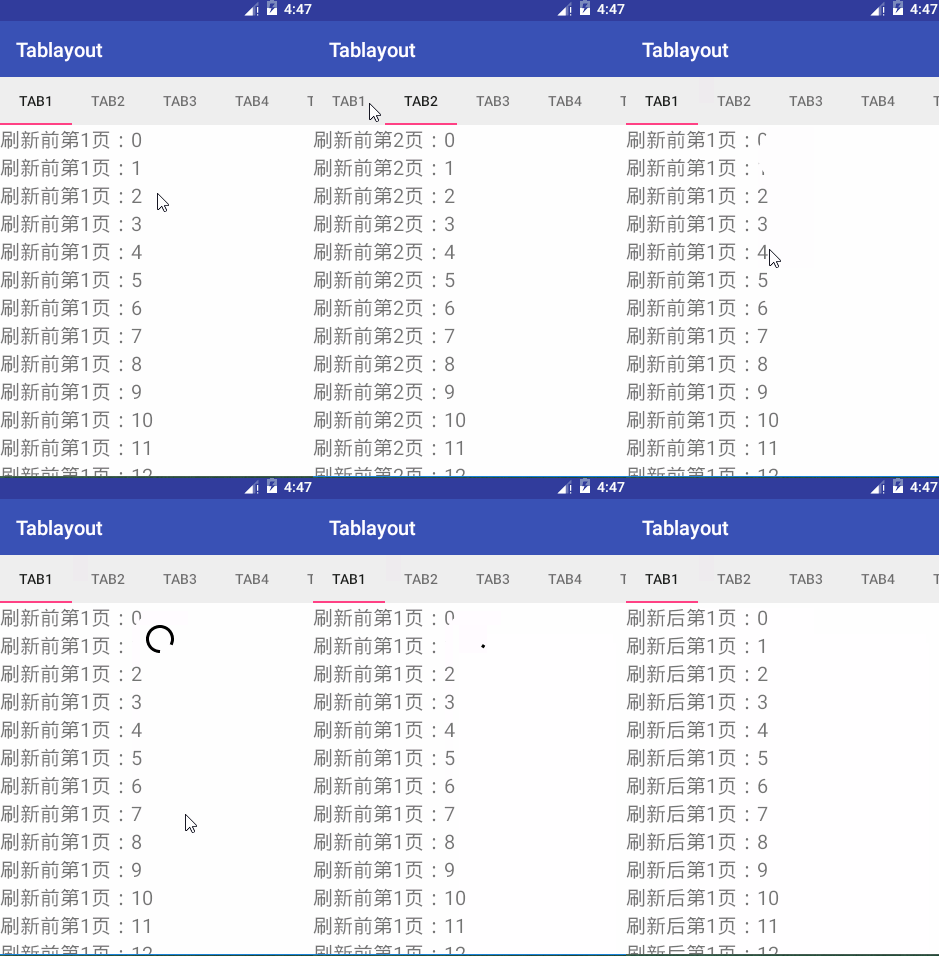
Tablayout有点类似之前接触过的开源ViewPagerIndicator,将其与viewpager绑定,可实现viewpager的导航功能。
SwipeRefreshLayout是官方出的下拉刷新控件。
1. 导入design包,Recyclerview包。
activity_main布局。
将Tablayout置于Viewpager之上。
<?xml version="1.0" encoding="utf-8"?>

<LinearLayout xmlns:android="http://schemas.android.com/apk/res/android"

              xmlns:app="http://schemas.android.com/apk/res-auto"

              android:layout_width="match_parent"

              android:layout_height="match_parent"

              android:orientation="vertical">

    <android.support.design.widget.TabLayout

        android:id="@+id/tabLayout"

        android:layout_width="match_parent"

        android:layout_height="wrap_content"

        app:tabMode="scrollable"

        />

    <android.support.v4.view.ViewPager

        android:id="@+id/viewPager"

        android:layout_width="match_parent"

        android:layout_height="0dp"

        android:layout_weight="1"

        android:background="#ffffff"

        />

</LinearLayout>
2.MainActivity。
通过tabLayout.setupWithViewPager(viewPager);直接自动完成绑定,当然也有单独给每个Tab设置的方法,但是不如这样简单。
也还可以在代码或xml布局中给tablayout设置样式。
通过Adapter中getPageTitle()方法确定Tab的名称。
package com.example.xw.tablayout;

import android.content.Context;

import android.support.design.widget.TabLayout;

import android.support.v4.app.Fragment;

import android.support.v4.app.FragmentManager;

import android.support.v4.app.FragmentPagerAdapter;

import android.support.v4.view.ViewPager;

import android.support.v7.app.AppCompatActivity;

import android.os.Bundle;

public class MainActivity extends AppCompatActivity {

    private ViewPager mViewPager;

    private TabLayout mTabLayout;

    @Override

    protected void onCreate(Bundle savedInstanceState) {

        super.onCreate(savedInstanceState);

        setContentView(R.layout.activity_main);

        ViewPager viewPager= (ViewPager) findViewById(R.id.viewPager);

        MyAdapter adapter=new MyAdapter(getSupportFragmentManager(),this);

        viewPager.setAdapter(adapter);

        TabLayout tabLayout= (TabLayout) findViewById(R.id.tabLayout);

        tabLayout.setupWithViewPager(viewPager);

    }

    class MyAdapter extends FragmentPagerAdapter{

        private String[] titles=new String[]{"Tab1","Tab2","Tab3","Tab4","Tab5","Tab6"};

        private Context mContext;

        public MyAdapter(FragmentManager fm, Context context) {

            super(fm);

            mContext=context;

        }

        @Override

        public Fragment getItem(int position) {

            return PageFragment.newInstance(position+1);

        }

        @Override

        public int getCount() {

            return titles.length;

        }

        @Override

        public CharSequence getPageTitle(int position) {

            return titles[position];

        }

    }

}
3.fragment的布局
将Recyclerview作为SwipeRefreshLayout的child
<?xml version="1.0" encoding="utf-8"?>

<android.support.v4.widget.SwipeRefreshLayout xmlns:android="http://schemas.android.com/apk/res/android"

  android:id="@+id/swipeLayout"

   android:layout_width="match_parent"

    android:layout_height="match_parent"

    android:orientation="vertical">

    <android.support.v7.widget.RecyclerView

        android:id="@+id/recycler_view"

        android:layout_width="match_parent"

        android:layout_height="match_parent"/>

</android.support.v4.widget.SwipeRefreshLayout>
Recyclerview的item布局
这里简单的用一个textview.
rv_item
<?xml version="1.0" encoding="utf-8"?>

<TextView xmlns:android="http://schemas.android.com/apk/res/android"

          android:id="@+id/rv_item"

          android:textSize="20sp"

          android:layout_width="wrap_content"

          android:layout_height="wrap_content"

          android:text="item">

</TextView>
PagerFragment
通过swipeRefreshLayout.setOnRefreshListener监听刷新事件,在onRefresh()里开启一个线程去修改adapter的数据,发送message,在主线程的handler
的handleMessage中,通过swipeRefreshLayout.setRefreshing(false); mMyAdapter.notifyDataSetChanged();停止刷新动画和设置Adapter刷新。
package com.example.xw.tablayout;

import android.graphics.Color;

import android.os.Bundle;

import android.os.Handler;

import android.os.Message;

import android.support.annotation.Nullable;

import android.support.v4.app.Fragment;

import android.support.v4.view.PagerAdapter;

import android.support.v4.widget.SwipeRefreshLayout;

import android.support.v7.widget.LinearLayoutManager;

import android.support.v7.widget.RecyclerView;

import android.view.LayoutInflater;

import android.view.View;

import android.view.ViewGroup;

import android.widget.TextView;

/**

 * Created by xw on 2016/9/2.

 */

public class PageFragment extends Fragment {

    public static final String ARGS_PAGE="argspage";

    private int mPage;

    private RecyclerView mRecyclerView;

    private MyAdapter mMyAdapter;

    private SwipeRefreshLayout swipeRefreshLayout;

    private String data="刷新前";

    private Handler mHandler = new Handler(){

        @Override

        public void handleMessage(Message msg) {

            super.handleMessage(msg);

            switch (msg.what) {

                case 1:

                    swipeRefreshLayout.setRefreshing(false);

                    mMyAdapter.notifyDataSetChanged();

                    //swipeRefreshLayout.setEnabled(false);

                    break;

                default:

                    break;

            }

        }

    };

    public static PageFragment newInstance(int page){

        Bundle args=new Bundle();

        args.putInt(ARGS_PAGE,page);

        PageFragment fragment=new PageFragment();

        fragment.setArguments(args);

        return fragment;

    }

    @Override

    public void onCreate(@Nullable Bundle savedInstanceState) {

        super.onCreate(savedInstanceState);

        mPage=getArguments().getInt(ARGS_PAGE);

        mMyAdapter=new MyAdapter();

    }

    @Nullable

    @Override

    public View onCreateView(LayoutInflater inflater, @Nullable ViewGroup container, @Nullable Bundle savedInstanceState) {

      View view=inflater.inflate(R.layout.fragment,container,false);

        swipeRefreshLayout = (SwipeRefreshLayout)view.findViewById(R.id.swipeLayout);

        swipeRefreshLayout.setSize(SwipeRefreshLayout.LARGE);

      swipeRefreshLayout.setOnRefreshListener(new SwipeRefreshLayout.OnRefreshListener() {

          @Override

          public void onRefresh() {

              new Thread(new Runnable() {

                  @Override

                  public void run() {

                      data="刷新后";

                      try {

                          Thread.sleep(5000);

                      } catch (InterruptedException e) {

                          e.printStackTrace();

                      }

                      mHandler.sendEmptyMessage(1);

                  }

              }).start();

          }

      });

        mRecyclerView= (RecyclerView) view.findViewById(R.id.recycler_view);

        mRecyclerView.setLayoutManager(new LinearLayoutManager(getActivity()));

        mRecyclerView.setAdapter(mMyAdapter);

        return view;

    }

    class MyAdapter extends RecyclerView.Adapter<MyHolder>{

        @Override

        public MyHolder onCreateViewHolder(ViewGroup parent, int viewType) {

            View v=LayoutInflater.from(getActivity()).inflate(R.layout.rv_item,parent,false);

            return new MyHolder(v);

        }

        @Override

        public void onBindViewHolder(MyHolder holder, int position) {

                holder.mTextView.setText(""+data+"第"+mPage+"页:"+position);

        }

        @Override

        public int getItemCount() {

            return 100;

        }

    }

    class MyHolder extends RecyclerView.ViewHolder{

        private TextView mTextView;

        public MyHolder(View itemView) {

            super(itemView);

            mTextView= (TextView) itemView;

        }

    }

}
Material Design控件使用学习 TabLayout+SwipeRefreshlayout的更多相关文章
- Material Design控件使用学习 toolbar+drawerlayout+ Snackbar
效果 1.,导包design包和appcompat-v7 ,设置Theme主题Style为NoActionbar 2.custom_toolbar.xml <?xml version=" ...
- Android Material Design控件学习(三)——使用TextInputLayout实现酷市场登录效果
前言 前两次,我们学习了 Android Material Design控件学习(一)--TabLayout的用法 Android Material Design控件学习(二)--Navigation ...
- Android Material Design控件学习(一)——TabLayout的用法
前言 Google官方在14年Google I/O上推出了全新的设计语言--Material Design.一并推出了一系列实现Material Design效果的控件库--Android Desig ...
- Android Material Design控件学习(二)——NavigationView的学习和使用
前言 上次我们学习了TabLayout的用法,今天我们继续学习MaterialDesign(简称MD)控件--NavigationView. 正如其名,NavigationView,导航View.一般 ...
- Android Material Design控件使用(四)——下拉刷新 SwipeRefreshLayout
使用下拉刷新SwipeRefreshLayout 说明 SwipeRefreshLayout是Android官方的一个下拉刷新控件,一般我们使用此布局和一个RecyclerView嵌套使用 使用 xm ...
- Android Material Design控件使用(一)——ConstraintLayout 约束布局
参考文章: 约束布局ConstraintLayout看这一篇就够了 ConstraintLayout - 属性篇 介绍 Android ConstraintLayout是谷歌推出替代PrecentLa ...
- Android Material Design 控件常用的属性
android:fitsSystemWindows="true" 是一个boolean值的内部属性,让view可以根据系统窗口(如status bar)来调整自己的布局,如果值为t ...
- Android Material Design控件使用(二)——FloatButton TextInputEditText TextInputLayout 按钮和输入框
FloatingActionButton 1. 使用FloatingActionButton的情形 FAB代表一个App或一个页面中最主要的操作,如果一个App的每个页面都有FAB,则通常表示该App ...
- Android Material Design控件使用(三)——CardView 卡片布局和SnackBar使用
cardview 预览图 常用属性 属性名 说明 cardBackgroundColor 设置背景颜色 cardCornerRadius 设置圆角大小 cardElevation 设置z轴的阴影 ca ...
随机推荐
- luogu P4139 上帝与集合的正确用法(扩展欧拉定理)
本蒟蒻现在才知带扩展欧拉定理. 对于任意的\(b\geq\varphi(p)\)有 \(a^b\equiv a^{b\ mod\ \varphi(p)+\varphi(p)}(mod\ p)\) 当\ ...
- BZOJ 3376 [Usaco2004 Open]Cube Stacking 方块游戏(带权并查集)
题解 #include<iostream> #include<cstring> #include<cstdio> #include<cmath> #in ...
- BZOJ 3689 异或之 (可持久化01Trie+堆)
题目大意:给你一个序列,求出第$K$大的两两异或值 先建出来可持久化$01Trie$ 用一个$set$/堆存结构体,存某个异或对$<i,j>$的第二关键字$j$,以及$ai\;xor\;a ...
- 紫书 例题8-11 UVa 10954 (优先队列)
解法和合并果子是一样的, 每次取最小的两个, 更新答案, 加入队列 #include<cstdio> #include<queue> #define REP(i, a, b) ...
- C#调用带结构体指针的C Dll的方法
在C#中调用C(C++)类的DLL的时候,有时候C的接口函数包含很多参数,而且有的时候这些参数有可能是个结构体,而且有可能是结构体指针,那么在C#到底该如何安全的调用这样的DLL接口函数呢?本文将详细 ...
- java.sql.SQLException: The server time zone value 'Öйú±ê׼ʱ¼ä' is unrecognized
Exception in thread "main" java.sql.SQLException: The server time zone value 'Öйú±ê׼ʱ¼ä ...
- Google笔试(2015年8月)
华电北风吹 天津大学认知计算与应用重点实验室 日期:2015/8/21 这三道题目的PDF能够在这里下载 https://github.com/ncepuzhengyi/jobHuntingExam/ ...
- Android控件篇
Android中提供了丰富的UI空间.为了最大限度地发挥平台的性能.每个开发人员必须熟练掌握UI控件尤其是经常使用的UI控件.并能依据须要呈现的内容选择最恰当的控件. Android提供了XML配置和 ...
- View注入框架:Butterknife简单使用
View注入框架 下载地址 1.Activity Binging 通过@Bind凝视字段,Butter Knife能够通过View的ID自己主动找到并把对应的视图布局. class ExampleAc ...
- 使用client对象模型读取SharePoint列表数据
使用client对象模型读取SharePoint列表数据 client对象模型提供了强有力的方式.从远程client应用程序管理列表. 1. 管理员身份打开VS,新建项目Windows窗口应用程序,命 ...