
PyQt4 模拟记事本基本功能(保存,打开文件)
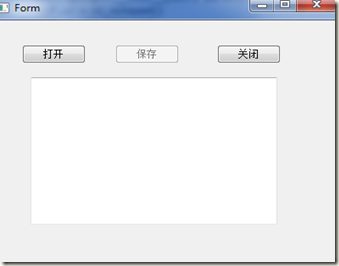
完成功能:
1. 默认【保存】按钮enable
2. 修改文本的内容后,【enable】
3. 解决字符乱码问题:utf-8
4. 提示:如果修改了文件没有保存的时候,又尝试打开新的文件,给出相关的提示信息
操作步骤:
1. 在Designer中设计,生产**.ui文件
2. 切换到.ui文件所在目录,运行如下命令,生成.py文件
pyuic4 **.ui > **.py
# -*- coding: utf-8 -*-

import sys

from PyQt4 import QtCore, QtGui

from edytor import Ui_notepad

from os.path import isfile

import codecs

class StartQt4(QtGui.QMainWindow):

    def __init__(self, parent=None, flags=0):

        QtGui.QWidget.__init__(self, parent)

        self.ui = Ui_notepad()

        self.ui.setupUi(self)

        ''' click点击 button_open 执行file_dialog'''

        QtCore.QObject.connect(self.ui.button_open, QtCore.SIGNAL("clicked()"), self.file_dialog)

        ''' click点击 button_save 执行file_save保存'''

        QtCore.QObject.connect(self.ui.button_save, QtCore.SIGNAL("clicked()"), self.file_save)

        ''' editor_window的内容发送改变时,执行enable_save函数,enable = true'''

        QtCore.QObject.connect(self.ui.editor_window, QtCore.SIGNAL("textChanged()"),self.enable_save )

    def file_dialog(self):

        response = False

        # buttton texts

        SAVE = 'Save'

        DISCARD = 'Discard'

        CANCEL =  'Cancel'

        # if we have changes then ask about them

        if self.ui.button_save.isEnabled() and self.filename:

            message = QtGui.QMessageBox(self)

            message.setText('What to do about unsaved changes ?')

            message.setWindowTitle('Notpad')

            message.setIcon(QtGui.QMessageBox.Question)

            message.addButton(SAVE, QtGui.QMessageBox.AcceptRole)

            message.addButton(DISCARD, QtGui.QMessageBox.DestructiveRole)

            message.addButton(CANCEL, QtGui.QMessageBox.RejectRole)

            message.setDetailedText('Unsaved changes in file: '+ str(self.filename))

            message.exec_()

            response = message.clickedButton().text()

        # save file

        if response == SAVE:

            self.file_save()

            self.ui.button_save.setEnabled(False)

        # descard changes

        elif response == DISCARD:

            self.ui.button_save.setEnabled(False)

        # if we didn't cancelled show the file dialogue

        if response != CANCEL:

            ''' 使用QFileDialog来选择文件'''

            fd = QtGui.QFileDialog(self)

            ''' 使用getOpenFileName()弹出一个文件选择框

            fd.getOpenFileName()用于返回我们选择文件的名字。如果没有选择文件的话,会得打一个空的文件名

            '''

            self.filename = fd.getOpenFileName()

            if isfile(self.filename):

                text = codecs.open(self.filename, 'r', 'utf-8').read()

                self.ui.editor_window.setPlainText(text)

                self.ui.button_save.setEnabled(False)

            '''文本没有被保存的时候,显示提示消息 —— 通过save是否被禁用得到文本是否被保存'''

    def file_save(self):

        if isfile(self.filename):

            file = codecs.open(self.filename, 'w', 'utf-8')

            file.write(unicode(self.ui.editor_window.toPlainText()))

            file.close()

            self.ui.button_save.setEnabled(False)

    def enable_save(self):

        self.ui.button_save.setEnabled(True)

if __name__ == "__main__":

     app = QtGui.QApplication(sys.argv)

     myapp = StartQt4()

     myapp.show()

     sys.exit(app.exec_())
PyQt4 模拟记事本基本功能(保存,打开文件)的更多相关文章
- python2.7+pyqt4实现记事本基本功能
记事本程序: # coding:utf-8 import sys from PyQt4.QtGui import QMainWindow from PyQt4.QtGui import QApplic ...
- Xftp设置指定记事本(notepad++)打开文件
右键
- Linux内核分析:打开文件描述符实现
在Linux中每一个进程的数据是存储在一个task_struct结构(定义在sched.h中)中的. struct task_struct { volatile long state; /* -1 u ...
- WebBrowser自动填充打开文件对话框
WebBrowser自动填充打开文件对话框 在使用WebBrowser编写自动表单填写软件的时候,不知道大家是否遇到国填写文件选择表单的情况.遇到这种情况的时候,无法直接队Html元素赋值,必须模 ...
- linux 文件描述符表 打开文件表 inode vnode
在Linux中,进程是通过文件描述符(file descriptors,简称fd)而不是文件名来访问文件的,文件描述符实际上是一个整数.Linux中规定每个进程能最多能同时使用NR_OPEN个文件 ...
- C#打开文件
C#中经常用到的功能,打开文件: /// <summary> /// 打开文件,可选择多个文件 /// </summary> /// <param name=" ...
- 用汇编语言给XP记事本添加“自动保存”功能 good
[文章标题]: 用汇编语言给XP记事本添加“自动保存”功能 [文章作者]: newjueqi [作者邮箱]:zengjiansheng1@126.com [作者QQ]:190678908 [使用工具] ...
- java中文件保存、打开文件对话框
package com.soft.test; //AWT: FileDialog类 + FilenameFilter类 可以实现本功能 //Swing: JFileChooser类 + FileFil ...
- CFileDialog 打开文件夹文件 保存文件夹文件
格式说明: explicit CFileDialog( BOOL bOpenFileDialog, //TRUE 为打开, FALSE 为保存 L ...
随机推荐
- Linux基础:xargs命令
简介 xargs可以将输入内容(通常通过命令行管道传递),转成后续命令的参数,通常用途有: 命令组合:尤其是一些命令不支持管道输入,比如ls. 避免参数过长:xargs可以通过-nx来将参数分组,避免 ...
- Hibernate学习(二补充)关系映射----基于外键的双向一对一
刚刚写的是基于外键的单向一对一. 那么双向一对一就是在单向一对一的基础上稍微改动就可以了. account.java和account.hbm.xml都不用变动 只要我们小小的变动address.j ...
- zephyr初始化流程
1.调用应用层main()函数 kernel/init.c 181行 /** * * @brief Mainline for kernel's background task ...
- Ubuntu 报错 sudo: unable to resolve host
Ubuntu 在每次执行命令的时候,会报如下错误: $ sudo sudo: unable to resolve host iZ2zecsdy8flu603bmdg1bZ iZ2zecsdy8flu6 ...
- 增加tomcat的缓存
起因是我做了一个批量压缩图片的功能,在服务器上跑这个功能的时候,发现服务器有警告.警告的内容大概如下. XX.... to the cache because there was insuffic ...
- 自学Zabbix2.6-zabbix升级
如果你从zabbix 1.6升级到1.8或者zabbix 1.8升级到zbbix 2.0,那么你需要额外执行sql文件(path.sql): 但是在2.0之后这些步骤都不需要手动做,如果你的版本很低, ...
- 快收藏!高手Linux运维管理必备工具大全,你会吗?
一.统一账号管理 1.LDAP 统一管理各种平台帐号和密码,包括但不限于各种操作系统(Windows.Linux),Linux系统sudo集成,系统用户分组,主机登入限制等:可与Apache,HTTP ...
- [.Net跨平台]部署DTCMS到Jexus遇到的问题及解决思路---Linux环境搭建
最近朋友托我帮忙研究如何把一个DTCMS部署到Linux下,经过1天的研究,部署基本成功,可能有些细节还未注意到,现在把心得分享一下.过程比预期的要简单 身为.Net程序员,这个问题的第一步可能就是如 ...
- 小白的Python之路 day2 字符编码和转码
字符编码和转码 详细文章: http://www.cnblogs.com/yuanchenqi/articles/5956943.html http://www.diveintopython3.net ...
- 【java】HashSet
package com.tn.hashSet; public class Person { private int id; private String name; private String bi ...