
T4 代码生成 Demo (抽奖程序)
参考自这位大狮的: https://github.com/Pencroff/Dapper-DAL/blob/master/Dapper-DAL/Models/ModelGenerator.tt
项目Demo下载 http://download.csdn.net/detail/qq_21533697/9904071
- 支持Oracle,MSSQL,SQLite
- Demo项目是个抽奖小程序,抽奖只用到了LuckDraw表
- Demo用的SQLite包含库方便直接运行
- 里面用到Dapper就只写了Model层的模板,
文件目录
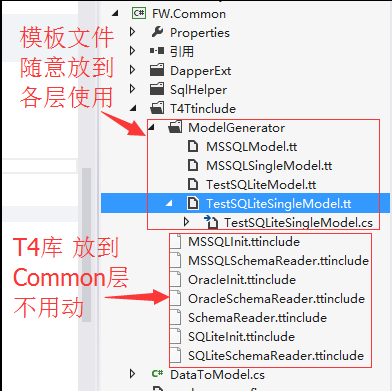
T4库
表结构读取抽象类 SchemaReader.ttinclude
 <#+

 /*

 The contents of this file are subject to the New BSD

  License (the "License"); you may not use this file

  except in compliance with the License. You may obtain a copy of

  the License at http://www.opensource.org/licenses/bsd-license.php

  Software distributed under the License is distributed on an

  "AS IS" basis, WITHOUT WARRANTY OF ANY KIND, either express or

  implied. See the License for the specific language governing

  rights and limitations under the License.

 */

 string ConnectionString = "";

 string TableFilter = "";

 string TopNamespace = "";

 string Namespace = "";

 string ClassPrefix = "";

 string ClassSuffix = "";

 string SchemaName = null;

 bool IncludeViews;

 string[] ExcludeTablePrefixes = new string[]{};

 string _connectionString="";

 string _providerName="";

 static Regex rxCleanUp = new Regex(@"[^\w\d_]", RegexOptions.Compiled);

 static Func<string, string> CleanUp = (str) =>

 {

     str = rxCleanUp.Replace(str, "_");

     if (char.IsDigit(str[])) str = "_" + str;

     return str;

 };

 string CheckNullable(Column col)

 {

     string result="";

     if(col.IsNullable &&

         col.PropertyType !="byte[]" &&

         col.PropertyType !="string" &&

         col.PropertyType !="Microsoft.SqlServer.Types.SqlGeography" &&

         col.PropertyType !="Microsoft.SqlServer.Types.SqlGeometry"

         )

         result="?";

     return result;

 }

 static bool IsExcluded(string tablename, string[] ExcludeTablePrefixes)

 {

     for (int i = ; i < ExcludeTablePrefixes.Length; i++)

     {

         string s = ExcludeTablePrefixes[i];

         if(tablename.StartsWith(s)) return true;

     }

     return false;

 }

 abstract class SchemaReader

 {

     public abstract Tables ReadSchema(string connstr, string tableFilter);

     public GeneratedTextTransformation outer;

     public void WriteLine(string o)

     {

         outer.WriteLine(o);

     }

     public string GetPropertyType(string sqlType)

     {

         string sysType = "string";

         switch (sqlType)

         {

             case "bigint":

                 sysType = "long";

                 break;

             case "smallint":

                 sysType = "short";

                 break;

             case "int":

             case "number":

             case "integer":

                 sysType = "int";

                 break;

             case "uniqueidentifier":

                 sysType = "Guid";

                 break;

             case "smalldatetime":

             case "datetime":

             case "date":

             case "time":

                 sysType = "DateTime";

                 break;

             case "float":

                 sysType = "double";

                 break;

             case "real":

                 sysType = "float";

                 break;

             case "numeric":

             case "smallmoney":

             case "decimal":

             case "money":

                 sysType = "decimal";

                 break;

             case "tinyint":

                 sysType = "byte";

                 break;

             case "bit":

                 sysType = "bool";

                 break;

             case "image":

             case "binary":

             case "varbinary":

             case "timestamp":

                 sysType = "byte[]";

                 break;

             case "geography":

                 sysType = "Microsoft.SqlServer.Types.SqlGeography";

                 break;

             case "geometry":

                 sysType = "Microsoft.SqlServer.Types.SqlGeometry";

                 break;

         }

         return sysType;

     }

 }

 public class Table

 {

     public List<Column> Columns;

     public string Name;

     public string Schema;

     public bool IsView;

     public string CleanName;

     public string ClassName;

     public string SequenceName;

     public bool Ignore;

     public Column PK

     {

         get

         {

             return this.Columns.SingleOrDefault(x=>x.IsPK);

         }

     }

     public Column GetColumn(string columnName)

     {

         return Columns.Single(x=>string.Compare(x.Name, columnName, true)==);

     }

     public Column this[string columnName]

     {

         get

         {

             return GetColumn(columnName);

         }

     }

 }

 public class Column

 {

     public string Name;

     public string PropertyName;

     public string PropertyType;

     public string DbType;

     public bool IsPK;

     public bool IsNullable;

     public bool IsAutoIncrement;

     public bool Ignore;

 }

 public class Tables : List<Table>

 {

     public Tables()

     {

     }

     public Table GetTable(string tableName)

     {

         return this.Single(x=>string.Compare(x.Name, tableName, true)==);

     }

     public Table this[string tableName]

     {

         get

         {

             return GetTable(tableName);

         }

     }

 }

 #>
SQLite表结构读取实现 SQLiteSchemaReader.ttinclude
 <#@ include file=".\SchemaReader.ttinclude" #>

 <#+

 Tables LoadTables()

 {

     WriteLine("// This file was automatically generated by the Dapper.SimpleCRUD T4 Template");

     WriteLine("// Do not make changes directly to this file - edit the template instead");

     WriteLine("// ");

     WriteLine("// The following connection settings were used to generate this file");

     WriteLine("// ");

     WriteLine("//     Connection String : `{0}`", ConnectionString);

     WriteLine("");

     //DbProviderFactory _factory ;

     try

     {

         // _factory = DbProviderFactories.GetFactory(ProviderName);

     }

     catch (Exception x)

     {

         var error=x.Message.Replace("\r\n", "\n").Replace("\n", " ");

         WriteLine("");

         WriteLine("// -----------------------------------------------------------------------------------------");

         WriteLine("// -----------------------------------------------------------------------------------------");

         WriteLine("");

         return new Tables();

     }

     try

     {

         Tables result;

         SchemaReader reader= new SqliteSchemaReader();

         result=reader.ReadSchema(ConnectionString, TableFilter);

         for (int i=result.Count-; i>=; i--)

         {

             if (SchemaName!=null && string.Compare(result[i].Schema, SchemaName, true)!=)

             {

                 result.RemoveAt(i);

                 continue;

             }

             if (!IncludeViews && result[i].IsView)

             {

                 result.RemoveAt(i);

                 continue;

             }

         }

         var rxClean = new Regex("^(Equals|GetHashCode|GetType|ToString|repo|Save|IsNew|Insert|Update|Delete|Exists|SingleOrDefault|Single|First|FirstOrDefault|Fetch|Page|Query)$");

         foreach (var t in result)

         {

             t.ClassName = ClassPrefix + t.ClassName + ClassSuffix;

             foreach (var c in t.Columns)

             {

                 c.PropertyName = rxClean.Replace(c.PropertyName, "_$1");

                 // Make sure property name doesn't clash with class name

                 if (c.PropertyName == t.ClassName)

                     c.PropertyName = "_" + c.PropertyName;

             }

         }

             return result;

     }

     catch (Exception x)

     {

         var error=x.Message.Replace("\r\n", "\n").Replace("\n", " ");

         Warning(string.Format("Failed to read database schema - {0}", error));

         WriteLine("");

         WriteLine("// -----------------------------------------------------------------------------------------");

         WriteLine("// Failed to read database schema - {0}", error);

         WriteLine("// -----------------------------------------------------------------------------------------");

         WriteLine("");

         return new Tables();

     }

 }

 class SqliteSchemaReader : SchemaReader

     {

         private    string _connstr {get;set;}

         public override Tables ReadSchema(string connstr, string tableFilter)

         {

             _connstr = connstr;

             var result = new Tables();

             //pull the tables in a reader

             using (IDataReader rdr = ExecuteReader(TABLE_SQL + tableFilter)) // SQLitehelper.

             {

                 while (rdr.Read())

                 {

                     Table tbl = new Table();

                     tbl.Name = rdr["name"].ToString();

                     //tbl.Schema = rdr["TABLE_SCHEMA"].ToString();

                     //tbl.IsView = string.Compare(rdr["TABLE_TYPE"].ToString(), "View", true) == 0;

                     tbl.CleanName = CleanUp(tbl.Name);

                     // tbl.CleanName = T4Generator.CleanUp(tbl.Name);

                     if (tbl.CleanName.StartsWith("tbl_")) tbl.CleanName = tbl.CleanName.Replace("tbl_", "");

                     if (tbl.CleanName.StartsWith("tbl")) tbl.CleanName = tbl.CleanName.Replace("tbl", "");

                     tbl.CleanName = tbl.CleanName.Replace("_", "");

                     tbl.ClassName = tbl.CleanName;

                     result.Add(tbl);

                 }

            }

             foreach (var tbl in result)

             {

                 tbl.Columns = LoadColumns(tbl);

                 //Mark the primary key

                 //string PrimaryKey = GetPK(tbl.Schema, tbl.Name);

                 //var pkColumn = tbl.Columns.SingleOrDefault(x => x.Name.ToLower().Trim() == PrimaryKey.ToLower().Trim());

                 //if (pkColumn != null)

                 //{

                 //    pkColumn.IsPK = true;

                 //}

             }

             return result;

         }

         List<Column> LoadColumns(Table tbl)

         {

             var result = new List<Column>();

             using (IDataReader rdr = ExecuteReader(COLUMN_SQL.Replace("@tableName", tbl.Name))) // SQLitehelper.

             {

                 while (rdr.Read())

                 {

                     Column col = new Column();

                     col.Name = rdr["name"].ToString();

                     col.PropertyName = CleanUp(col.Name);

                     //col.PropertyName = T4Generator.CleanUp(col.Name);

                     col.PropertyType = base.GetPropertyType(rdr["type"].ToString().ToLower());

                     col.IsNullable = rdr["notnull"].ToString() != "";

                     //col.IsAutoIncrement = false; //((int)rdr["IsIdentity"]) == 1;

                     col.IsPK = rdr["pk"].ToString() == "";

                     result.Add(col);

                 }

             }

             return result;

         }

         string Table_Filter =  " ";

         const string TABLE_SQL = " select name from sqlite_master where type = 'table' ";

         const string COLUMN_SQL = " PRAGMA table_info(@tableName) ";

         /// <summary>

         /// 查询

         /// </summary>

         /// <param name="sql">sql语句</param>

         /// <param name="slPars">参数</param>

         /// <returns>发挥SQLiteDataReader</returns>

         public SQLiteDataReader ExecuteReader(string sql, params SQLiteParameter[] slPars)

         {

             SQLiteConnection conn = new SQLiteConnection(_connstr);

             using (SQLiteCommand cmd = new SQLiteCommand(sql,conn))

             {

                 if (slPars != null)

                 {

                     cmd.Parameters.AddRange(slPars);

                 }

                 try

                 {

                     conn.Open();

                     return cmd.ExecuteReader(CommandBehavior.CloseConnection);

                 }

                 catch(Exception ex)

                 {

                     conn.Close();

                     conn.Dispose();

                     throw ex;

                 }

             }

         }

     }

 #>
SQLite配置文件 SQLiteInit.ttinclude
1.配置连接串 注意修改连接串为自己对应的 ConnectionString = @"Data Source=E:/cc/test/LotterySite/Lib/db/cater.db;";
2.需要生成的表 3.顶级命名空间 4.一个库对应一个配置文件 (开始是把这些配置直接写在各层模板文件的,后来涉及多库的切换,每个文件改链接麻烦)
 <#@ include file="./SQLiteSchemaReader.ttinclude" #>

 <#  // 初始化文件 一个库对应一个ttinclude文件

     // Settings  初始化配置

     ConnectionString = @"Data Source=E:/cc/test/LotterySite/Lib/db/cater.db;";  // 连接串

     TableFilter = " and name in ('LuckDraw') ";  // 过滤表

     TopNamespace = "FW";  // 顶级命名空间

     ClassPrefix = "";

     ClassSuffix = "";

     IncludeViews = true;

     ExcludeTablePrefixes = new string[]{"aspnet_","webpages_"};

     // Read schema

     var tables = LoadTables();   //读取的所有表结构

 #>
SQLite 模板使用
 <#@ template hostspecific="True" #>

 <#@ include file="EF.Utility.CS.ttinclude"#>

 <#@ include file="$(SolutionDir)\FW.Common\T4Ttinclude\SQLiteInit.ttinclude" #>

 <#@ assembly name="EnvDTE" #>

 <#@ assembly name="System.Data" #>

 <#@ assembly name="System.Data.Entity.Design" #>

 <#@ assembly name="System.Xml" #>

 <#@ assembly name="System.Configuration" #>

 <#@ assembly name="$(SolutionDir)\Lib\sqlite\System.Data.SQLite.dll" #>

 <#@ import namespace="System.Collections.Generic" #>

 <#@ import namespace="System.Data" #>

 <#@ import namespace="System.Data.Common" #>

 <#@ import namespace="System.Diagnostics" #>

 <#@ import namespace="System.Globalization" #>

 <#@ import namespace="System.IO" #>

 <#@ import namespace="System.Linq" #>

 <#@ import namespace="System.Text" #>

 <#@ import namespace="System.Text.RegularExpressions" #>

 <#@ import namespace="System.Configuration" #>

 <#@ import namespace="System.Data.SQLite" #>

 <#@ output extension=".cst"#>

 <#

     Namespace = TopNamespace + ".TestModel";

     // Read schema

     EntityFrameworkTemplateFileManager fileManager = EntityFrameworkTemplateFileManager.Create(this); // 多文件生成

 /*

     // Tweak Schema

     tables["tablename"].Ignore = true;                            // To ignore a table

     tables["tablename"].ClassName = "newname";                    // To change the class name of a table

     tables["tablename"]["columnname"].Ignore = true;            // To ignore a column

     tables["tablename"]["columnname"].PropertyName="newname";    // To change the property name of a column

     tables["tablename"]["columnname"].PropertyType="bool";        // To change the property type of a column

 */

 #>

 <# fileManager.StartHeader(); #>

 using System;

 using Dapper;

 using Dapper.Contrib.Extensions;

 namespace <#=Namespace #>

 {

 <# fileManager.EndBlock(); #>

 <#

 foreach(Table tbl in from t in tables where !t.Ignore select t){

         if(IsExcluded(tbl.Name, ExcludeTablePrefixes)) continue;

         fileManager.StartNewFile(tbl.Name+".cs"); // 新建文件

 #>

     /// <summary>

     /// A class which represents the <#=tbl.Name#> <#=(tbl.IsView)?"view":"table"#>.

     /// </summary>

     [Table("[<#=tbl.Name#>]")]

     public partial class <#=tbl.ClassName#>

     {

        /* <#foreach(Column col in from c in tbl.Columns where !c.Ignore select c) {#> <#=col.PropertyName #> <#}#> */

 <#foreach(Column col in from c in tbl.Columns where !c.Ignore select c)

 {#>

     <# if (tbl.PK!=null && tbl.PK.Name==col.PropertyName) { #>

     [Key]

     <#}#>

     public virtual <#=col.PropertyType #><#=CheckNullable(col)#> <#=col.PropertyName #> { get; set; }

 <#}#>

     }

 <#}#>

 <# fileManager.StartFooter(); #>

 } // namespace

 <# fileManager.EndBlock(); #>

 <# fileManager.Process(true); #>
模板属性:
Namespace 命名空间
tables 表结构集合
表属性
Name 数据库中的表名
ClassName 实体类名称
IsView 是否是视图(没怎么用)
PK.Name 主键列名
列属性
PropertyName 属性名称
PropertyType 属性类型
CheckNullable(col) 可空类型判断
注意引入对应的SQLite的T4配置库
<#@ include file="$(SolutionDir)\FW.Common\T4Ttinclude\SQLiteInit.ttinclude" #>
$(SolutionDir) 解决方案目录
T4 代码生成 Demo (抽奖程序)的更多相关文章
- sql的行转列(PIVOT)与列转行(UNPIVOT) webapi 跨域问题 Dapper 链式查询 扩展 T4 代码生成 Demo (抽奖程序)
sql的行转列(PIVOT)与列转行(UNPIVOT) 在做数据统计的时候,行转列,列转行是经常碰到的问题.case when方式太麻烦了,而且可扩展性不强,可以使用 PIVOT,UNPIVOT比 ...
- 使用jQuery+PHP+Mysql实现抽奖程序
抽奖程序在实际生活中广泛运用,由于应用场景不同抽奖的方式也是多种多样的.本文将采用实例讲解如何利用jQuery+PHP+Mysql实现类似电视中常见的一个简单的抽奖程序. 查看演示 本例中的抽奖程序要 ...
- jQuery幸运大转盘_jQuery+PHP抽奖程序的简单实现
jQuery幸运大转盘_jQuery+PHP抽奖程序的简单实现 在线实例 查看演示 完整代码 <!DOCTYPE html PUBLIC "-//W3C//DTD XHTML 1.0 ...
- 一个好玩的jq+php实现转盘抽奖程序
前台页面: <!DOCTYPE HTML> <html> <head> <meta charset="utf-8"> <met ...
- 幸运大转盘-jQuery+PHP实现的抽奖程序
目前好多网站上应用的转盘抽奖程序大多是基于flash的,而本文结合实例将使用jQuery和PHP来实现转盘抽奖程序,为了便于理解,作者分两部分来讲解,本文讲解第一部分,侧重使用jQuery实现转盘的转 ...
- java模拟一个抽奖程序
今天用一个程序模拟一个从1-32之间,随机抽取7组号码的抽奖程序 * 需要使用Java的图形界面知识 * 窗口 JFrame * 面板 JPanel * 显示文本信息的标签 JLabel * 文 ...
- jQuery幸运大转盘_jQuery+PHP抽奖程序
http://www.thinkphp.cn/code/1153.html 网上转盘抽奖程序大多是flash完成的,而本文使用jQuery和PHP来实现转盘抽奖程序. 若是想看更多js特效.网站源码. ...
- .net+mssql制作抽奖程序思路及源码
近期一直在研究数据库,刚好有个项目要做抽奖程序,恩,拿来练练手吧. 抽奖程序: 思路整理,无非就是点一个按钮,然后一个图片旋转一会就出来个结果就行了,可这个程序的要求不是这样的,是需要从数据库中随机抽 ...
- 简单的javascript抽奖程序
<html> <head> <title>手机号码抽奖程序</title> <script> //声明一个数组装住号码,可根 ...
随机推荐
- Java将头像图片保存到MySQL数据库
在做头像上传的过程中通常是将图片保存到数据库中,这里简单介绍一中将图片保存到数据库的方法: jsp代码: <div> <input class="avatar-input& ...
- Java之FilenameFilter接口
FilenameFilter接口:是用于过滤文件的 要实现的是accept方法 实例代码: 1,匿名类实现FilenameFilter-–过滤指定类型文件 package File类过滤器; impo ...
- iOS 手势
一.看这里 二.抽象类 UIGestureRecognizer 继承于该类的有7类:轻点,捏合,拖拽,滑动,长按,旋转,边缘滑动; 一个手势可以绑定多个事件 - (void)addTarget:( ...
- 新手如何快速入门Python
学习任何一门语言都是从入门(1年左右),通过不间断练习达到熟练水准(3到5年),少数人最终能精通语言,成为执牛耳者,他们是金字塔的最顶层.虽然万事开头难,但好的开始是成功的一半,今天这篇文章就来谈谈如 ...
- 15.Three Sum
思路 直接暴力,\(O(n^4 log(n))\),不出意外的超时了.. class Solution { public: vector<vector<int>> threeS ...
- DDD理论学习系列(5)-- 统一建模语言
DDD理论学习系列--案例及目录 1.引言 上一节讲解了领域模型,领域模型主要是将业务中涉及到的概念以面向对象的思想进行抽象,抽象出实体对象,确定实体所对应的方法和属性,以及实体之间的关系.然后将这些 ...
- thinkphp3.2.3 版本使用redis缓存添加认证
我在使用thinkphp3.2.3的时候 发现如果是使用redis缓存 设置了认证的redis能连接成功 却无法 set 操作 ,检查发现是没有认证导致的 $redis->auth这一步没有, ...
- 15套java互联网架构师、高并发、集群、负载均衡、高可用、数据库设计、缓存、性能优化、大型分布式 项目实战视频教程
* { font-family: "Microsoft YaHei" !important } h1 { color: #FF0 } 15套java架构师.集群.高可用.高可扩 展 ...
- 关于cookie与session的理解
服务器端并不能捕获客户端的浏览器关闭事件,因此你关闭浏览器以后,服务器端那个Session还是存在的,要超时以后才被回收,启动一个新的浏览器会启动一个新的session,所以他不认你了session永 ...
- MyElipse配置
DK1.6.0+Tomcat6.0+myEclipse的安装配置 C:\Users\Administrator\AppData\Local\Genuitec\Pulse Explorer JDK1.6 ...