
python 3.6 tkinter+urllib+json 火车车次信息查询
--------blogs: 陈月白 http://www.cnblogs.com/chenyuebai --------
一、概述
妹子工作时需要大量地查询火车车次至南京的信息,包括该车次到达站(南京站or南京南站)、到达时间、出发时间等,然后根据这些信息做下一步工作。
版本结束,趁着间歇期,帮她弄了个简易的批量查询工具,粉色的按钮是给她用的~哈哈哈! (๑*◡*๑)
大概80行代码,主要是:
界面读取待查询车次 - - - - 调用车次信息接口- - - - 解析返回数据 - - - - 组装结果 - - - - 封装到界面(tkinter)
python+tkinter实现界面,详见之前的学习笔记:http://www.cnblogs.com/chenyuebai/p/7150382.html
最终效果图:
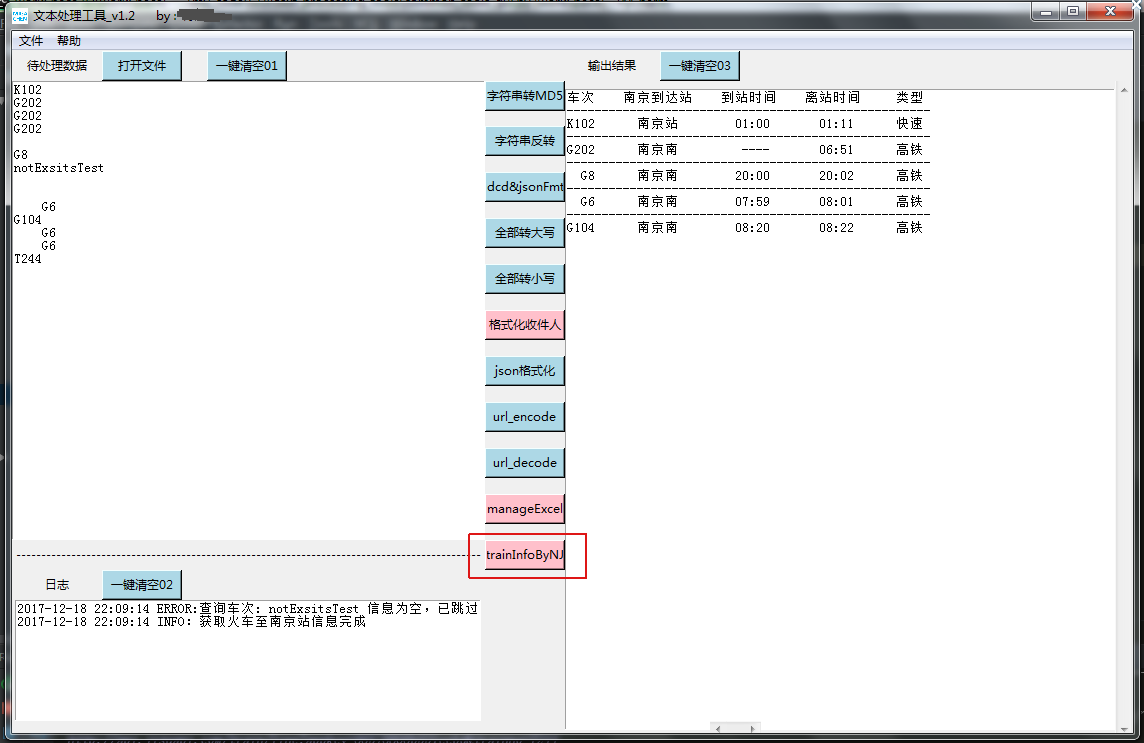
二、实现
1.界面读取待查询车次
之前总结过使用tkinter实现GUI,详见之前的笔记:http://www.cnblogs.com/chenyuebai/p/7150382.html
2.调用车次信息接口
题外话,之前是做的从界面读取待查询车次信息,然后构造成携程的查询url,取到数据后筛选信息;
但后续在取到页面数据后,decode时发现总抛解码异常,百度之,原因是页面源码中编码格式有多样,decode时需要加个错误跳过参数。。
但车次信息恰巧在跳过之列。。。
但是已经跟妹子说很快就能搞好(装b),于是就直接申请了某第三方平台的接口 QAQ
网上查了下,免费的接口基本都不提供服务了。于是用的某第三方平台的接口(某速数据),注册赠1000条,续费5元1W条(暂时没续=。=)
    #调用车次信息接口,获取车次信息
    def getTrainScheduleInfo(self,trainSchedule):
        trainBaseInfo = ""
        #拼接URL
        url = "http://api.xxxx.com/train/line?appkey=xxxxxx&trainno=" + trainSchedule
        #print(url)
        #获取数据
        try:
            trainBaseInfo = self.send_GET_request(url)  #发送GET请求,python3.X是用urllib.request库,网上很多
        except:
            print("ERROR:FUNC getTrainScheduleInfo select_items_from_url failed.url = %s ,flag = %s"%(trainSchedule))
        return trainBaseInfo
3.解析返回数据
返回数据为json类型的字符串,直接json.loads后,解析即可
#获取所有待查询车次信息
        allTrainResultDic = {}      #车次查询结果集合
        for trainSchedule in trainScheduleList:
            trainBaseInfo = self.getTrainScheduleInfo(trainSchedule)        #json string
            # #----测试----
            # trainBaseInfo = '''{"status":"0","msg":"ok","result":{"trainno":"G8","type":"高铁","list":[{"sequenceno":"1","station":"上海虹桥","day":"1","arrivaltime":"----","departuretime":"19:00","stoptime":"0","costtime":"0","distance":"0","isend":"0","pricesw":"","pricetd":"","pricegr1":"","pricegr2":"","pricerw1":"0","pricerw2":"0","priceyw1":"0","priceyw2":"0","priceyw3":"0","priceyd":"0.0","priceed":"0.0"},{"sequenceno":"2","station":"南京南","day":"1","arrivaltime":"20:00","departuretime":"20:02","stoptime":"2","costtime":"60","distance":"295","isend":"0","pricesw":"429.5","pricetd":"0","pricegr1":"0","pricegr2":"0","pricerw1":"0","pricerw2":"0","priceyw1":"0","priceyw2":"0","priceyw3":"0","priceyd":"229.5","priceed":"134.5"},{"sequenceno":"3","station":"济南西","day":"1","arrivaltime":"21:59","departuretime":"22:01","stoptime":"2","costtime":"179","distance":"0","isend":"0","pricesw":"1263.5","pricetd":"","pricegr1":"","pricegr2":"","pricerw1":"0","pricerw2":"0","priceyw1":"0","priceyw2":"0","priceyw3":"0","priceyd":"673.5","priceed":"398.5"},{"sequenceno":"4","station":"天津南","day":"1","arrivaltime":"22:59","departuretime":"23:01","stoptime":"2","costtime":"239","distance":"0","isend":"0","pricesw":"1603.5","pricetd":"","pricegr1":"","pricegr2":"","pricerw1":"0","pricerw2":"0","priceyw1":"0","priceyw2":"0","priceyw3":"0","priceyd":"853.5","priceed":"508.5"},{"sequenceno":"5","station":"北京南","day":"1","arrivaltime":"23:34","departuretime":"23:34","stoptime":"0","costtime":"274","distance":"0","isend":"1","pricesw":"1748","pricetd":"","pricegr1":"","pricegr2":"","pricerw1":"0","pricerw2":"0","priceyw1":"0","priceyw2":"0","priceyw3":"0","priceyd":"933.0","priceed":"553.0","costtimetxt":"4时34分"}]}}'''
            # #----测试----
            print("trainBaseInfo =",trainBaseInfo)
            #解析
            if trainBaseInfo:
                try:
                    trainBaseInfo_loads = json.loads(trainBaseInfo)
                    ":
                        resultNodeValue = trainBaseInfo_loads["result"]
                        trainnoNodeValue = resultNodeValue["trainno"]     #查询车次代码
                        typeNodeValue = resultNodeValue["type"]          #车次类型
                        listNodeValue = resultNodeValue["list"]         #途径站点信息集合 list
                        #筛选出途经南京、南京南
                        for trainInfo in listNodeValue:
                            if (cityName1 in trainInfo.values()) or (cityName2 in trainInfo.values()):
                                #解析数据
                                arrivedStation = trainInfo["station"]         #到达站
                                arrivedTime = trainInfo["arrivaltime"]        #到站时间
                                leaveTime = trainInfo["departuretime"]      #离站时间
                                if arrivedStation == "南京":
                                    arrivedStation = "南京站"
                                # 存储该车次查询结果
                                trainResult = []
                                trainResult.append(arrivedStation)
                                trainResult.append(arrivedTime)
                                trainResult.append(leaveTime)
                                trainResult.append(typeNodeValue)
                                allTrainResultDic[trainSchedule] = trainResult
                            else:
                                #self.write_log_to_Text("ERROR:车次: %s 无途径南京站信息,跳过" % trainSchedule)
                                continue
                    else:
                        self.write_log_to_Text("ERROR:车次: %s 检查返回数据状态码不为0,跳过" % trainSchedule)
                        continue
                except:
                    self.write_log_to_Text("ERROR:车次:%s 返回的json串失败 "% trainSchedule)
            else:
                self.write_log_to_Text("ERROR:车次: %s 查询接口返回信息为空,已跳过"%trainSchedule)
                continue
        print(allTrainResultDic)
4.组装结果、界面输出
        #组装结果界面输出
        self.result_data_Text.delete(1.0, END)
        head = "车次    南京到达站    到站时间    离站时间     类型"
        self.result_data_Text.insert(1.0, head)
        for train in allTrainResultDic.keys():
            outMsg = "\n" + "-" * 52 + "\n" + "%4s"%train + "%9s"%allTrainResultDic[train][0] + "%13s"%allTrainResultDic[train][1] + "%12s"%allTrainResultDic[train][2] + "%8s"%allTrainResultDic[train][3]
            self.result_data_Text.insert(END,outMsg)
        self.write_log_to_Text("INFO:获取火车至南京信息完成")
完成。最终感叹,调接口确实比自己爬省事多了哈哈哈! ヾ(◍°∇°◍)ノ゙
END
2017.12.20
交作业了,妹子很喜欢!nice!
python 3.6 tkinter+urllib+json 火车车次信息查询的更多相关文章
- Python大法之从火车余票查询到打造抢Supreme神器
本文作者:i春秋作家——阿甫哥哥 系列文章专辑:https://bbs.ichunqiu.com/forum.php?mod=collection&action=view&ctid=9 ...
- 火车车次查询-余票查询--Api接口
1.来自12306的火车车次数据 使用12306网站的接口,查询余票.此接口采集自 这里. 全国火车站代号字典,下载 . 火车票余票查询 http://dynamic.12306.cn/otsquer ...
- python的httplib、urllib和urllib2的区别及用
慢慢的把它们总结一下,总结就是最好的学习方法 宗述 首先来看一下他们的区别 urllib和urllib2 urllib 和urllib2都是接受URL请求的相关模块,但是urllib2可以接受一个Re ...
- java实现根据起点终点和日期查询去哪儿网的火车车次和火车站点信息
本文章为原创文章,转载请注明,欢迎评论和改正. 一,分析 之前所用的直接通过HTML中的元素值来爬取一些网页上的数据,但是一些比较敏感的数据,很多正规网站都是通过json数据存储,这些数据通过HTML ...
- Python爬虫实践~BeautifulSoup+urllib+Flask实现静态网页的爬取
爬取的网站类型: 论坛类网站类型 涉及主要的第三方模块: BeautifulSoup:解析.遍历页面 urllib:处理URL请求 Flask:简易的WEB框架 介绍: 本次主要使用urllib获取网 ...
- Python导出Excel为Lua/Json/Xml实例教程(三):终极需求
相关链接: Python导出Excel为Lua/Json/Xml实例教程(一):初识Python Python导出Excel为Lua/Json/Xml实例教程(二):xlrd初体验 Python导出E ...
- Python导出Excel为Lua/Json/Xml实例教程(二):xlrd初体验
Python导出Excel为Lua/Json/Xml实例教程(二):xlrd初体验 相关链接: Python导出Excel为Lua/Json/Xml实例教程(一):初识Python Python导出E ...
- Python导出Excel为Lua/Json/Xml实例教程(一):初识Python
Python导出Excel为Lua/Json/Xml实例教程(一):初识Python 相关链接: Python导出Excel为Lua/Json/Xml实例教程(一):初识Python Python导出 ...
- Python标准库之urllib,urllib2
urllib模块提供了一些高级接口,用于编写需要与HTTP服务器交互的客户端.典型的应用程序包括从网页抓取数据.自动化.代理.网页爬虫等. 在Python 2中,urllib功能分散在几个不同的库模块 ...
随机推荐
- Winsock网络编程笔记(1)----入门
今天第一次接触winsock网络编程,看的资料是Windows网络编程第二版.通过博客记住自己的看书笔记.. 在这里贴出第一个程序,虽然程序什么都没做,但以此作为入门,熟悉其网络编程风格.. #inc ...
- Is It A Tree?
Is It A Tree? Time Limit: 2000/1000 MS (Java/Others) Memory Limit: 65536/32768 K (Java/Others) Total ...
- Sqoop的安装部署
在root的用户下 1):前提 安装JDK环境 2):前提 安装Hadoop和Hive客户端环境,如果需要导出到HBase则需要安装HBase客户端 3):下载sqoop : 命令: wget htt ...
- HTML学习笔记 CSS表格及轮廓案例 第八节 (原创)参考使用表
#tb, tb1, tr, th, td { border: 5px solid blue; /*加边框*/ padding: 5px; /*内边距*/ } #tb1 { border-collaps ...
- EasyUI扩展验证
1.首先在jquery.easyui.min.js下最后插入下面代码 $.extend($.fn.validatebox.defaults.rules, { idcard : {// 验证身份证 va ...
- 【ThinkPHP框架学习 】(2) --- 后台管理系统如何用iframe点击左边右边局部刷新
如题: 在写后台管理系统时,需要实现后台界面的局部动态刷新. 左边的导航栏使用a标签进行设置,通过href和target属性的配合,就可以将iframe中的子页实现动态 ...
- webStorm恢复误删除文件或工程
背景: 提交git时可能由于没有提交所有文件,不知什么原因导致最近几天所写文件全部消失,所改文件全部恢复到以前.最终通过webstorm找回项目.下面总结通过webstorm找回误删文件,或恢复到历史 ...
- Python模块:paramiko
paramiko是一个用于做远程控制的模块,使用该模块可以对远程服务器进行命令或文件操作,值得一说的是,fabric和ansible内部的远程管理就是使用的paramiko来现实. 1.下载安装 Wi ...
- [转载] Hive与HBase的联系与区别
转载自http://blog.csdn.net/wangmuming/article/details/23954527和http://www.cnblogs.com/justinzhang/p/427 ...
- 使用MS Test做单元测试
声明:本篇博客翻译自:http://www.c-sharpcorner.com/article/unit-testing-with-ms-tests-in-c-sharp/ 写在翻译之前: 依然清晰的 ...