
bash启动时加载配置文件过程
bash&shell系列文章:http://www.cnblogs.com/f-ck-need-u/p/7048359.html
当用户登录系统时,会加载各种bash配置文件,还会设置或清空一系列变量,有时还会执行一些自定义的命令。这些行为都算是启动bash时的过程。
另外,有些时候登录系统是可以交互的(如正常登录系统),有些时候是无交互的(如执行一个脚本),因此总的来说bash启动类型可分为交互式shell和非交互式shell。更细分一层,交互式shell还分为交互式的登录shell和交互式非登录shell,非交互的shell在某些时候可以在bash命令后带上"--login"或短选项"-l",这时也算是登录式,即非交互的登录式shell。
1.1 判断是否交互式、是否登录式
判断是否为交互式shell有两种简单的方法:
方法一:判断变量"-",如果值中含有字母"i",表示交互式。
[root@xuexi ~]# echo $-

himBH

[root@xuexi ~]# vim a.sh

#!/bin/bash

echo $-

[root@xuexi ~]# bash a.sh

hB
方法二:判断变量PS1,如果值非空,则为交互式,否则为非交互式,因为非交互式会清空该变量。
[root@xuexi ~]# echo $PS1

[\u@\h \W]\$
判断是否为登录式的方法也很简单,只需执行"shopt login_shell"即可。值为"on"表示为登录式,否则为非登录式。
[root@xuexi ~]# shopt login_shell

login_shell     on
[root@xuexi ~]# bash

[root@xuexi ~]# shopt login_shell

login_shell     off
所以,要判断是交互式以及登录式的情况,可简单使用如下命令:
echo $PS1;shopt login_shell
# 或者
echo $-;shopt login_shell
1.2 几种常见的bash启动方式
(1).正常登录(伪终端登录如ssh登录,或虚拟终端登录)时,为交互式登录shell。
[root@xuexi ~]# echo $PS1;shopt login_shell

[\u@\h \W]\$

login_shell     on
(2).su命令,不带"--login"时为交互式、非登录式shell,带有"--login"时,为交互式、登录式shell。
[root@xuexi ~]# su root

[root@xuexi ~]# echo $PS1;shopt login_shell

[\u@\h \W]\$

login_shell     off
[root@xuexi ~]# su -

Last login: Sat Aug  :: CST  on pts/

[root@xuexi ~]# echo $PS1;shopt login_shell

[\u@\h \W]\$

login_shell     on
(3).执行不带"--login"选项的bash命令时为交互式、非登录式shell。但指定"--login"时,为交互式、登录式shell。
[root@xuexi ~]# bash

[root@xuexi ~]# echo $PS1;shopt login_shell

[\u@\h \W]\$

login_shell     off
[root@xuexi ~]# bash -l

[root@xuexi ~]# echo $PS1;shopt login_shell

[\u@\h \W]\$

login_shell     on
(4).使用命令组合(使用括号包围命令列表)以及命令替换进入子shell时,继承父shell的交互和登录属性。
[root@xuexi ~]# (echo $BASH_SUBSHELL;echo $PS1;shopt login_shell)

[\u@\h \W]\$

login_shell     on
[root@xuexi ~]# su

[root@xuexi ~]# (echo $BASH_SUBSHELL;echo $PS1;shopt login_shell)

[\u@\h \W]\$

login_shell     off
(5).ssh执行远程命令,但不登录时,为非交互、非登录式。
[root@xuexi ~]# ssh localhost 'echo $PS1;shopt login_shell'

login_shell     off
(6).执行shell脚本时,为非交互、非登录式shell。但指定了"--login"时,将为非交互、登录式shell。
例如,脚本内容如下:
[root@xuexi ~]# vim b.sh

#!/bin/bash

echo $PS1

shopt login_shell
不带"--login"选项时,为非交互、非登录式shell。
[root@xuexi ~]# bash b.sh

login_shell     off
带"--login"选项时,为非交互、登录式shell。
[root@xuexi ~]# bash -l b.sh

login_shell     on
(7).在图形界面下打开终端时,为交互式、非登录式shell。
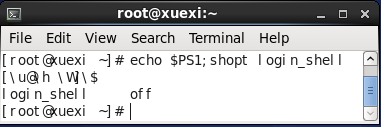
但可以设置为使用交互式、登录式shell。
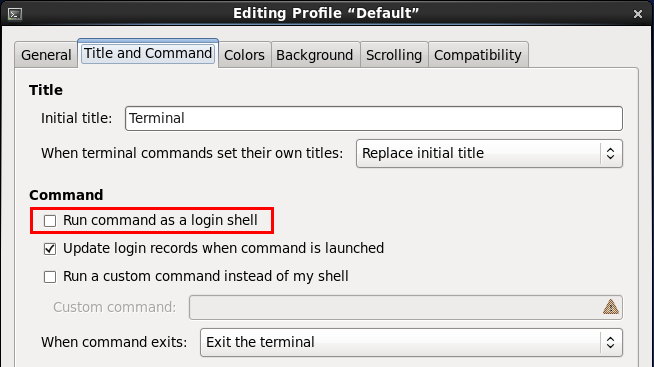
1.3 加载bash环境配置文件
无论是否交互、是否登录,bash总要配置其运行环境。bash环境配置主要通过加载bash环境配置文件来完成。但是否交互、是否登录将会影响加载哪些配置文件,除了交互、登录属性,有些特殊的属性也会影响读取配置文件的方法。
bash环境配置文件主要有/etc/profile、~/.bash_profile、~/.bashrc、/etc/bashrc和/etc/profile.d/*.sh,为了测试各种情形读取哪些配置文件,先分别向这几个配置文件中写入几个echo语句,用以判断该配置文件是否在启动bash时被读取加载了。
echo "echo '/etc/profile goes'" >>/etc/profile

echo "echo '~/.bash_profile goes'" >>~/.bash_profile

echo "echo '~/.bashrc goes'" >>~/.bashrc

echo "echo '/etc/bashrc goes'" >>/etc/bashrc

echo "echo '/etc/profile.d/test.sh goes'" >>/etc/profile.d/test.sh

chmod +x /etc/profile.d/test.sh
①.交互式登录shell或非交互式但带有"--login"(或短选项"-l",例如在shell脚本中指定"#!/bin/bash -l"时)的bash启动时,将先读取/etc/profile,再依次搜索~/.bash_profile、~/.bash_login和~/.profile,并仅加载第一个搜索到且可读的文件。当退出时,将执行~/.bash_logout中的命令。
但要注意,在/etc/profile中有一条加载 /etc/profile.d/*.sh 的语句,它会使用source加载/etc/profile.d/下所有可执行的sh后缀的脚本。
[root@xuexi ~]# grep -A  \*\.sh /etc/profile

for i in /etc/profile.d/*.sh ; do

    if [ -r "$i" ]; then

        if [ "${-#*i}" != "$-" ]; then

            . "$i"

        else

            . "$i" >/dev/null 2>&1

        fi

    fi

done
内层if语句中的 "${-#*i}" != "$-" 表示将"$-"从左向右模式匹配"*i"并将匹配到的内容删除(即进行变量切分),如果"$-"切分后的值不等于"$-",则意味着是交互式shell,于是怎样怎样,否则怎样怎样。
同样的,在~/.bash_profile中也一样有加载~/.bashrc的命令。
[root@xuexi ~]# grep -A  \~/\.bashrc ~/.bash_profile

if [ -f ~/.bashrc ]; then

        . ~/.bashrc

fi
而~/.bashrc中又有加载/etc/bashrc的命令。
[root@xuexi ~]# grep -A  /etc/bashrc ~/.bashrc

if [ -f /etc/bashrc ]; then

        . /etc/bashrc

fi
其实/etc/bashrc中还有加载 /etc/profile.d/*.sh 的语句,但前提是非登录式shell时才会执行。以下是部分语句:
if ! shopt -q login_shell ; then   # We're not a login shell

...

    for i in /etc/profile.d/*.sh; do

        if [ -r "$i" ]; then

            if [ "$PS1" ]; then

                . "$i"

            else

                . "$i" >/dev/null 2>&1

            fi

        fi

    done

...

fi
从内层if语句和/etc/profile中对应的判断语句的作用是一致的,只不过判断方式不同,写法不同。
因此,交互式的登录shell加载bash环境配置文件的实际过程如下图:

以下结果验证了结论:
Last login: Mon Aug 14 04:49:29 2017     # 新开终端登录时

/etc/profile.d/*.sh goes

/etc/profile goes

/etc/bashrc goes

~/.bashrc goes

~/.bash_profile goes
 [root@xuexi ~]# ssh localhost        # ssh远程登录时

root@localhost's password:

Last login: Mon Aug 14 05:05:50 2017 from 172.16.10.1

/etc/profile.d/*.sh goes

/etc/profile goes

/etc/bashrc goes

~/.bashrc goes

~/.bash_profile goes
[root@xuexi ~]# bash -l        # 执行带有"--login"选项的login时

/etc/profile.d/*.sh goes

/etc/profile goes

/etc/bashrc goes

~/.bashrc goes

~/.bash_profile goes
[root@xuexi ~]# su -          # su带上"--login"时

/etc/profile.d/*.sh goes

/etc/profile goes

/etc/bashrc goes

~/.bashrc goes

~/.bash_profile goes
[root@xuexi ~]# vim a.sh    # 执行shell脚本时带有"--login"时

#!/bin/bash -l

echo haha

[root@xuexi ~]# ./a.sh

/etc/profile goes

/etc/bashrc goes

~/.bashrc goes

~/.bash_profile goes

haha
之所以执行shell脚本时没有显示执行 /etc/profile.d/*.sh ,是因为它是非交互式的,根据/etc/profile中的 if [ "${-#*i}" != "$-" ] 判断,它将会把 /etc/profile.d/*.sh 的执行结果重定向到/dev/null中。也就是说,即使是shell脚本(带"--login "选项),它也加载了所有bash环境配置文件。
②.交互式非登录shell的bash启动时,将读取~/.bashrc,不会读取/etc/profile和~/.bash_profile、~/.bash_login和~/.profile。
因此,交互式非登录shell加载bash环境配置文件的实际过程为下图内方框中所示:
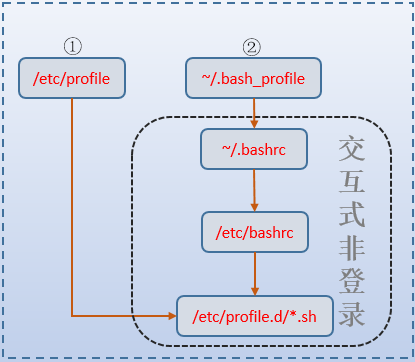
例如,执行不带"--login"的bash命令或su命令时。
[root@xuexi ~]# bash

/etc/profile.d/*.sh goes

/etc/bashrc goes

~/.bashrc goes
[root@xuexi ~]# su

/etc/profile.d/*.sh goes

/etc/bashrc goes

~/.bashrc goes
③.非交互式、非登录式shell启动bash时,不会加载前面所说的任何bash环境配置文件,但会搜索变量BASH_ENV,如果搜索到了,则加载其所指定的文件。但并非所有非交互式、非登录式shell启动时都会如此,见情况④。
它就像是这样的语句:
if [ -n "$BASH_ENV" ];then

    . "$BASH_ENV"

fi
几乎执行所有的shell脚本都不会特意带上"--login"选项,因此shell脚本不会加载任何bash环境配置文件,除非手动配置了变量BASH_ENV。
④.远程shell方式启动的bash,它虽然属于非交互、非登录式,但会加载~/.bashrc,所以还会加载/etc/bashrc,由于是非登录式,所以最终还会加载/etc/profile.d/*.sh,只不过因为是非交互式而使得执行的结果全部重定向到了/dev/null中。
如果了解rsync,就知道它有一种远程shell连接方式。所谓的远程shell方式,是指通过网络的方式启动bash并将bash的标准输出关联起来,就像它连接了一个远程的shell守护进程一样。一般由sshd实现这样的连接方式,老版的rshd也一样支持。
事实也确实如此,使用ssh连接但不登录远程主机时(例如只为了执行远程命令),就是远程shell的方式,但它却是非交互、非登录式的shell。
[root@xuexi ~]# ssh localhost echo haha

root@localhost's password:

/etc/bashrc goes

~/.bashrc goes

haha
正如上文所说,它同样加载了 /etc/profile.d/*.sh ,只不过/etc/bashrc中的if判断语句 if [ "$PS1" ]; then 使得非交互式的shell要将执行结果重定向到/dev/null中。
bash启动时加载配置文件过程的更多相关文章
- tomcat启动时加载配置文件 报错
原因: @serice("customerService") 和@Repository(value="customerDao") 解决: 直接@ ...
- 微服务架构 | *2.3 Spring Cloud 启动及加载配置文件源码分析(以 Nacos 为例)
目录 前言 1. Spring Cloud 什么时候加载配置文件 2. 准备 Environment 配置环境 2.1 配置 Environment 环境 SpringApplication.prep ...
- Servlet在启动时加载的tomcat源码(原创)
tomcat 8.0.36 知识点: 通过配置loadOnStartup可以设置Servlet是否在Tomcat启动时加载,以及按值大小进行有序加载,其最小有效值为0,最大有效值为Integer.MA ...
- ElasticSearch 启动时加载 Analyzer 源码分析
ElasticSearch 启动时加载 Analyzer 源码分析 本文介绍 ElasticSearch启动时如何创建.加载Analyzer,主要的参考资料是Lucene中关于Analyzer官方文档 ...
- web.xml中配置启动时加载的servlet,load-on-starup
web.xml中配置启动时加载的servlet,load-on-starup 使用servlet来初始化配置文件数据: 在servlet的配置当中,<load-on-startup>1&l ...
- spring项目中监听器作用-ContextLoaderListener(项目启动时,加载一些东西到缓存中)
作用:在启动Web容器时,自动装配Spring applicationContext.xml的配置信息. 因为它实现了ServletContextListener这个接口,在web.xml配置这个监听 ...
- 设置程序启动时加载的storyboard
这个设置表明:程序启动时会加载Main.storyboard
- Tomcat启动时加载数据到缓存---web.xml中listener加载顺序(例如顺序:1、初始化spring容器,2、初始化线程池,3、加载业务代码,将数据库中数据加载到内存中)
最近公司要做功能迁移,原来的后台使用的Netty,现在要迁移到在uap上,也就是说所有后台的代码不能通过netty写的加载顺序加载了. 问题就来了,怎样让迁移到tomcat的代码按照原来的加载顺序进行 ...
- Tomcat启动时加载数据到缓存---web.xml中listener加载顺序(优先初始化Spring IOC容器)
JavaWebSpringTomcatCache 最近用到在Tomcat服务器启动时自动加载数据到缓存,这就需要创建一个自定义的缓存监听器并实现ServletContextListener接口,并且 ...
随机推荐
- HTML form表单小结
HTML form标签小结 最近研究 form标签,有一些小心得写下来与大家分享分享,共勉.在小结的最后有一个form表单的小例子,可以作为参考. -----DanlV form是HTML的一个极为重 ...
- Android可更换布局的换肤方案
换肤,顾名思义,就是对应用中的视觉元素进行更新,呈现新的显示效果.一般来说,换肤的时候只是更新UI上使用的资源,如颜色,图片,字体等等.本文介绍一种笔者自己使用的基于布局的Android换肤方案,不仅 ...
- mongoDB 学习笔记纯干货(mongoose、增删改查、聚合、索引、连接、备份与恢复、监控等等)
最后更新时间:2017-07-13 11:10:49 原始文章链接:http://www.lovebxm.com/2017/07/13/mongodb_primer/ MongoDB - 简介 官网: ...
- javascript面向对象个人理解
1. javascript面向对象特性:抽象性,封装性,继承性: 2. js中的对象:键值对的集合:比如说{key:value} 3.抽象性:用一个对象描述一个数据,需要抽取这个对象的核心数据:两个必 ...
- 使用css3实现小菊花加载效果
使用css3实现小菊花加载效果 最常见的就是我们用到的加载动画.加载动画的效果处理的好,会给页面带来画龙点睛的作用,而使用户愿意去等待.而页面中最常用的做法是把动画做成gif格式,当做背景图或是img ...
- Spring和SpringMVC父子的容器之道---[上篇]
Spring和SpringMVC作为Bean管理容器和MVC层的默认框架,已被众多WEB应用采用,而在实际开发中,由于有了强大的注解功能,很多基于XML的配置方式已经被替代,但在实际项目中,我们经常会 ...
- python+matplotlib+web.py
最近看了厦门大学数据库实验室林子雨老师的<大数据课程实验案例:网站用户行为分析>,可视化这块是用的R语言,我决定用Python来实现一下. 参考文献 http://dblab.xmu.ed ...
- C++第三篇--程序结构
C++第三篇--程序结构 1. 初识程序结构 将类中的成员函数全部放在类外实现,类中只负责声明该函数 person.cpp #include <stdio.h> class Person{ ...
- nopCommerce 3.9 大波浪系列 之 汉化-中文语言
一.导入语言包 nop官网下载中文语言文件,下载后是一个xml文件. 打开xml文件我们可以看到LocaleResource节点Name属性为资源名称,Value节点为资源值. 后台[Confignu ...
- ES6中的箭头函数
关于函数表达式中的this:自动引用正在调用当前方法的.前的对象1.obj.fun()中的this fun中的this -> obj2.new Fun() Fun中的this -> 正在创 ...