
css 启动页 loading动画
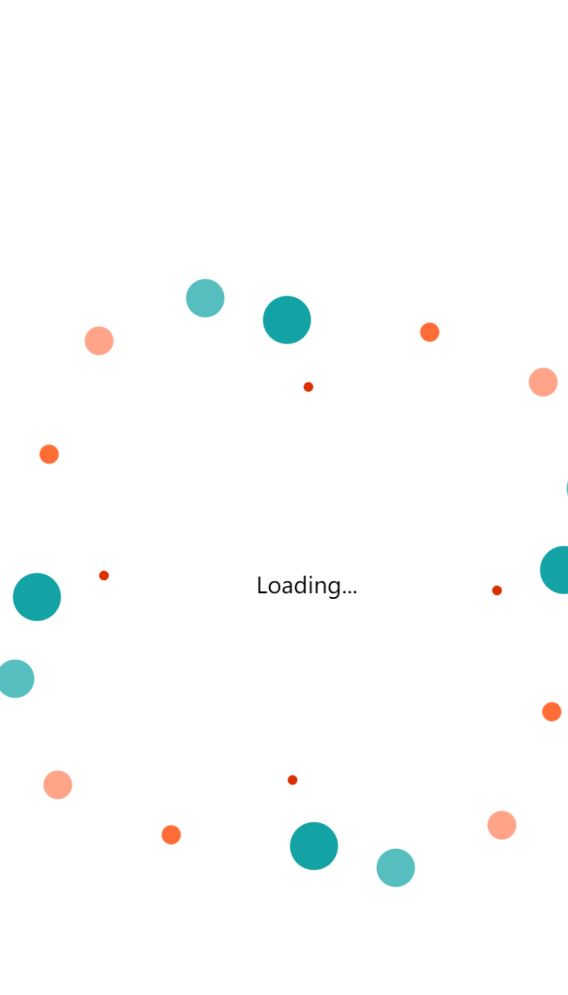
<div class="index-html-loader">
  <div class="text">Loading...</div>
  <div class="horizontal">
    <div class="circlesup">
      <div class="circle"></div>
      <div class="circle"></div>
      <div class="circle"></div>
      <div class="circle"></div>
      <div class="circle"></div>
    </div>
    <div class="circlesdwn">
      <div class="circle"></div>
      <div class="circle"></div>
      <div class="circle"></div>
      <div class="circle"></div>
      <div class="circle"></div>
    </div>
  </div>
  <div class="vertical">
    <div class="circlesup">
      <div class="circle"></div>
      <div class="circle"></div>
      <div class="circle"></div>
      <div class="circle"></div>
      <div class="circle"></div>
    </div>
    <div class="circlesdwn">
      <div class="circle"></div>
      <div class="circle"></div>
      <div class="circle"></div>
      <div class="circle"></div>
      <div class="circle"></div>
    </div>
  </div>
</div>
<style>
  /* Start the loader code, first, let's align it the center of screen */
  .index-html-loader {
    position: absolute;
    top: 50%;
    left: 50%;
    -webkit-transform: translate(-50%, -50%);
    -moz-transform: translate(-50%, -50%);
    -mos-transform: translate(-50%, -50%);
    -o-transform: translate(-50%, -50%);
    transform: translate(-50%, -50%);
    text-align: center;
    /* disable selection and cursor changes */
    -webkit-touch-callout: none;
    -webkit-user-select: none;
    -khtml-user-select: none;
    -moz-user-select: none;
    -ms-user-select: none;
    user-select: none;
    cursor: default;
  }

  /* Text align it the center of screen and connect the looped animation for 2 seconds */
  .index-html-loader .text {
    position: absolute;
    left: -1.3em;
    top: -1.7em;
    -webkit-animation: text 2s infinite;
    -moz-animation: text 2s infinite;
    -moz-animation: text 2s infinite;
    -ms-animation: text 2s infinite;
    -o-animation: text 2s infinite;
    animation: text 2s infinite;
  }

  /* Set for the first layer vertical position */
  .index-html-loader .vertical {
    position: absolute;
    top: -1.84em;
    left: -0.4em;
    -webkit-transform: rotate(90deg);
    -moz-transform: rotate(90deg);
    -ms-transform: rotate(90deg);
    -o-transform: rotate(90deg);
    transform: rotate(90deg);
  }

  /* Set for the second layer horizontal position */
  .index-html-loader .horizontal {
    position: absolute;
    top: 0em;
    left: 0em;
    -webkit-transform: rotate(0deg);
    -moz-transform: rotate(0deg);
    -ms-transform: rotate(0deg);
    -o-transform: rotate(0deg);
    transform: rotate(0deg);
  }

  /* The next two classes do mirror for animation */
  .index-html-loader .circlesup {
    position: absolute;
    top: -4.7em;
    right: 12.1em;
  }

  .index-html-loader .circlesdwn {
    position: absolute;
    top: 2.5em;
    right: -13.5em;
    -webkit-transform: rotate(180deg);
    -moz-transform: rotate(180deg);
    -ms-transform: rotate(180deg);
    -o-transform: rotate(180deg);
    transform: rotate(180deg);
  }

  /* Create a container for our circles, rotate it 45 degrees and set animation*/
  .index-html-loader .circle {
    position: absolute;
    width: 15em;
    height: 15em;
    -webkit-transform: rotate(45deg);
    -moz-transform: rotate(45deg);
    -ms-transform: rotate(45deg);
    -o-transform: rotate(45deg);
    transform: rotate(45deg);
    -webkit-animation: orbit 2s infinite;
    -moz-animation: orbit 2s infinite;
    -moz-animation: orbit 2s infinite;
    -ms-animation: orbit 2s infinite;
    -o-animation: orbit 2s infinite;
    animation: orbit 2s infinite;
    z-index: 5;
  }

  /* Style's of our circles */
  .index-html-loader .circle:after {
    content: '';
    position: absolute;
    width: 2em;
    height: 2em;
    -webkit-border-radius: 100%;
    -moz-border-radius: 100%;
    -ms-border-radius: 100%;
    -o-border-radius: 100%;
    border-radius: 100%;
    background: #13A3A5;
    /* Pick a color 1*/
  }

  .index-html-loader .circle:nth-child(2) {
    -webkit-animation-delay: 100ms;
    -moz-animation-delay: 100ms;
    -ms-animation-delay: 100ms;
    -o-animation-delay: 100ms;
    animation-delay: 100ms;
    z-index: 4;
  }

  .index-html-loader .circle:nth-child(2):after {
    background: #56bebf;
    /* Pick a color 2*/
    -webkit-transform: scale(0.8, 0.8);
    -moz-transform: scale(0.8, 0.8);
    -ms-transform: scale(0.8, 0.8);
    -o-transform: scale(0.8, 0.8);
    transform: scale(0.8, 0.8);
  }

  .index-html-loader .circle:nth-child(3) {
    -webkit-animation-delay: 225ms;
    -moz-animation-delay: 225ms;
    -ms-animation-delay: 225ms;
    -o-animation-delay: 225ms;
    animation-delay: 225ms;
    z-index: 3;
  }

  .index-html-loader .circle:nth-child(3):after {
    background: #ffa489;
    /* Pick a color 3*/
    -webkit-transform: scale(0.6, 0.6);
    -moz-transform: scale(0.6, 0.6);
    -ms-transform: scale(0.6, 0.6);
    -o-transform: scale(0.6, 0.6);
    transform: scale(0.6, 0.6);
  }

  .index-html-loader .circle:nth-child(4) {
    -webkit-animation-delay: 350ms;
    -moz-animation-delay: 350ms;
    -ms-animation-delay: 350ms;
    -o-animation-delay: 350ms;
    animation-delay: 350ms;
    z-index: 2;
  }

  .index-html-loader .circle:nth-child(4):after {
    background: #ff6d37;
    /* Pick a color 4*/
    -webkit-transform: scale(0.4, 0.4);
    -moz-transform: scale(0.4, 0.4);
    -ms-transform: scale(0.4, 0.4);
    -o-transform: scale(0.4, 0.4);
    transform: scale(0.4, 0.4);
  }

  .index-html-loader .circle:nth-child(5) {
    -webkit-animation-delay: 475ms;
    -moz-animation-delay: 475ms;
    -ms-animation-delay: 475ms;
    -o-animation-delay: 475ms;
    animation-delay: 475ms;
    z-index: 1;
  }

  .index-html-loader .circle:nth-child(5):after {
    background: #DB2F00;
    /* Pick a color 5*/
    -webkit-transform: scale(0.2, 0.2);
    -moz-transform: scale(0.2, 0.2);
    -ms-transform: scale(0.2, 0.2);
    -o-transform: scale(0.2, 0.2);
    transform: scale(0.2, 0.2);
  }

  /* Animation keys */

  @keyframes orbit {
    0% {
      transform: rotate(45deg);
    }

    5% {
      transform: rotate(45deg);
      animation-timing-function: ease-out;
    }

    70% {
      transform: rotate(405deg);
      animation-timing-function: ease-in;
    }

    100% {
      transform: rotate(405deg);
    }
  }

  @keyframes text {
    0% {
      transform: scale(0.2, 0.2);
      animation-timing-function: ease-out;
    }

    50% {
      transform: scale(1, 1);
      animation-timing-function: ease-out;
    }

    60% {
      transform: scale(1, 1);
      animation-timing-function: ease-out;
    }

    100% {
      transform: scale(0.2, 0.2);
    }
  }
</style>
css 启动页 loading动画的更多相关文章
- 纯css去实现loading动画效果图
当项目中加载内容慢的的时候,需要显示一个loading动画效果图 之前我们使用的是一圈点点旋转的效果,现在设计修改为,如下gif图片效果-------------------------------- ...
- CSS制作简单loading动画
曾经以为,loading的制作需要一些比较高深的web动画技术,后来发现大多数loading都可以用“障眼法”做出来.比如一个旋转的圆圈,并不都是将gif图放进去,有些就是画个静止图像,然后让它旋转就 ...
- css制作简单loading动画效果【css3 loading加载动画】
曾经以为,loading的制作需要一些比较高深的web动画技术,后来发现大多数loading都可以用“障眼法”做出来.比如一个旋转的圆圈,并不都是将gif图放进去,有些就是画个静止图像,然后让它旋转就 ...
- iOS关于启动页自定义特殊处理
平常开发中对于启动页可能会有一些特别的要求,比如在启动页加动画或加一些按键可以响应事件等,最近项目中要在启动页增加版本号,因为版本号是不断的改变,所以要动态实现把它加到启动页上:在XCode上面配置的 ...
- 教你实现类似于格瓦拉启动页中的放大转场动画(OC&Swift)
教你实现类似于格瓦拉启动页中的放大转场动画(OC&Swift) 一.前言 用过格瓦拉电影,或者其他app可能都知道,一种点击按钮用放大效果实现转场的动画现在很流行,效果大致如下 在iOS中,在 ...
- electron-vue 项目添加启动loading动画问题
前言 electron-vue脚手架搭建的项目,在开发阶段可能你注意不到项目启动慢的问题,但是在build 生成的exe可执行文件,启动后,要反应很久才能进入到app.vue 中加载的页面,体验性很差 ...
- IOS启动页动画(uiview 淡入淡出效果 )2
Appdelegate里面右个这个函数,只要它没结束,你的等待界面就不会消失.以在启动的时候做些动画 - (BOOL)application:(UIApplication *)application ...
- 巧用 CSS 实现动态线条 Loading 动画
有群友问我,使用 CSS 如何实现如下 Loading 效果: 这是一个非常有意思的问题. 我们知道,使用 CSS,我们可以非常轻松的实现这样一个动画效果: <div></div&g ...
- 页面预加载loading动画,再载入内容
默认情况下如果网站请求速度慢,所以会有一段时间的空白页面等等,用户体验效果不好,见到很多的页面都有预加载的效果,加载之前先加载一个动画,后台进程继续加载页面内容,当页面内容加载完之后再退出动画显示内容 ...
- 【IOS】模仿"抽屉新热榜"动态启动页YFSplashScreen
IOS最好要设置系统默认启动页面,不然进入应用就会突然闪现黑色画面 下图是我们要实现的效果: 总体思路:设置一个系统默认启动页面,在进入didFinishLaunchingWithOptions时, ...
随机推荐
- C++ MFC学习 (六)
由于微软在VS2013 及之后不建议再使用 C/C++ 的传统库函数 scanf,strcpy,sprintf 等,所以直接使用这些库函数会提示 C4996 错误 VS建议采用带 _S的函数,如: s ...
- virtualenv指定使用本地某个版本python
virtualenv -p D:\env\py37_1\Scripts\python3.exe time01 红色的地方是 你本地python解释器的安装路径,后面黄色部分是创建的虚拟环境的名称. 另 ...
- .NET 6 + Hangfire 实现后台作业管理
一.环境: ASP.NET Core 6 + Hangfire + MySQL 二.新建ASP.NET Core空项目 项目名称:HangfireExample 框架:.NET 6.0 三.N ...
- 第1关—print()函数与转换
Print()函数的用法有以下几种:单枪匹马--不带引号.搭配单引号.搭配双引号.搭配三引号,我们逐个见识下吧! 1.无引号 注意,这里的括号一定要用[英文括号],不然会报错 impor ...
- Spring事务的四大特性
1.事务(Transaction) 事务一般是指数据库事务, 是基于关系型数据库(RDBMS)的企业应用的重要组成部分.在软件开发领域,事务扮演者十分重要的角色,用来确保应用程序数据的完整性和一致性. ...
- Pytorch实战学习(五):多分类问题
<PyTorch深度学习实践>完结合集_哔哩哔哩_bilibili Softmax Classifer 1.二分类问题:糖尿病预测 2.多分类问题 MNIST Dataset:10个标签, ...
- Python-闭包(Closure)
一.认识闭包 有时候需要在函数外部得到函数内部的局部变量,但是由于Python作用域的关系,这一点是无法实现的. def f(): n = 22 print(n) #NameError:name 'n ...
- Python学习笔记(二)变量的使用
一.变量的定义 把程序运算的中间结果临时存到内存里,以备后面的代码继续调用,这几个名字的学名就叫做"变量" 可以把变量看做保存信息的容器,它们的目的是在内存中标注和存储数据,然后可 ...
- 剑指 Offer II 树
我为什么要把代码粘在这里 断更很久了,基于一个错误的观念:我想看题,我到leetcode官网看不就行了吗? 但是若干年后我可能还会到我的博客园看看呀,我有可能上刷题网站吗?而且心得不好写到注释上. 记 ...
- 活动 | Cloud Ace 受邀参加中国智造出海数字科技峰会
[Cloud Ace 是谷歌云全球战略合作伙伴,拥有 200 多名工程师,也是谷歌最高级别合作伙伴,多次获得 Google Cloud 合作伙伴奖. 作为谷歌托管服务商,我们提供谷歌云.谷歌地图.谷歌 ...