
Springboot 之 Filter 实现 Gzip 压缩超大 json 对象
简介
在项目中,存在传递超大 json 数据的场景。直接传输超大 json 数据的话,有以下两个弊端
占用网络带宽,而有些云产品就是按照带宽来计费的,间接浪费了钱
传输数据大导致网络传输耗时较长
为了避免直接传输超大 json 数据,可以对 json 数据进行 Gzip 压缩后,再进行网络传输。请求头添加 Content-Encoding 标识,传输的数据进行过压缩
Servlet Filter 拦截请求,对压缩过的数据进行解压
HttpServletRequestWrapper 包装,把解压的数据写入请求体
pom.xml 引入依赖
<project xmlns="http://maven.apache.org/POM/4.0.0" xmlns:xsi="http://www.w3.org/2001/XMLSchema-instance"

	xsi:schemaLocation="http://maven.apache.org/POM/4.0.0 http://maven.apache.org/xsd/maven-4.0.0.xsd">

	<modelVersion>4.0.0</modelVersion>

	<groupId>com.olive</groupId>

	<artifactId>request-uncompression</artifactId>

	<version>0.0.1-SNAPSHOT</version>

	<packaging>jar</packaging>

	<name>request-uncompression</name>

	<url>http://maven.apache.org</url>

	<parent>

		<groupId>org.springframework.boot</groupId>

		<artifactId>spring-boot-starter-parent</artifactId>

		<version>2.5.14</version>

		<relativePath /> <!-- lookup parent from repository -->

	</parent>

	<properties>

		<project.build.sourceEncoding>UTF-8</project.build.sourceEncoding>

		<maven.compiler.source>8</maven.compiler.source>

		<maven.compiler.target>8</maven.compiler.target>

	</properties>

	<dependencies>

		<dependency>

			<groupId>org.springframework.boot</groupId>

			<artifactId>spring-boot-starter-test</artifactId>

			<scope>test</scope>

		</dependency>

		<dependency>

			<groupId>org.projectlombok</groupId>

			<artifactId>lombok</artifactId>

		</dependency>

		<dependency>

		    <groupId>org.springframework.boot</groupId>

		    <artifactId>spring-boot-starter-web</artifactId>

		</dependency>

		<dependency>

			<groupId>com.alibaba.fastjson2</groupId>

			<artifactId>fastjson2</artifactId>

			<version>2.0.14</version>

		</dependency>

    <dependency>

			<groupId>commons-io</groupId>

			<artifactId>commons-io</artifactId>

			<version>2.9.0</version>

		</dependency>

	</dependencies>

</project>
创建压缩工具类
GzipUtils 类提供压缩解压相关方法
package com.olive.utils;

import com.alibaba.fastjson2.JSON;

import com.olive.vo.ArticleRequestVO;

import lombok.extern.slf4j.Slf4j;

import org.apache.commons.io.FileUtils;

import java.io.*;

import java.util.zip.GZIPInputStream;

import java.util.zip.GZIPOutputStream;

@Slf4j

public class GzipUtils {

    private static final String GZIP_ENCODE_UTF_8 = "UTF-8";

    /**

     * 字符串压缩为GZIP字节数组

     *

     * @param str

     * @return

     */

    public static byte[] compress(String str) {

        return compress(str, GZIP_ENCODE_UTF_8);

    }

    /**

     * 字符串压缩为GZIP字节数组

     *

     * @param str

     * @param encoding

     * @return

     */

    public static byte[] compress(String str, String encoding) {

        if (str == null || str.length() == 0) {

            return null;

        }

        ByteArrayOutputStream out = new ByteArrayOutputStream();

        GZIPOutputStream gzip = null;

        try {

            gzip = new GZIPOutputStream(out);

            gzip.write(str.getBytes(encoding));

        } catch (IOException e) {

           log.error("compress>>", e);

        }finally {

            if(gzip!=null){

                try {

                    gzip.close();

                } catch (IOException e) {

                }

            }

        }

        return out.toByteArray();

    }

    /**

     * GZIP解压缩

     *

     * @param bytes

     * @return

     */

    public static byte[] uncompress(byte[] bytes) {

        if (bytes == null || bytes.length == 0) {

            return null;

        }

        ByteArrayOutputStream out = new ByteArrayOutputStream();

        ByteArrayInputStream in = new ByteArrayInputStream(bytes);

        GZIPInputStream unGzip = null;

        try {

            unGzip = new GZIPInputStream(in);

            byte[] buffer = new byte[256];

            int n;

            while ((n = unGzip.read(buffer)) >= 0) {

                out.write(buffer, 0, n);

            }

        } catch (IOException e) {

            log.error("uncompress>>", e);

        }finally {

            if(unGzip!=null){

                try {

                    unGzip.close();

                } catch (IOException e) {

                }

            }

        }

        return out.toByteArray();

    }

    /**

     * 解压并返回String

     *

     * @param bytes

     * @return

     */

    public static String uncompressToString(byte[] bytes) throws IOException {

        return uncompressToString(bytes, GZIP_ENCODE_UTF_8);

    }

    /**

     * @param bytes

     * @return

     */

    public static byte[] uncompressToByteArray(byte[] bytes) throws IOException {

        return uncompressToByteArray(bytes, GZIP_ENCODE_UTF_8);

    }

    /**

     * 解压成字符串

     *

     * @param bytes    压缩后的字节数组

     * @param encoding 编码方式

     * @return 解压后的字符串

     */

    public static String uncompressToString(byte[] bytes, String encoding) throws IOException {

        byte[] result = uncompressToByteArray(bytes, encoding);

        return new String(result);

    }

    /**

     * 解压成字节数组

     *

     * @param bytes

     * @param encoding

     * @return

     */

    public static byte[] uncompressToByteArray(byte[] bytes, String encoding) throws IOException {

        if (bytes == null || bytes.length == 0) {

            return null;

        }

        ByteArrayOutputStream out = new ByteArrayOutputStream();

        ByteArrayInputStream in = new ByteArrayInputStream(bytes);

        GZIPInputStream unGzip = null;

        try {

            unGzip = new GZIPInputStream(in);

            byte[] buffer = new byte[256];

            int n;

            while ((n = unGzip.read(buffer)) >= 0) {

                out.write(buffer, 0, n);

            }

            return out.toByteArray();

        } catch (IOException e) {

            log.error("uncompressToByteArray>>", e);

            throw new IOException("解压缩失败!");

        }finally {

            if(unGzip!=null){

                unGzip.close();

            }

        }

    }

    /**

     * 将字节流转换成文件

     *

     * @param filename

     * @param data

     * @throws Exception

     */

    public static void saveFile(String filename, byte[] data) throws Exception {

        FileOutputStream fos = null;

        try {

            if (data != null) {

                String filepath = "/" + filename;

                File file = new File(filepath);

                if (file.exists()) {

                    file.delete();

                }

                fos = new FileOutputStream(file);

                fos.write(data, 0, data.length);

                fos.flush();

                System.out.println(file);

            }

        }catch (Exception e){

            throw e;

        }finally {

            if(fos!=null){

                fos.close();

            }

        }

    }

}
对Request进行包装
UnZipRequestWrapper 读取输入流,然进行解压;解压完后,再把解压出来的数据封装到输入流中。
package com.olive.filter;

import com.olive.utils.GzipUtils;

import lombok.extern.slf4j.Slf4j;

import javax.servlet.ReadListener;

import javax.servlet.ServletInputStream;

import javax.servlet.http.HttpServletRequest;

import javax.servlet.http.HttpServletRequestWrapper;

import java.io.*;

/**

 *  Json String 经过压缩后保存为二进制文件 -> 解压缩后还原成 Jso nString转换成byte[]写回body中

 */

@Slf4j

public class UnZipRequestWrapper extends HttpServletRequestWrapper {

    private final byte[] bytes;

    public UnZipRequestWrapper(HttpServletRequest request) throws IOException {

        super(request);

        try (BufferedInputStream bis = new BufferedInputStream(request.getInputStream());

             ByteArrayOutputStream baos = new ByteArrayOutputStream()) {

            final byte[] body;

            byte[] buffer = new byte[1024];

            int len;

            while ((len = bis.read(buffer)) > 0) {

                baos.write(buffer, 0, len);

            }

            body = baos.toByteArray();

            if (body.length == 0) {

                log.info("Body无内容,无需解压");

                bytes = body;

                return;

            }

            this.bytes = GzipUtils.uncompressToByteArray(body);

        } catch (IOException ex) {

            log.error("解压缩步骤发生异常!", ex);

            throw ex;

        }

    }

    @Override

    public ServletInputStream getInputStream() throws IOException {

        final ByteArrayInputStream byteArrayInputStream = new ByteArrayInputStream(bytes);

        return new ServletInputStream() {

            @Override

            public boolean isFinished() {

                return false;

            }

            @Override

            public boolean isReady() {

                return false;

            }

            @Override

            public void setReadListener(ReadListener readListener) {

            }

            public int read() throws IOException {

                return byteArrayInputStream.read();

            }

        };

    }

    @Override

    public BufferedReader getReader() throws IOException {

        return new BufferedReader(new InputStreamReader(this.getInputStream()));

    }

}
定义GzipFilter对请求进行拦截
GzipFilter 拦截器根据请求头是否包含Content-Encoding=application/gzip,如果包含就对数据进行解压;否则就直接放过。
package com.olive.filter;

import lombok.extern.slf4j.Slf4j;

import org.springframework.stereotype.Component;

import javax.servlet.*;

import javax.servlet.http.HttpServletRequest;

import java.io.IOException;

/**

 * 解压filter

 */

@Slf4j

@Component

public class GzipFilter implements Filter {

    private static final String CONTENT_ENCODING = "Content-Encoding";

    private static final String CONTENT_ENCODING_TYPE = "application/gzip";

    @Override

    public void init(FilterConfig filterConfig) throws ServletException {

        log.info("init GzipFilter");

    }

    @Override

    public void doFilter(ServletRequest request, ServletResponse response, FilterChain chain) throws IOException, ServletException {

        long start = System.currentTimeMillis();

        HttpServletRequest httpServletRequest = (HttpServletRequest)request;

        String encodeType = httpServletRequest.getHeader(CONTENT_ENCODING);

        if (encodeType!=null && CONTENT_ENCODING_TYPE.equals(encodeType)) {

            log.info("请求:{} 需要解压", httpServletRequest.getRequestURI());

            UnZipRequestWrapper unZipRequest = new UnZipRequestWrapper(httpServletRequest);

            chain.doFilter(unZipRequest, response);

        }else {

            log.info("请求:{} 无需解压", httpServletRequest.getRequestURI());

            chain.doFilter(request,response);

        }

        log.info("耗时:{}ms", System.currentTimeMillis() - start);

    }

    @Override

    public void destroy() {

        log.info("destroy GzipFilter");

    }

}
注册 GzipFilter 拦截器
package com.olive.config;

import com.olive.filter.GzipFilter;

import org.springframework.beans.factory.annotation.Autowired;

import org.springframework.boot.web.servlet.FilterRegistrationBean;

import org.springframework.context.annotation.Bean;

import org.springframework.context.annotation.Configuration;

/**

 * 注册filter

 */

@Configuration

public class FilterRegistration {

    @Autowired

    private GzipFilter gzipFilter;

    @Bean

    public FilterRegistrationBean<GzipFilter> gzipFilterRegistrationBean() {

        FilterRegistrationBean<GzipFilter> registration = new FilterRegistrationBean<>();

        //Filter可以new,也可以使用依赖注入Bean

        registration.setFilter(gzipFilter);

        //过滤器名称

        registration.setName("gzipFilter");

        //拦截路径

        registration.addUrlPatterns("/*");

        //设置顺序

        registration.setOrder(1);

        return registration;

    }

}
定义 Controller
该 Controller 非常简单,主要是输入请求的数据
package com.olive.controller;

import java.util.HashMap;

import java.util.Map;

import com.alibaba.fastjson2.JSON;

import com.olive.vo.ArticleRequestVO;

import org.springframework.web.bind.annotation.RequestBody;

import org.springframework.web.bind.annotation.RequestMapping;

import org.springframework.web.bind.annotation.RestController;

@RestController

public class TestController {

	@RequestMapping("/getArticle")

	public Map<String, Object> getArticle(@RequestBody ArticleRequestVO articleRequestVO){

		Map<String, Object> result = new HashMap<>();

		result.put("code", 200);

		result.put("msg", "success");

		System.out.println(JSON.toJSONString(articleRequestVO));

		return result;

	}

}
Controller 参数接收VO
package com.olive.vo;

import lombok.Data;

import java.io.Serializable;

@Data

public class ArticleRequestVO implements Serializable {

    private Long id;

    private String title;

    private String content;

}
定义 Springboot 引导类
package com.olive;

import org.springframework.boot.SpringApplication;

import org.springframework.boot.autoconfigure.SpringBootApplication;

@SpringBootApplication

public class Application {

    public static void main(String[] args) {

        SpringApplication.run(Application.class);

    }

}
测试
- 非压缩请求测试
curl -X POST \

  http://127.0.0.1:8080/getArticle \

  -H 'content-type: application/json' \

  -d '{

	"id":1,

	"title": "java乐园",

	"content":"xxxxxxxxxx"

}'
- 压缩请求测试
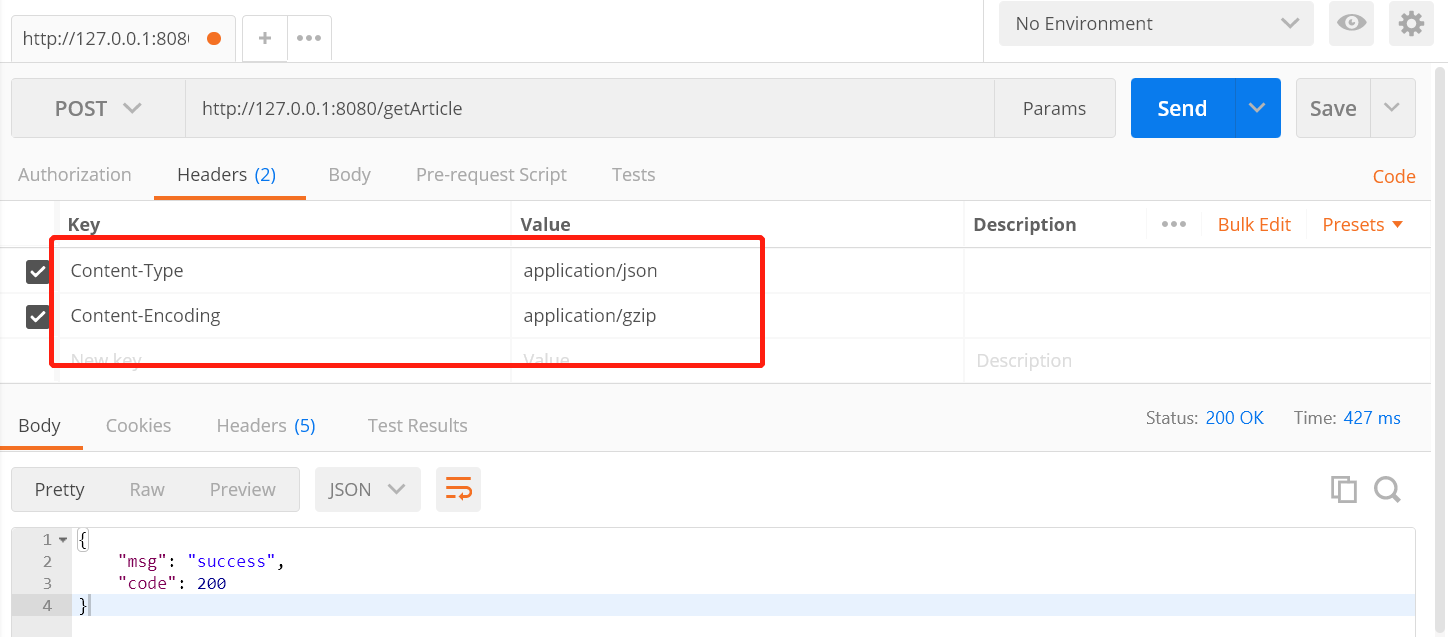
不要直接将压缩后的 byte[] 数组当作字符串进行传输,否则压缩后的请求数据比没压缩后的还要大得多!
项目中一般采用以下两种传输压缩后的 byte[] 的方式:
- 将压缩后的 byet[] 进行 Base64 编码再传输字符串,这种方式会损失掉一部分 GZIP 的压缩效果,适用于压缩结果要存储在 Redis 中的情况
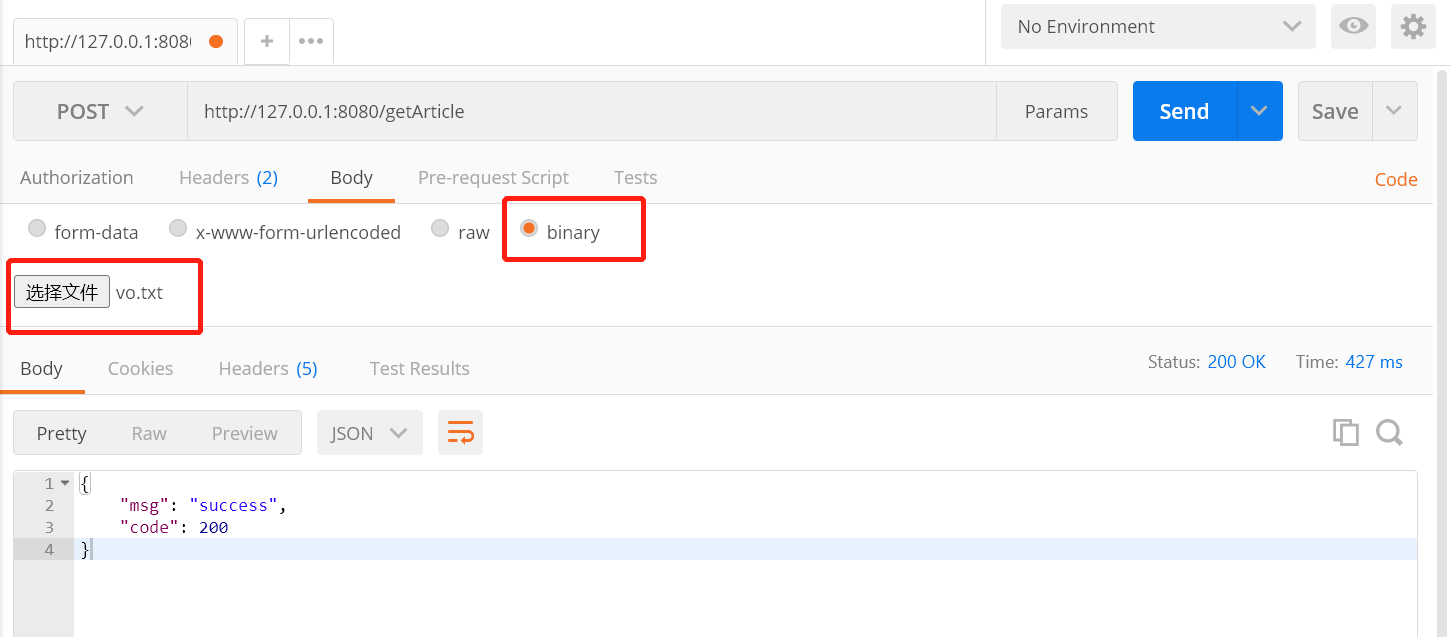
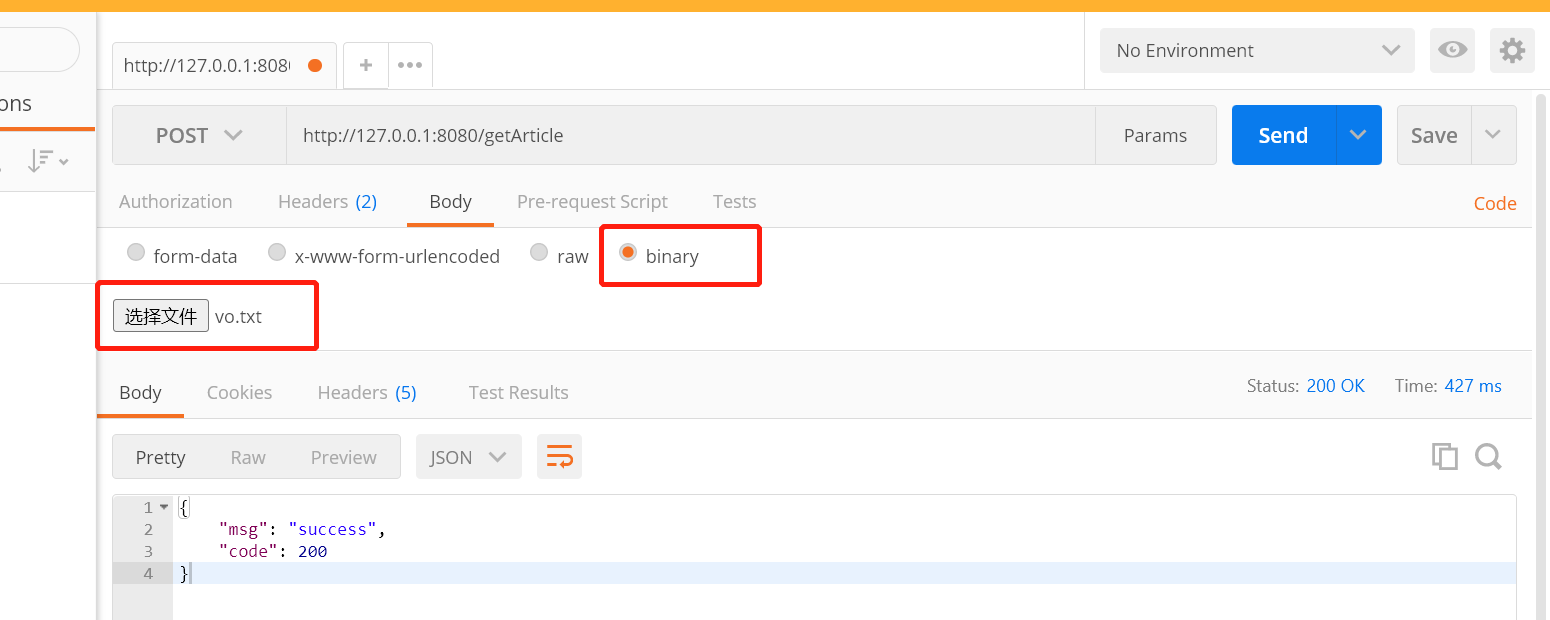
- 将压缩后的 byte[] 以二进制的形式写入到文件中,请求时直接在 body 中带上文件即可,用这种方式可以不损失压缩效果
小编测试采用第二种方式,采用以下代码把原始数据进行压缩
public static void main(String[] args) {

      ArticleRequestVO vo = new ArticleRequestVO();

      vo.setId(1L);

      vo.setTitle("bug弄潮儿");

      try {

          byte[] bytes = FileUtils.readFileToByteArray(new File("C:\\Users\\2230\\Desktop\\凯平项目资料\\改装车项目\\CXSSBOOT_DB_DDL-1.0.9.sql"));

          vo.setContent(new String(bytes));

          byte[] dataBytes = compress(JSON.toJSONString(vo));

          saveFile("d:/vo.txt", dataBytes);

      } catch (Exception e) {

          e.printStackTrace();

      }

  }
压缩后数据存储到d:/vo.txt,然后在 postman 中安装下图选择
Springboot 之 Filter 实现 Gzip 压缩超大 json 对象的更多相关文章
- 使用filter过滤GZIP压缩(二)
在代码之前,讲一下用filter实现GZIP压缩的原理: 因为GZIP压缩之后,是从服务器端传输到浏览器端,从servlet到浏览器(从jsp到浏览器),其实是response带回内容,所以我们要在f ...
- Json字符串解析原理、超大json对象的解析
概述 附上完整的代码:https://pan.baidu.com/s/1dEDmGz3(入口类是Json)JSON:JavaScript 对象表示法(JavaScript Object Notatio ...
- Asp.net WebAPi gzip压缩和json格式化
现在webapi越来越流行了,很多时候它都用来做接口返回json格式的数据,webapi原本是根据客户端的类型动态序列化为json和xml的,但实际很多时候我们都是序列化为json的,所以webapi ...
- springboot开启gzip压缩
springboot 2.x开启gzip压缩 1.application.yml配置 server: compression: enabled: true min-response-size: mim ...
- 使用Gzip压缩数据,加快页面访问速度
在返回的json数据量大时,启用Gzip压缩,可以提高传输效率.下面为Gzip压缩对json字符串压缩并输出到页面的代码. 一.代码 /** 向浏览器输出字符串响应数据,启用 ...
- Springboot 之 Filter 实现超大响应 JSON 数据压缩
简介 项目中,请求时发送超大 json 数据外:响应时也有可能返回超大 json数据.上一篇实现了请求数据的 gzip 压缩.本篇通过 filter 实现对响应 json 数据的压缩. 先了解一下以下 ...
- Filter之——GZIP全站压缩
GZIP压缩:将压缩后的文本文件,发送给浏览器,减少流量. 一.进行gzip压缩条件: 1.请求头:Accept-Encoding : gzip 告诉服务器,该浏览器支持gzip压缩. 2.响应头: ...
- JSP Filter,GZIP压缩响应流
url:http://hi.baidu.com/xhftx/blog/item/fbc11d3012648711ebc4af59.html 关键词:JSP,Filter,Servlet,GZIP 现在 ...
- loadrunner 发送gzip压缩json格式(转)
转:http://blog.csdn.net/gzh0222/article/details/7711281 使用java vuser实现,发送gzip压缩json格式. /* * LoadRunne ...
随机推荐
- python 部分内置函数详解
简介 eval与exec eval和exec都是python内置的可以执行python代码的函数,但它们之间有所区别. eval(expression[, globals[, locals]]) ex ...
- 编译式安装PHP
yum install -y curl curl-devel libxslt-devel* --prefix是编译安装后的目录 --enable-fpm是为了支持nginx /configure ...
- 小白之Python基础(三)
列表和元组 1.列表:最常用的 Python 数据类型(可变的数据类型) 1)列表是一个值,它包含多个值构成的序列: 2)通过[ ]或list()创建的有序元素的集合: 3)表项(列表中的值,也可以叫 ...
- 万答#5,binlog解析出来的日志为何无法恢复
欢迎来到 GreatSQL社区分享的MySQL技术文章,如有疑问或想学习的内容,可以在下方评论区留言,看到后会进行解答 问题描述 问题来自一位群友,简单说就是用 mysqlbinlog 工具读取 bi ...
- 使用.NET简单实现一个Redis的高性能克隆版(四、五)
译者注 该原文是Ayende Rahien大佬业余自己在使用C# 和 .NET构建一个简单.高性能兼容Redis协议的数据库的经历. 首先这个"Redis"是非常简单的实现,但是他 ...
- http、https和Cookie
http和https http,https 都是网络传输协议 是用于网络相关传输,http走的是明文传输,https走的密文传输(内部采用对称加密以及非对称加密).对应的https安全性要高于http ...
- 通过route , tracert , traceroute 查看本地路由配置及访问ip或域名时经过的路由信息
转载请注明出处: 1.路由器和交换机的区别和过程 在windows 系统或linux 系统访问 外网ip 或域名时,都会通过层层的路由器,然后将请求转发到最终的目标服务器:因为互联网通过路由器实现公网 ...
- Kotlin协程解析系列(上):协程调度与挂起
vivo 互联网客户端团队- Ruan Wen 本文是Kotlin协程解析系列文章的开篇,主要介绍Kotlin协程的创建.协程调度与协程挂起相关的内容 一.协程引入 Kotlin 中引入 Corout ...
- Taurus.MVC 微服务框架 入门开发教程:项目部署:3、微服务应用程序版本升级:全站升级和局部模块升级。
系列目录: 本系列分为项目集成.项目部署.架构演进三个方向,后续会根据情况调整文章目录. 本系列第一篇:Taurus.MVC V3.0.3 微服务开源框架发布:让.NET 架构在大并发的演进过程更简单 ...
- springBoot项目实现发送邮件功能
需要的依赖: <dependency> <groupId>org.springframework.boot</groupId> <artifactId> ...