
VTK拾取网格模型上的可见点
消隐与Z-Buffer
使用缓冲器记录物体表面在屏幕上投影所覆盖范围内的全部像素的深度值,依次访问屏幕范围内物体表面所覆盖的每一像素,用深度小(深度用z值表示,z值小表示离视点近)的像素点颜色替代深度大的像素点颜色可以实现消隐,称为深度缓冲器算法。深度缓冲器算法也称为Z-Buffer算法,在物体空间内不对物体表面的可见性进行检测,在图像空间中根据每个像素的深度值确定最终绘制到屏幕的物体表面上各个像素的颜色。
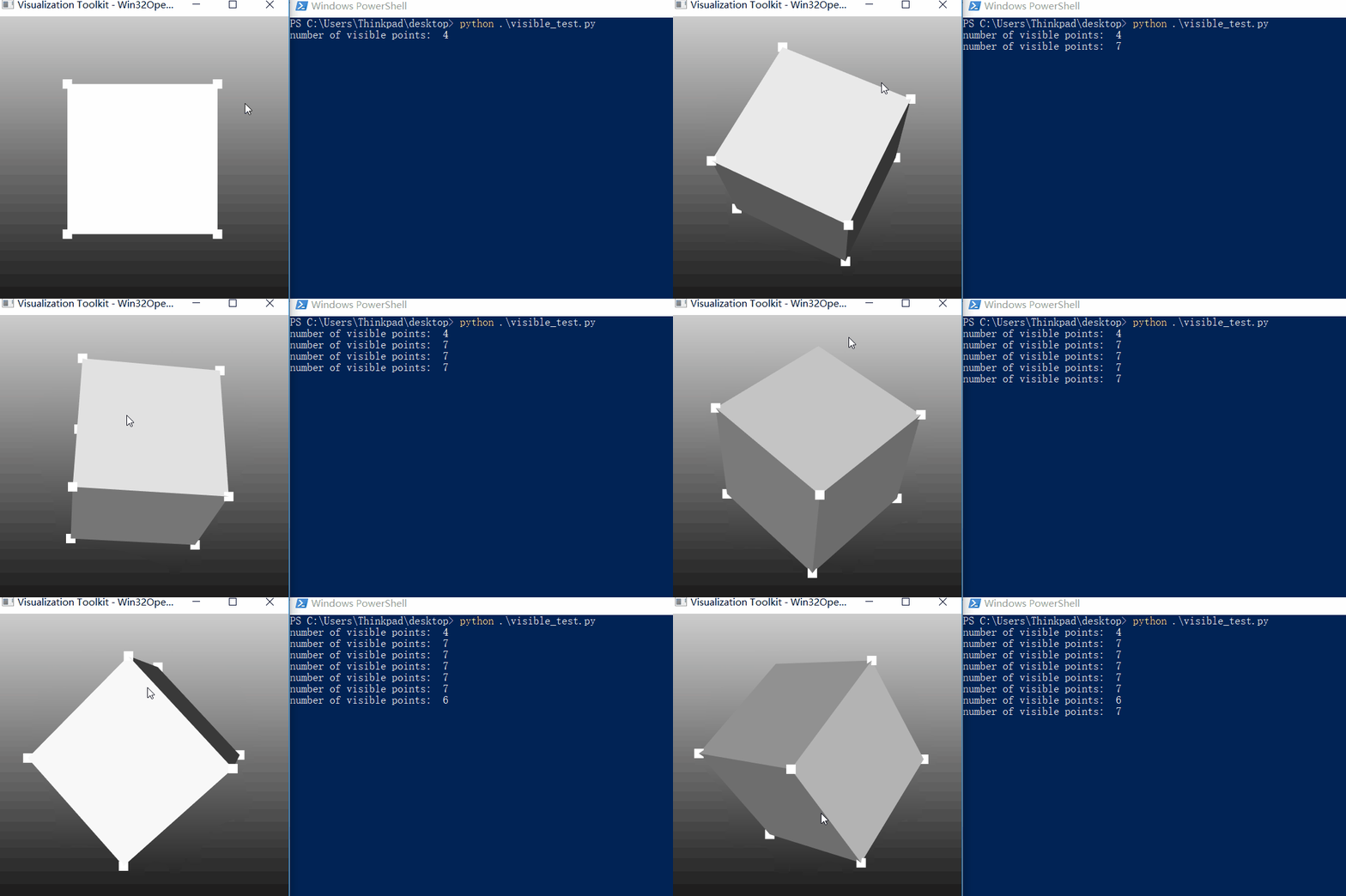
下面的例子中从读入一个简单的8个顶点的立方体STL模型,用vtkSelectVisiblePoints类过滤可见点,并输出相关信息。
VTK: vtkSelectVisiblePoints Class Reference: extract points that are visible (based on z-buffer calculation). vtkSelectVisiblePoints is a filter that selects points based on whether they are visible or not. Visibility is determined by accessing the z-buffer of a rendering window. (The position of each input point is converted into display coordinates, and then the z-value at that point is obtained. If within the user-specified tolerance, the point is considered visible.) Points that are visible are passed to the output. Associated data attributes are passed to the output as well.
鼠标左键旋转到不同视角,点击右键观察输出的信息:
#!usrbinenv python

import vtk

def loadSTL(filenameSTL):

    readerSTL = vtk.vtkSTLReader()

    readerSTL.SetFileName(filenameSTL)

    # 'update' the reader i.e. read the .stl file

    readerSTL.Update()

    polydata = readerSTL.GetOutput()

    # If there are no points in 'vtkPolyData' something went wrong

    if polydata.GetNumberOfPoints() == 0:

        raise ValueError("No point data could be loaded from '" + filenameSTL)

        return None

    return polydata

# Customize vtkInteractorStyleTrackballCamera

class MyInteractor(vtk.vtkInteractorStyleTrackballCamera):

    def __init__(self, parent=None):

        self.AddObserver("RightButtonPressEvent", self.RightButtonPressEvent)

    def SetVisibleFilter(self, vis):

        self.VisibleFilter = vis

    def RightButtonPressEvent(self,obj,event):

        self.VisibleFilter.Update()

        print "number of visible points: ", self.VisibleFilter.GetOutput().GetNumberOfPoints()

        mapper = vtk.vtkPolyDataMapper()

        mapper.SetInputData(self.VisibleFilter.GetOutput())

        actor =vtk.vtkActor()

        actor.SetMapper(mapper)

        actor.GetProperty().SetPointSize(15)

          self.GetDefaultRenderer().AddActor(actor)

        # Forward events

        self.OnRightButtonDown()

        return

def CreateScene():

    # Create a rendering window and renderer

    renWin = vtk.vtkRenderWindow()

    ren = vtk.vtkRenderer()

    # Set background color

    ren.GradientBackgroundOn()

    ren.SetBackground(.1, .1, .1)

    ren.SetBackground2(0.8,0.8,0.8)

    # Set window size

    renWin.SetSize(600, 600)

    renWin.AddRenderer(ren)

    # Create a renderwindowinteractor

    iren = vtk.vtkRenderWindowInteractor()

    iren.SetRenderWindow(renWin)

    style = MyInteractor()

    style.SetDefaultRenderer(ren)

    iren.SetInteractorStyle(style)

    # load STL file

    mesh = loadSTL("cube.stl")

    mapper = vtk.vtkPolyDataMapper()

    mapper.SetInputData(mesh)         # maps polygonal data to graphics primitives

    actor = vtk.vtkLODActor()

    actor.SetMapper(mapper)

    ren.AddActor(actor)

    visPts = vtk.vtkSelectVisiblePoints()

    visPts.SetInputData(mesh)

    visPts.SetRenderer(ren)

    style.SetVisibleFilter(visPts)

    # Enable user interface interactor

    iren.Initialize()

    iren.Start()

if __name__ == "__main__":

    CreateScene()
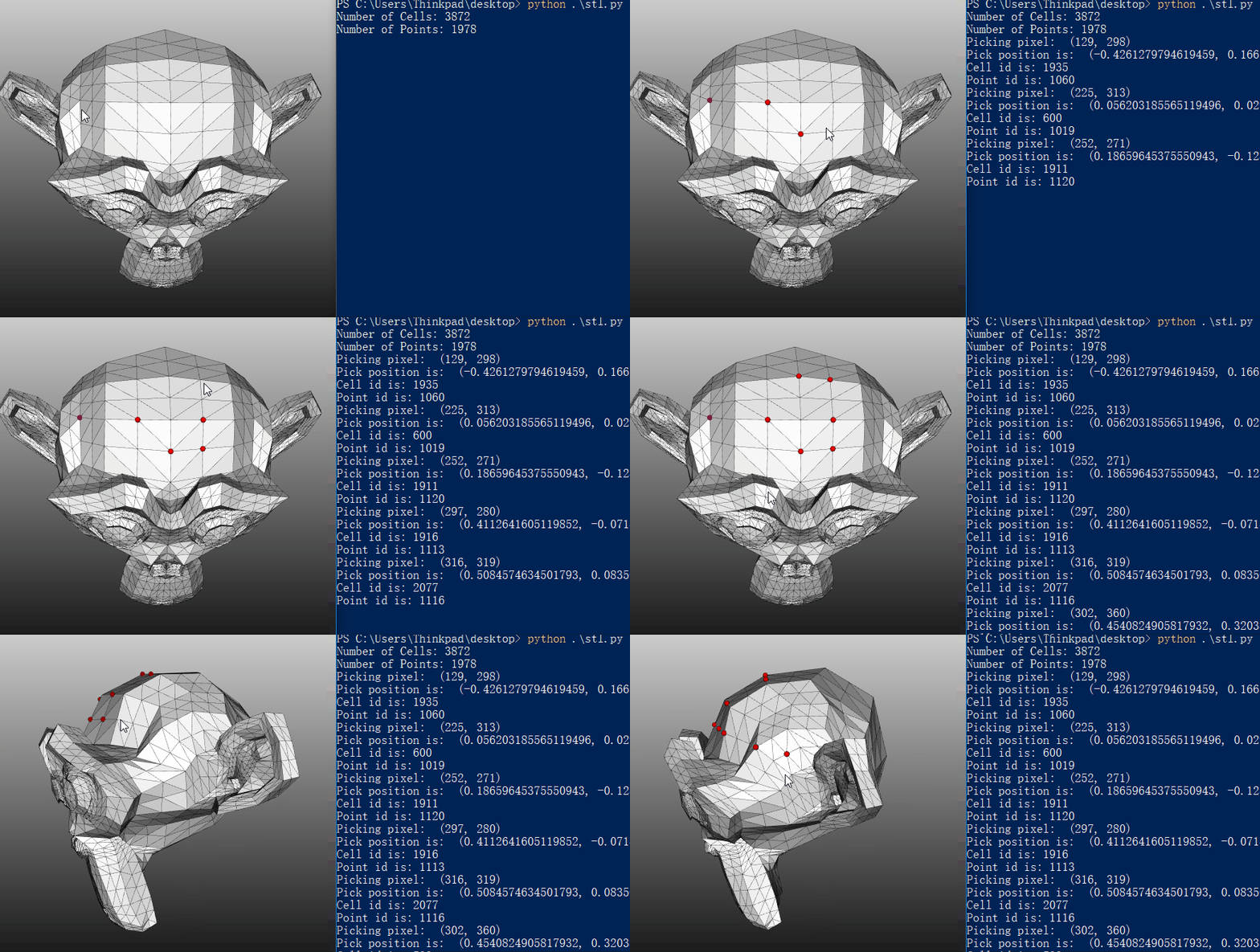
使用vtkCellPicker可以拾取模型上可见的面和点的信息(vtkCellPicker will shoot a ray into a 3D scene and return information about the first object that the ray hit),而用vtkPointPicker拾取点时会选择离射线距离最近的点,因此所选的点可能位于不可见的表面上。
#!usrbinenv python

import vtk

def loadSTL(filenameSTL):

    readerSTL = vtk.vtkSTLReader()

    readerSTL.SetFileName(filenameSTL)

    # 'update' the reader i.e. read the .stl file

    readerSTL.Update()

    polydata = readerSTL.GetOutput()

    print "Number of Cells:",  polydata.GetNumberOfCells()

    print "Number of Points:", polydata.GetNumberOfPoints()

    # If there are no points in 'vtkPolyData' something went wrong

    if polydata.GetNumberOfPoints() == 0:

        raise ValueError("No point data could be loaded from " + filenameSTL)

        return None

    return polydata

# Customize vtkInteractorStyleTrackballCamera

class MyInteractor(vtk.vtkInteractorStyleTrackballCamera):

    def __init__(self,parent=None):

        self.AddObserver("RightButtonPressEvent", self.RightButtonPressEvent)

    def RightButtonPressEvent(self,obj,event):

        clickPos = self.GetInteractor().GetEventPosition()

        print "Picking pixel: " , clickPos

        # Pick from this location

        picker = self.GetInteractor().GetPicker()

        picker.Pick(clickPos[0], clickPos[1], 0, self.GetDefaultRenderer())

        # If CellId = -1, nothing was picked

        if(picker.GetCellId() != -1):

            print "Pick position is: " , picker.GetPickPosition()

            print "Cell id is:",  picker.GetCellId()

            print "Point id is:", picker.GetPointId()

            point_position = mesh.GetPoint(picker.GetPointId())

            # Create a sphere

            sphereSource = vtk.vtkSphereSource()

            sphereSource.SetCenter(point_position)

            #sphereSource.SetRadius(0.2)

            sphereSource.SetRadius(0.02)

            # Create a mapper and actor

            mapper = vtk.vtkPolyDataMapper()

            mapper.SetInputConnection(sphereSource.GetOutputPort())

            actor = vtk.vtkActor()

            actor.SetMapper(mapper)

            actor.GetProperty().SetColor(1.0, 0.0, 0.0)

            self.GetDefaultRenderer().AddActor(actor)

        # Forward events

        self.OnRightButtonDown()

        return

def CreateScene():

    # Create a rendering window and renderer

    renWin = vtk.vtkRenderWindow()

    # Set window size

    renWin.SetSize(600, 600)

    ren = vtk.vtkRenderer()

    # Set background color

    ren.GradientBackgroundOn()

    ren.SetBackground(.1, .1, .1)

    ren.SetBackground2(0.8,0.8,0.8)

    renWin.AddRenderer(ren)

    # Create a renderwindowinteractor

    iren = vtk.vtkRenderWindowInteractor()

    iren.SetRenderWindow(renWin)

    style = MyInteractor()

    style.SetDefaultRenderer(ren)

    iren.SetInteractorStyle(style)

    # vtkCellPicker will shoot a ray into a 3D scene and return information about

    # the first object that the ray hits.

    cellPicker = vtk.vtkCellPicker()

    iren.SetPicker(cellPicker)

    # load STL file

    global mesh

    mesh = loadSTL("Suzanne.stl")

    mapper = vtk.vtkPolyDataMapper()

    mapper.SetInputData(mesh)         # maps polygonal data to graphics primitives

    actor = vtk.vtkLODActor()

    actor.SetMapper(mapper)

    actor.GetProperty().EdgeVisibilityOn()

    actor.GetProperty().SetLineWidth(0.3)

    ren.AddActor(actor)

    # Enable user interface interactor

    iren.Initialize()

    iren.Start()

if __name__ == "__main__":

    CreateScene()
参考:
VTK - Users - point picking problem
VTK: vtkCellPicker Class Reference
VTK: vtkPointPicker Class Reference
VTK/Examples/Cxx/PolyData/SelectVisiblePoints
Ray Casting with Python and VTK: Intersecting lines/rays with surface meshes
VTK拾取网格模型上的可见点的更多相关文章
- VTK计算网格模型上的最短路径
Dijkstra algorithm to compute the graph geodesic.Takes as input a polygonal mesh and performs a sing ...
- pcl曲面网格模型的三种显示方式
pcl网格模型有三种可选的显示模式,分别是面片模式(surface)显示,线框图模式(wireframe)显示,点模式(point)显示.默认为面片模式进行显示.设置函数分别为: void pcl:: ...
- 不同材质怎么通过ZBrush赋予同一个模型上
ZBrush 作为最专业的数字雕刻与绘画软件,能够制作出高质量的3D模型,包括模型的颜色贴图和材质属性.不同材质可以改变照明在表面上的反应,以便模型表现出光泽.凹凸.反射.金属性或透明效果.ZBrus ...
- 使用k-means对3D网格模型进行分割
使用k-means对3D网格模型进行分割 由于一些原因,最近在做网格分割的相关工作.网格分割的方法有很多,如Easy mesh cutting.K-means.谱分割.基于SDF的分割等.根据对分割要 ...
- Linux内核(7) - 设备模型(上)
对于驱动开发来说,设备模型的理解是根本,毫不夸张得说,理解了设备模型,再去看那些五花八门的驱动程序,你会发现自己站在了另一个高度,从而有了一种俯视的感觉,就像凤姐俯视知音和故事会,韩峰同志俯视女下属. ...
- ZBrush如何把不同材质赋予同一个模型上
ZBrush 作为最专业的数字雕刻与绘画软件,能够制作出高质量的3D模型,包括模型的颜色贴图和材质属性.不同材质可以改变照明在表面上的反应,以便模型表现出光泽.凹凸.反射.金属性或透明效果.ZBrus ...
- 3ds Max学习日记(十一)——如何给模型上贴图
参考链接:https://jingyan.baidu.com/article/e4511cf38a810b2b845eaf1f.html 之前一直都不知道怎么在3dsMax里给模型上材质和贴图,被 ...
- 在skyline中将井盖、雨水箅子等部件放到地面模型上
公司三维建模组遇到这样的一个问题,怎样将井盖.雨水盖子恰好放在做好的地面模型上.传统的方法是在skyline中逐个调整井盖的对地高度,就是调整为恰好能放在地面上.或者选择很粗糙的一个方法,在“高度”属 ...
- 第 16 章 CSS 盒模型[上]
学习要点: 1.元素尺寸 2.元素内边距 3.元素外边距 4.处理溢出 主讲教师:李炎恢 本章主要探讨 HTML5 中 CSS 盒模型,学习怎样了解元素的外观配置以及文档的整体布局. 一.元素尺寸 C ...
随机推荐
- android修改默认输入法
方案一:adb命令设置?方案2:系统配置:方案3:调用系统API接口设置---------------------------adb shell cmdadb rootadb remountadb p ...
- thinkphp注册验证
在model中新建一个UserModel //覆盖原本的设置 //一次性获得全部验证错误 protected $patchValidate = true; //实现表单项目验证 //通过重写父类属性_ ...
- canvas简单下雨特效
前面做了两个简单的效果,这次就来个下雨的效果 思路简单的说一下 随机在屏幕中的位置画雨滴,moveTo(x,y) 雨滴的长度就是lineTo(x,y+len) 每次重新绘制页面,就能达到下雨的效果了 ...
- asp.net core环境变量详解
环境变量详解 Windows操作系统的环境变量在哪设置应该都知道了. Linux(centos版本)的环境变量在/etc/profile里面进行设置.用户级的环境变量在其它文件里面,不多说了,有兴趣的 ...
- HDU5818 Joint Stacks 左偏树,可并堆
欢迎访问~原文出处——博客园-zhouzhendong 去博客园看该题解 题目传送门 - HDU5818 题意概括 有两个栈,有3种操作. 第一种是往其中一个栈加入一个数: 第二种是取出其中一个栈的顶 ...
- 009 使用servlet API作为参数
1.哪些可以使用 MVC中的Handler方法可以接受ServletAPI类型的参数. 2.controller package com.spring.it; import java.io.IOExc ...
- ubuntu16.04通过apt-get方式安装MongoDB
虽然Ubuntu本身也提供MongoDB安装包,但往往官网的安装包版本更新. hupeng@hupeng-vm:~$ apt-cache show mongodb-clients Package: m ...
- BootstrapTable使用实例
一.bootstrapTable简单使用: <link rel="stylesheet" href="./static/libs/bootstrap/css/boo ...
- 为什么macos开机黑屏但是有声音?
一般使用时间久了,或者升级系统就会出现这个情况.完全关机,然后按开机键,再按command+option+R+P.不要松手,等重启几次,响几次(3次左右).然后松手等它自己重启即可. mac开机黑 ...
- HDU1211 密文解锁 【扩展欧几里得】【逆元】
<题目链接> <转载于 >>> > 题目大意: RSA是个很强大的加密数据的工具,对RSA系统的描述如下: 选择两个大素数p.q,计算n = p * q,F( ...