
潭州课堂25班:Ph201805201 WEB 之 页面编写 第一课 (课堂笔记)
index.html
<!DOCTYPE html>

<html lang="en">

<head>

    <meta charset="UTF-8">

    <title>Title</title>

    <link rel="stylesheet" href="css/reset.css">

    <link rel="stylesheet" href="css/common.css">

    <link rel="stylesheet" href="https://at.alicdn.com/t/font_791183_yqg5z4kxenj.css">

</head>

<body>

    <!--header star-->

    <div class="header">

        <div class="header-contain">

            <h1 class="log"><a href="#" class="logo-title"></a></h1>

            <ul class="menu">

                <li><a href="#">首页</a> </li>

                <li><a href="course.html">在线课堂</a> </li>

                <li><a href="pay.html">付费课程</a> </li>

                <li><a href="search.html">搜索</a> </li>

            </ul>

            <div class="log-box">

                <i class="iconfont icon-iconuser"></i>             <!--引入图标时一般用 i 标签 -->

                <span><a href="reg.html">注册</a> </span>

                <span><a href="login.html">登录</a> </span>

            </div>

        </div>

    </div>

    <!--header end-->

    <!--footer star-->

    <div class="footer">

        <div class="footer-box">

            <div class="footer-content">

               <p>

                   <span><a href="#">关于 python</a> </span>

                    <span><a href="#">python 开发</a> </span>

                    <span><a href="#">python 数据分析</a> </span>

                    <span><a href="#">python 关于我:<i class="iconfont icon-ai-weixin" ></i></a> </span>

               </p>

                <p>

                     <span><a href="#">地址:福建.........</a> </span>

                     <span><a href="#">联系电话:12345678911</a> </span>

                </p>

            </div>

            <p  class="bottom-content">Copyright © 2015 - 2018 潭州python学院. All Rights Reserved</p>

        </div>

    </div>

</body>

</html>
共同样式
common.css
.header{

    height: 69px;

    width: 100%;

    background: black;

    color: white;

}

.header .header-contain{

    width: 1200px;

    height: 69px;

    line-height: 69px;

    margin: auto;

    background: blue;

}

/*logo star*/

.header .header-contain .log{

    width: 230px;

    height: 64px;

    float: left;        /*左浮动*/

}

.header .header-contain .log .logo-title{

    display: block;     /*块级*/

    width: 100%;

    height: 100%;

    background: url("https://www.python.org/static/img/python-logo.png ") no-repeat ;/*不平铺*/

}

/*logo end*/

/*meau star*/

.header .header-contain .meau{

    float: left;

    margin-left: 100px;

}

.header .header-contain .menu li{

    height: 69px;

    padding: 0 30px;

    float: left;

    /*border-bottom: 5px solid red;*/

    /*box-sizing:border-box;*/

}

.header .header-contain .menu li.active{

    border-bottom: 5px solid red;

    box-sizing: border-box;

}

.header .header-contain .menu li:hover{

    border-bottom: 5px solid red;

    box-sizing: border-box;

}

/*meau end*/

.header .header-contain .log-box {

    float: right;

}

.header .header-contain .log-box i{     /*阿里云图标*/

    font-size: 30px;

    vertical-align: -4px;              /*对齐方式*/

}

/*footer star*/

.footer{

    width: 100%;

    background: blueviolet;

}

.footer .footer-box{

    margin: auto;

    text-align:center;      /*文字水平居中*/

    color: white;

}

.footer .footer-box .footer-content{

    line-height: 50px;

    padding: 20px 0;

    background: url("https://www.python.org/static/img/python-logo.png ") no-repeat 50px 20px;/*不平铺*/

}

.footer .footer-box .bottom-content{

    line-height: 50px;

    width: 100%;

    background: black;

}
阿里图标库
http://www.iconfont.cn/

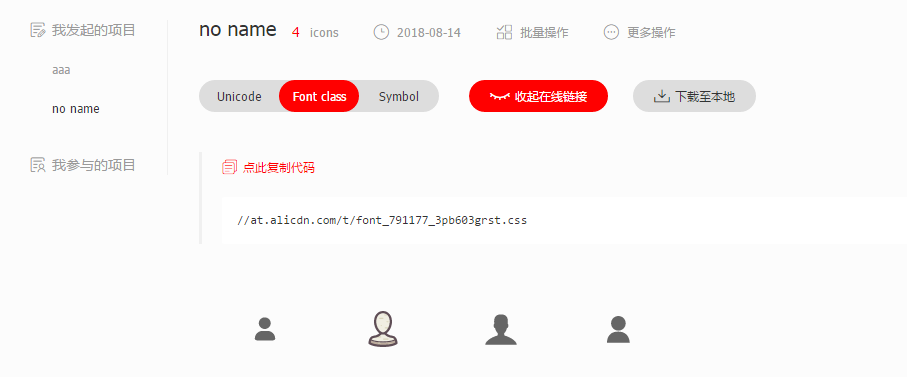
在 index.html 文件中引入
<link rel="stylesheet" href="https://at.alicdn.com/t/font_791177_3pb603grst.css">

其代码在浏览器中撕开时
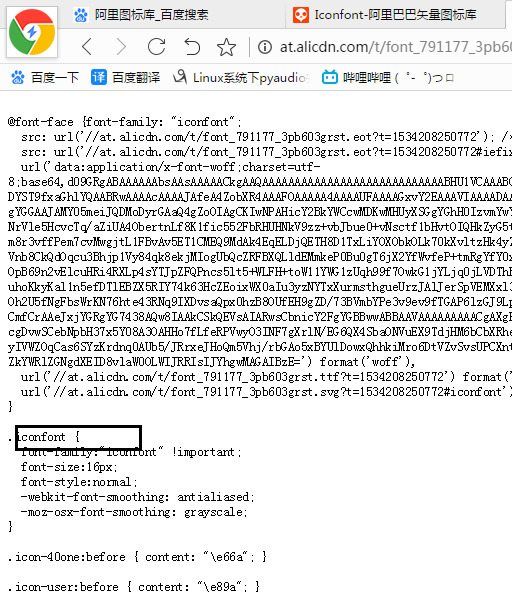
在 i 标签中天机类名 iconfont 要哪个图标复制哪个图标代码, 如 icon-user1

潭州课堂25班:Ph201805201 WEB 之 页面编写 第一课 (课堂笔记)的更多相关文章
- 潭州课堂25班:Ph201805201 WEB 之 页面编写 第二课 (课堂笔记)
index.html <!DOCTYPE html> <html lang="en"> <head> <meta charset=&quo ...
- 潭州课堂25班:Ph201805201 WEB 之 页面编写 第四课 登录注册 (课堂笔记)
index.html 首页 <!DOCTYPE html> <html lang="en"> <head> <meta charset=& ...
- 潭州课堂25班:Ph201805201 WEB 之 页面编写 第三课 (课堂笔记)
index.html <!DOCTYPE html> <html lang="en"> <head> <meta charset=&quo ...
- 潭州课堂25班:Ph201805201 WEB 之 Ajax第八课 (课堂笔记)
js <——>jq <!DOCTYPE html> <html lang="en"> <head> <meta charset ...
- 潭州课堂25班:Ph201805201 WEB 之 jQuery 第七课 (课堂笔记)
jq 的导入 <body> <script src="https://cdn.bootcss.com/jquery/3.3.1/jquery.js">< ...
- 潭州课堂25班:Ph201805201 WEB 之 JS 第六课 (课堂笔记)
上节补充方法 <!DOCTYPE html> <html lang="en"> <head> <meta charset="UT ...
- 潭州课堂25班:Ph201805201 WEB 之 JS 第五课 (课堂笔记)
算数运算符 <!DOCTYPE html> <html lang="en"> <head> <meta charset="UTF ...
- 潭州课堂25班:Ph201805201 WEB 之 JS 第四课 (课堂笔记)
JS 引入方式 在 HTML 中写入 写在 的标签里 <script> </script>推荐 放在 </body> 结束之前 <!DOCTYPE html& ...
- 潭州课堂25班:Ph201805201 WEB 之 CSS 第三课 (课堂笔记)
在 CSS 中第个标签都可以认为是个盒子,盒子就有以下几层 边框 border border-top: 5px solid black; /*上边框 实线*/ border-right: 3px do ...
随机推荐
- FarBox的建站过程
FarBox的建站过程 本文转自:http://mosir.org/html/y2012/How-to-build-your-website-by-farbox.html 作者: mosir 时间: ...
- 没有备份怎么恢复被drop的表(利用undrop-for-innodb)
介绍: 也许大家都难以理解,这么重要的数据为啥不备份(或者备份不可用)?而且还任性的drop table了.显然有备份是最好的,但是它们并不总是可用的.这种情况令人恐惧,但并非毫无希望.在许多 ...
- oracle数据文件迁移
这篇文章是从网络上获取的,然后根据内容一步步操作, 1.目前的疑问:移动日志文件的时候,为何要先进行切换? 2.move操作后,再进行rename操作的原理 --------------------- ...
- (并发编程)进程IPC,生产者消费者模型,守护进程补充
一.IPC(进程间通信)机制进程之间通信必须找到一种介质,该介质必须满足1.是所有进程共享的2.必须是内存空间附加:帮我们自动处理好锁的问题 a.from multiprocessing import ...
- jmeter之正则表达式
一.Jmeter关联的方式: Jmeter中关联可以在需要获取数据的请求上 右键-->后置处理器 选择需要的关联方式,如下图有很多种方法可以提取动态变化数据: 二.正则表达式提取器: 1.比如需 ...
- Linux查看文件命令
linux查看日志文件内容命令有 cat 由第一行开始显示文件内容 tac 从最后一行开始显示,可以看出 tac 是 cat 的倒着写 nl 显示的时候,顺道输出行号! more 一页一页的显示文件内 ...
- n个月后兔子的个数问题(for循环)
- php数据类型之自动转换和强制转换
PHP在PHP 5.x阶段都是完全的弱类型的编程语言.所谓弱类型,就是在声明变量的时候,不需要指定变量的类型.我要声明一个整型的变量,我不用在前面非得写上类型,再写变量.而PHP 7 的性能有很大的提 ...
- python 全栈开发,Day102(支付宝支付)
昨日内容回顾 1. django请求生命周期? - 当用户在浏览器中输入url时,浏览器会生成请求头和请求体发给服务端 请求头和请求体中会包含浏览器的动作(action),这个动作通常为get或者po ...
- C 几何水题 求不同斜率的数目 枚举+set
Description Master LU 非常喜欢数学,现在有个问题:在二维空间上一共有n个点,LU每连接两个点,就会确定一条直线,对应有一个斜率.现在LU把平面内所有点中任意两点连线,得到的斜率放 ...