
unbuntu安装Node.js
先删除这些
rm -rf ~/.npm
rm -rf ~/.npm-global
rm -rf ~/.npmrc
rm -rf ~/.node-gyp
按https://github.com/nodesource/distributions/blob/master/README.md#debinstall
安装
curl -sL https://deb.nodesource.com/setup_13.x | sudo -E bash -

sudo apt-get install -y nodejs
npm uninstall -g @angular/cli
npm cache clean --force
sudo apt remove nodejs
如果新安装的mint新版本,比如19.2 19.3... node会提示操作系统不支持
形如:

,那么参考https://github.com/nodesource/distributions/issues/881
1 下载nodejs_install.sh
wget -O nodejs_install.sh https://deb.nodesource.com/setup_13.x
2
xed ./nodejs_install.sh
在文件靠后的地方,找到mint
check_alt "Linux Mint"    "tara"     "Ubuntu" "bionic"

check_alt "Linux Mint"    "tessa"    "Ubuntu" "bionic"
加一行
check_alt "Linux Mint" "tara" "Ubuntu" "bionic"
check_alt "Linux Mint" "tessa" "Ubuntu" "bionic"check_alt "Linux Mint" "tricia" "Ubuntu" "bionic"
形如
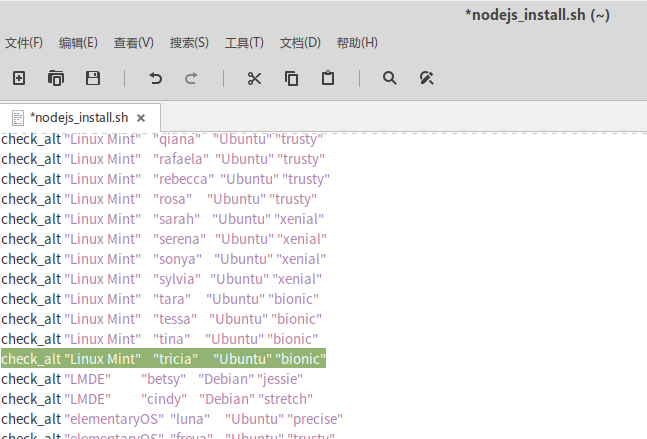
然后 保存退出
sudo bash ./nodejs_install.sh
就可以 安装了
sudo apt-get install -y nodejs
参考这个修改npm路径,以便用-g安装包的时候不报错
Make a directory for global installations:
mkdir ~/.npm-global
Configure npm to use the new directory path:
npm config set prefix '~/.npm-global'xed ~/.profileOpen or create a
~/.profilefile and add this line:export PATH=~/.npm-global/bin:$PATH
Back on the command line, update your system variables:
source ~/.profile
添加 PATH="$HOME/.npm-global/bin:$PATH"
再安装angular就不用sudo了
先确认安装了
sudo apt install build-essential
如果不行,就
sudo -i
aptitude install g++
否则sass编译不过,提示没有g++
npm install -g -f @angular/cli
应对被墙, 装nrm
npm i nrm -g
然后用
nrm ls 列出代理
nrm use XXX 切换代理
安装phantomjs
sudo apt-get install phantomjs
安装typescript
npm i -g typescript
查看版本
ng --version
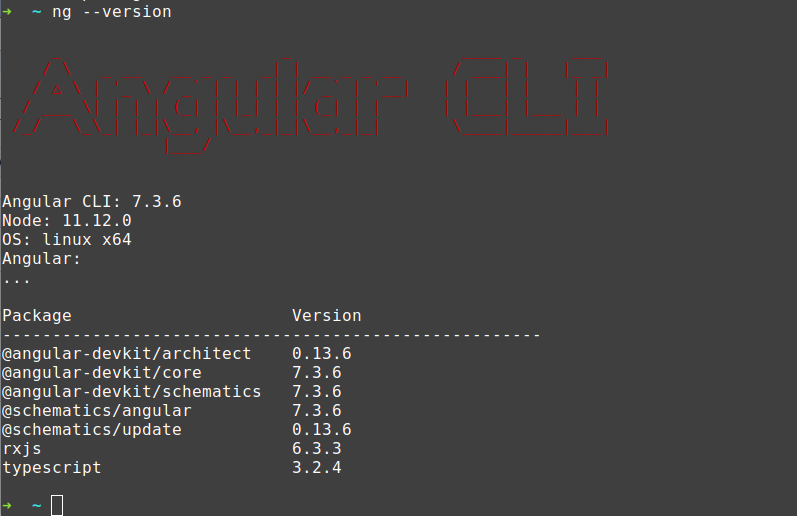
看见Angular: ...应该是安装正确的.
否则会看见error (8.x的node如果没卸载干净安装9 会提示 ts错误)
安装vscode https://code.visualstudio.com/docs/setup/linux
curl https://packages.microsoft.com/keys/microsoft.asc | gpg --dearmor > microsoft.gpg

sudo install -o root -g root -m 644 microsoft.gpg /etc/apt/trusted.gpg.d/

sudo sh -c 'echo "deb [arch=amd64] https://packages.microsoft.com/repos/vscode stable main" > /etc/apt/sources.list.d/vscode.list'
sudo apt-get install apt-transport-https
sudo apt-get update
sudo apt-get install code # or code-insidersunbuntu安装Node.js的更多相关文章
- 在Linux Mint上安装node.js和npm
1.安装Node.js 前端开发过程中,很多项目使用npm的http-server的模块来运行一个静态的服务器,我个人在Dell的笔记本上安装的是Linux Mint最新版本,所以想尝试一下在Linu ...
- ubuntu kylin 14.04安装Node.js和Famous
默认使用软件中心安装node.js,然后参考https://famo.us/install进行安装 1.sudo apt-get install git 2.npm install -g yo gru ...
- centos 6.5安装node.js
1.检查是否安装gcc编译器 rpm -q gcc rpm -q gcc-c++ 2.如果没有安装则通过以下代码安装gcc编译器 yum -y install gcc-c++ kernel-devel ...
- [译]How to Install Node.js on Ubuntu 14.04 如何在ubuntu14.04上安装node.js
原文链接为 http://www.hostingadvice.com/how-to/install-nodejs-ubuntu-14-04/ 由作者Jacob Nicholson 发表于October ...
- Linux 安装node.js ---- 源码编译的方式
一 : 普通用户: 安装前准备环境: 1.检查Linux 版本 命令: cat /etc/redhat-release 2.检查 gcc.gcc-c++ 是否安装过 命令: rpm -q gcc rp ...
- CentOS 6 中安装Node.js 4.0 版本或以上
如果想在CentOS 6 中安装Node.js >4.0,如果通过以往的方式安装: wget http://nodejs.org/dist/v4.0.0/node-v4.0.0.tar.gz t ...
- Nodejs学习笔记(一)--- 简介及安装Node.js开发环境
目录 学习资料 简介 安装Node.js npm简介 开发工具 Sublime Node.js开发环境配置 扩展:安装多版本管理器 学习资料 1.深入浅出Node.js http://www.info ...
- 1. windows环境安装Node.js
1. 下载 地址: https://nodejs.org/en/ 2. 下载最新版本v6.1.0 Currrent
- 安装node.js+express for win7的Web开发环境配置
1.安装 node.js. 进入官网的下载地址:http://www.nodejs.org/download/ . 选择Windows Installer或者选择Windows Installer ( ...
随机推荐
- yii2 mysql根据多个字段的数据计算排序
mysql根据多个字段的数据计算排序 select *,num1+num2*10+num3*100 num from $tableName order by num desc yii2框架活动记录ac ...
- git获取一个版本相对于另一个版本新增,修改,删除的文件
git diff --name-status 00ef237ef0f0a4b8bd9609c2b6d570472028212d abf13b4d58abbb05a7d494cdc205d025978a ...
- Golang中map的三种声明方式和简单实现增删改查
package main import ( "fmt" ) func main() { test3 := map[string]string{ "one": & ...
- 接口自动化(unittest)
一.用例 TestCase 也就是测试用例 TestSuite 多个测试用例集合在一起,就是TestSuite TestLoader是用来加载TestCase到TestSuite中的 TestRunn ...
- ARM 架构、ARM7、ARM9、STM32、Cortex M3 M4 、51、AVR 之间有什么区别和联系?(转载自知乎)
ARM架构: 由英国ARM公司设计的一系列32位的RISC微处理器架构总称,现有ARMv1~ARMv8种类. ARM7: 一类采用ARMv3或ARMv4架构的,使用冯诺依曼结构的内核. ...
- python --- 18 类与类之间的关系, 特殊成员
类与类之间的关系 一.依赖关系 执行某个动作的时候. 需要xxx来帮助你完成这个操作 随时可以更换另外一个东西来完成此操作 此时的关系是最轻的. 二.关联关系(组合关系,聚合关系) 1.一对 ...
- eMMC之分区管理、总线协议和工作模式【转】
本文转载自:https://blog.csdn.net/u013686019/article/details/66472291 一.eMMC 简介 eMMC 是 embedded MultiMedia ...
- Python 必备好库 - 好工具收藏
apscheduler collections collections.OrderDict collections.defaultdict Python 标准库提供了 collections 模块.这 ...
- 牛客竞赛&&mjt的毒瘤赛
题目链接 https://ac.nowcoder.com/acm/contest/368/F 思路 询问可以离线. 然后每个节点上建32个权值线段树(权值不大,其实只要20颗) 记录每一位权值为x(如 ...
- SpringBoot 使用Sharding-JDBC进行分库分表及其分布式ID的生成
为解决关系型数据库面对海量数据由于数据量过大而导致的性能问题时,将数据进行分片是行之有效的解决方案,而将集中于单一节点的数据拆分并分别存储到多个数据库或表,称为分库分表. 分库可以有效分散高并发量,分 ...