
EOS踩坑记 2
【EOS踩坑记 2】
1、--contracts-console
在开发模式下,需要将 nodeos 添加此选项。


2、Debug Method
The main method used to debug smart contract is Caveman Debugging, where we utilize the printing functionality to inspect the value of a variable and check the flow of the contract.
原始人调试法(Log 调试法)
Printing in smart contract can be done through the Print API. The C++ API is the wrapper for C API, so most often we will just use the C++ API.
3、If no optional arguments are used (i.e. --url and --wallet-url), cleos automatically tries to connect to a locally running eos node (i.e. nodeos).
4、nodeos --plugin
--plugin eosio::chain_api_plugin
也可以在 cofnig.ini 中配置

plugin = eosio::chain_api_plugin
5、nodeos -h 可以查看 plugin 有哪些option可以设置
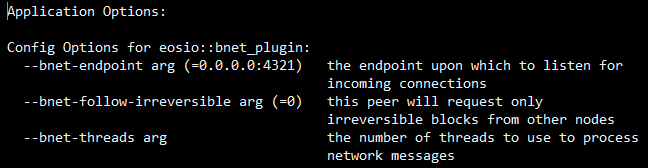
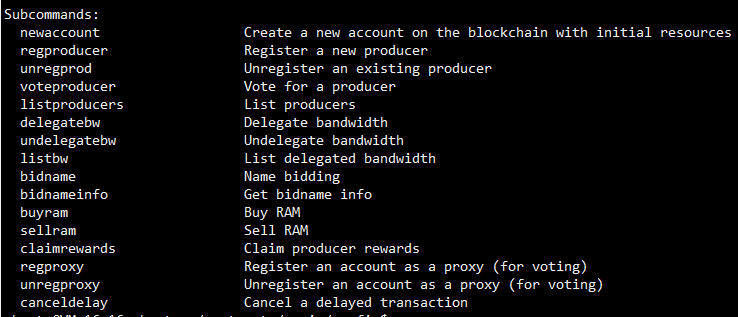
6、cleos system

7、p2p-peer-address
通过 config.ini 中的 p2p-peer-address 可以配置要联接的主网结点,使得当前结点可以加入主网。

# Default p2p port is

p2p-peer-address = 123.255.78.9:
8、Non-Producing Node
A non-producing node is a node that is not configured to produce blocks. An example use case would be to provide a synchronized node that provides a public HTTP-RPC API for developers or as a dedicated private endpoint for your app.
You need to set some peers in your config ini, for example:
p2p-peer-address = 106.10.42.238:9876
Or you can include the peer in as a boot flag, like so:
--p2p-peer-address=106.10.42.238:9876
只需指定 p2p-peer-address,就这么简单。详情见参考[3]。
9、nodeos 单节点常用选项
    # Enable production on a stale chain, since a single-node test chain is pretty much always stale

    enable-stale-production = true

    # Enable block production with the testnet producers

    producer-name = eosio

    # Load the block producer plugin, so you can produce blocks

    plugin = eosio::producer_plugin

    # As well as API and HTTP plugins

    plugin = eosio::chain_api_plugin

    plugin = eosio::http_plugin

   # This will be used by the validation step below, to view history

    plugin = eosio::history_api_plugin
10、EOSIO Core Network
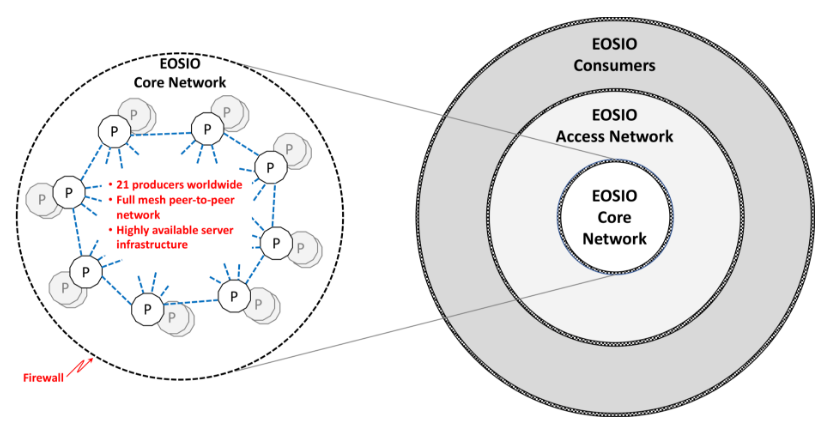
11、EOSIO Access Network
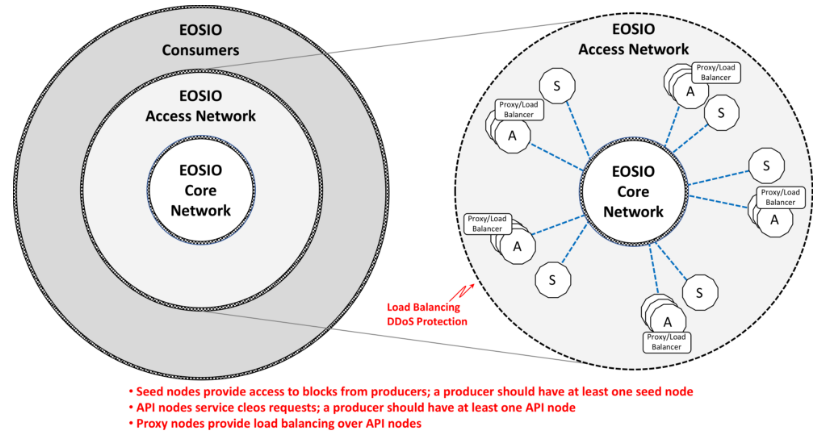
1)API Node
API nodes handle requests from cleos to perform transactions and query state. API nodes communicate with cleos via http, and with other nodeos nodes using the EOSIO networking protocols.
Each producer node should have at least one associated API node.
2)Seed Node
Seed nodes communicate with other nodeos nodes in order to maintain synchronization with the producer nodes. Seed nodes might be producer candidates that are maintaining synchronization with producers and servicing other nodes.
Each producer node should have at least one associated seed node.
12、EOSIO Consumer Network
参考:
1、https://developers.eos.io/eosio-cpp/docs/debugging
2、https://developers.eos.io/eosio-nodeos/docs/environment-producing-node
3、https://developers.eos.io/eosio-nodeos/docs/environment-non-producing-node
EOS踩坑记 2的更多相关文章
- EOS踩坑记
[EOS踩坑记] 1.每个account只能更新自己的contract,即使两个account的秘钥相同,也不允许. 如下,使用alice的权限来更新james的contract.会返回 Missin ...
- Spark踩坑记——Spark Streaming+Kafka
[TOC] 前言 在WeTest舆情项目中,需要对每天千万级的游戏评论信息进行词频统计,在生产者一端,我们将数据按照每天的拉取时间存入了Kafka当中,而在消费者一端,我们利用了spark strea ...
- Spark踩坑记——数据库(Hbase+Mysql)
[TOC] 前言 在使用Spark Streaming的过程中对于计算产生结果的进行持久化时,我们往往需要操作数据库,去统计或者改变一些值.最近一个实时消费者处理任务,在使用spark streami ...
- 【踩坑记】从HybridApp到ReactNative
前言 随着移动互联网的兴起,Webapp开始大行其道.大概在15年下半年的时候我接触到了HybridApp.因为当时还没毕业嘛,所以并不清楚自己未来的方向,所以就投入了HybridApp的怀抱. Hy ...
- Spark踩坑记——共享变量
[TOC] 前言 Spark踩坑记--初试 Spark踩坑记--数据库(Hbase+Mysql) Spark踩坑记--Spark Streaming+kafka应用及调优 在前面总结的几篇spark踩 ...
- Spark踩坑记——从RDD看集群调度
[TOC] 前言 在Spark的使用中,性能的调优配置过程中,查阅了很多资料,之前自己总结过两篇小博文Spark踩坑记--初试和Spark踩坑记--数据库(Hbase+Mysql),第一篇概况的归纳了 ...
- djangorestframework+vue-cli+axios,为axios添加token作为headers踩坑记
情况是这样的,项目用的restful规范,后端用的django+djangorestframework,前端用的vue-cli框架+webpack,前端与后端交互用的axios,然后再用户登录之后,a ...
- HttpWebRequest 改为 HttpClient 踩坑记-请求头设置
HttpWebRequest 改为 HttpClient 踩坑记-请求头设置 Intro 这两天改了一个项目,原来的项目是.net framework 项目,里面处理 HTTP 请求使用的是 WebR ...
- vue踩坑记
vue踩坑记 易错点 语法好难啊qwq 不要把'data'写成'date' 在v-html/v-bind中使用vue变量时不需要加变量名 在非vue事件中使用vue中变量时需要加变量名 正确 < ...
随机推荐
- JavaBasic_11
Object默认的实现是比较对象的地址 Object默认的实现是比较对象的地址局部内部类 局部位置内部类:局部是指方法体中 1.可以直接访问外部类的成员(这个特征是所有内部类所共有) 2.可以创建内部 ...
- JAVA高级篇(一、JVM基本概念)
一.什么是JVM VM的中文名称叫Java虚拟机,它是由软件技术模拟出计算机运行的一个虚拟的计算机. JVM也充当着一个翻译官的角色,我们编写出的Java程序,是不能够被操作系统所直接识别的,这时候J ...
- C语言笔记变量与数据类型
目录 1.转义字符 2.常量与变量 2.1 什么是常量和变量 2.2 内存 2.3 变量的内存机制 2.4 变量命名规则 2.5 变量的定义 2.6 常量的定义 2.7 计算机内存字节顺序 2.8 局 ...
- Centos6.5搭建Elasticsearch
ElasticSearch是基于Lucene的搜索服务.支持分布式多用户能力的全文搜索引擎,提供RESTful web接口.Elasticsearch是用Java开发的,Apache旗下开源项目,支持 ...
- 10.python面向对象进阶功能
isinstance(obj,cls)和issubclass(sub,super)(1)isinstance(obj,cls)检查一个对象obj是否是一个类cls的实例(2)issubclass(su ...
- c# .net 面试总结
一. sql优化 . 写明查询具体某几列,减少*的使用,表名过长时,尽量使用表的别名 *和列名一样 ,在业务密集的SQL当中尽量不采用IN操作符,用EXISTS 方案代替. in 和 exists的区 ...
- CocosCreator引擎修改与定制
1.CCGame.js 修改部分数据脚本的加载时机,避免首屏卡顿 // Load game scripts var jsList = config[CONFIG_KEY.jsList]; if (js ...
- Nmap使用指南
一.目标指定 1.CIDR标志位 192.168.1.0/24 2.指定范围 192.168.1.1-255 192.168.1-255.1(任意位置) 3.IPv6地址只能用规范的IPv6地址或主机 ...
- 无旋treap
#ifndef FHQTREAP_H_INCLUDED #define FHQTREAP_H_INCLUDED //author Eterna #define Hello The_Cruel_Worl ...
- MySQL Error--The Table is full
问题描述 在MySQL 错误日志中发下以下错误信息:[ERROR] /export/servers/mysql/bin/mysqld: The table '#sql-xxxx-xxx' is ful ...