
FastCGI与PHP
什么是CGI
CGI全称"通用网关接口"(Common Gateway Interface),用于HTTP服务器与其它机器上的程序服务通信交流的一种工具,CGI程序须运行在网络服务器上。
传统CGI接口方式的主要缺点是性能较差,因为每次HTTP服务器遇到动态程序时都需要重启解析器来执行解析,然后结果被返回给HTTP服务器。这在处理高并发访问几乎是不可用的,因此就诞生了FastCGI。另外传统的CGI接口方式安全性也很差。
什么是FastCGI
FastCGI是一个可伸缩地、高速地在HTTP服务器和动态脚本语言间通信的接口(FastCGI接口在Linux下是socket(可以是文件socket,也可以是ip socket)),主要优点是把动态语言和HTTP服务器分离开来。多数流行的HTTP服务器都支持FastCGI,包括Apache、Nginx和lightpd。
同时,FastCGI也被许多脚本语言所支持,比较流行的脚本语言之一为PHP。FastCGI接口方式采用C/S架构,可以将HTTP服务器和脚本解析服务器分开,同时在脚本解析服务器上启动一个或多个脚本解析守护进程。当HTTP服务器每次遇到动态程序时,可以将其直接交付给FastCGI进程执行,然后将得到的结构返回给浏览器。这种方式可以让HTTP服务器专一地处理静态请求或者将动态脚本服务器的结果返回给客户端,这在很大程度上提高了整个应用系统的性能。
FastCGI的重要特点:
1、FastCGI是HTTP服务器和动态脚本语言间通信的接口或者工具。
2、FastCGI优点是把动态语言解析和HTTP服务器分离开来。
3、Nginx、Apache、Lighttpd以及多数动态语言都支持FastCGI。
4、FastCGI接口方式采用C/S架构,分为客户端(HTTP服务器)和服务端(动态语言解析服务器)。
5、PHP动态语言服务端可以启动多个FastCGI的守护进程。
6、HTTP服务器通过FastCGI客户端和动态语言FastCGI服务端通信。
Nginx FastCGI的运行原理
Nginx不支持对外部动态程序的直接调用或者解析,所有的外部程序(包括PHP)必须通过FastCGI接口来调用。FastCGI接口在Linux下是socket(可以是文件socket,也可以是ip socket)。为了调用CGI程序,还需要一个FastCGI的wrapper,这个wrapper绑定在某个固定socket上,如端口或者文件socket。当Nginx将CGI请求发送给这个socket的时候,通过FastCGI接口,wrapper接收到请求,然后派生出一个新的线程,这个线程调用解释器或者外部程序处理脚本并读取返回数据;接着,wrapper再将返回的数据通过FastCGI接口,沿着固定的socket传递给Nginx;最后,Nginx将返回的数据发送给客户端,这就是Nginx+FastCGI的整个运作过程。
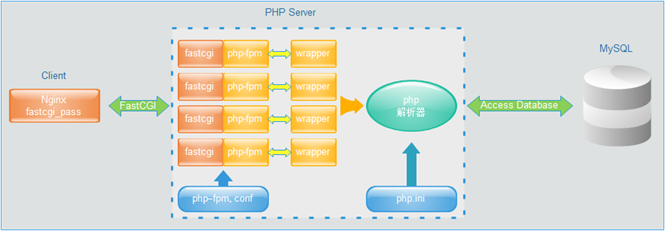
FastCGI的主要优点是把动态语言和HTTP服务器分离开来,是Nginx专一处理静态请求和向后转发动态请求,而PHP/PHP-FPM服务器专一解析PHP动态请求。
检查安装PHP所需lib库
php程序在开发及运行时会调用一些zlib、gb 函数库,因此需要安装下面的库。
- [root@lnmp tools]# yum install zlib-devel libxml2-devel libjpeg-devel libiconv-devel freetype-devel libpng-devel gd-devel curl-devel libxslt-devel -y
安装yum无法安装的libiconv库
- [root@lnmp tools]# wget http://ftp.gnu.org/pub/gnu/libiconv/libiconv-1.14.tar.gz
- [root@lnmp tools]# tar zxf libiconv-1.14.tar.gz
- [root@lnmp tools]# cd libiconv-1.14
- [root@lnmp libiconv-1.14]# ./configure --prefix=/usr/local/libiconv
- [root@lnmp libiconv-1.14]# make && make install
安装libmcrypt库
- [root@lnmp tools]# wget http://sourceforge.net/projects/mcrypt/files/Libmcrypt/2.5.8/libmcrypt-2.5.8.tar.gz
- [root@lnmp libmcrypt-2.5.8]# ./configure
- [root@lnmp libmcrypt-2.5.8]# make && make install
快速安装方法:
安装epel源
- [root@lnmp ~]# wget -O /etc/yum.repos.d/epel.repo http://mirrors.aliyun.com/repo/epel-6.repo
安装PHP依赖包
- [root@lnmp ~]# yum -y install libxml2-devel gd-devel libcurl-devel libxslt-devel libmcrypt-devel mhash mcrypt
安装libicov
同上。
安装libmcrypt
- [root@lnmp yum.repos.d]# yum install libmcrypt-devel -y
- [root@lnmp yum.repos.d]# rpm -qa libmcrypt-devel
- libmcrypt-devel-2.5.8-9.el6.x86_64
安装mhash加密扩展库
Mhash是基于离散数学原理的不可逆向的php加密方式扩展库,其在默认情况下不开启。mhash可以用于创建校验数值、消息摘要、消息认证码,以及无需原文的关键信息保持(如密码)等。
- [root@lnmp ~]# yum install mhash mhash-devel -y
- [root@lnmp ~]# rpm -qa mhash mhash-devel
- mhash-devel-0.9.9.9-3.el6.x86_64
- mhash-0.9.9.9-3.el6.x86_64
安装mcrypt加密扩展库
PHP程序员在编写代码程序时,除了要保证代码的高性能之外,还有一点是非常重要的,那就是程序的安全性保障。PHP除了自带的几种加密函数外,还有功能更全面的PHP加密扩展库mcrypt和mhash。
- [root@lnmp ~]# yum install mcrypt -y
- [root@lnmp ~]# rpm -qa mcrypt
- mcrypt-2.6.8-10.el6.x86_64
安装PHP
lnmp服务器
- [root@lnmp tools]# tar xf php-5.3.28.tar.gz
- [root@lnmp tools]# ls -ld php-5.3.28
- drwxr-xr-x 13 nginx games 4096 Dec 11 2013 php-5.3.28
- [root@lnmp tools]# cd php-5.3.28
编译安装
- ###################输入以下内容
- ./configure \
- --prefix=/application/php5.3.28 \
- --with-mysql=/application/mysql \ #使用php自带mysql参数:--with-mysql=mysqlnd
- --with-iconv-dir=/usr/local/libiconv \
- --with-freetype-dir \
- --with-jpeg-dir \
- --with-png-dir \
- --with-zlib \
- --with-libxml-dir=/usr \
- --enable-xml \
- --disable-rpath \
- --enable-safe-mode \
- --enable-bcmath \
- --enable-shmop \
- --enable-sysvsem \
- --enable-inline-optimization \
- --with-curl \
- --with-curlwrappers \
- --enable-mbregex \
- --enable-fpm \
- --enable-mbstring \
- --with-mcrypt \
- --with-gd \
- --enable-gd-native-ttf \
- --with-openssl \
- --with-mhash \
- --enable-pcntl \
- --enable-sockets \
- --with-xmlrpc \
- --enable-zip \
- --enable-soap \
- --enable-short-tags \
- --enable-zend-multibyte \
- --enable-static \
- --with-xsl \
- --with-fpm-user=nginx \
- --with-fpm-group=nginx \
- --enable-ftp
- ####################编译结果
- creating main/internal_functions.c
- creating main/internal_functions_cli.c
- +--------------------------------------------------------------------+
- | License: |
- | This software is subject to the PHP License, available in
this | - | distribution in the file LICENSE. By continuing this installation |
- | process, you are bound by the terms of this license agreement. |
- | If you do not agree with the terms of this license, you must abort |
- | the installation process at this point. |
- +--------------------------------------------------------------------+
- Thank you for
using PHP. - [root@lnmp php-5.3.28]# echo $?
- 0
- [root@lnmp php-5.3.28]# make
- /usr/bin/ld: cannot find -lltdl
- collect2: ld returned 1 exit status
- make: *** [sapi/fpm/php-fpm] Error 1
- [root@lnmp php-5.3.28]# echo $?
- 2
cannot find –lltdl解决办法,需要安装libltdl。
- [root@lnmp tools]# cd libmcrypt-2.5.8/libltdl/
- [root@lnmp libltdl]# ./configure -enable-ltdl-install
- [root@lnmp libltdl]# make && make install
重新回到PHP的安装目录下进行查询编译PHP。
- [root@lnmp php-5.3.28]# make
- clicommand.inc
- pharcommand.inc
- directorytreeiterator.inc
- invertedregexiterator.inc
- phar.inc
- Build complete.
- Don't forget to run 'make test'.
- [root@lnmp php-5.3.28]# echo $?
- 0
- [root@lnmp php-5.3.28]# make install
创建软连接
- /home/oldboy/tools/php-5.3.28/build/shtool install -c ext/phar/phar.phar /application/php5.3.28/bin
- ln -s -f /application/php5.3.28/bin/phar.phar /application/php5.3.28/bin/phar
- Installing PDO headers: /application/php5.3.28/include/php/ext/pdo/
- [root@lnmp php-5.3.28]# echo $?
- 0
- [root@lnmp php-5.3.28]# ln -s /application/php5.3.28/ /application/php
mysql服务器
- [root@mysql tools]# tar xf php-5.5.38.tar.gz
- [root@mysql tools]# ls -ld php-5.5.38
- drwxr-xr-x 14 1000 1000 4096 Jul 20 2016 php-5.5.38
- [root@mysql tools]# cd php-5.5.38
编译安装
- #############输入以下内容
- ./configure \
- --prefix=/application/php5.5.38 \
- --with-mysql=mysqlnd \
- --with-iconv-dir=/usr/local/libiconv \
- --with-freetype-dir \
- --with-jpeg-dir \
- --with-png-dir \
- --with-zlib \
- --with-libxml-dir=/usr \
- --enable-xml \
- --disable-rpath \
- --enable-bcmath \
- --enable-shmop \
- --enable-sysvsem \
- --enable-inline-optimization \
- --with-curl \
- --enable-mbregex \
- --enable-fpm \
- --enable-mbstring \
- --with-mcrypt \
- --with-gd \
- --enable-gd-native-ttf \
- --with-openssl \
- --with-mhash \
- --enable-pcntl \
- --enable-sockets \
- --with-xmlrpc \
- --enable-soap \
- --enable-short-tags \
- --enable-static \
- --with-xsl \
- --with-fpm-user=nginx \
- --with-fpm-group=nginx \
- --enable-ftp
- ############编译结果
- Thank you for
using PHP. - config.status: creating php5.spec
- config.status: executing default commands
- [root@mysql php-5.5.38]# echo $?
- 0
- [root@mysql php-5.5.38]# make
- invertedregexiterator.inc
- clicommand.inc
- directorytreeiterator.inc
- directorygraphiterator.inc
- pharcommand.inc
- phar.inc
- Build complete.
- Don't forget to run 'make test'.
- [root@mysql php-5.5.38]# echo $?
- 0
- [root@mysql php-5.5.38]# make install
- ln -s -f phar.phar /application/php5.5.38/bin/phar
- Installing PDO headers: /application/php5.5.38/include/php/ext/pdo/
- [root@mysql php-5.5.38]# echo $?
- 0
创建软连接
- [root@mysql php-5.5.38]# ln -s /application/php5.5.38/ /application/php
- [root@mysql php-5.5.38]# ls -ld /application/php
- lrwxrwxrwx 1 root root 23 Feb 26 16:08 /application/php -> /application/php5.5.38/
配置PHP引擎配置文件php.ini
- [root@lnmp php-5.3.28]# cp php.ini-production /application/php/lib/php.ini
配置PHP服务(FastCGI模式)配置文件php-fpm.conf
- [root@lnmp php-5.3.28]# cd /application/php/etc/
- [root@lnmp etc]# ls
- pear.conf php-fpm.conf.default
- [root@lnmp etc]# cp php-fpm.conf.default php-fpm.conf
- [root@lnmp etc]# ls
- pear.conf php-fpm.conf php-fpm.conf.default
指定pid路径:pid = /app/logs/php-fpm.pid
进程管理的错误日志路径:error_log = /app/logs/php-fpm.log
错误日志级别:log_level = error
主进程文件描述符:rlimit_files = 32768
模型:events.mechanism = epoll
用户和组:
listen.owner = nginx
listen.group = nginx
最大进程数:pm.max_children = 1024
开始启动进程数:pm.start_servers = 16
最小空闲进程数:pm.min_spare_servers = 5
最大空闲进程数:pm.max_spare_servers = 20
超时时间:pm.process_idle_timeout = 15s;
每个进程最大请求:pm.max_requests = 2048
慢查询:slowlog = /app/logs/$pool.log.slow
超时时间:request_slowlog_timeout = 10
邮箱地址:php_admin_value[sendmail_path] = /usr/sbin/sendmail -t -i -f xxxxxxx@xxx.com
启动PHP
- [root@lnmp etc]# /application/php/sbin/php-fpm
- [root@lnmp etc]# ps -ef|grep php-fpm
- root 1695 1 0 17:32 ? 00:00:00 php-fpm: master process (/application/php5.3.28/etc/php-fpm.conf)
- nginx 1696 1695 0 17:32 ? 00:00:00 php-fpm: pool www
- nginx 1697 1695 0 17:32 ? 00:00:00 php-fpm: pool www
- nginx 1698 1695 0 17:32 ? 00:00:00 php-fpm: pool www
- nginx 1699 1695 0 17:32 ? 00:00:00 php-fpm: pool www
- nginx 1700 1695 0 17:32 ? 00:00:00 php-fpm: pool www
- nginx 1701 1695 0 17:32 ? 00:00:00 php-fpm: pool www
- nginx 1702 1695 0 17:32 ? 00:00:00 php-fpm: pool www
- nginx 1703 1695 0 17:32 ? 00:00:00 php-fpm: pool www
- nginx 1704 1695 0 17:32 ? 00:00:00 php-fpm: pool www
- nginx 1705 1695 0 17:32 ? 00:00:00 php-fpm: pool www
- nginx 1706 1695 0 17:32 ? 00:00:00 php-fpm: pool www
- nginx 1707 1695 0 17:32 ? 00:00:00 php-fpm: pool www
- nginx 1708 1695 0 17:32 ? 00:00:00 php-fpm: pool www
- nginx 1709 1695 0 17:32 ? 00:00:00 php-fpm: pool www
- nginx 1710 1695 0 17:32 ? 00:00:00 php-fpm: pool www
- nginx 1711 1695 0 17:32 ? 00:00:00 php-fpm: pool www
- root 1713 1360 0 17:33 pts/0 00:00:00 grep php-fpm
- [root@lnmp etc]# ps -ef|grep php-fpm|wc -l
- 18
查看端口
- [root@lnmp etc]# netstat -lntup|grep php-fpm
- tcp 0 0 127.0.0.1:9000 0.0.0.0:* LISTEN 1695/php-fpm
- [root@lnmp etc]# ss -lntup|grep php-fpm
- tcp LISTEN 0 128 127.0.0.1:9000 *:* users:(("php-fpm",1695,7),("php-fpm",1696,0),("php-fpm",1697,0),("php-fpm",1698,0),("php-fpm",1699,0),("php-fpm",1700,0),("php-fpm",1701,0),("php-fpm",1702,0),("php-fpm",1703,0),("php-fpm",1704,0),("php-fpm",1705,0),("php-fpm",1706,0),("php-fpm",1707,0),("php-fpm",1708,0),("php-fpm",1709,0),("php-fpm",1710,0),("php-fpm",1711,0))
配置PHP与Nginx
- [root@lnmp ~]# cd /application/nginx/conf/extra/
- [root@lnmp extra]# cat blog.conf
- server {
- listen 80;
- server_name blog.etiantian.org;
- root html/blog;
- location / {
- index index.html index.htm;
- }
- location ~ .*\.(php|php5)?$ {
- fastcgi_pass 127.0.0.1:9000;
- fastcgi_index index.php;
- include fastcgi.conf;
- }
- }
- [root@lnmp extra]# ../../sbin/nginx -t
- nginx: the configuration file /application/nginx-1.6.1/conf/nginx.conf syntax is ok
- nginx: configuration file /application/nginx-1.6.1/conf/nginx.conf test is successful
- [root@lnmp extra]# ../../sbin/nginx -s reload
- [root@lnmp extra]# cd /application/nginx/html/blog/
- [root@lnmp blog]# cat phpinfo.php
- <?php
- phpinfo();
- ?>
浏览器访问
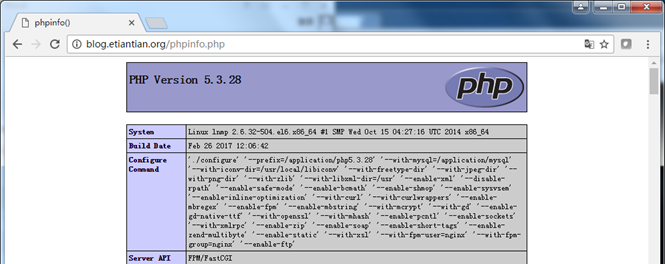
配置PHP与MySQL
- [root@lnmp blog]# pwd
- /application/nginx/html/blog
- [root@lnmp blog]# cat test_mysql.php
- <?php
- //$link_id=mysql_connect('主机名','用户','密码');
- $link_id=mysql_connect('localhost','root','system');
- //$link_id=mysql_connect('localhost','test','');
- if($link_id){
- echo "mysql successful by oldboy!";
- }else{
- echo mysql_error();
- }
- //php单行注释
- /*php多行注释*、
- ?>

- [root@lnmp blog]# rm -f phpinfo.php test_mysql.php
部署一个BLOG程序服务

WordPress是一套利用PHP语言和MySQL数据库开发的开源免费的Blog(博客、网站)程序,用户可以在支持PHP环境和MySQL数据库的服务器上建立Blog站点。
WordPress是一个功能非常强大的博客系统,插件众多,易于扩展功能。安装和使用都非常方便。目前WordPress已经成为主流的Blog搭建平台,很多发布平台也是根据WordPress二次开发的。
- [root@lnmp blog]# pwd
- /application/nginx/html/blog
- [root@lnmp blog]# wget https://cn.wordpress.org/wordpress-4.7.2-zh_CN.tar.gz
创建一个专用的数据库WordPress用于存放blog数据。
- [root@lnmp blog]# mysql -uroot -psystem
- mysql> create database wordpress;
- Query OK, 1 row affected (0.00 sec)
- mysql> show databases;
- +--------------------+
- | Database |
- +--------------------+
- | information_schema |
- | mysql |
- | performance_schema |
- | wordpress |
- +--------------------+
- 4 rows in
set (0.07 sec)
创建一个管理的数据库WordPress的用户wordpress。
- mysql> grant all on wordpress.* to wordpress@'localhost' identified by 'system';
- Query OK, 0 rows affected (0.00 sec)
- mysql> flush privileges;
- Query OK, 0 rows affected (0.01 sec)
- mysql> select user,host from mysql.user where user='wordpress';
- +-----------+-----------+
- | user | host |
- +-----------+-----------+
- | wordpress | localhost |
- +-----------+-----------+
- 1 row in
set (0.00 sec)
部署WordPress
- [root@lnmp blog]# tar xf wordpress-4.7.2-zh_CN.tar.gz
- [root@lnmp blog]# mv wordpress/* .
- [root@lnmp blog]# rm -fr wordpress
- [root@lnmp blog]# cd ../
- [root@lnmp html]# ll -ld blog/
- drwxr-xr-x 5 root root 4096 Feb 27 10:10 blog/
- [root@lnmp html]# find ./blog/ -type f|xargs chmod 644
- [root@lnmp html]# find ./blog/ -type d|xargs chmod 755
权限设置
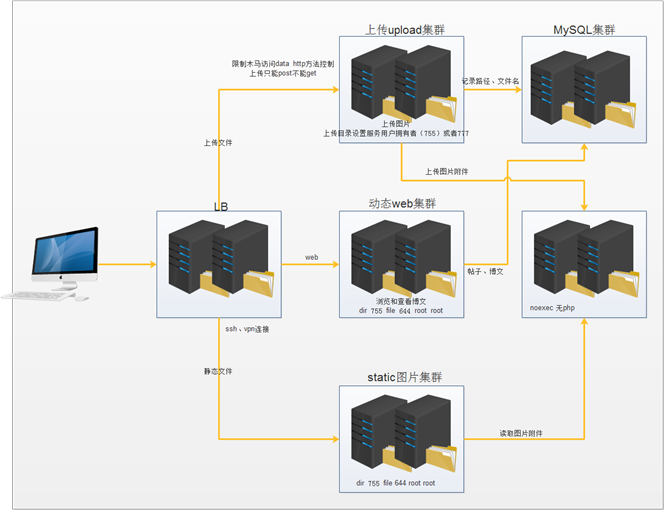
默认目录权限:dir 755 root root
默认文件权限:file 644 root root
用户目录权限:dir nginx nginx 755
用户文件权限:file nginx nginx 644
- [root@lnmp html]# chown -R root.root blog/
- [root@lnmp html]# find ./blog/ -type f|xargs chmod 644
- [root@lnmp html]# find ./blog/ -type d|xargs chmod 755
- [root@lnmp html]# mkdir blog/wp-content/uploads
- [root@lnmp html]# chown -R nginx.nginx blog/wp-content/uploads/
浏览器访问http://blog.etiantian.org/index.php
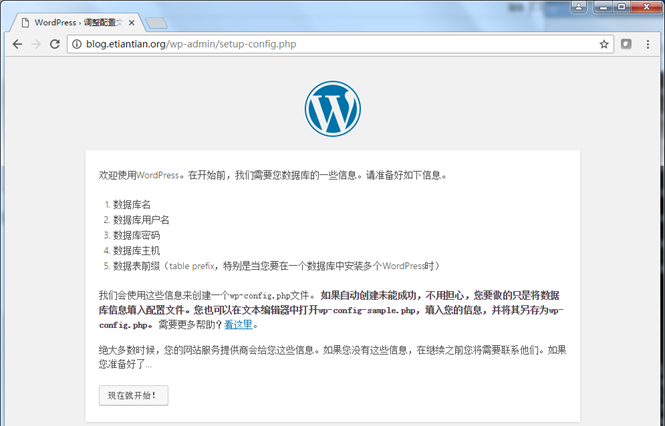
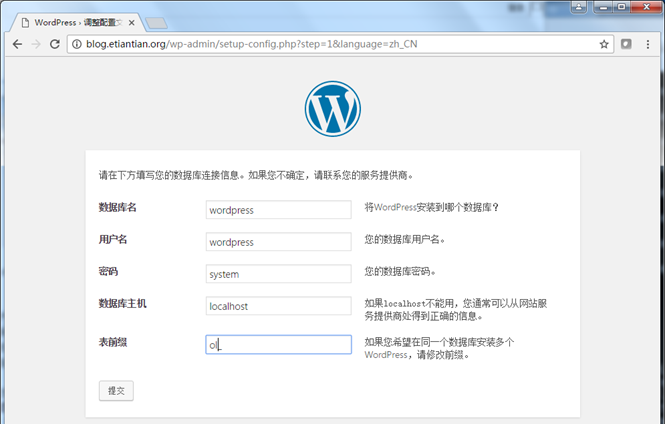
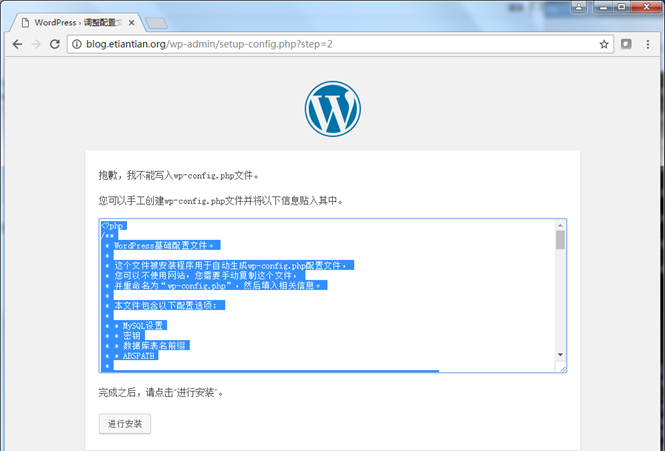
根据提示创建wp-config.php,然后点击"进行安装"。
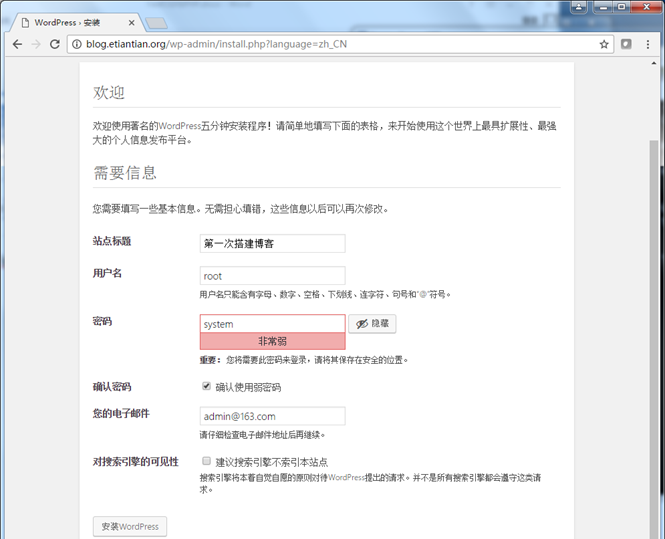
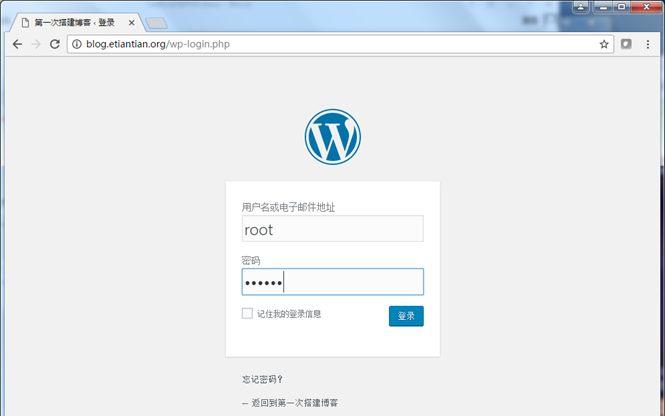
数据库中查看安装结果
- [root@lnmp blog]# mysql -uroot -psystem
- Welcome to the MySQL monitor. Commands end with ; or \g.
- mysql> use wordpress
- Database changed
- mysql> show tables;
- Empty set (0.01 sec)
- mysql> show tables;
- +-----------------------+
- | Tables_in_wordpress |
- +-----------------------+
- | ol_commentmeta |
- | ol_comments |
- | ol_links |
- | ol_options |
- | ol_postmeta |
- | ol_posts |
- | ol_term_relationships |
- | ol_term_taxonomy |
- | ol_termmeta |
- | ol_terms |
- | ol_usermeta |
- | ol_users |
- +-----------------------+
- 12 rows in
set (0.00 sec) - mysql> select * from ol_users;
- +----+------------+------------------------------------+---------------+---------------+----------+---------------------+---------------------+-------------+--------------+
- | ID | user_login | user_pass | user_nicename | user_email | user_url | user_registered | user_activation_key | user_status | display_name |
- +----+------------+------------------------------------+---------------+---------------+----------+---------------------+---------------------+-------------+--------------+
- | 1 | root | $P$BbYLtgyYZ9xItWMJXp4rYB/ggABd9t/ | root | admin@163.com | | 2017-02-27 03:37:27 | | 0 | root |
- +----+------------+------------------------------------+---------------+---------------+----------+---------------------+---------------------+-------------+--------------+
- 1 row in
set (0.00 sec)
FastCGI与PHP的更多相关文章
- CGI与FastCGI nginx+PHP-FPM
本文转载自CGI与FastCGI 1.当我们在谈到cgi的时候,我们在讨论什么 最早的Web服务器简单地响应浏览器发来的HTTP请求,并将存储在服务器上的HTML文件返回给浏览器,也就是静态html. ...
- IIS8 使用FastCGI配置PHP环境支持 过程详解
平时帮朋友们配置过一些PHP环境的服务器,但是一直使用的都是Apache HTTP+PHP,今天呢,我吧IIS+PHP配置方式给大家发一下下~呵呵. 在这里,我使用的是FastCGI模块映射的方式配置 ...
- FastCgi与PHP-fpm之间的关系
web server(比如说nginx)只是内容的分发者.比如,如果请求/index.html,那么web server会去文件系统中找到这个文件,发送给浏览器,这里分发的是静态数据.好了,如果现在请 ...
- CGI与FastCGI
当我们在谈到cgi的时候,我们在讨论什么 最早的Web服务器简单地响应浏览器发来的HTTP请求,并将存储在服务器上的HTML文件返回给浏览器,也就是静态html.事物总是不 断发展,网站也越来越复杂, ...
- 搞不清FastCgi与PHP-fpm之间是个什么样的关系?
问 我在网上查fastcgi与php-fpm的关系,查了快一周了,基本看了个遍,真是众说纷纭,没一个权威性的定义. 网上有的说,fastcgi是一个协议,php-fpm实现了这个协议: 有的说,php ...
- FastCgi与PHP-fpm关系
1 CGI (1)什么是CGI: CGI(Common Gateway Interface)公共网关接口, 是WWW技术中最重要的技术之一,有着不可替代的重要地位, CGI是外部应用程序(CGI程序 ...
- CGI, FastCGI, WSGI, uWSGI, uwsgi简述
CGI 通用网关接口(Common Gateway Interface/CGI)是一种重要的互联网技术,可以让一个客户端,从网页浏览器向执行在网络服务器上的程序请求数据.CGI描述了服务器和请求处理程 ...
- fastcgi与cgi的区别
fastcgi与cgi的区别 先讲下cgi:cgi在2000年或更早的时候用得比较多, 以前web服务器一般只处理静态的请求,如果碰到一个动态请求怎么办呢?web服务器会根据这次请求的内容,然后会fo ...
- nginx+fastcgi+c/cpp
参考:http://github.tiankonguse.com/blog/2015/01/19/cgi-nginx-three/ 跟着做了一遍,然后根据记忆写的,不清楚有没错漏步骤,希望多多评论多多 ...
- 【转】搞清FastCgi与PHP-fpm之间的关系
一.问题:网上有的说,fastcgi是一个协议,php-fpm实现了这个协议: 有的说,php-fpm是fastcgi进程的管理器,用来管理fastcgi进程的: 有的说,php-fpm是php内核的 ...
随机推荐
- SQL 入门了解
SQL 随着应用程序的功能越来越复杂,数据量越来越大,如何管理这些数据就成了大问题: 读写文件并解析出数据需要大量重复代码: 从成千上万的数据中快速查询出指定数据需要复杂的逻辑. 如果每个应用程序都各 ...
- php配置php_pdo_mysql模块
网上的都是什么编译安装的,总算找到一个简单的方法 安装好PHP yum install php php-fpm -y 直接安装pdo模块 yum install php-pdo_mysql 在/etc ...
- 建筑的永恒之道 (C·亚历山大 著)
永恒之道 建筑或城市只有踏上了永恒之道,才会生机勃勃. 第1章 永恒之道 它是一个唯有我们自己才能带秩序的过程,它不可能被求取,但只要我们顺应它,它便会自然而然地出现. 质 为了探求永恒之道,我们首先 ...
- Docker进入容器后使用ifconfig等命令“command not found”解决办法
当进入一个容器后,使用ifconfig.ip addr等命令时,出现如下“command not found”: 解决办法: yum update yum -y install n ...
- Mysql索引会失效的几种情况
1.如果条件中有or,即使其中有条件带索引也不会使用(这也是为什么尽量少用or的原因): 2.对于多列索引,不是使用的第一部分,则不会使用索引: 3.like查询是以%开头: 4.如果列类型是字符串, ...
- rabbitMQ windows 安装 入门
转: https://www.cnblogs.com/junrong624/p/4121656.html 这里需要下载 rabbitmq, 我网盘里有今天没时间上传了,下次吧 1.下载,其实erlan ...
- ThinkPHP5.*版本发布安全更新
2018 年 12 月 9 日 发布 本次版本更新主要涉及一个安全更新,由于框架对控制器名没有进行足够的检测会导致在没有开启强制路由的情况下可能的getshell漏洞,受影响的版本包括5.0和5.1版 ...
- DBUS 的学习 概念清晰
dbus里面 name和path 怎么确定的,xml的不准确: 后来发现这个应该是在写debus server的时候自己制定的,xml只是理论上应该和这个保持一致 D-Bus三层架构 D-Bus是一个 ...
- JAVA 异常类型结构分析
JAVA 异常类型结构分析 Throwable 是所有异常类型的基类,Throwable 下一层分为两个分支,Error 和 Exception. Error 和 Exception Error Er ...
- 实验一:通过bridge-utils工具创建网桥并实现网络连接
实验名称: 通过bridge-utils工具创建网桥并实现网络连接 实验环境: 实验要求: 安装bridge-utils工具,创建网桥br0,通过brctl命令,为网桥配置IP地址192.168.23 ...