
.net core 使用 ef core
第一步: 创建一个.net core console app。

第二步:安装EFCore package 和 design(以前vs是有EF项目模板的,core版本现在没有,所有安装这个工具来创建ModelsType Context等).
工具-->Nuget包管理器-->程序包管理控制台
1.Install-package microsoft.entityframeworkcore.sqlserver
2.Install-package microsoft.entityframeworkcore.sqlserver.design
3.Install-Package Microsoft.EntityFrameworkCore.Tools –Pre (-Pre应该是预览版的意思)
第三步:使用工具的scaffold-dbcontext(数据库上下文脚手架)指令来生成models和context。
Nuget包管理器里面:PM
PM>Scaffold-DbContext "Data Source=.;Initial Catalog=database1;User ID=sa;Password=123456" Microsoft.EntityFrameworkCore.SqlServer -OutputDir Model
指令详细介绍:
Scaffold-DbContext [-Connection] <String> [-Provider] <String> [-OutputDir <String>] [-Context <String>]
[-Schemas <String>] [-Tables <String>] [-DataAnnotations] [-Force] [-Project <String>]
[-StartupProject <String>] [-Environment <String>] [<CommonParameters>]
PARAMETERS
-Connection <String>
Specifies the connection string of the database.
-Provider <String>
Specifies the provider to use. For example, Microsoft.EntityFrameworkCore.SqlServer.
-OutputDir <String>
Specifies the directory to use to output the classes. If omitted, the top-level project directory is used.
-Context <String>
Specifies the name of the generated DbContext class.
-Schemas <String>
Specifies the schemas for which to generate classes.
-Tables <String>
Specifies the tables for which to generate classes.
-DataAnnotations [<SwitchParameter>]
Use DataAnnotation attributes to configure the model where possible. If omitted, the output code will use only the fluent API.
-Force [<SwitchParameter>]
Force scaffolding to overwrite existing files. Otherwise, the code will only proceed if no output files would be overwritten.
覆盖已经有的文件,重新拉取数据库的表生成model
-Project <String>
Specifies the project to use. If omitted, the default project is used.
-StartupProject <String>
Specifies the startup project to use. If omitted, the solution's startup project is used.
-Environment <String>
Specifies the environment to use. If omitted, "Development" is used.
本文实例:
Scaffold-dbcontext "Server=192.168.1.159;database=SGD.Invest;Integrated Security=false;user id=****;password=*****" Microsoft.EntityFrameworkCore.SqlServer -outputdir /filepath/Models -Force
Integrated Security(是否集成认证 windows账户认证的意思)

第四步:上面我们已经看到Context文件已经生成,只需要生成它的实例就可以使用了。


附:
配置dbcontext的官方文档:https://docs.microsoft.com/en-us/ef/core/miscellaneous/configuring-dbcontext
第五步:
-OutputDir Models: 生成的文件的存放目录,目前目录是根目录下的Models目录
之后引擎会试图连接你的SQL Server 数据库,并生成文件在你指定的目录里。
在目录中找到一个***Context.cs并打开它,你会发现一个如下方法,
protected override void OnConfiguring(DbContextOptionsBuilder optionsBuilder)

{

  #warning To protect potentially sensitive information in your connection string, you should move it out of source code. See http://go.microsoft.com/fwlink/?LinkId=723263 for guidance on storing connection strings.

  optionsBuilder.UseSqlServer(@"{your sql connect string}");

}
如自动生成代码里所写的warning一样,我们不应该把连接字符串放在这里。接下来的工作,让我们来从appsettings.json中读取配置。
在/Models/***Context.cs中添加一个属性用来存放ConnectionString,另外我们需要重写OnConfiguring方法【注释原来方法】,完整的代码应该是这样:
public static string ConnectionString { get; set; }

protected override void OnConfiguring(DbContextOptionsBuilder optionsBuilder)

{

  optionsBuilder.UseSqlServer(ConnectionString);

}
打开appSetting.json,添加如下代码:
"ConnectionStrings": {

  "TestNetCoreEF": "Data Source={your sql server host address};Initial Catalog=TestNetCoreEF;user id={your username};password={your password};"

},
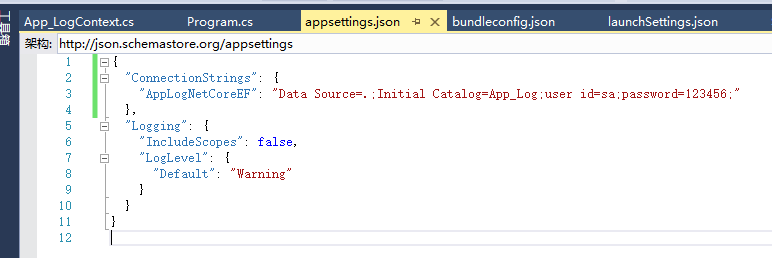
打开 Startup.cs,在ConfigureServices(IServiceCollection services)方法中添加如下代码:
TestNetCoreEFContext.ConnectionString = Configuration.GetConnectionString("TestNetCoreEF");
完整的代码应该是这样:
public void ConfigureServices(IServiceCollection services)

{

  //config the db connection string

  TestNetCoreEFContext.ConnectionString = Configuration.GetConnectionString("TestNetCoreEF");

  // Add framework services.

  services.AddMvc();

}

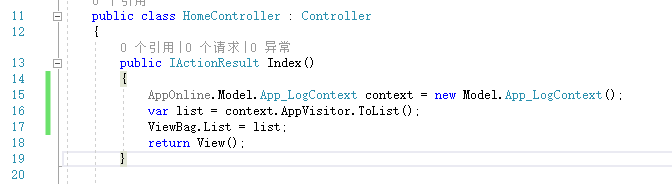
之后的调用和ef一样,
.net core 使用 ef core的更多相关文章
- net Core 通过 Ef Core 访问、管理Mysql
net Core 通过 Ef Core 访问.管理Mysql 本文地址:http://www.cnblogs.com/likeli/p/5910524.html 环境 dotnet Core版本:1. ...
- asp.net core + mysql + ef core + linux
asp.net core + mysql + ef core + linux 以前开发网站是针对windows平台,在iis上部署.由于这次需求的目标服务器是linux系统,就尝试用跨平台的.NET ...
- Entity Framework Core(EF Core) 最简单的入门示例
目录 概述 基于 .NET Core 的 EF Core 入门 创建新项目 更改当前目录 安装 Entity Framework Core 创建模型 创建数据库 使用模型 基于 ASP.NET Cor ...
- .net core webapi+EF Core
.net core webapi+EF Core 一.描述: EF Core必须下载.net core2.0版本 Micorsoft.EntityFrameworkCore:EF框架的核心包Micor ...
- 【ASP.NET Core】EF Core - “影子属性” 深入浅出经典面试题:从浏览器中输入URL到页面加载发生了什么 - Part 1
[ASP.NET Core]EF Core - “影子属性” 有朋友说老周近来博客更新较慢,确实有些慢,因为有些 bug 要研究,另外就是老周把部分内容转到直播上面,所以写博客的内容减少了一点. ...
- 一个官翻教程集合:ASP.NET Core 和 EF Core 系列教程
通过一个大学课程案例讲解了复杂实体的创建过程及讲解 1.ASP.NET Core 和 Entity Framework Core 系列教程——入门 (1 / 10) 2.ASP.NET Core 和 ...
- ASP.NET CORE 使用 EF CORE访问数据库
asp.net core通过ef core来访问数据库,这里用的是代码优先,通过迁移来同步数据库与模型. 环境:vs2017,win10,asp.net core 2.1 一.从建立asp.net c ...
- [.NET Core] - 使用 EF Core 的 Scaffold-DbContext 脚手架命令创建 DbContext
Scaffold-DbContext 命令 参数 Scaffold-DbContext [-Connection] <String> [-Provider] <String> ...
- .NET 5/.NET Core使用EF Core 5连接MySQL数据库写入/读取数据示例教程
本文首发于<.NET 5/.NET Core使用EF Core 5(Entity Framework Core)连接MySQL数据库写入/读取数据示例教程> 前言 在.NET Core/. ...
- Asp.net Core 通过 Ef Core 访问、管理Mysql
本文地址:http://www.cnblogs.com/likeli/p/5910524.html 环境 dotnet Core版本:1.0.0-preview2-003131 本文分为Window环 ...
随机推荐
- SpringBoot项目启动时链接数据库很慢
SpringBoot项目启动时链接数据库很慢 springboot项目在启动时候,如下图所示,链接数据库很慢 解决方法:在mysql 的配置文件中 配置 skip-name-resolve
- sqlite数据库中为字段设置默认值为当前时间
开始 `creation_time` NUMERIC DEFAULT (datetime('now','localtime')), `update_time` NUMERIC DEFAULT (dat ...
- 逆向 AWS API 设计
由于AWS并没有像Google一样公开出一份API Design Guide,所以只能根据 API 的模样去逆向工程最初的设计考量.既然上一篇介绍了很多 REST 的缺陷,那么这里也会介绍一下 AWS ...
- tensorboard窥视
运行神经网络时,跟踪网络参数,以及输入输出是很重要的,可据此判断模型是否在学习,损失函数的值是否在不断减小.Tensorboard通过可视化方法,用于分析和调试网络模型. 使用tensorboard的 ...
- PHP日历的算法
<?php if (function_exists('date_default_timezone_set')) { date_default_timezone_set('Asia/Chongqi ...
- CSS 步骤进度条
;;; } .wizard li {;; text-align: center; line-height: 30px; height: 30px; background-color: #C3C3C3; ...
- Java IO--NIO(一)
一.基本概念描述 1.1 I/O简介 I/O即输入输出,是计算机与外界世界的一个接口.IO操作的实际主题是操作系统.在java编程中,一般使用流的方式来处理IO,所有的IO都被视作是单个字节的移动,通 ...
- Delphi7使用一段时间后抽风提示注册
今天在单位用电脑接自己的移动硬盘,一打开资源管理器就卡死,删除硬盘总是提示用程序在使用,反复试了几次,老样子.很是窝火.干脆直接关机电脑,桌面上还有开着的Delphi编译器,重新开机!开机后一打开编译 ...
- CSS层叠样式表--使用
一.颜色属性 二.字体属性三.背景属性四.文本属性五.边框属性六.列表属性七.display属性八.内外边距九.float属性十.定位十一.margin定位 一.颜色属性 (1)英文单词 <p ...
- 微信小程序wepy开发循环wx:for需要注意
微信小程序wepy开发循环wx:for需要注意 item index值必须在wx:for之后使用 <view wx:for="{{tablist}}" class=" ...