
[WCF] Restful 自定义宿主
IPersonRetriever:
/*

 * 由SharpDevelop创建。

 * 用户: Administrator

 * 日期: 2017/6/2

 * 时间: 22:13

 *

 * 要改变这种模板请点击 工具|选项|代码编写|编辑标准头文件

 */

using System;

using System.Collections.Generic;

using System.Linq;

using System.Runtime.Serialization;

using System.ServiceModel;

using System.ServiceModel.Web;

using System.Text;

namespace WcfRESTful

{

	/// <summary>

	/// Description of IPersonRetriever.

	/// </summary>

	[ServiceContract]

	public interface IPersonRetriever

	{

		[OperationContract]

		[WebInvokeAttribute(UriTemplate = "Persons",Method="POST", ResponseFormat = WebMessageFormat.Json)]

		Person GetPerson();

	}

	[DataContract]

	public class Person

	{

		[DataMember]

		public string Name { get; set; }

		[DataMember]

		public int Age { get; set; }

		[DataMember]

		public string Birthday { get; set; }

	}

}
PersonRetriever:
/*

 * 由SharpDevelop创建。

 * 用户: Administrator

 * 日期: 2017/6/2

 * 时间: 22:15

 *

 * 要改变这种模板请点击 工具|选项|代码编写|编辑标准头文件

 */

using System;

using System.ServiceModel.Web;

namespace WcfRESTful

{

	/// <summary>

	/// Description of PersonRetriever.

	/// </summary>

	public class PersonRetriever: IPersonRetriever

	{

		public Person GetPerson()

        {

            WebOperationContext.Current.OutgoingResponse.ContentType = "text/plain";

            return new Person { Name = "Test", Age = 22, Birthday = DateTime.Now.ToString("yyyy-mm-dd HH:MM:ss:ffff") };

        }

    }

}
Program :
/*

 * 由SharpDevelop创建。

 * 用户: Administrator

 * 日期: 2017/6/2

 * 时间: 22:19

 *

 * 要改变这种模板请点击 工具|选项|代码编写|编辑标准头文件

 */

using System;

using System.ServiceModel;

using System.ServiceModel.Description;

namespace WcfRESTful

{

	class Program

	{

		public static void Main(string[] args)

		{

			Console.WriteLine("Hello World!");

			// TODO: Implement Functionality Here

			Uri baseAddress = new Uri("http://127.0.0.1:9998/PersonRetriever");

			using (ServiceHost host = new ServiceHost(typeof(PersonRetriever), baseAddress)) {

				WebHttpBinding binding = new WebHttpBinding();

				ServiceEndpoint endpoint = host.AddServiceEndpoint(typeof(IPersonRetriever), binding, baseAddress);

				WebHttpBehavior httpBehavior = new WebHttpBehavior();

				endpoint.Behaviors.Add(httpBehavior);

				host.Opened += delegate {

					Console.WriteLine("Hosted successfully.");

				};

				host.Open();

				Console.ReadLine();

			}

			Console.Write("Press any key to continue . . . ");

			Console.ReadKey(true);

		}

	}

}
截图 :
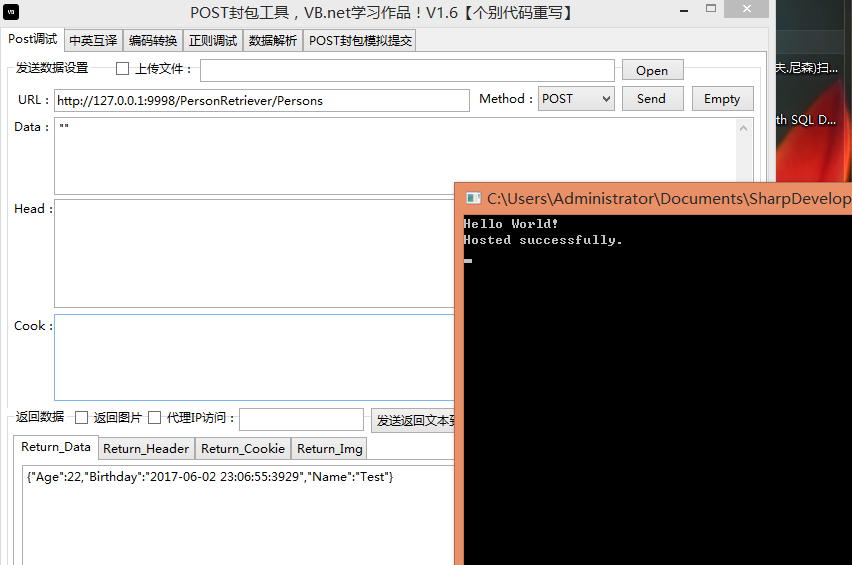
源码: http://files.cnblogs.com/files/Areas/WcfRESTful.zip
[WCF] Restful 自定义宿主的更多相关文章
- Linux学习日记-WCF RestFul的部署(三)
一.关于WCF 的部署 默认的wshttp风格的wcf是很容易部署上去的,但是这里给个建议尽量不要使用WCF的配置文件去部署尽管 我们都已经很熟悉了,在使用配置文件你会发现各种蛋疼的问题. 二.WCF ...
- 构建基于WCF Restful Service的服务
前言 传统的Asmx服务,由于遵循SOAP协议,所以返回内容以xml方式组织.并且客户端需要添加服务端引用才能使用(虽然看到网络上已经提供了这方面的Dynamic Proxy,但是没有这种方式简便), ...
- 使用多种客户端消费WCF RestFul服务(四)——Jquery篇
Jquery篇 互联网开发中少不了各类前端开发框架,其中JQUERY就是最流行之一,本篇我们就采用JQUERY来消费WCF RestFul服务,其中用到JSON基础知识,如果有想了解的朋友,请访问:& ...
- 使用多种客户端消费WCF RestFul服务(三)——.net4.5篇
.net 4.5篇 在.net 4.5下面微软提供了System.Net.Http.dll可以非常方便的使用HTTP请求(其实是用来支持Asp.Net Web Api的,不过我们可以拿过来用) 服务仍 ...
- [经验] - JQuery.Ajax + 跨域 (crossDomain) + POST + JSON + WCF RESTful, 5大陷阱和解决方案
最近在开发WSS RESTful服务的时候, 碰到了这些个纠结的问题. 在网上查找了半天, 找到n多种解决方案, 但是都是部分的, 要么是没有跨域的情况, 要么是没有post的情况, 要么不是用WCF ...
- WCF Restful Service的服务
构建基于WCF Restful Service的服务 前言 传统的Asmx服务,由于遵循SOAP协议,所以返回内容以xml方式组织.并且客户端需要添加服务端引用才能使用(虽然看到网络上已经提供了这方面 ...
- JQuery.Ajax + 跨域 (crossDomain) + POST + JSON + WCF RESTful, 5大陷阱和解决方案
JQuery.Ajax + 跨域 (crossDomain) + POST + JSON + WCF RESTful, 5大陷阱和解决方案 最近在开发WSS RESTful服务的时候, 碰到了这些个纠 ...
- WCF Restful Service Get / Post请求
Rest 它是用于创建分布式超文本媒体的一种架构方式,我们可以通过标准的HTTP(GET,POST,PUT,DELETE)操作来构建基于面向资源的软件架构方式(Resource-Oriented Ar ...
- 大比速:remoting、WCF(http)、WCF(tcp)、WCF(RESTful)、asp.net core(RESTful)
近来在考虑一个服务选型,dotnet提供了众多的远程服务形式.在只考虑dotnet到dotnet的情形下,我们可以选择remoting.WCF(http).WCF(tcp).WCF(RESTful). ...
随机推荐
- java解决手机上传竖拍照片旋转90\180\270度问题
<dependency> <groupId>com.drewnoakes</groupId> <artifactId>metadata-extracto ...
- 解决错误:Your ApplicationContext is unlikely to start due to a @ComponentScan of the default package.
原因是代码直接放在默认包里边,比如src\main\java目录下 应该在src\main\java下建立子目录,比如src\main\java\com\test 这样的话,代码就在com.test这 ...
- Docker permission denied while trying to connect to the Docker daemon socket
Problem jenkins执行docker打包的时候报错,说没有权限 docker build -t docker.ryan-miao.com/com.demo:f1aa23e --build-a ...
- SSH + Google Authenticator 安全加固
1. SSH连接 Secure Shell(安全外壳协议,简称SSH)是一种加密的网络传输协议,可在不安全的网络中为网络服务提供安全的传输环境.SSH通过在网络中创建安全隧道来实现SSH客户端与服务器 ...
- oralce 11.2.0.4手动创建EM
安装完oracle,启动dbconsole,失败 [oracle@elearning admin]$ emctl start dbconsole OC4J Configuration issue. / ...
- python pip 安装包报 编码问题
好久不玩 TF 了, 今天尝试了一个案例,发现要安装module , 就搞了一下, 发现要先安装 base , 安装过程有遇到好多问题, 就写写, 将其中解决过程记录下来. 1. 保存,编码问题 Un ...
- Visual Studio进行Web性能测试- Part II
Visual Studio进行Web性能测试- Part II 2012-08-31 14:34 by 知平软件, 7557 阅读, 5 评论, 收藏, 编辑 原文作者:Ambily.raj 对于一个 ...
- Linux内核调试方法总结
Linux内核调试方法总结 一 调试前的准备 二 内核中的bug 三 内核调试配置选项 1 内核配置 2 调试原子操作 四 引发bug并打印信息 1 BUG()和BUG_ON() 2 ...
- 【Vegas原创】Excel中,日期和时间用&连接后格式不正确的解决方法
=TEXT(B2+C2,"yyyy-mm-dd hh:mm:ss")
- Delphi调用java so
package hardware.print; public class printer { static public native int Open(); } jni导出的函数是 Java_har ...