
【Spring-Security】Re08 Thymeleaf权限控制 与 退出功能
一、需要的组件支持:
新版本这里的组件有些问题:
https://blog.csdn.net/qq_36488647/article/details/104532754

https://blog.csdn.net/YzVermicelli/article/details/106417610
然后我这里就是需要降低下一个版本,Maven依赖就不会爆红了【SpringBoot2.3.4版本】
<dependency>

    <groupId>org.thymeleaf.extras</groupId>

    <artifactId>thymeleaf-extras-springsecurity5</artifactId>

    <version>3.0.3.RELEASE</version>

</dependency>
Security本体的组件:
<dependency>

    <groupId>org.springframework.boot</groupId>

    <artifactId>spring-boot-starter-security</artifactId>

</dependency>

<dependency>

    <groupId>org.springframework.security</groupId>

    <artifactId>spring-security-test</artifactId>

</dependency>
Web支持 + Thymeleaf模板引擎:
<dependency>

    <groupId>org.springframework.boot</groupId>

    <artifactId>spring-boot-starter-thymeleaf</artifactId>

</dependency>

<dependency>

    <groupId>org.springframework.boot</groupId>

    <artifactId>spring-boot-starter-web</artifactId>

</dependency>
二、属性获取
然后要使用的模板目录内的页面文件需要导入Thyemleaf + Security的约束
注意一定是使用这个约束地址,新版本的地址反而无效了。。。
<html lang="en"xmlns:th="http://www.thymeleaf.org" xmlns:sec="http://www.thymeleaf.org/extras/spring-security">
我们可以获取的用户信息:
<!DOCTYPE html>

<html lang="en" xmlns:th="http://www.thymeleaf.org" xmlns:sec="http://www.thymeleaf.org/extras/spring-security">

<head>

    <meta charset="UTF-8">

    <title>Main-Page</title>

</head>

<body>

    <h3>This is main page</h3>

    <p>登录账号 <span sec:authentication="name"></span></p>

    <p>登录账号 <span sec:authentication="principal.username"></span></p>

    <p>凭证 <span sec:authentication="credentials"></span></p>

    <p>权限角色集合 <span sec:authentication="authorities"></span></p>

    <p>IP地址 <span sec:authentication="details.remoteAddress"></span></p>

    <p>会话ID <span sec:authentication="details.sessionId"></span></p>

</body>

</html>
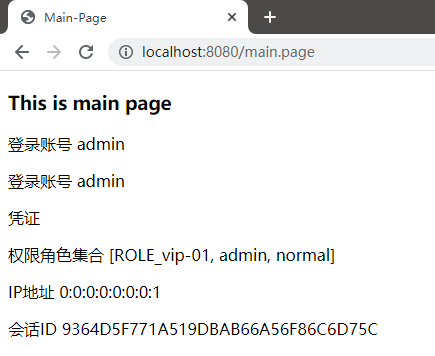
访问查看:
三、权限判断:
现在我在用户权限赋予中增加角色和权限:
package cn.zeal4j.service;

import org.springframework.beans.factory.annotation.Autowired;

import org.springframework.security.core.authority.AuthorityUtils;

import org.springframework.security.core.userdetails.User;

import org.springframework.security.core.userdetails.UserDetails;

import org.springframework.security.core.userdetails.UserDetailsService;

import org.springframework.security.core.userdetails.UsernameNotFoundException;

import org.springframework.security.crypto.password.PasswordEncoder;

import org.springframework.stereotype.Service;

/**

 * @author Administrator

 * @file IntelliJ IDEA Spring-Security-Tutorial

 * @create 2020 09 27 21:57

 */

@Service

public class UserDetailsServiceImpl implements UserDetailsService {

    @Autowired

    private PasswordEncoder passwordEncoder;

    @Override

    public UserDetails loadUserByUsername(String username) throws UsernameNotFoundException {

        // 1、通过提供的用户名参数访问数据库,查询记录返回过来,如果记录不存在则抛出异常

        // username = "admin";

        if (!"admin".equals(username)) throw new UsernameNotFoundException("用户名不存在");

        // 2、查询出来的凭证是被加密了的,这里是模拟查询的密码

        String encode = passwordEncoder.encode("123456");

        // 权限不可以为空,所以需要这么一个工具方法简单实现

        return new User(username, encode, AuthorityUtils.commaSeparatedStringToAuthorityList("admin,normal,ROLE_vip-01,ROLE_A,ROLE_B,ROLE_C,/create,/update,/delete"));

    }

}
在页面中的权限控制案例:
<!DOCTYPE html>

<html lang="en" xmlns:th="http://www.thymeleaf.org" xmlns:sec="http://www.thymeleaf.org/extras/spring-security">

<head>

    <meta charset="UTF-8">

    <title>Main-Page</title>

    <style type="text/css">

        h3, p {

            text-align: center;

        }

    </style>

</head>

<body>

    <h3>This is main page</h3>

    <p>登录账号 <span sec:authentication="name"></span></p>

    <p>登录账号 <span sec:authentication="principal.username"></span></p>

    <p>凭证 <span sec:authentication="credentials"></span></p>

    <p>权限角色集合 <span sec:authentication="authorities"></span></p>

    <p>IP地址 <span sec:authentication="details.remoteAddress"></span></p>

    <p>会话ID <span sec:authentication="details.sessionId"></span></p>

    <h3>权限控制展示</h3>

    <p> <button sec:authorize="hasRole('A')" >角色A</button> </p>

    <p> <button sec:authorize="hasRole('B')" >角色B</button> </p>

    <p> <button sec:authorize="hasRole('C')" >角色C</button> </p>

    <p> <button sec:authorize="hasRole('D')" >角色D</button> </p>

    <p> <button sec:authorize="hasAuthority('/create')" >创建权限</button> </p>

    <p> <button sec:authorize="hasAuthority('/update')" >更新权限</button> </p>

    <p> <button sec:authorize="hasAuthority('/delete')" >删除权限</button> </p>

    <p> <button sec:authorize="hasAuthority('/select')" >查询权限</button> </p>

</body>

</html>
访问查看:
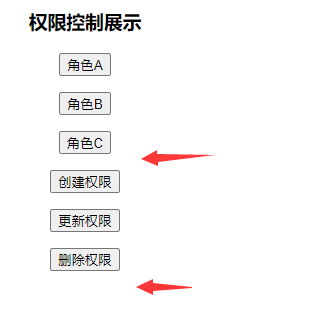
可以看到角色D和SELECT权限都没有,Security对应也不会显示这些按钮
四、退出功能:
Security默认提供了Logout退出控制

<!DOCTYPE html>

<html lang="en">

<head>

    <meta charset="UTF-8">

    <title>Project-Index</title>

</head>

<body>

    <h1>Hello Spring-Security !!!</h1>

    <a href="/logout">click to logout</a>

</body>

</html>
点击会自动重定向到登录页面来,并且会有一个logout参数值在地址中:

如果不希望附带这个参数,则需要配置退出的处理:
package cn.zeal4j.configuration;

import cn.zeal4j.handler.CustomAccessDeniedHandler;

import cn.zeal4j.handler.FarsAuthenticationFailureHandler;

import cn.zeal4j.handler.FarsAuthenticationSuccessHandler;

import org.springframework.beans.factory.annotation.Autowired;

import org.springframework.beans.factory.annotation.Qualifier;

import org.springframework.context.annotation.Bean;

import org.springframework.context.annotation.Configuration;

import org.springframework.http.HttpMethod;

import org.springframework.security.config.annotation.web.builders.HttpSecurity;

import org.springframework.security.config.annotation.web.configuration.WebSecurityConfigurerAdapter;

import org.springframework.security.core.parameters.P;

import org.springframework.security.core.userdetails.UserDetails;

import org.springframework.security.core.userdetails.UserDetailsService;

import org.springframework.security.crypto.bcrypt.BCryptPasswordEncoder;

import org.springframework.security.crypto.password.PasswordEncoder;

import org.springframework.security.web.access.AccessDeniedHandler;

import org.springframework.security.web.authentication.rememberme.JdbcTokenRepositoryImpl;

import org.springframework.security.web.authentication.rememberme.PersistentTokenRepository;

import javax.sql.DataSource;

/**

 * @author Administrator

 * @file IntelliJ IDEA Spring-Security-Tutorial

 * @create 2020 09 27 21:55

 */

@Configuration

public class SecurityConfiguration extends WebSecurityConfigurerAdapter {

    @Autowired

    private AccessDeniedHandler accessDeniedHandler;

    @Qualifier("userDetailsServiceImpl")

    @Autowired

    private UserDetailsService userDetailsService;

    @Autowired

    private DataSource dataSource;

    @Autowired

    private PersistentTokenRepository persistentTokenRepository;

    @Bean

    public PersistentTokenRepository getPersistentTokenRepository() {

        JdbcTokenRepositoryImpl jdbcTokenRepository = new JdbcTokenRepositoryImpl();

        jdbcTokenRepository.setDataSource(dataSource); // 数据源注入

        jdbcTokenRepository.setCreateTableOnStartup(false); // 由Security完成Token表的创建,如果有了就设置false关闭

        return jdbcTokenRepository;

    }

    @Bean

    public PasswordEncoder getPasswordEncoder() {

        return new BCryptPasswordEncoder();

    }

    @Override

    protected void configure(HttpSecurity httpSecurity) throws Exception {

        httpSecurity.formLogin(). // 设置登陆行为方式为表单登陆

                // 登陆请求参数设置

                usernameParameter("username").

                passwordParameter("password").

                loginPage("/login.html"). // 设置登陆页面URL路径

                loginProcessingUrl("/login.action"). // 设置表单提交URL路径

                successForwardUrl("/main.page"). // 设置认证成功跳转URL路径 POST请求

                failureForwardUrl("/error.page");  // 设置认证失败跳转URL路径 POST请求

                //  successHandler(new FarsAuthenticationSuccessHandler("https://www.acfun.cn/")). // 使用自定义的重定向登陆

                //  failureHandler(new FarsAuthenticationFailureHandler("/error.html")).; // 跨域处理,不需要跳转了

        httpSecurity.authorizeRequests().

                regexMatchers(HttpMethod.POST, "正则表达式").permitAll(). // 还可以对符合正则表达式的请求方式进行要求,这个属性使用来制定请求的方式

                antMatchers("/**/*.js", "/**/*.css", "/**/images/*.*").permitAll(). // 静态资源放行

                antMatchers("/login.html").permitAll(). // 登陆页面允许任意访问

                antMatchers("/error.html").permitAll(). // 失败跳转后重定向的页面也需要被允许访问

                antMatchers("/admin.page").hasAnyAuthority("admin").

                /*antMatchers("/vip-01.page").hasAnyAuthority("vip-01").*/

                antMatchers("/vip-01.page").hasRole("vip-01").

                antMatchers("/ip.page").hasIpAddress("192.168.43.180").

                // mvcMatchers("/main.page").servletPath("/xxx").permitAll(). // mvcMatchers资源放行匹配

                // antMatchers("/xxx/main.page").permitAll(). // 或者多写MSP的前缀

                anyRequest().authenticated(); // 其他请求均需要被授权访问

                // anyRequest().access("@customServiceImpl.hasPermission(request, authentication)"); // 自定义Access配置

        // CSRF攻击拦截关闭

        httpSecurity.csrf().disable();

        httpSecurity.exceptionHandling().accessDeniedHandler(accessDeniedHandler);

        // 记住我

        httpSecurity.rememberMe().

                tokenValiditySeconds(60). // 设置Token有效时间, 以秒为单位取值

                userDetailsService(userDetailsService).

                tokenRepository(persistentTokenRepository);

        // 退出登录处理

        httpSecurity.logout().logoutSuccessUrl("/login.html");

    }

}
如果需要配置独特的退出URL也可以设置:
// 退出登录处理

httpSecurity.

        logout().

        // logoutUrl("/xxx/xxx/logout").

        logoutSuccessUrl("/login.html");
【Spring-Security】Re08 Thymeleaf权限控制 与 退出功能的更多相关文章
- Spring Security 动态url权限控制(三)
一.前言 本篇文章将讲述Spring Security 动态分配url权限,未登录权限控制,登录过后根据登录用户角色授予访问url权限 基本环境 spring-boot 2.1.8 mybatis-p ...
- 别再让你的微服务裸奔了,基于 Spring Session & Spring Security 微服务权限控制
微服务架构 网关:路由用户请求到指定服务,转发前端 Cookie 中包含的 Session 信息: 用户服务:用户登录认证(Authentication),用户授权(Authority),用户管理(R ...
- spring security采用自定义登录页和退出功能
更新... 首先采用的是XML配置方式,请先查看 初识Spring security-添加security 在之前的示例中进行代码修改 项目结构如下: 一.修改spring-security.xml ...
- Spring Security实现RBAC权限管理
Spring Security实现RBAC权限管理 一.简介 在企业应用中,认证和授权是非常重要的一部分内容,业界最出名的两个框架就是大名鼎鼎的 Shiro和Spring Security.由于Spr ...
- 登陆模块,这个是很重要的模块,有shiro和spring security专门的权限认证框架
登陆模块,这个是很重要的模块,有shiro和spring security专门的权限认证框架
- spring security实现记住我下次自动登录功能
目录 spring security实现记住我下次自动登录功能 一.原理分析 二.实现方式 2.1 简单实现方式 2.2 数据库实现方式 三.区分是密码登录还是rememberme登录 spring ...
- Atitit.用户权限服务 登录退出功能
Atitit.用户权限服务 登录退出功能 参数说明 /com.attilax/user/loginOut.jsp?url="+url Utype=mer 作者:: ★(attilax)&g ...
- Spring Security 自定义 登陆 权限验证
转载于:https://www.jianshu.com/p/6b8fb59b614b 项目简介 基于Spring Cloud 的项目,Spring Cloud是在Spring Boot上搭建的所以按照 ...
- spring security 登录、权限管理配置
登录流程 1)容器启动(MySecurityMetadataSource:loadResourceDefine加载系统资源与权限列表) 2)用户发出请求 3)过滤器拦截(MySecurityFil ...
- 基于Spring AOP实现的权限控制
1.AOP简介 AOP,面向切面编程,往往被定义为促使软件系统实现关注点的分离的技术.系统是由许多不同的组件所组成的,每一个组件负责一块特定的功能.除了实现自身核心功能之外,这些组件还经常承担着额外的 ...
随机推荐
- graylog 大于等于 查询
graylog 大于等于 查询 :>=1000 不要有空格 如下: pay_channel:PSBC AND hs:>=4
- 2. Elasticsearch 使用插件和kibana操作
引言 在上一篇文章中1. Elasticsearch 入门安装与部署 已经教了大家如何在linux系统中安装和启动Elasticsearch,本文就带大家一起学习如何操作 Elasticsearch. ...
- FreeRTOS简单内核实现5 阻塞延时
0.思考与回答 0.1.思考一 为什么 FreeRTOS简单内核实现3 任务管理 文章中实现的 RTOS 内核不能看起来并行运行呢? Task1 延时 100ms 之后执行 taskYIELD() 切 ...
- 《最新出炉》系列入门篇-Python+Playwright自动化测试-51- 字符串操作 - 上篇
1.简介 在日常的自动化测试工作中进行断言的时候,我们可能经常遇到的场景.从一个字符串中找出一组数字或者其中的某些关键字,而不是将这一串字符串作为结果进行断言.这个时候就需要我们对字符串进行操作,宏哥 ...
- Springboot项目密码加密器jasypt
最新版依赖 <dependency> <groupId>com.github.ulisesbocchio</groupId> <artifactId>j ...
- 使用Kubesec检查YAML文件安全
目录 一.系统环境 二.前言 三.Kubesec简介 四.使用Kubesec检查YAML文件安全 五.总结 一.系统环境 本文主要基于Kubernetes1.22.2和Linux操作系统Ubuntu ...
- typroa破解
Typora 一款 Markdown 编辑器和阅读器 风格极简 / 多种主题 / 支持 macOS,Windows 及 Linux 实时预览 / 图片与文字 / 代码块 / 数学公式 / 图表 目录大 ...
- Atcoder Beginner Contest 324 G Generate Arrays 题解-Treap
为了更好的阅读体验,请点击这里 题目链接 套上平衡树板子就能做的很快的题,然后因为是指针存树,因此交换只需要把序列大小较小的挨个拿出来插到相应的地方即可.复杂度 \(O(N \log^2 N)\). ...
- 了解Microsoft Media Foundation
关于Microsoft Media Foundation 是什么 Microsoft Media Foundation是用来处理(创建.修改.传输.合成)多媒体数据(音视频)的一个平台. 有什么用 M ...
- 最新最全的BMS/EMS/PCS六大国产“储能方案”,不信你全都看过!
作为国内领先的嵌入式产品平台提供商,创龙科技在"能源电力"行业拥有超过1000家客户,接下来就让小编向大家分享创龙科技推出的BMS/EMS/PCS"六大储能方案" ...