
Vue【原创】日历组件Calendar
最近项目中封装了一个日历组件,用于节假日管理,支持输入默认选中的日期,选择管理日期。
效果图:
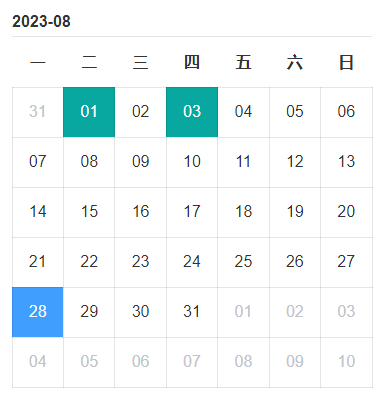
calendar组件:


1 <template>
2 <div class="calendar">
3 <slot name="title">
4 <div class="calendar-title">{{ curYearMonth }}</div>
5 </slot>
6
7 <table class="calendar-table">
8 <thead>
9 <tr>
10 <th v-for="(item, i) in weeks" :key="i">{{ item }}</th>
11 </tr>
12 </thead>
13 <tbody>
14 <tr v-for="(dates, i) in res" :key="i" :style="{ height: cellHeight }">
15 <td v-for="(item, index) in dates" :key="index" :class="{
16 notCurMonth: !item.isCurMonth,
17 currentDay: item.date === curDate,
18 selectDay: item.isSelected,
19 rangeSelectd: item.isRangeSelected,
20 weekend: item.isWeekend
21 }" @click="handleItemClick(item, i, index)" @mouseover="handleItemMove(item, i, index)">
22 <!-- <span>{{ item.date.split('-').slice(1).join('-') }}</span> -->
23 <span>{{ item.date | cellDate }}</span>
24 <slot :data="item" />
25 </td>
26 </tr>
27 </tbody>
28 </table>
29 </div>
30 </template>
31
32 <script>
33 import {
34 getDaysInMonth,
35 handleCreateDate,
36 handleCreateDatePicker,
37 parseTime
38 } from '../../../src/utils/dateUtils.js';
39
40 const SELECT_MODE = {
41 SINGLE: 'single',
42 RANGE: 'range'
43 }
44
45 export default {
46 name: 'LiloCalendar',
47 components: {},
48 filters: {
49 cellDate(value) {
50 // value.split('-')[1] + '-' + value.split('-')[2]
51 return value.split('-')[2]
52 }
53 },
54 props: {
55 selectMode: {
56 type: String,
57 default: SELECT_MODE.SINGLE //'single,range'
58 },
59 startOfWeek: {
60 type: Number,
61 default: 1
62 },
63 canSelect: {
64 type: Boolean,
65 default: false
66 },
67 cellHeight: {
68 type: String,
69 default: '60px'
70 },
71 currentDate: {
72 type: String,
73 default: new Date().getFullYear() + '-' + (new Date().getMonth() + 1)
74 },
75 defaultSelectedDates: {
76 type: Array,
77 default () {
78 return []
79 }
80 },
81 },
82 data() {
83 return {
84 monthOptions: [],
85 yearOptions: [],
86 weeks: ['一', '二', '三', '四', '五', '六', '日'],
87 curYear: 0, // 当前年
88 curMonth: 0, // 当前月
89 days: 0, // 当前月总共天数
90 curDate: parseTime(new Date().getTime()), // 当前日期 yyyy-MM-dd 格式,用来匹配是否是当前日期
91 prevDays: [], // 非当前月的上一月展示的日期
92 rearDays: [], // 非当前月的下一月展示的日期
93 curDays: [], // 当前月的日期
94 showDays: [], // 总共展示的42个日期
95 res: [], // 二维数组
96 selectedDates: [], // 选中的日期
97 selectedMode: false, // true表示点击, false表示滑动
98 moveIndex: [], // 两个,第一个是起始,第二个是结束
99 canMove: false // 当moveIndex数组有一个值时,可以触发滑动
100 };
101 },
102 computed: {
103 curYearMonth() {
104 const temp = parseInt(this.curMonth) + 1;
105 return this.curYear + '-' + (temp < 10 ? `0${temp}` : temp);
106 }
107 },
108 watch: {
109 curMonth: {
110 handler(val) {
111 this.handleGetDays(this.curYear, val, this.startOfWeek);
112 }
113 },
114 curYear: {
115 handler(val) {
116 this.handleGetDays(val, this.curMonth, this.startOfWeek);
117 }
118 },
119 currentDate: {
120 handler(val) {
121 this.setup();
122 }
123 },
124 defaultSelectedDates: {
125 handler(val) {
126 this.setup();
127 }
128 }
129 },
130 created() {},
131 mounted() {
132 this.setup();
133 },
134 methods: {
135 setup() {
136 this.weeks.unshift(...this.weeks.splice(this.startOfWeek - 1));
137 this.handleGetDays(this.curYear, this.curMonth, this.startOfWeek);
138 this.selectedMode = this.selectMode === SELECT_MODE.SINGLE;
139
140 const temp = this.currentDate.split('-');
141 this.curYear = parseInt(temp[0]);
142 this.curMonth = parseInt(temp[1]) - 1;
143
144 this.monthOptions = handleCreateDatePicker().months;
145 this.yearOptions = handleCreateDatePicker().years;
146 if (localStorage.selectedDates) this.selectedDates = JSON.parse(localStorage.selectedDates);
147 },
148 handleGetDays(year, month, startOfWeek) {
149 this.showDays = [];
150 this.days = getDaysInMonth(year, month);
151 let firstDayOfWeek = new Date(`${year}-${month + 1}-01`).getDay();
152
153 // 处理周起始日
154 const obj = {
155 1: '一',
156 2: '二',
157 3: '三',
158 4: '四',
159 5: '五',
160 6: '六',
161 0: '日'
162 };
163 const firstDayInCN = obj[firstDayOfWeek];
164 const index = this.weeks.indexOf(firstDayInCN);
165 // console.log(firstDayOfWeek, index);
166
167 if (firstDayOfWeek === 0) {
168 // 星期天为0 星期一为1 ,以此类推
169 firstDayOfWeek = 7;
170 }
171
172 this.prevDays = handleCreateDate(year, month, 1, index + 1, 'prev');
173 this.rearDays = handleCreateDate(year, month, 1, 42 - this.days - index, 'rear');
174
175 this.curDays = handleCreateDate(year, month, 1, this.days, 'cur', this.defaultSelectedDates);
176 this.showDays.unshift(...this.prevDays);
177 this.showDays.push(...this.curDays);
178 this.showDays.push(...this.rearDays);
179 this.res = this.handleFormatDates(this.showDays);
180 },
181 handleFormatDates(arr, size = 7) {
182 // 传入长度42的原数组,最终转换成二维数组
183 const arr2 = [];
184 for (let i = 0; i < size - 1; i++) {
185 const temp = arr.slice(i * size, i * size + size);
186 arr2.push(temp);
187 }
188 // console.log(arr2)
189 return arr2;
190 },
191 handleTableHead(start) {
192 const sliceDates = this.weeks.splice(start - 1);
193 this.weeks.unshift(...sliceDates);
194 },
195 handleItemClick(item, i, j) {
196 if (!this.canSelect) return;
197 if (!item.isCurMonth) return;
198 if (this.selectedMode) {
199 this.$nextTick(() => {
200 // this.$set(this.res[i][j], 'isSelected', )
201 this.res[i][j].isSelected = !this.res[i][j].isSelected;
202 if (this.res[i][j].isSelected) {
203 this.selectedDates.push(this.res[i][j].date);
204 this.selectedDates = Array.from(new Set(this.selectedDates));
205 this.$emit('date-selected', {
206 selectedDates: this.selectedDates,
207 removeDate: '',
208 addDate: item.date
209 });
210 } else {
211 this.selectedDates.splice(this.selectedDates.indexOf(item.date), 1);
212 this.$emit('date-selected', {
213 selectedDates: this.selectedDates,
214 removeDate: item.date,
215 addDate: ''
216 });
217 }
218 });
219 } else {
220 // 滑动模式下,第一次点击是起始,第二次点击是结束
221 const index = i * 7 + j;
222 this.canMove = true;
223 if (this.moveIndex.length === 1) {
224 this.canMove = false;
225 }
226 if (this.moveIndex.length === 2) {
227 this.showDays.forEach(item => {
228 item.isSelected = false;
229 item.isRangeSelected = false;
230 });
231 this.canMove = true;
232 this.moveIndex.length = 0;
233 }
234 this.moveIndex.push(index);
235 this.moveIndex.sort((a, b) => a - b);
236 this.selectedDates = this.showDays.slice(this.moveIndex[0], this.moveIndex[1] + 1);
237 this.selectedDates.length !== 0 && this.$emit('date-selected', this.selectedDates);
238 }
239 },
240 handleItemMove(data, i, j) {
241 if (this.canMove && !this.selectedMode) {
242 const index = i * 7 + j;
243 this.showDays.forEach(item => {
244 item.isSelected = false;
245 item.isRangeSelected = false;
246 });
247 // 让第一个日期和最后一个日期显示蓝色高亮
248 this.showDays[index].isSelected = true;
249 this.showDays[this.moveIndex[0]].isSelected = true;
250
251 // 不同情况的判断,当用户的鼠标滑动进日期的索引小于起始日期的索引,要做if else处理
252 if (this.moveIndex[0] < index) {
253 for (let i = this.moveIndex[0] + 1; i < index; i++) {
254 this.showDays[i].isRangeSelected = true;
255 }
256 } else {
257 for (let i = index + 1; i < this.moveIndex[0]; i++) {
258 this.showDays[i].isRangeSelected = true;
259 }
260 }
261 }
262 },
263 handleQuickChange(type) {
264 if (type === 'prev') {
265 this.curMonth--;
266 // console.log(this.curMonth);
267 if (this.curMonth === -1) {
268 this.curMonth = 11;
269 this.curYear -= 1;
270 }
271 } else if (type === 'next') {
272 this.curMonth++;
273 if (this.curMonth === 12) {
274 this.curMonth = 0;
275 this.curYear += 1;
276 }
277 }
278 }
279 }
280 };
281 </script>
282
283 <style scoped lang="scss">
284 .calendar {
285 display: flex;
286 align-items: center;
287 justify-content: center;
288 flex-direction: column;
289 }
290
291 .calendar-title {
292 width: 100%;
293 padding-top: 8px;
294 padding-bottom: 5px;
295 font-weight: bold;
296 border-bottom: 1px solid rgba($color: #000000, $alpha: .1);
297 }
298
299 .calendar-table {
300 width: 100%;
301 table-layout: fixed;
302 border-collapse: collapse;
303 transition: 0.3s;
304
305 thead tr {
306 height: 50px;
307 }
308
309 tbody tr {
310 &:first-child td {
311 border-top: 1px solid rgba($color: #000000, $alpha: .1);
312 }
313
314 td {
315 cursor: pointer;
316 border-right: 1px solid rgba($color: #000000, $alpha: .1);
317 border-bottom: 1px solid rgba($color: #000000, $alpha: .1);
318 text-align: center;
319
320 &:first-child {
321 border-left: 1px solid rgba($color: #000000, $alpha: .1);
322 }
323 }
324 }
325 }
326
327 .notCurMonth {
328 transition: all .25s ease-out;
329 color: #c0c4cc;
330 }
331
332 .currentDay {
333 transition: all .25s ease-out;
334 color: #fff;
335 background-color: #409eff;
336 }
337
338 .selectDay {
339 transition: all .25s ease-out;
340 color: #fff;
341 background-color: #08a8a0;
342 }
343
344 .rangeSelectd {
345 transition: all .25s ease-out;
346 color: #606266;
347 background-color: #dee2e9;
348 }
349
350 .weekend {
351 transition: all .25s ease-out;
352 color: #f56c6c;
353 }
354 </style>
调用案例和参数说明(我这里说全局插件引入,单独使用需要自行import导入):
 1 <template>

 2     <div class="calendar-container">

 3         <lilo-calendar

 4             :default-selected-dates="defaultSelectedDates"

 5             :current-date="currentDate"

 6             :start-of-week="startOfWeek"

 7             :cell-height="cellHeight"

 8             :can-select="canSelect"

 9             @date-selected="dateSelected">

10             <!-- <template #title> -->

11                 <!-- 标题栏可以设置插槽 -->

12                 <!-- <div class="custom-title">2023-08</div> -->

13             <!-- </template> -->

14         </lilo-calendar>

15     </div>

16 </template>

17

18 <script>

19     export default {

20         data() {

21             return {

22                 defaultSelectedDates: [ '2023-08-01', '2023-08-03' ], //默认选中的日期

23                 currentDate: '2023-08', //当前月份

24                 startOfWeek: 1, //从星期几开始,

25                     // 1: '一',

26                     // 2: '二',

27                     // 3: '三',

28                     // 4: '四',

29                     // 5: '五',

30                     // 6: '六',

31                     // 0: '日'

32                 cellHeight: '120px', //日期单元的高度

33                 canSelect: true //是否可以选中,选中之后触发date-selected事件

34             }

35         },

36         methods: {

37             dateSelected(val) {

38                 console.log(val)

39             }

40         }

41     }

42 </script>

43

44 <style lang="scss" scoped>

45     .calendar-container {

46         padding: 20px;

47         .custom-title {

48             width: 100%;

49             padding: 8px;

50             color: #409eff;

51             font-weight: bold;

52             font-size: 1.1rem;

53             border-bottom: 1px solid #0000001f;

54         }

55     }

56 </style>
查看基于【日历组件】的【节假日管理】功能整个请移步:https://www.cnblogs.com/loveFlex/p/17662512.html
Vue【原创】日历组件Calendar的更多相关文章
- Vue自定义日历组件
今天给大家介绍Vue的日历组件,可自定义样式.日历类型及支持扩展,可自定义事件回调.Props数据传输. 线上demo效果 示例 Template: <Calendar :sundayStart ...
- 使用ant design vue的日历组件,实现一个简单交易日与非交易日的切换
使用ant design vue的日历组件,实现一个简单交易日与非交易日的切换 需求: 日历区分交易日.非交易日 可以切换面板查看整年交易日信息 可以在手动调整交易日.非交易日 演示实例 序--使用软 ...
- vue初学实践之路——vue简单日历组件(1)
---恢复内容开始--- 最近做的项目有一个需求,需要有一个日历组件供预定功能使用,之前的代码过于繁琐复杂,所以我采用vue重写了这个组件. npm.vue等等安装. 只是一个简单的日历组件,所以并不 ...
- 一个vue的日历组件
说明: 1.基于element-ui开发的vue日历组件. 地址 更新: 1.增加value-format指定返回值的格式2.增加头部插槽自定义头部 <ele-calendar > < ...
- vue初学实践之路——vue简单日历组件(3)
这一篇我们来实现管理员修改每一天剩余数量的功能. <div id="calendar"> <div id="left"> <spa ...
- vue初学实践之路——vue简单日历组件(2)
上一篇我们已经实现了基本的日历显示功能,这一次我们要加上预定的功能 废话不多说,上代码 <div id="calendar"> <!-- 年份 月份 --> ...
- vue自定义日历组件的实现
实现一个日期组件,如图: components.js代码如下: Vue.component('sc-calendar',{ template:'<div class="scCalend ...
- vue 自定义日历组件
<template> <div class=""> <div class="calendarTraffic" name=" ...
- 基于Vue的日历组件
可以标注重要日子 自己写的,可能不是特别很好,大家多提意见!!! 地址:https://github.com/jsLWQ/calendar
- Vue文件封装日历组件
封装就是要具有灵活性,样式自适应,调用的时候传入props就可以变成自己想要的样式. 效果展示网址:https://1963331542.github.io/ 源代码: <template> ...
随机推荐
- vue全家桶进阶之路9:常用指令
以下是一些常见的指令: v-bind - 用于绑定一个或多个属性到组件或 HTML 元素上. v-model - 用于双向绑定一个表单元素或组件的值到数据模型上. v-for - 用于循环遍历一个数组 ...
- 如何在Docker Compose中限制容器的CPU和内存使用?
最近我在使用开源统计Umami过程中,发现CPU和内存经常占满,导致其它服务都不能正常使用.Umami我使用的docker-compose进行部署,于是打算使用docker-compose限制下容器的 ...
- AcWing 3729. 改变数组元素
给定一个空数组 V 和一个整数数组 a1,a2,-,an. 现在要对数组 V进行 n次操作. 第 i次操作的具体流程如下: 从数组 V尾部插入整数 0. 2.将位于数组 V末尾的 ai 个元素都 ...
- python mitmproxy抓包库
一.简介 mitmproxy是一款用Python编写的支持HTTP(S)的中间人代理工具.它可以拦截.查看.修改.重放和保存HTTP/HTTPS流量 ,支持命令行界面和图形界面,可用于安全测试.网络调 ...
- Python 列表、字典、元组的一些小技巧
1. 字典排序 我们知道 Python 的内置 dictionary 数据类型是无序的,通过 key 来获取对应的 value.可是有时我们需要对 dictionary 中的 item 进行排序输出, ...
- 【Python&RS】GDAL对栅格数据重采样/对齐栅格
GDAL(Geospatial Data Abstraction Library)是一个在X/MIT许可协议下的开源栅格空间数据转换库.它利用抽象数据模型来表达所支持的各种文件格式.它 ...
- 反转链表 Java版 图文并茂思路分析带答案(力扣第206题)
反转链表 力扣第206题 我们不只是简单的学习(背诵)一个数据结构,而是要分析他的思路,以及为什么要有不同的指针等等 非递归方式: 思路分析:首先要链表有个头指针没有任何问题 然后,我们要将1的下一个 ...
- node使用jsonwebtoken生成token与验证是否过期
场景 我们可以使用 cookie,session,token 来做鉴权. 下面我们来看一下, 如何使用 token 来做鉴权 jwt.sign 的简单介绍 npm install jsonwebtok ...
- 国标GB28181协议客户端开发(四)实时视频数据传输
国标GB28181协议客户端开发(四)实时视频数据传输 本文是<国标GB28181协议设备端开发>系列的第四篇,介绍了实时视频数据传输的过程.通过解读INVITE报文中的SDP信息,读取和 ...
- FHQ-Treap的详细图解
第一部分 按值分裂的 FHQ-Treap 按值分裂的 FHQ-Treap 的典型例题是P3369 [模板]普通平衡树. 思路 FHQ-Treap 是什么? FHQ-Treap 是二叉搜索树的一种. 比 ...