
SpringCloud升级之路2020.0.x版-4.maven依赖回顾以及项目框架结构

本系列代码地址:https://github.com/HashZhang/spring-cloud-scaffold/tree/master/spring-cloud-iiford

我们先来回顾下 maven 依赖中一个重要原则:最短路径原则。这在之后我们的使用中会经常用到。
举一个例子,假设我们以 spring-boot-parent 作为 parent:
<parent>

    <groupId>org.springframework.boot</groupId>

    <artifactId>spring-boot-starter-parent</artifactId>

    <version>2.0.9</version>

</parent>
我们想用想用 elasticsearch 作为搜索引擎,在项目中添加了依赖
<dependency>

    <groupId>org.elasticsearch</groupId>

    <artifactId>elasticsearch</artifactId>

    <version>7.10.2</version>

</dependency>
写好代码,一跑,报类不存在异常:
 java.lang.NoClassDefFoundError: org/elasticsearch/common/xcontent/DeprecationHandler

    at com.lv.springboot.datasource.ClientUTis.main(ClientUTis.java:13)

Caused by: java.lang.ClassNotFoundException: org.elasticsearch.common.xcontent.DeprecationHandler

    at java.net.URLClassLoader.findClass(URLClassLoader.java:381)

    at java.lang.ClassLoader.loadClass(ClassLoader.java:424)

    at sun.misc.Launcher$AppClassLoader.loadClass(Launcher.java:331)

    at java.lang.ClassLoader.loadClass(ClassLoader.java:357)

    ... 1 more
看下依赖mvn dependency:tree,发现依赖的elasticsearch版本是:
org.elasticsearch.client:elasticsearch-rest-high-level-client:7.0.1

|--org.elasticsearch:elasticsearch:5.6.16

|--org.elasticsearch.client:elasticsearch-rest-client:7.0.1

|--org.elasticsearch.plugin:parent-join-client:7.0.1

|--org.elasticsearch.plugin:aggs-matrix-stats-client:7.0.1

|--org.elasticsearch.plugin:rank-eval-client:7.0.1

|--org.elasticsearch.plugin:lang-mustache-client:7.0.1
可能读者会感觉很奇怪,明明指定了elasticsearch的依赖了啊,而且是项目的根 pom,依赖不是最短路径原则么?不应该以这个依赖为准么?
仔细分析,原来 SpringBoot的DependencyManagement 中,org.elasticsearch:elasticsearch已经被包含了(以下为节选):
<groupId>org.springframework.boot</groupId>

<artifactId>spring-boot-dependencies</artifactId>

<version>2.0.9.RELEASE</version>

<properties>

<elasticsearch.version>5.6.16</elasticsearch.version>

</properties>

<dependencyManagement>

    <dependencies>

        <dependency>

            <groupId>org.elasticsearch</groupId>

            <artifactId>elasticsearch</artifactId>

            <version>${elasticsearch.version}</version>

        </dependency>

    </dependencies>

</dependencyManagement>
spring-boot 其实已经考虑到用户可能要换版本了,所以将版本放入了 <properties/>,properties 也具有最短路径原则,所以可以通过在你的项目根 pom 中的 properties 增加相同 key 修改版本:
<properties>

    <elasticsearch.version>7.10.2</elasticsearch.version>

</properties>
所有可以这么替换的属性, spring-boot 官方文档已经列出了,参考官方文档附录:Version Properties
也可以通过 dependencyManagement 的最短路径原则,通过在你的项目根 pom 中的增加想修改依赖的 dependencyManagement 即可:
<dependencyManagement>

    <dependencies>

        <dependency>

            <groupId>org.elasticsearch</groupId>

            <artifactId>elasticsearch</artifactId>

            <version>7.10.2</version>

        </dependency>

    </dependencies>

</dependencyManagement>
最后,可以记住下面的原则,就知道项目的依赖到底是哪个版本啦:
Maven依赖可以分为如下几部分:
- 直接依赖,就是本项目 dependencies 部分的依赖
- 间接依赖,就是本项目 dependencies 部分的依赖所包含的依赖
- 依赖管理,就是本项目 dependency management 里面的依赖
- parent 的直接依赖
- parent 的间接依赖
- parent 的依赖管理
- bom 的直接依赖(一般没有)
- bom 的间接依赖(一般没有)
- bom 的依赖管理
可以这么理解依赖:
- 首先,将 parent 的直接依赖,间接依赖,还有依赖管理,插入本项目,放入本项目的直接依赖,间接依赖还有依赖管理之前
- 对于直接依赖,如果有 version,那么就依次放入 DependencyMap 中。如果没有 version,则从依赖管理中查出来 version,之后放入 DependencyMap 中。key 为依赖的 groupId + artifactId,value为version,后放入的会把之前放入的相同 key 的 value 替换
- 对于每个依赖,各自按照 1,2 加载自己的 pom 文件,但是如果第一步中的本项目 dependency management 中有依赖的版本,使用本项目 dependency management的依赖版本,生成 TransitiveDependencyMap,这里面就包含了所有的间接依赖。
- 所有间接依赖的 TransitiveDependencyMap, 对于项目的 DependencyMap 里面没有的 key,依次放入项目的 DependencyMap
- 如果 TransitiveDependencyMap 里面还有间接依赖,那么递归执行3, 4。
由于是先放入本项目的 DependencyMap,再去递归 TransitiveDependencyMap,这就解释了 maven 依赖的最短路径原则。
Bom 的效果基本和 Parent 一样,只是一般限制中,Bom 只有 dependencyManagement 没有 dependencies

如下图所示,我们会抽象出如下几个依赖:
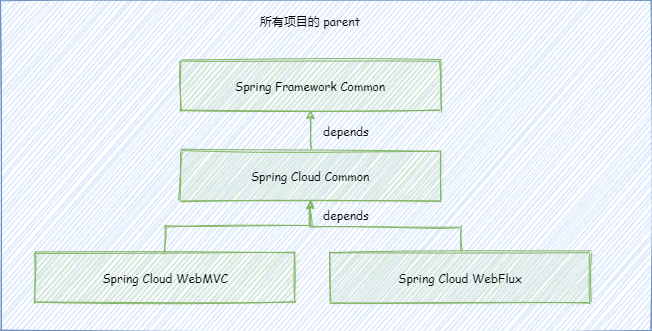
- 所有项目的 parent:以某版本 Spring Boot 作为 parent,管理 Spring Cloud 依赖,并且包括一些公共依赖,还有单元测试依赖。如果以后我们想修改 Spring Boot 或者 Spring Cloud 版本,就在这里修改。并且,指定了所有项目编译配置。
- Spring Framework Common:所有使用了 Spring 或者 Spring Boot 的公共依赖,一般我们编写 starter,或者编写一些工具包,不需要 Spring Cloud 的特性,就会添加这个依赖。
- Spring Cloud Common:添加了 Spring Framework Common 的依赖。我们的微服务分为主要基于 spring-webmvc 的同步微服务项目以及主要基于 spring-webflux 的异步微服务项目,其中有一些公共的依赖和代码,就放在了这个项目中。
- Spring Cloud WebMVC:添加了 Spring Cloud Common 的依赖。基于 spring-webmvc 的同步微服务项目需要添加的核心依赖。
- Spring Cloud WebFlux:添加了 Spring Cloud Common 的依赖。基于 spring-webflux 的异步微服务项目需要添加的核心依赖。
我们在微服务项目中主要使用的依赖为:
- 对于纯工具包,只使用了 Spring 与 Spring Boot 的特性的,添加 Spring Framework Common 的依赖。
- 对于基于 spring-webmvc 的同步微服务项目,添加 Spring Cloud WebMVC 的依赖。
- 对于基于 spring-webflux 的异步微服务项目,添加 Spring Cloud WebFlux 的依赖。

本小节我们回顾了并深入理解了 maven 依赖最短路径原则,然后给出了我们项目框架的结构,主要对外提供了三种依赖:只使用了 Spring 与 Spring Boot 的特性的依赖,对于基于 spring-webmvc 的同步微服务项目的依赖以及对于基于 spring-webflux 的异步微服务项目的依赖。下一节我们将对这些项目模块的 pom 文件进行详细分析。
微信搜索“我的编程喵”关注公众号,每日一刷,轻松提升技术,斩获各种offer:

SpringCloud升级之路2020.0.x版-4.maven依赖回顾以及项目框架结构的更多相关文章
- SpringCloud升级之路2020.0.x版-1.背景
本系列为之前系列的整理重启版,随着项目的发展以及项目中的使用,之前系列里面很多东西发生了变化,并且还有一些东西之前系列并没有提到,所以重启这个系列重新整理下,欢迎各位留言交流,谢谢!~ Spring ...
- SpringCloud升级之路2020.0.x版-41. SpringCloudGateway 基本流程讲解(1)
本系列代码地址:https://github.com/JoJoTec/spring-cloud-parent 接下来,将进入我们升级之路的又一大模块,即网关模块.网关模块我们废弃了已经进入维护状态的 ...
- SpringCloud升级之路2020.0.x版-6.微服务特性相关的依赖说明
本系列代码地址:https://github.com/HashZhang/spring-cloud-scaffold/tree/master/spring-cloud-iiford spring-cl ...
- SpringCloud升级之路2020.0.x版-10.使用Log4j2以及一些核心配置
本系列代码地址:https://github.com/HashZhang/spring-cloud-scaffold/tree/master/spring-cloud-iiford 我们使用 Log4 ...
- SpringCloud升级之路2020.0.x版-43.为何 SpringCloudGateway 中会有链路信息丢失
本系列代码地址:https://github.com/JoJoTec/spring-cloud-parent 在开始编写我们自己的日志 Filter 之前,还有一个问题我想在这里和大家分享,即在 Sp ...
- SpringCloud升级之路2020.0.x版-5.所有项目的parent与spring-framework-common说明
本系列代码地址:https://github.com/HashZhang/spring-cloud-scaffold/tree/master/spring-cloud-iiford 源代码文件:htt ...
- SpringCloud升级之路2020.0.x版-29.Spring Cloud OpenFeign 的解析(1)
本系列代码地址:https://github.com/JoJoTec/spring-cloud-parent 在使用云原生的很多微服务中,比较小规模的可能直接依靠云服务中的负载均衡器进行内部域名与服务 ...
- SpringCloud升级之路2020.0.x版-34.验证重试配置正确性(1)
本系列代码地址:https://github.com/JoJoTec/spring-cloud-parent 在前面一节,我们利用 resilience4j 粘合了 OpenFeign 实现了断路器. ...
- SpringCloud升级之路2020.0.x版-2.微服务框架需要考虑的问题
本系列为之前系列的整理重启版,随着项目的发展以及项目中的使用,之前系列里面很多东西发生了变化,并且还有一些东西之前系列并没有提到,所以重启这个系列重新整理下,欢迎各位留言交流,谢谢!~ 上图中演示了一 ...
随机推荐
- 【题解】Luogu p2016 战略游戏 (最小点覆盖)
题目描述 Bob喜欢玩电脑游戏,特别是战略游戏.但是他经常无法找到快速玩过游戏的办法.现在他有个问题. 他要建立一个古城堡,城堡中的路形成一棵树.他要在这棵树的结点上放置最少数目的士兵,使得这些士兵能 ...
- Jetpack Compose和View的互操作性
Jetpack Compose Interoperability Compose风这么大, 对于已有项目使用新技术, 难免会担心兼容性. 对于Compose来说, 至少和View的结合是无缝的. (目 ...
- Docker与k8s的恩怨情仇(三)—后浪Docker来势汹汹
转载请注明出处:葡萄城官网,葡萄城为开发者提供专业的开发工具.解决方案和服务,赋能开发者. 上一节我们为大家介绍了Cloud Foundry等最初的PaaS平台如何解决容器问题,本文将为大家展示Doc ...
- 深入理解Linux文件系统与日志分析
一.inode和bolck概述 二.链接文件 三.inode节点耗尽故障处理 四.EXT类型文件恢复 五.xfs文件备份和恢复 六.日志文件 一.inode和bolck概述 1.定义 文件数据 文件数 ...
- ECS实例中的应用偶尔出现丢包现象并且内核日志(dmesg)存在“kernel: nf_conntrack: table full, dropping packet”的报错信息
问题描述 连接ECS实例中的应用时偶尔出现丢包现象.经排查,ECS实例的外围网络正常,但内核日志(dmesg)中存在"kernel: nf_conntrack: table full, dr ...
- Linux:修改Ubuntu环境变量后bash找不到
1.问题显示 修改环境变量,导致命令全部失效 2.解决办法 #使用备份bin export PATH=/usr/bin:/bin 之后使用命令就可以了. 3.找到修改的环境变量 一般修改的环境变量 ...
- mqtt 集成
-- 在pom.xml导入依赖 <!-- mqtt --> <dependency> <groupId>org.springframework.boot</g ...
- 使用xcodeproj 动态插入第三方代码
# 为什么这么做? 现在有这么一个使用场景,基线能生成项目A,项目B,项目C...如果只有项目A中使用SDK_A,其他项目都不使用,这时候就需要对基线进行差分,只有当我切换到项目A时,才插入SDK_A ...
- android开发相关知识笔记
1.xpage页面打开: openPage(TestFragment.class) openPage("标识") // 页面打开等待结果返回: openPageForResult( ...
- Docker从容器拷贝文件到宿主机或从宿主机拷贝文件到容器
1.从容器里面拷文件到宿主机? 答:在宿主机里面执行以下命令 docker cp 容器名:要拷贝的文件在容器里面的路径 要拷贝到宿主机的相应路径 示例: 假设容器名为testtomcat, ...