
ingress controller 和ingress使用实例
ingress controller安装
k8s集群版本:1.15+
官方文档:
https://kubernetes.github.io/ingress-nginx/
创建基础配置
kubectl apply -f https://raw.githubusercontent.com/kubernetes/ingress-nginx/master/deploy/static/mandatory.yaml
Using NodePort:
kubectl apply -f https://raw.githubusercontent.com/kubernetes/ingress-nginx/master/deploy/static/provider/baremetal/service-nodeport.yaml
以上执行完成后,查看ingress-controller已经运行起来了
[root@k8s-master ~]# kubectl get pods -n ingress-nginx

NAME                                        READY   STATUS    RESTARTS   AGE

nginx-ingress-controller-689498bc7c-tvhv5   1/1     Running   3          16d

[root@k8s-master ~]#
查看service信息,nodeport端口31380,31390
[root@k8s-master ~]# kubectl get svc -n ingress-nginx

NAME            TYPE       CLUSTER-IP      EXTERNAL-IP   PORT(S)                      AGE

ingress-nginx   NodePort   10.108.101.78   <none>        80:31380/TCP,443:31390/TCP   14d

[root@k8s-master ~]#
至此ingress-controller安装完成
What is Ingress?
  internet

        |

   [ Ingress ]

   --|-----|--

   [ Services ]
ingress使用
本次通过安装kubernetes的dashboard来演示ingress的使用
dashboard的安装
kubectl apply -f https://raw.githubusercontent.com/kubernetes/dashboard/v1.10.1/src/deploy/recommended/kubernetes-dashboard.yaml
[root@k8s-master jtdeploy]# cat kubernetes-dashboard.yaml

# Copyright 2017 The Kubernetes Authors.

#

# Licensed under the Apache License, Version 2.0 (the "License");

# you may not use this file except in compliance with the License.

# You may obtain a copy of the License at

#

#     http://www.apache.org/licenses/LICENSE-2.0

#

# Unless required by applicable law or agreed to in writing, software

# distributed under the License is distributed on an "AS IS" BASIS,

# WITHOUT WARRANTIES OR CONDITIONS OF ANY KIND, either express or implied.

# See the License for the specific language governing permissions and

# limitations under the License.

# ------------------- Dashboard Secret ------------------- #

apiVersion: v1

kind: Secret

metadata:

  labels:

    k8s-app: kubernetes-dashboard

  name: kubernetes-dashboard-certs

  namespace: kube-system

type: Opaque

---

# ------------------- Dashboard Service Account ------------------- #

apiVersion: v1

kind: ServiceAccount

metadata:

  labels:

    k8s-app: kubernetes-dashboard

  name: kubernetes-dashboard

  namespace: kube-system

---

# ------------------- Dashboard Role & Role Binding ------------------- #

kind: Role

apiVersion: rbac.authorization.k8s.io/v1

metadata:

  name: kubernetes-dashboard-minimal

  namespace: kube-system

rules:

  # Allow Dashboard to create 'kubernetes-dashboard-key-holder' secret.

- apiGroups: [""]

  resources: ["secrets"]

  verbs: ["create"]

  # Allow Dashboard to create 'kubernetes-dashboard-settings' config map.

- apiGroups: [""]

  resources: ["configmaps"]

  verbs: ["create"]

  # Allow Dashboard to get, update and delete Dashboard exclusive secrets.

- apiGroups: [""]

  resources: ["secrets"]

  resourceNames: ["kubernetes-dashboard-key-holder", "kubernetes-dashboard-certs"]

  verbs: ["get", "update", "delete"]

  # Allow Dashboard to get and update 'kubernetes-dashboard-settings' config map.

- apiGroups: [""]

  resources: ["configmaps"]

  resourceNames: ["kubernetes-dashboard-settings"]

  verbs: ["get", "update"]

  # Allow Dashboard to get metrics from heapster.

- apiGroups: [""]

  resources: ["services"]

  resourceNames: ["heapster"]

  verbs: ["proxy"]

- apiGroups: [""]

  resources: ["services/proxy"]

  resourceNames: ["heapster", "http:heapster:", "https:heapster:"]

  verbs: ["get"]

---

apiVersion: rbac.authorization.k8s.io/v1

kind: RoleBinding

metadata:

  name: kubernetes-dashboard-minimal

  namespace: kube-system

roleRef:

  apiGroup: rbac.authorization.k8s.io

  kind: Role

  name: kubernetes-dashboard-minimal

subjects:

- kind: ServiceAccount

  name: kubernetes-dashboard

  namespace: kube-system

---

# ------------------- Dashboard Deployment ------------------- #

kind: Deployment

apiVersion: apps/v1

metadata:

  labels:

    k8s-app: kubernetes-dashboard

  name: kubernetes-dashboard

  namespace: kube-system

spec:

  replicas: 1

  revisionHistoryLimit: 10

  selector:

    matchLabels:

      k8s-app: kubernetes-dashboard

  template:

    metadata:

      labels:

        k8s-app: kubernetes-dashboard

    spec:

      containers:

      - name: kubernetes-dashboard

        image: k8s.gcr.io/kubernetes-dashboard-amd64:v1.10.1

        ports:

        - containerPort: 9090

          protocol: TCP

        args:

          - --enable-skip-login

          # Uncomment the following line to manually specify Kubernetes API server Host

          # If not specified, Dashboard will attempt to auto discover the API server and connect

          # to it. Uncomment only if the default does not work.

          # - --apiserver-host=http://my-address:port

        volumeMounts:

        - name: kubernetes-dashboard-certs

          mountPath: /certs

          # Create on-disk volume to store exec logs

        - mountPath: /tmp

          name: tmp-volume

        livenessProbe:

          httpGet:

            scheme: HTTP

            path: /

            port: 9090

          initialDelaySeconds: 30

          timeoutSeconds: 30

      volumes:

      - name: kubernetes-dashboard-certs

        secret:

          secretName: kubernetes-dashboard-certs

      - name: tmp-volume

        emptyDir: {}

      serviceAccountName: kubernetes-dashboard

      # Comment the following tolerations if Dashboard must not be deployed on master

      tolerations:

      - key: node-role.kubernetes.io/master

        effect: NoSchedule

---

apiVersion: rbac.authorization.k8s.io/v1beta1

kind: ClusterRoleBinding

metadata:

  name: kubernetes-dashboard

  labels:

    k8s-app: kubernetes-dashboard

roleRef:

  apiGroup: rbac.authorization.k8s.io

  kind: ClusterRole

  name: cluster-admin

subjects:

- kind: ServiceAccount

  name: kubernetes-dashboard

  namespace: kube-system

---

# ------------------- Dashboard Service ------------------- #

kind: Service

apiVersion: v1

metadata:

  labels:

    k8s-app: kubernetes-dashboard

  name: kubernetes-dashboard

  namespace: kube-system

spec:

  type: NodePort

  ports:

    - port: 9090

      targetPort: 9090

  selector:

    k8s-app: kubernetes-dashboard

[root@k8s-master jtdeploy]#
配置文件修改原模板containerPort 端口
args:
- --enable-skip-login 表示不认证
使用以上配置文件即可创建
查看pods
[root@k8s-master jtdeploy]# kubectl get pods -n kube-system

NAME                                    READY   STATUS    RESTARTS   AGE

calico-node-2srnw                       2/2     Running   8          20d

calico-node-ppnjh                       2/2     Running   8          20d

coredns-86c58d9df4-ptth2                1/1     Running   4          20d

coredns-86c58d9df4-wxldx                1/1     Running   4          20d

etcd-k8s-master                         1/1     Running   4          20d

kube-apiserver-k8s-master               1/1     Running   4          20d

kube-controller-manager-k8s-master      1/1     Running   4          20d

kube-proxy-4kwj6                        1/1     Running   4          20d

kube-proxy-hfmqn                        1/1     Running   4          20d

kube-scheduler-k8s-master               1/1     Running   4          20d

kubernetes-dashboard-784b868d9d-hc77v   1/1     Running   3          16d

tiller-deploy-dbb85cb99-srbch           1/1     Running   4          20d

[root@k8s-master jtdeploy]#
查看svc
[root@k8s-master jtdeploy]# kubectl get svc -n kube-system

NAME                   TYPE        CLUSTER-IP     EXTERNAL-IP   PORT(S)         AGE

calico-typha           ClusterIP   10.105.54.12   <none>        5473/TCP        20d

kube-dns               ClusterIP   10.96.0.10     <none>        53/UDP,53/TCP   20d

kubernetes-dashboard   ClusterIP   10.106.65.78   <none>        9090/TCP        16d

tiller-deploy          ClusterIP   10.97.33.192   <none>        44134/TCP       20d

[root@k8s-master jtdeploy]#
这里没有使用nodeport ,所有使用ingress来配置外网访问.
haproxy安装
root@xuliang-PC:~/haproxy# cat docker-compose.yml

version: "2"

services:

  haproxy:

    image: haproxy:1.8

    ports:

      - 80:31380

      - 443:31390

      - 8181:8181

    restart: always

    volumes:

      - /root/haproxy/haproxy.cfg:/usr/local/etc/haproxy/haproxy.cfg

    network_mode: host

#    networks:

#    #      - haproxy_lb

#

#    #networks:

#    #  haproxy_lb:

#    #    driver: bridge

root@xuliang-PC:~/haproxy#
haproxy配置文件
root@xuliang-PC:~/haproxy# cat haproxy.cfg

global

   stats timeout 30s

   maxconn 1000

defaults

   mode tcp

   option dontlognull

   retries 3

   timeout http-request    30s

   timeout queue           1m

   timeout connect         30s

   timeout client          1m

   timeout server          1m

   timeout http-keep-alive 30s

   timeout check           30s

   option redispatch

   option srvtcpka

   option clitcpka

## HTTP

frontend http_front

   bind *:80

   default_backend http_backend

backend http_backend

   server k8s-master 192.168.100.101:31380 check

   server k8s-node1 192.168.1.102:31380 check

   #server k8s-node3 192.168.1.103:31380 check

## HTTPS

frontend https_front

   bind *:443

   default_backend https_backend

backend https_backend

   server k8s-master 192.168.100.101:31390 check

   server k8s-node1 192.168.100.102:31390 check

   #server k8s-node4 192.168.1.103:31390 check

# HAProxy stats

listen stats

   bind *:8181

   mode http

   stats enable

   stats uri /

   stats realm Haproxy\ Statistics

   stats auth haproxy:haproxy

root@xuliang-PC:~/haproxy#
在本机添加hosts,有域名的可以配置域名解析
root@xuliang-PC:~/haproxy# cat /etc/hosts

192.168.100.29 myapp.test.com

root@xuliang-PC:~/haproxy#
测试解析
root@xuliang-PC:~/haproxy# ping myapp.test.com

PING myapp.test.com (192.168.100.29) 56(84) bytes of data.

64 bytes from myapp.test.com (192.168.100.29): icmp_seq=1 ttl=64 time=0.024 ms

64 bytes from myapp.test.com (192.168.100.29): icmp_seq=2 ttl=64 time=0.024 ms

64 bytes from myapp.test.com (192.168.100.29): icmp_seq=3 ttl=64 time=0.028 ms

^C

--- myapp.test.com ping statistics ---

3 packets transmitted, 3 received, 0% packet loss, time 2032ms

rtt min/avg/max/mdev = 0.024/0.025/0.028/0.004 ms

root@xuliang-PC:~/haproxy#
配置ingress
[root@k8s-master ~]# cat ingress-dashboard.yaml

apiVersion: extensions/v1beta1

kind: Ingress

metadata:

  name: ingress-dashboard

  namespace: kube-system

  annotations:

    kubernetes.io/ingress.class: "nginx"

spec:

  rules:

  - host: myapp.test.com

    http:

      paths:

      - path: /

        backend:

          serviceName: kubernetes-dashboard

          servicePort: 9090

---

apiVersion: v1

kind: Service

metadata:

  name: ingress-nginx

  namespace: ingress-nginx

  labels:

    app.kubernetes.io/name: ingress-nginx

    app.kubernetes.io/part-of: ingress-nginx

spec:

  type: NodePort

  ports:

    - name: http

      port: 80

      targetPort: 80

      protocol: TCP

      nodePort: 31380

    - name: https

      port: 443

      targetPort: 443

      protocol: TCP

      nodePort: 31390

  selector:

    app.kubernetes.io/name: ingress-nginx

    app.kubernetes.io/part-of: ingress-nginx

---

[root@k8s-master ~]#
此处注意一定要配置:
annotations:

    kubernetes.io/ingress.class: "nginx"

查看ingress
[root@k8s-master dashboard]# kubectl get ingress -n kube-system

NAME                HOSTS            ADDRESS         PORTS   AGE

ingress-dashboard   myapp.test.com   10.108.73.126   80      147m

[root@k8s-master dashboard]#
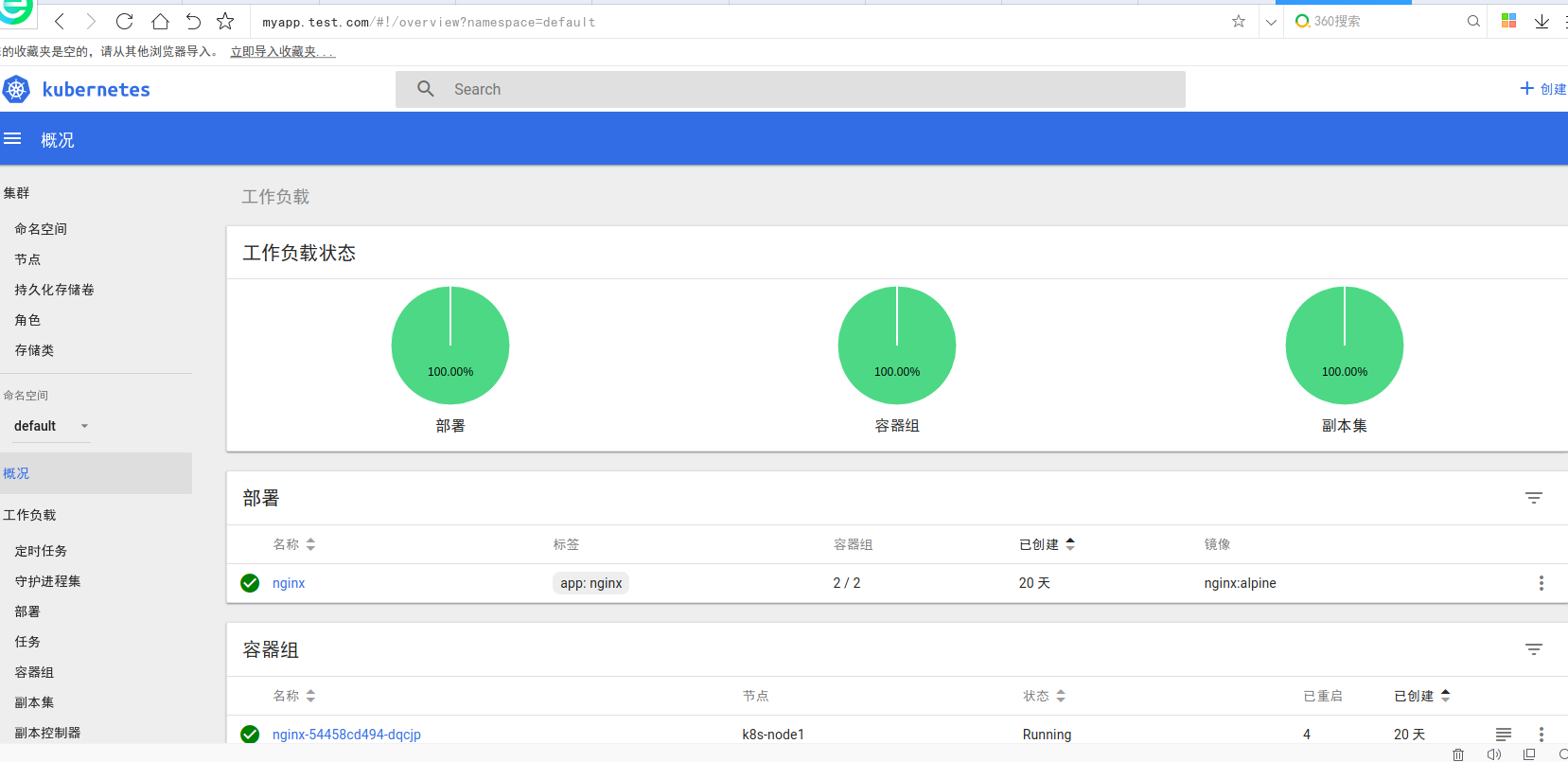
至此可以通过域名访问
ingress controller 和ingress使用实例的更多相关文章
- Kubernetes 学习11 kubernetes ingress及ingress controller
一.上集回顾 1.Service 3种模型:userspace,iptables,ipvs 2.Service类型 ClusterIP,NodePort NodePort:client -> N ...
- 实操教程丨如何在K8S集群中部署Traefik Ingress Controller
注:本文使用的Traefik为1.x的版本 在生产环境中,我们常常需要控制来自互联网的外部进入集群中,而这恰巧是Ingress的职责. Ingress的主要目的是将HTTP和HTTPS从集群外部暴露给 ...
- Kubernetes Ingress Controller的使用及高可用落地
Kubernetes Ingress Controller的使用及高可用落地 看懂本文要具备一下知识点: Service实现原理和会应用 知道反向代理原理,了解nginx和apache的vhost概念 ...
- Kubernetes 服务入口管理与 Nginx Ingress Controller
Kubernetes 具有强大的副本,动态扩容等特性,每一次 Pod 的变化 IP 地址都会发生变化,所以 Kubernetes 引进了 Service 的概念.Kubernetes 中使用 Serv ...
- Kubernetes学习之路(十五)之Ingress和Ingress Controller
目录 一.什么是Ingress? 1.Pod 漂移问题 2.端口管理问题 3.域名分配及动态更新问题 二.如何创建Ingress资源 三.Ingress资源类型 1.单Service资源型Ingres ...
- 11. Ingress及Ingress Controller(主nginx ingress controller)
11. Ingress,Ingress Controller拥有七层代理调度能力 什么是Ingress: Ingress是授权入站连接到达集群服务的规则集合 Ingress是一个Kubernetes资 ...
- traefik ingress Controller使用
Kubernetes Ingress Kubernetes Ingress是路由规则的集合,这些规则控制外部用户如何访问Kubernetes集群中运行的服务. 在Kubernetes中,有三种方式可以 ...
- 浅谈 k8s ingress controller 选型
大家好,先简单自我介绍下,我叫厉辉,来自腾讯云.业余时间比较喜欢开源,现在是Apache APISIX PPMC.今天我来简单给大家介绍下 K8S Ingress 控制器的选型经验,今天我讲的这些内容 ...
- 为 Rainbond Ingress Controller 设置负载均衡
Rainbond 作为一款云原生应用管理平台,天生带有引导南北向网络流量的分布式网关 rbd-gateway.rbd-gateway 组件,实际上是好雨科技团队开发的一种 Ingress Contro ...
随机推荐
- Svelte v2 已经过时了!
带你走马观花,细看新版变化. 注意:原文发表于2018-04-18,随着框架不断演进,部分内容可能已不适用. 大约是一年之前,我们首次在 Svelte 的 issue 跟踪器上讨论过 v2 版本,现在 ...
- 翻译:《实用的Python编程》03_03_Error_checking
目录 | 上一节 (3.2 深入函数) | 下一节 (3.4 模块) 3.3 错误检查 虽然前面已经介绍了异常,但本节补充一些有关错误检查和异常处理的其它细节. 程序是如何运行失败的 Python 不 ...
- 剑指 Offer 35. 复杂链表的复制
剑指 Offer 35. 复杂链表的复制 Offer_35 题目详情 方法一 可以使用一个HashMap来存储旧结点和新结点的映射. 这种方法需要遍历链表两遍,因为需要首先知道映射关系才能求出next ...
- CCF(URL映射:80分):字符串处理+模拟
URL映射 CCF201803-3 #include<iostream> #include<cstdio> #include<cstring> #include&l ...
- 创建一个scrapy爬虫框架的项目
第一步:打开pycharm,选择"terminal",如图所示: 第二步:在命令中端输入创建scrapy项目的命令:scrapy startproject demo (demo指的 ...
- CF557E Ann and Half-Palindrome 题解
算法:dp+字典树 题目链接Ann and Half-Palindrome 在CF刷字符串题的时候遇到了这题,其实并没有黑题这么难,个人感觉最多是紫题吧(虽然一开始以为是后缀自动机的神仙题). ...
- External Libraries中没有Maven的jar包的原因(已解决)
**深坑!** ## External Libraries中没有Maven的jar包的原因(已解决) 2021年3月1日 --- 搭建一个新项目 IDEA 从 Git 上拉 拉去Maven项目然后 m ...
- 【java框架】MyBatis(7)--MyBatis注解开发
1.MyBatis注解开发 1.1.Lombok的基本使用 Lombok是SpringBoot2.1.X版本与IDEA官方支持的一个插件,它是为简化POJO类中繁杂重复代码:geter/setter/ ...
- 【odoo14】第三章、创建插件
现在我们已经有了开发环境并了解了如何管理实例及数据库,现在让我们来学习下如何创建插件模块. 本章内容如下: 创建和安装模块 完成manifest文件 组织模块文件结构 添加模型 添加菜单及视图 添加访 ...
- 一个操作 cookie 的原生方法 cookieStore
我们平时对 cookie 的增删改查等操作,都是在操作 document.cookie,这里我们介绍一个新方法cookieStore. 1. 平时如何操作 cookie document.cookie ...