
liunx安装nginx
参考 https://blog.csdn.net/dyllove98/article/details/41120789
1,去官网下载最新的包
官网地址:http://nginx.org/download/
也可以直接 wget http://nginx.org/download/nginx-1.9.9.tar.gz (我这下载很慢所有直接去官网下,在上传到服务器)
2,下载相关依赖包
[root@localhost src] wget http://www.openssl.org/source/openssl-fips-2.0.10.tar.gz

[root@localhost src] tar zxvf pcre-8.40.tar.gz

[root@localhost src] cd pcre-8.40

[root@localhost pcre-8.40]# ./configure && make && make install

下面两个安装步骤和上面的一致

[root@localhost src] wget http://zlib.net/zlib-1.2.11.tar.gz

[root@localhost src] wget ftp://ftp.csx.cam.ac.uk/pub/software/programming/pcre/pcre-8.40.tar.gz
3,解压nginx
tar zxvf nginx-1.9.9.tar.gz

cd nginx-1.9.9/
./configure --prefix=/usr/local/nginx --with-http_realip_module --with-http_sub_module --with-http_gzip_static_module --with-http_stub_status_module
4,编译nginx
make && make install
添加一个nginx主程序的符号链接 ln -sf /usr/local/nginx/sbin/nginx /usr/sbin
检查配置是否正常
nginx -t
首先把原来的配置文件清空:
> /usr/local/nginx/conf/nginx.conf
“>” 这个符号之前阿铭介绍过,为重定向的意思,单独用它,可以把一个文本文档快速清空。
vim /usr/local/nginx/conf/nginx.conf

写入如下内容:
user nobody nobody;

worker_processes 2;

error_log /usr/local/nginx/logs/nginx_error.log crit;

pid /usr/local/nginx/logs/nginx.pid;

worker_rlimit_nofile 51200;

events

{

    use epoll;

    worker_connections 6000;

}

http

{

    include mime.types;

    default_type application/octet-stream;

    server_names_hash_bucket_size 3526;

    server_names_hash_max_size 4096;

    log_format combined_realip '$remote_addr $http_x_forwarded_for [$time_local]'

    '$host "$request_uri" $status'

    '"$http_referer" "$http_user_agent"';

    sendfile on;

    tcp_nopush on;

    keepalive_timeout 30;

    client_header_timeout 3m;

    client_body_timeout 3m;

    send_timeout 3m;

    connection_pool_size 256;

    client_header_buffer_size 1k;

    large_client_header_buffers 8 4k;

    request_pool_size 4k;

    output_buffers 4 32k;

    postpone_output 1460;

    client_max_body_size 10m;

    client_body_buffer_size 256k;

    client_body_temp_path /usr/local/nginx/client_body_temp;

    proxy_temp_path /usr/local/nginx/proxy_temp;

    fastcgi_temp_path /usr/local/nginx/fastcgi_temp;

    fastcgi_intercept_errors on;

    tcp_nodelay on;

    gzip on;

    gzip_min_length 1k;

    gzip_buffers 4 8k;

    gzip_comp_level 5;

    gzip_http_version 1.1;

    gzip_types text/plain application/x-javascript text/css text/htm application/xml;

server

{

    listen 80;

    server_name localhost;

    index index.html index.htm index.php;

    root /usr/local/nginx/html;

    location ~ \.php$ {

        include fastcgi_params;

        fastcgi_pass 127.0.0.1:9000;

        fastcgi_index index.php;

        fastcgi_param SCRIPT_FILENAME /usr/local/nginx/html$fastcgi_script_name;

    }

}

}
5,启动nginx
/usr/local/nginx/sbin/nginx
在检查下配置
nginx -t
查看nginx 是否启动
ps -ef | grep nginx
6,测试
php安装参考 : https://www.cnblogs.com/chancy/p/9238149.html
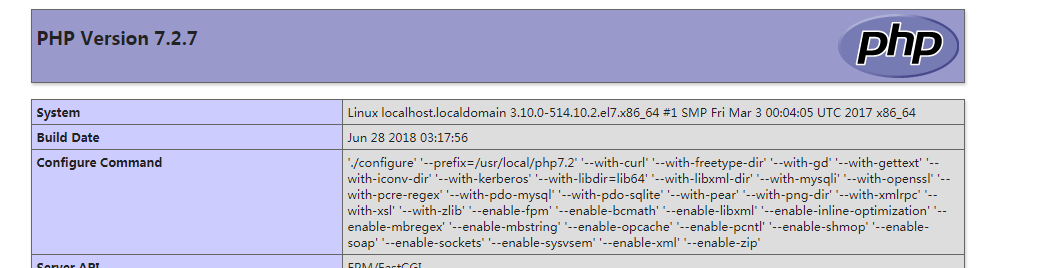
vim /usr/local/nginx/html/index.php

内容如下:
<?php

    echo phpinfo();

?>
liunx安装nginx的更多相关文章
- LIUNX 安装 nginx
安装依赖 yum install gcc yum install pcre-devel yum install zlib zlib-devel yum install openssl openssl- ...
- liunx 利用nginx 实现负载均衡
一般采用软件实现负载均衡的有Nginx.apache.nginx 近年来使用频繁,其官网上面显示可以承载5万并发访问量,太牛了. nginx 相比 apache优势明显:Nginx 服务程序比较稳定, ...
- linux系统虚拟机下安装nginx基础
虽然安装nginx什么的 .以及如何配置等等一系列的资料案例已经很多了 但是作为菜鸟的我还是搞了半天哈 官网上面也有.但是一些细节方面的并没有说明.导致踩了半天坑才搞好 本案例的系统环境 wi ...
- (转)AIX7.1安装Nginx 1.13的方法
原文:https://blog.csdn.net/lvshaorong/article/details/79401860 https://blog.csdn.net/lvshaorong/articl ...
- Liunx之nginx配置
一.nginx安装 卸载yum安装的ngjnx yum remove nginx -y 编译安装nginx步骤 编译安装nginx的步骤 1.解决软件依赖 yum install gcc patch ...
- centos直接yum安装nginx
Ubuntu下安装nginx,直接apt-get install nginx就行了,很方便. 但是今天装了CentOS6.2,直接yum install nginx不行,要先处理下源,下面是安装完整流 ...
- 安装Nginx服务
Nginx最大特点: 静态小文件(1M),支持高并发,同时占用系统资源很少.3W并发,10个进程,内存150M. Nginx特点: 1.配置简单,灵活,轻量. 2.高并发(静态小文件),静态几万的并发 ...
- Linux下安装nginx
一直会使用nginx,也学习了好多nginx知识.也在本地安装过nginx,这次是第一次在正式的环境安装nginx,把这些记录下来总结经验. 一.安装环境 操作系统:CentOS release 6. ...
- centos系统编译安装nginx+php环境另加独立mysql教程
以前看过的安装nginx+php环境都带了mysql数据库了,这个是因为很多站长都是nginx+php+mysql都在同一台服务器了,那么今天我们是单独处理了,一个是nginx+php环境,然后mys ...
随机推荐
- 设计模式C++实现——装饰者模式
版权声明:本文为博主原创文章,未经博主同意不得转载. https://blog.csdn.net/walkerkalr/article/details/28633123 模式定义: 装 ...
- C++ 参数传值 与 传引用
参数传值 在 C++ 中,函数参数的传递有两种方式:传值和传引用.在函数的形参不是引用的情况下,参数传递方式是传值的.传引用的方式要求函数的形参是引用.“传值”是指,函数的形参是实参的一个拷贝,在函数 ...
- Spring Security(八):2.4.3 Project Modules
In Spring Security 3.0, the codebase has been sub-divided into separate jars which more clearly sepa ...
- 20175310 《Java程序设计》第6周学习总结
20175310 <Java程序设计>第6周学习总结 本周博客: <20175310 类定义 - 20175310xcy - 博客园 >https://www.cnblogs. ...
- Android测试(三):本地单元测试
原文:https://developer.android.com/training/testing/unit-testing/local-unit-tests.html 如果你的单元测试没有依赖或者只 ...
- 【C#复习总结】析构函数
上篇提到析构函数,就顺便复习一下. 一 C# 析构函数 1.1 析构函数的定义 析构函数用于释放被占用的系统资源. 析构函数的名字由符号“-”加类名组成. 1.2 析构函数注意的问题 使用析构函数时, ...
- iOS开发简记(9):APPStore审核
"觅知音"这个APP的第一个版本从提交审核到上架,历时三个星期,其中遇到一些审核上的问题,它的处理或许能帮助到遇到同样问题的小伙伴们,所以这里列举出来,这三个星期如何跟苹果的审核团 ...
- 图解SSH原理及两种登录方法
SSH(Secure Shell)是一套协议标准,可以用来实现两台机器之间的安全登录以及安全的数据传送,其保证数据安全的原理是非对称加密. 传统的对称加密使用的是一套秘钥,数据的加密以及解密用的都是这 ...
- 剑指offer--4.重建二叉树
题目:输入某二叉树的前序遍历和中序遍历的结果,请重建出该二叉树.假设输入的前序遍历和中序遍历的结果中都不含重复的数字.例如输入前序遍历序列{1,2,4,7,3,5,6,8}和中序遍历序列{4,7,2, ...
- H5 27-优先级之important
27-优先级之important 我是段落 <!DOCTYPE html> <html lang="en"> <head> <meta c ...