
Python学习笔记(3)-字符串
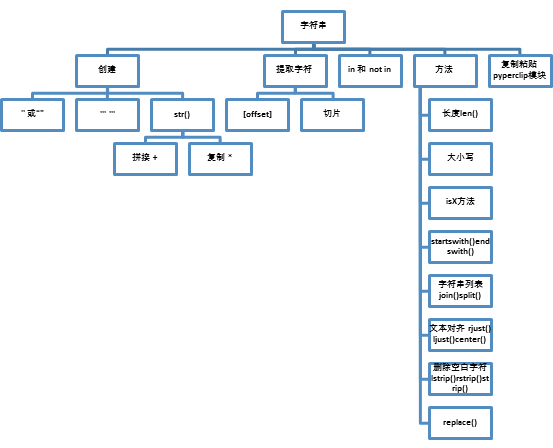
创建字符串
一对单引号或双引号
>>> 'hello world'
'hello world'
>>> "hello world"
'hello world'
可以字符串开始的引号之前加上r,忽略所有转义字符
三元引号,创建多行字符串,所有引号、制表符、换行都是字符串的一部分,可以作多行注释
>>> print('''
你好
蔡威
再见''')
你好
蔡威
再见
使用str()进行类型转换
可以将Python数据类型转换为字符串
拼接
>>> 'caiwei'+','+'hello'
'caiwei,hello'
复制
>>> '我爱你'*3
'我爱你我爱你我爱你'
提取字符,下标和切片
>>> a = 'helloworld'
>>> a[0]
'h'
>>> a[::2]
'hlool'
in 和 not in
>>> 'hello' in 'helloworld'
True
>>> 'caiwei' in 'helloworld'
False
字符串方法
长度len()
>>> len('hello')
大小写lower() upper()
所有字符都变成大写或小写
>>> 'HEllo'.lower()
'hello'
>>> 'HEllo'.upper()
'HELLO'
isX方法
islower() isupper()大小写
isalpha()字母
isalnum()数字和字母
isdecimal()数字
isspace()转义字符
判断开始或结束部分是否等于另一个字符串startswith() endswith()
>>> 'helloworld'.startswith('he')
True
>>> 'helloworld'.startswith('ll')
False
>>> 'helloworld'.endswith('world')
True
>>> 'helloworld'.endswith('he')
False
字符串和列表 join()和split()
>>> 'hello,world'.split(',')
['hello', 'world']
>>> ','.join(['hello', 'world'])
'hello,world'
对齐文本rjust(),ljust()和center()
第一个参数在这个字符串个数
第二个参数是指填充字符
>>> a.rjust(20,'*')
'**********helloworld'
>>> a.ljust(20,'*')
'helloworld**********'
>>> a.center(20,'*')
'*****helloworld*****'
删除空白字符lstrip() rstrip() strip()
可以设置参数,默认空格
>>> a = ' hello world '
>>> a.lstrip()
'hello world '
>>> a
' hello world '
>>> a.rstrip()
' hello world'
>>> a
' hello world '
>>> a.strip()
'hello world'
>>> a
' hello world '
替换 replace()
第一个参数是要修改字符串,
第二个参数是传入字符串
>>> a.replace('world','caiwei')
' hello caiwei '
复制粘贴字符串pyperclip模块
>>> import pyperclip as py
>>> py.copy('hello world')
>>> py.paste()
'hello world'
Python学习笔记(3)-字符串的更多相关文章
- python学习笔记(字符串操作、字典操作、三级菜单实例)
字符串操作 name = "alex" print(name.capitalize()) #首字母大写 name = "my name is alex" pri ...
- Python学习笔记3—字符串
原始字符串 使用\转义或者r,这种方法在网站设置网站目录结构的时候非常管用. >>> dos="c:\news" >>> print dos c ...
- 【Python学习笔记】字符串操作
字符串的表示 python中的字符串是一个常量,可以使用单引号'',双引号""或三引号""" """来创建一个字符串常量 ...
- Python学习笔记:字符串
字符串 字符串定义:字符串可以使用一对单引号.双引号或三引号来定义,即便是单个字符也会当做字符串来处理(Python中没有字符类型,单个字符也就是只有一个字符的字符串而已). 原始字符串:字符串中反斜 ...
- python学习笔记(一)---字符串与列表
字符串的一些处理 字符串的大小写 name="lonmar hb" print(name.upper())#全大写 print(name.lower())#全小写 print(na ...
- 【Python学习笔记】字符串拼接方法(5种)总结
字符串的 5 种拼接方法: “+”号 “,”号 直接连接 格式化 多行字符串拼接 第一种:“+”号 print("Hello"+"Python") 打印结果: ...
- python学习笔记(二)-字符串方法
python的字符串内建函数: #====================常用方法=============================name = 'besttest' new_name = n ...
- Python学习笔记----操作字符串
1.字符串相加.列表相加.列表和字符串不能混着使用 #序列相加 a="hello" b="python" c=a+b print("字符串相加的结果& ...
- Python学习笔记之字符串
一.字符串格式化 >>> format="Hello,%s. %s enough for ya?" >>> values=('World','H ...
随机推荐
- [Linux]lnmp一键安装包,访问yii/tp5/laravel的时候,报错500或者空白页面
当你将默认的访问路径改后(nginx.conf中的root 之后的路径),同时应该将/home/wwwroot/default/.user.ini 中的路径也改了! .user.ini 是隐藏文件,需 ...
- 将Y-m-d转换为Y年m月d日
自己编写的,不能直接套用,理解后可自行变化: $var=explode(' ',$res['act_starting']); $var1=$var[0]; $time=explode ...
- Python 执行 mysql 存储过程
mysql 创建简单的临时表 tmp create database test; use test; DROP TABLE IF EXISTS `tmp`; CREATE TABLE `tmp` ( ...
- elementUI vue tree input 懒加载 输入下拉树型示例 点击其他区域关闭自定义div
<!DOCTYPE html> <html lang="zh"> <head> <meta charset="UTF-8&quo ...
- 【Wyn Enterprise BI知识库】 认识多维数据建模与分析 ZT
与业务系统类似,商业智能的基础是数据.但是,因为关注的重点不同,业务系统的数据使用方式和商业智能系统有较大差别.本文主要介绍的就是如何理解商业智能所需的多维数据模型和多维数据分析. 数据立方体 多维数 ...
- 16.Odoo产品分析 (二) – 商业板块(9) – 网站生成器(1)
查看Odoo产品分析系列--目录 安装"电子商务"模块时,该模块会自动安装,但网站生成器是电子商务的前提,因此,先分析该模块,在下面就是对电子商务模块的分析. 1. 编辑网站 安装 ...
- iOS ----------怎么修改xcode默认打开方式
很简单就能解决:选中文件,右键,显示简介,打开方式,选择8.2.然后打钩.
- mysql左连接
举个例子说明: select d.id, d.uid,d.username,d.dateline, d.message,d.replynum, c.picid, c.filename from doi ...
- django rest framework 项目创建
Django Rest Framework 是一个强大且灵活的工具包,用以构建Web API 为什么要使用Rest Framework Django REST Framework可以在Django的基 ...
- canvas学习总结四:绘制虚线
上一章节我们说到,线性路径的绘制,主要利用movoTo(),lineTo()等方法,当然 Canvas 2D API 也提供了虚线的绘制方法,CanvasRenderingContext2D.setL ...