
39_redux_counter应用_redux版本
一、下载
要想使用redux,首先要下载它
npm install --save redux
二、核心API
1.createStore()
作用:创建包含指定reducer的store对象
编码:import {createStore} from 'redux'
import counter from './reducers/counter'
const store = createStore(counter)
2.store对象
作用:
redux库最核心的管理对象
它内部维护着:
state
reducer
核心方法:
getState()
dispatch(action)
subscribe(listener)
编码:
store.getState()
store.dispatch({type:'INCREMENT',number})
store.subscribe(render)
三、redux的三个核心概念
1.action
标识要执行行为的对象
包含两个属性:
type:标识属性,值为字符串,唯一,必要属性
xxx:数据属性,值类型任意,可选属性
例子:
const action = {
type:'INCREMENT',
data:2
}
Action Creator(创建Action的工厂函数)
const increment = (number) => ({type:'INCREMENT',number})
2.reducer
根据老的state和action,产生新的state的纯函数
样例:
export default function counter(state = 0, action){
switch(action.type){
case 'INCREMENT':
return state + action.data
case 'DECREMENT':
return state - action.data
default:
return state
}
}
注意:
返回一个新的状态
不要修改原来的状态
3.store
将state、action与reducer联系在一起发的对象
如何得到这个对象?
import {createStore} from 'redux'
import reducer from './reducers'
const store = createStore(reducer)
此对象的功能?
getState():得到state
dispatch(action):分发action,出发reducer调用,产生新的state
subscribe(listener):注册监听,当产生了新的state时,自动调用
四、代码:
项目结构:
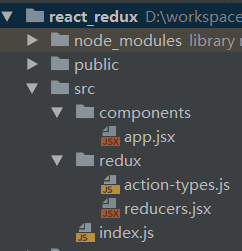
import React from 'react';
import ReactDOM from 'react-dom';
import {createStore} from 'redux';

import App from './components/app';
import {counter} from './redux/reducers';

//生成store对象
const store = createStore(counter);//内部会第一次调用reduer函数得到初始state
console.log(store, store.getState());

function render() {
    ReactDOM.render(<App store={store}/>, document.getElementById('root'));
}

//初始化渲染
render()

//订阅监听(store中的状态变化了,就会自动调用重绘)
store.subscribe(render)
index.js
import React, {Component} from 'react'
import {INCREMENT, DECREMENT} from '../redux/action-types'
export default class App extends Component {
increment = () => {
//1.得到选择的增加数量
const number = this.select.value * 1
//2.调用store的方法更新状态
this.props.store.dispatch({type: INCREMENT, data: number})
};
decrement = () => {
//1.得到选择的增加数量
const number = this.select.value * 1
//2.调用store的方法更新状态
this.props.store.dispatch({type: DECREMENT, data: number})
};
incrementIfOdd = () => {
//1.得到选择的增加数量
const number = this.select.value * 1
//2.得到原本的count状态
const count = this.props.store.getState()
//3.判断,满足条件再更新状态
if (count % 2 === 1) {
//调用store方法更新状态
this.props.store.dispatch({type: INCREMENT, data: number})
}
}
incrementAsync = () => {
//1.得到选择的增加数量
const number = this.select.value * 1
//启动延时定时器
setTimeout(() => {
this.props.store.dispatch({type: INCREMENT, data: number})
}, 1000)
};
render() {
const count = this.props.store.getState()
// debugger
return (
<div>
<p>click {count} times</p>
<div>
<select ref={select => this.select = select}>
<option value="1">1</option>
<option value="2">2</option>
<option value="3">3</option>
</select>
<button onClick={this.increment}>+</button>
<button onClick={this.decrement}>-</button>
<button onClick={this.incrementIfOdd}>increment odd</button>
<button onClick={this.incrementAsync}>increment async</button>
</div>
</div>
)
}
}
app.jsx
/*
* 包含所有action type的常量字符串
* */

export const INCREMENT = 'INCREMENT';
export const DECREMENT = 'DECREMENT';
action-tupes.js
/*
* 包含n个reducer函数的模块
* */
export function counter(state = 0, action) {

    console.log('counter()', state, action)

    switch (action.type) {
        case 'INCREMENT':
            return state + action.data
        case 'DECREMENT':
            return state - action.data
        default:
            return state
    }

}
reducers.jsx
39_redux_counter应用_redux版本的更多相关文章
- 45_redux_comment应用_redux版本_异步功能
/* * 包含所有action的type名称常量 * */ //添加评论 export const ADD_COMMENT = 'add_comment'; //删除评论 export const D ...
- 44_redux_comment应用_redux版本_同步功能
项目结构: components里面的东西没变,将app.jsx移动至containers中 /* * 包含所有action的type名称常量 * */ //添加评论 export const ADD ...
- 42_redux_counter应用_redux异步版本
前言: redux默认不支持异步编程,需要下载redux插件(异步中间件) 如何下载: npm install --save redux-thunk 项目结构: 代码: import React, { ...
- 40_redux_counter应用_redux完善版本
项目结构: 代码: import React from 'react'; import ReactDOM from 'react-dom'; import store from './redux/st ...
- 【AR实验室】OpenGL ES绘制相机(OpenGL ES 1.0版本)
0x00 - 前言 之前做一些移动端的AR应用以及目前看到的一些AR应用,基本上都是这样一个套路:手机背景显示现实场景,然后在该背景上进行图形学绘制.至于图形学绘制时,相机外参的解算使用的是V-SLA ...
- ABP入门系列(2)——通过模板创建MAP版本项目
一.从官网创建模板项目 进入官网下载模板项目 依次按下图选择: 输入验证码开始下载 下载提示: 二.启动项目 使用VS2015打开项目,还原Nuget包: 设置以Web结尾的项目,设置为启动项目: 打 ...
- 理解Maven中的SNAPSHOT版本和正式版本
Maven中建立的依赖管理方式基本已成为Java语言依赖管理的事实标准,Maven的替代者Gradle也基本沿用了Maven的依赖管理机制.在Maven依赖管理中,唯一标识一个依赖项是由该依赖项的三个 ...
- MIP 官方发布 v1稳定版本
近期,MIP官方发布了MIP系列文件的全新v1版本,我们建议大家尽快完成升级. 一. 我是开发者,如何升级版本? 对于MIP页面开发者来说,只需替换线上引用的MIP文件为v1版本,就可以完成升级.所有 ...
- 终于等到你:CYQ.Data V5系列 (ORM数据层)最新版本开源了
前言: 不要问我框架为什么从收费授权转到免费开源,人生没有那么多为什么,这些年我开源的东西并不少,虽然这个是最核心的,看淡了就也没什么了. 群里的网友:太平说: 记得一年前你开源另一个项目的时候我就说 ...
随机推荐
- 汇编实验一 查看CPU和内存,用机器指令和汇编语言指令编程
在装完DosBox环境之后,就可以用debug模式进行汇编指令的编程了. 实验内容: 首先用a指令进行数据的储存,然后用t命令进行调试. 可以发现ax,bx在不同的命令下发生了改变,cs的地 ...
- PythonStudy——装饰器 Decorator
def outer(func): def inner(): print("新增功能1") func() print("新增功能2") return inner ...
- Django学习笔记之验证和授权
验证和授权概述 Django有一个内置的授权系统.他用来处理用户.分组.权限以及基于cookie的会话系统.Django的授权系统包括验证和授权两个部分.验证是验证这个用户是否是他声称的人(比如用户名 ...
- sql 用过记住
1 递归查询一个节点下的所有子节点 包括该节点 connect by h.parent_menu_id= prior h.menu_idstart with h.menu_id='当前节点' h.pa ...
- python通过openpyxl操作excel
python 对Excel操作常用的主要有xlwt.xlrd.openpyxl ,前者xlwt主要适合于对后缀为xls比较进行写入,而openpyxl主要是针对于Excel 2007 以上版本进行操作 ...
- [转]CPU-bound(计算密集型) 和I/O bound(I/O密集型)
转自:http://blog.csdn.net/q_l_s/article/details/51538039 I/O密集型 (CPU-bound) I/O bound 指的是系统的CPU效能相对硬盘/ ...
- Robot Framework脚本在jenkins执行完之后无法查看日志
首先确保Robot Framework Plugin已经安装好,构建结束后test result和log.html等日志文件已显示,只是无法打开查看: 修改tomcat配置:vi tomcat/con ...
- docker 快速部署ES集群 spark集群
1) 拉下来 ES集群 spark集群 两套快速部署环境, 并只用docker跑起来,并保存到私库. 2)弄清楚怎么样打包 linux镜像(或者说制作). 3)试着改一下,让它们跑在集群里面. 4) ...
- 工控随笔_05_西门子_Step7软件仿真方法
现在的PLC厂商提供的开发环境都具备仿真能力.无论是西门子.三菱.罗克韦尔还是ABB 或是其他一些厂商提供的产品都具有仿真功能. 仿真就是在没有硬件的情况下来测试程序功能,同时也为初学者提供了方便,即 ...
- python基础知识4--数据类型与变量
阅读目录 一.变量 二.数据类型 2.1 什么是数据类型及数据类型分类 2.2 标准数据类型: 2.2.1 数字 2.2.1.1 整型: 2.2.1.2 长整型long: 2.2.1.3 布尔bool ...