
自己动手编写spring IOC源码
前言:对于spring IOC概念不是很了解的朋友可以阅读我上一篇博客——轻松理解spring IOC(这两篇博客也是由于我的个人原因导致现在才发布,惭愧啊)。通过这篇博客的理解之后,相信大家会对spring的IOC概念会有进一步的理解。接下来我先预览一下本例中java的类图关系。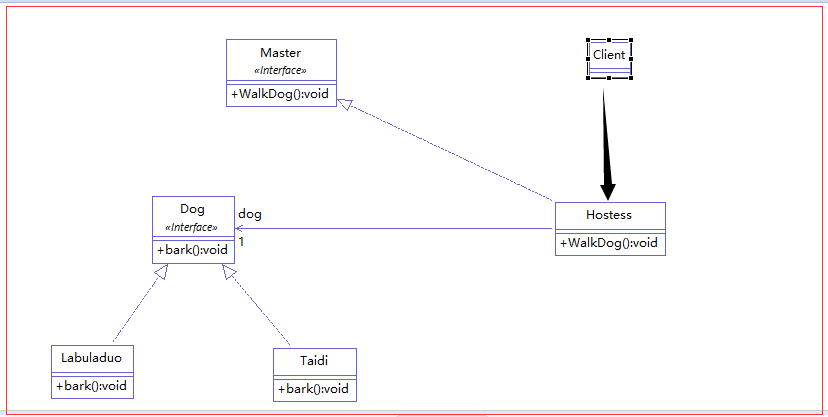
解析:我们有一个Master接口,接口中定义了一个WalkDog()遛狗的方法,Hostess是对这个接口的具体实现。然后我们有一个Dog接口,接口中有一个bark()方法,Labuladuo和Taidi是对其的实现。最后我们的程序入口Client类调用Hostess对象的WalkDog方法。
需求:Hostess对象遛狗需要一个狗对象,目前我们的类中有两个符合需求的对象,我们只要在配置文件中进行相关配置便可以指定我们的Hostess对象调用的是哪一个具体的Dog对象。
 public static void main(String[] args) {

         ApplicationContext context = new ClassPathXmlApplicationContext("applicationContext.xml");

         Master master = (Master)context.getBean("hostess");

         System.out.println();

         System.out.println();

         System.out.println();

         System.out.println("***********************************");

         master.WalkDog();

     }
解析:从main方法的前两句原spring的代码中我们可以猜想,spring框架中一定是定义了ApplicationContext这个接口,并且接口中定义了一个getBean()的方法,而ClassPathXmlApplicationContext类肯定是对其的实现。既然是我们自己动手写spring框架,我们把这个接口和类实现了也就可以了。
接口 ApplicationContext
 public interface ApplicationContext {

     public Object getBean(String beanid);

 }
实现类 ClassPathXmlApplicationContext
 package com;

 import java.io.File;

 import java.lang.reflect.Method;

 import org.dom4j.Document;

 import org.dom4j.DocumentException;

 import org.dom4j.Element;

 import org.dom4j.Node;

 import org.dom4j.io.SAXReader;

 public class ClassPathXmlApplicationContext implements ApplicationContext {

     private String fileName;

     public ClassPathXmlApplicationContext(String fileName){

         this.fileName = fileName;

     }

     @Override

     public Object getBean(String beanid) {

         //获取本类的当前目录

         String currentPath = this.getClass().getResource("").getPath().toString();

         SAXReader reader = new SAXReader();//DOM4J解释器

         Document doc = null;//xml文档本身

         Object obj = null;//目标表创建出来的实例

         try {

             doc = reader.read(  new File(currentPath+fileName)  );

             String xpath = "/beans/bean[@id='"+beanid+"']";

             Element beanNode = (Element) doc.selectSingleNode(xpath);

             String className = beanNode.attributeValue("class");

             obj = Class.forName(className).newInstance();

             Element propertyNode = (Element) beanNode.selectSingleNode("property");

             if(propertyNode!=null){

                 System.out.println("当前bean有属性需要注入");

                 String propertyName = propertyNode.attributeValue("name");

                 System.out.println("当前bean需要注入的属性为"+propertyName);

                 //拼接出注入方法

                 String setMethod = "set"+(propertyName.substring(0, 1)).toUpperCase()+propertyName.substring(1,propertyName.length());

                 System.out.println("自动调用注入方法"+setMethod);

                 String set_object_name = propertyNode.attributeValue("ref");

                 System.out.println("需要注入的对象名"+set_object_name);

                 Object di_object = getBean(set_object_name);

                 System.out.println("注入的对象实例"+di_object);

                 Method []methods = obj.getClass().getMethods();

                 for (Method m : methods) {

                     if(setMethod.equals(m.getName())  ) {

                         m.invoke(obj, di_object);

                         break;

                     }

                 }

             }else{

                 System.out.println("当前bean没有属性,无需注入直接结束");

             }

         } catch (Exception e) {

             e.printStackTrace();

         }

         return obj;

     }

 }
配置文件 applicationContext.xml
 <?xml version="1.0" encoding="UTF-8"?>

 <beans>

     <bean id="hostess" class="com.Hostess">

         <property name="dog" ref="Taidi_dog"></property>

     </bean>

     <bean id="Taidi_dog" class="com.Taidi"></bean>

     <bean id="Labuladuo_dog" class="com.Labuladuo"></bean>

 </beans>
解析:① 我们的applicationContext.xml文件主要是配置我们的java bean。这里我们自己写一份这样的文件通知我们自己的框架有哪些对象需要注入。
② 接口 ApplicationContext 这里我只是定义了一个方法就不多解释了。
③ 实现类 ClassPathXmlApplicationContext 主要是解析我们的xml文件然后构造实例的一个类。解析xml文件我们主要使用的是dom4j,获取各个节点和节点属性与属性值。创建对象则是通过反射的方式构造对象 [obj = Class.forName(className).newInstance();]。 在判断一个对象是否有属性需要注入则是使用递归算法对其一一注入。
最后: 我们来看一下运行结果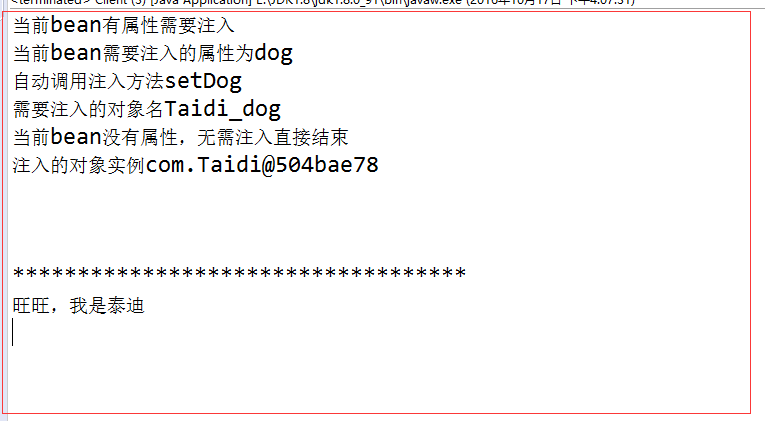
小结:我们自己手写的框架自然没有spring框架严谨,安全(不然它早倒闭了),不过spring的原理我们自己的也是大同小异的。通过源码级别的解读,相信大家已经可以熟练掌握IOC原理。
自己动手编写spring IOC源码的更多相关文章
- 深入Spring IOC源码之ResourceLoader
在<深入Spring IOC源码之Resource>中已经详细介绍了Spring中Resource的抽象,Resource接口有很多实现类,我们当然可以使用各自的构造函数创建符合需求的Re ...
- Spring IOC 源码之ResourceLoader
转载自http://www.blogjava.net/DLevin/archive/2012/12/01/392337.html 在<深入Spring IOC源码之Resource>中已经 ...
- Spring IOC 源码分析
Spring 最重要的概念是 IOC 和 AOP,本篇文章其实就是要带领大家来分析下 Spring 的 IOC 容器.既然大家平时都要用到 Spring,怎么可以不好好了解 Spring 呢?阅读本文 ...
- spring IoC源码分析 (3)Resource解析
引自 spring IoC源码分析 (3)Resource解析 定义好了Resource之后,看到XmlFactoryBean的构造函数 public XmlBeanFactory(Resource ...
- Spring IoC源码解析之invokeBeanFactoryPostProcessors
一.Bean工厂的后置处理器 Bean工厂的后置处理器:BeanFactoryPostProcessor(触发时机:bean定义注册之后bean实例化之前)和BeanDefinitionRegistr ...
- Spring IoC源码解析之getBean
一.实例化所有的非懒加载的单实例Bean 从org.springframework.context.support.AbstractApplicationContext#refresh方法开发,进入到 ...
- Spring系列(三):Spring IoC源码解析
一.Spring容器类继承图 二.容器前期准备 IoC源码解析入口: /** * @desc: ioc原理解析 启动 * @author: toby * @date: 2019/7/22 22:20 ...
- Spring IoC 源码分析 (基于注解) 之 包扫描
在上篇文章Spring IoC 源码分析 (基于注解) 一我们分析到,我们通过AnnotationConfigApplicationContext类传入一个包路径启动Spring之后,会首先初始化包扫 ...
- Spring Ioc源码分析系列--Ioc的基础知识准备
Spring Ioc源码分析系列--Ioc的基础知识准备 本系列文章代码基于Spring Framework 5.2.x Ioc的概念 在Spring里,Ioc的定义为The IoC Containe ...
随机推荐
- 使用PullToRefresh插件实现ListView下拉刷新(Android Studio)
下载PullToRefresh
- 3Sum algorithm - 非常容易理解的实现 (java)
原题重述:(点击图片可以进入来源链接) 这到题目的中文解释是, 输入一个数组,例如{-1 0 1 2 -1 -4},从数组中找三个数(a,b,c),使得其和0,输出所有的(a,b,c)组合. 要求ab ...
- MySQL 一致性读 深入研究
一致性读,又称为快照读.使用的是MVCC机制读取undo中的已经提交的数据.所以它的读取是非阻塞的. 相关文档:http://dev.mysql.com/doc/refman/5.6/en/innod ...
- mysql-5.7.9-winx64在windows上安装遇到的一些问题
mysql5.7.9版本以上在windwos上安装时会遇到无法启动但是没有任何报错的问题,那是因为5.7.9以上的版本在MySQL目录下会缺少data目录: Data目录下存储的是一些表文件,用来描述 ...
- python logging colorlog
import logging LOG_LEVEL = logging.NOTSET LOGFORMAT = "[%(log_color)s%(levelname)s] [%(log_colo ...
- 解决ubuntu eclipse中 Android SDK Manager 图标不见的方法
在eclipse中选择的步骤如下: Window ---> Custom Perspective --> command Group Availability ----> an ...
- (转)也谈BIO | NIO | AIO (Java版)
原文地址: https://my.oschina.net/bluesky0leon/blog/132361 关于BIO | NIO | AIO的讨论一直存在,有时候也很容易让人混淆,就我的理解,给出一 ...
- POJ 1753. Flip Game 枚举or爆搜+位压缩,或者高斯消元法
Flip Game Time Limit: 1000MS Memory Limit: 65536K Total Submissions: 37427 Accepted: 16288 Descr ...
- MyBatis源码分析-IDEA新建MyBatis源码工程
MyBatis 是支持定制化 SQL.存储过程以及高级映射的优秀的持久层框架.MyBatis 避免了几乎所有的 JDBC 代码和手动设置参数以及获取结果集.MyBatis 可以对配置和原生Map使用简 ...
- 常用算法——排序(一)
排序(Sort)是计算机程序设计中的一种重要操作,也是日常生活中经常遇到的问题.例如,字典中的单词是以字母的顺序排列,否则,使用起来非常困难.同样,存储在计算机中的数据的次序,对于处理这些数据的算法的 ...