
[b0008] Windows 7 下 hadoop 2.6.4 eclipse 本地开发调试配置
目的:
基于上篇的方法介绍,开发很不方便 。[0007] windows 下 eclipse 开发 hdfs程序样例
装上插件,方便后续直接在windows下的IDE开发调试。
环境:
- Linux Hadoop 2.6.4,参考文章 [0001]
- Win 7 64 下的 Eclipse Version: Luna Service Release 1 (4.4.1)
工具:
- hadoop-eclipse-plugin-2.6.4.jar 下载地址:http://download.csdn.net/detail/tondayong1981/9437360
- Hadoop 2.6.4 安装程序包, Hadoop2.6.4源码包
- hadoop 2.6 windows插件包 地址后面有
说明:
以下整个步骤过程是在全部弄好后,才来填补的。中间修改多次,为了快速成文有些内容从其他地方复制。因此,如果完全照着步骤,可能需要一些小修改。整个思路是对的。
1. 准备Hadoop安装包
在windows下解压 Hadoop 2.6.4 安装程序包。 将Linux上的hadoop 安装目录下 etc/hadoop的所有配置文件
全部替换 windows下解压后的配置文件
2 . 安装HDFS eclipse 插件
- eclipse关闭状态下, 将 hadoop-eclipse-plugin-2.6.4.jar 放到该目录下 eclipse安装目录\plugins\
- 启动eclipse
- 菜单栏->窗口windows->首选项preferences->Hadoop mapeduce ,指定hadoop路径为前面的解压路径
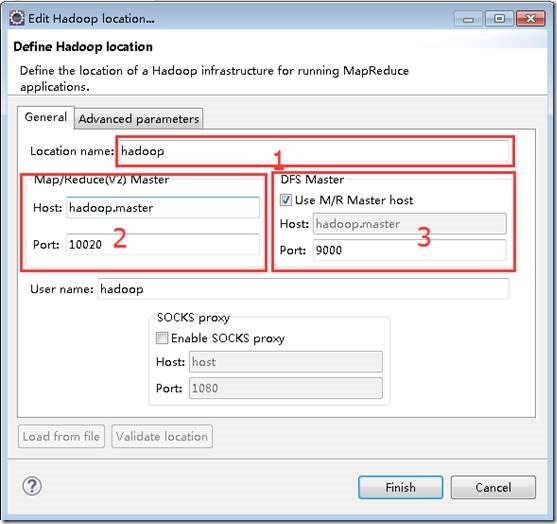
- 菜单栏->窗口windows->Open Perspective->Other->选择Map/Reduce ok->Map/Reduce Location选项卡 ->右边蓝色小象 打开配置窗口如图,进行如下设置,点击ok
1位置为配置的名称,任意。
2位置为mapred-site.xml文件中的mapreduce.jobhistory.address配置,如果没有则默认是10020。
3位置为core-site.xml文件中的fs.defaultFS:hdfs://ssmaster:9000 。
这是网上找到图片,我的设置
hadoop2.6伪分布式,ssmaster:10020,ssmaster:9000
设置成功后,在eclipse这里可以直接显示Linux Hadoop hdfs的文件目录
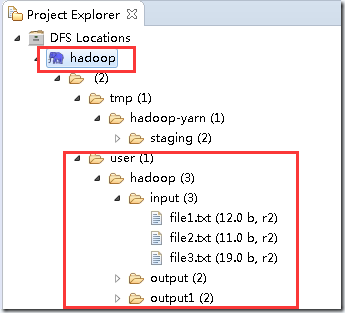
可以直接在这里 下载、上传、 删除HDFS上的文件,很方便

3 配置Mapreduce Windows 插件包
3.1 下载hadoop 2.6 windows插件包包
没找到2.6.4的,用2.6的最后也成功了。
其中参考下载地址: http://download.csdn.net/detail/myamor/8393459,这个似乎是win8的, 本人的系统win7,不是从这里下的。 忘记哪里了。可以搜索 winutils.exe + win7 。 下载后的文件应该有 hadoop.dll hadoop.pdb hadoop.lib hadoop.exp winutils.exe winutils.pdb libwinutils.lib
3.2 配置
a 解压上面的插件包, 将文件全部拷贝到 G:\RSoftware\hadoop-2.6.4\hadoop-2.6.4\bin ,该路径为前面"2 . 安装HDFS eclipse 插件"的hadoop指定路径。
b 设置环境变量
HADOOP_HOME =G:\RSoftware\hadoop-2.6.4\hadoop-2.6.4
Path 中添加 G:\RSoftware\hadoop-2.6.4\hadoop-2.6.4\bin
确保有 HADOOP_USER_NAME = hadoop 上一篇 [0007]中设置
重启Eclipse ,读取新环境变量
4 测试Mapreduce
4.1 新建mapreduce 工程


完成后项目会自动把Hadoop的所有jar包导入
4.2 项目配置log4j
在src目录下,创建log4j.properties文件 ,内容如下
log4j.rootLogger=debug,stdout,R

log4j.appender.stdout=org.apache.log4j.ConsoleAppender

log4j.appender.stdout.layout=org.apache.log4j.PatternLayout

log4j.appender.stdout.layout.ConversionPattern=%5p - %m%n

log4j.appender.R=org.apache.log4j.RollingFileAppender

log4j.appender.R.File=mapreduce_test.log

log4j.appender.R.MaxFileSize=1MB

log4j.appender.R.MaxBackupIndex=1

log4j.appender.R.layout=org.apache.log4j.PatternLayout

log4j.appender.R.layout.ConversionPattern=%p %t %c - %m%

log4j.logger.com.codefutures=DEBUG
4.3 WordCount类中 添加代码
在WordCount项目里右键src新建class,包名com.xxm(请自行命明),类名为WordCount

package mp.filetest;

import java.io.IOException;

import java.util.*;

import org.apache.hadoop.fs.Path;

import org.apache.hadoop.conf.*;

import org.apache.hadoop.io.*;

import org.apache.hadoop.mapreduce.*;

import org.apache.hadoop.mapreduce.lib.input.FileInputFormat;

import org.apache.hadoop.mapreduce.lib.input.TextInputFormat;

import org.apache.hadoop.mapreduce.lib.output.FileOutputFormat;

import org.apache.hadoop.mapreduce.lib.output.TextOutputFormat;

/**

 * 描述:WordCount explains by xxm

 * @author xxm

 */

public class WordCount2 {

 /**

 * Map类:自己定义map方法

 */

 public static class Map extends Mapper<LongWritable, Text, Text, IntWritable> {

    /**

    * LongWritable, IntWritable, Text 均是 Hadoop 中实现的用于封装 Java 数据类型的类

    * 都能够被串行化从而便于在分布式环境中进行数据交换,可以将它们分别视为long,int,String 的替代品。

    */

    private final static IntWritable one = new IntWritable(1);

    private Text word = new Text();

    /**

    * Mapper类中的map方法:

    * protected void map(KEYIN key, VALUEIN value, Context context)

    * 映射一个单个的输入k/v对到一个中间的k/v对

    * Context类:收集Mapper输出的<k,v>对。

    */

    public void map(LongWritable key, Text value, Context context) throws IOException, InterruptedException {

        String line = value.toString();

        StringTokenizer tokenizer = new StringTokenizer(line);

        while (tokenizer.hasMoreTokens()) {

            word.set(tokenizer.nextToken());

            context.write(word, one);

        }

    }

 }

 /**

 * Reduce类:自己定义reduce方法

 */

 public static class Reduce extends Reducer<Text, IntWritable, Text, IntWritable> {

    /**

    * Reducer类中的reduce方法:

    * protected void reduce(KEYIN key, Interable<VALUEIN> value, Context context)

    * 映射一个单个的输入k/v对到一个中间的k/v对

    * Context类:收集Reducer输出的<k,v>对。

    */

    public void reduce(Text key, Iterable<IntWritable> values, Context context)

      throws IOException, InterruptedException {

        int sum = 0;

        for (IntWritable val : values) {

            sum += val.get();

        }

        context.write(key, new IntWritable(sum));

    }

 }

 /**

 * main主函数

 */

 public static void main(String[] args) throws Exception {

    Configuration conf = new Configuration();//创建一个配置对象,用来实现所有配置

    Job job = new Job(conf, "wordcount2");//新建一个job,并定义名称

    job.setOutputKeyClass(Text.class);//为job的输出数据设置Key类

    job.setOutputValueClass(IntWritable.class);//为job输出设置value类

    job.setMapperClass(Map.class); //为job设置Mapper类

    job.setReducerClass(Reduce.class);//为job设置Reduce类

    job.setJarByClass(WordCount2.class);

    job.setInputFormatClass(TextInputFormat.class);//为map-reduce任务设置InputFormat实现类

    job.setOutputFormatClass(TextOutputFormat.class);//为map-reduce任务设置OutputFormat实现类

    FileInputFormat.addInputPath(job, new Path(args[0]));//为map-reduce job设置输入路径

    FileOutputFormat.setOutputPath(job, new Path(args[1]));//为map-reduce job设置输出路径

    job.waitForCompletion(true); //运行一个job,并等待其结束

 }

}
可选, 如果没有配置,最后可能报这个错误,在文章最后面异常部分, 按照异常解决办法配置。
( Y.2 运行过程中 异常
1 main"java.lang.UnsatisfiedLinkError:org.apache.hadoop.io.nativeio.NativeIO$Windows.access0(Ljava/lang/String;I)
)
4.4 运行
确保Hadoop已经启动
在WordCount的代码区域,右键,点击Run As—>Run Configurations,配置运行参数,文件夹输入和输出,第2个参数的路径确保HDFS上不存在
hdfs://ssmaster:9000/input
hdfs://ssmaster:9000/output
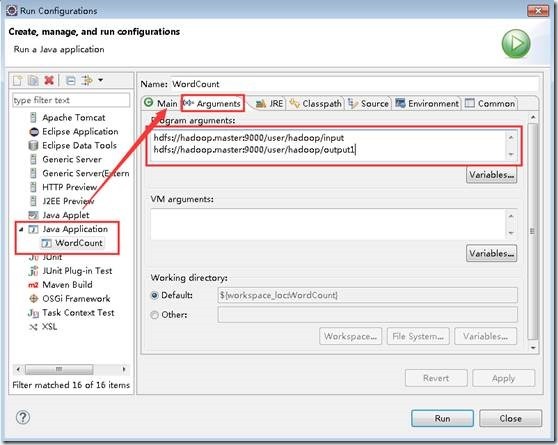
点击 Run运行,可以直接在eclipse的控制台看到执行进度和结果
INFO - Job job_local1914346901_0001 completed successfully

  INFO - Counters:

    File System Counters

        FILE: Number of bytes read=

        FILE: Number of bytes written=

        FILE: Number of read operations=

        FILE: Number of large read operations=

        FILE: Number of write operations=

        HDFS: Number of bytes read=

        HDFS: Number of bytes written=

        HDFS: Number of read operations=

        HDFS: Number of large read operations=

        HDFS: Number of write operations=

    Map-Reduce Framework

        Map input records=

        Map output records=

        Map output bytes=

        Map output materialized bytes=

        Input split bytes=

        Combine input records=

        Combine output records=

        Reduce input groups=

        Reduce shuffle bytes=

        Reduce input records=

        Reduce output records=

        Spilled Records=

        Shuffled Maps =

        Failed Shuffles=

        Merged Map outputs=

        GC time elapsed (ms)=

        CPU time spent (ms)=

        Physical memory (bytes) snapshot=

        Virtual memory (bytes) snapshot=

        Total committed heap usage (bytes)=

    Shuffle Errors

        BAD_ID=

        CONNECTION=

        IO_ERROR=

        WRONG_LENGTH=

        WRONG_MAP=

        WRONG_REDUCE=

    File Input Format Counters

        Bytes Read=

    File Output Format Counters

        Bytes Written=
执行日志
在“DFS Locations”下,刷新刚创建的“hadoop”看到本次任务的输出目录下是否有输出文件。
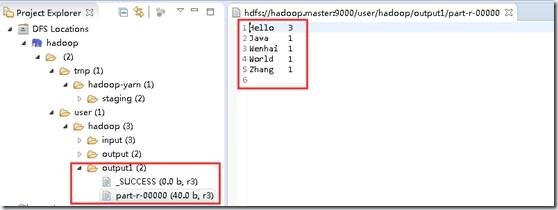
4.5 可选 命令行下执行,导出成jar包,上传到Linux
右键项目名字->导出->java/jar文件 ->指定jar路径名字->指定main类为 完成
先删除刚才的输出目录
hadoop@ssmaster:~/java_program$ hadoop fs -rm -r /output
hadoop@ssmaster:~/java_program$ hadoop fs -ls /

Found 4 items

drwxr-xr-x   - hadoop supergroup          0 2016-10-24 05:04 /data

drwxr-xr-x   - hadoop supergroup          0 2016-10-23 00:45 /input

drwxr-xr-x   - hadoop supergroup          0 2016-10-24 05:04 /test

drwx------   - hadoop supergroup          0 2016-10-23 00:05 /tmp
执行 hadoop jar hadoop_mapr_wordcount.jar /input /output
hadoop@ssmaster:~/java_program$ hadoop  jar hadoop_mapr_wordcount.jar  /input /output

// :: INFO client.RMProxy: Connecting to ResourceManager at ssmaster/192.168.249.144:

// :: WARN mapreduce.JobResourceUploader: Hadoop command-line option parsing not performed. Implement the Tool interface and execute your application with ToolRunner to remedy this.

// :: INFO input.FileInputFormat: Total input paths to process :

// :: INFO mapreduce.JobSubmitter: number of splits:

// :: INFO mapreduce.JobSubmitter: Submitting tokens for job: job_1477315002921_0004

// :: INFO impl.YarnClientImpl: Submitted application application_1477315002921_0004

// :: INFO mapreduce.Job: The url to track the job: http://ssmaster:8088/proxy/application_1477315002921_0004/

// :: INFO mapreduce.Job: Running job: job_1477315002921_0004

// :: INFO mapreduce.Job: Job job_1477315002921_0004 running in uber mode : false

// :: INFO mapreduce.Job:  map % reduce %

// :: INFO mapreduce.Job:  map % reduce %

// :: INFO mapreduce.Job:  map % reduce %

// :: INFO mapreduce.Job: Job job_1477315002921_0004 completed successfully

// :: INFO mapreduce.Job: Counters:

    File System Counters

        FILE: Number of bytes read=

        FILE: Number of bytes written=

        FILE: Number of read operations=

        FILE: Number of large read operations=

        FILE: Number of write operations=

        HDFS: Number of bytes read=

        HDFS: Number of bytes written=

        HDFS: Number of read operations=

        HDFS: Number of large read operations=

        HDFS: Number of write operations=

    Job Counters

        Launched map tasks=

        Launched reduce tasks=

        Data-local map tasks=

        Total time spent by all maps in occupied slots (ms)=

        Total time spent by all reduces in occupied slots (ms)=

        Total time spent by all map tasks (ms)=

        Total time spent by all reduce tasks (ms)=

        Total vcore-milliseconds taken by all map tasks=

        Total vcore-milliseconds taken by all reduce tasks=

        Total megabyte-milliseconds taken by all map tasks=

        Total megabyte-milliseconds taken by all reduce tasks=

    Map-Reduce Framework

        Map input records=

        Map output records=

        Map output bytes=

        Map output materialized bytes=

        Input split bytes=

        Combine input records=

        Combine output records=

        Reduce input groups=

        Reduce shuffle bytes=

        Reduce input records=

        Reduce output records=

        Spilled Records=

        Shuffled Maps =

        Failed Shuffles=

        Merged Map outputs=

        GC time elapsed (ms)=

        CPU time spent (ms)=

        Physical memory (bytes) snapshot=

        Virtual memory (bytes) snapshot=

        Total committed heap usage (bytes)=

    Shuffle Errors

        BAD_ID=

        CONNECTION=

        IO_ERROR=

        WRONG_LENGTH=

        WRONG_MAP=

        WRONG_REDUCE=

    File Input Format Counters

        Bytes Read=

    File Output Format Counters

        Bytes Written=
备注:如何导出包,可以用这种方式执行 hadoop jar xxxx.jar wordcount /input /output [遗留]
Y 异常
Y.1 Permission denied: user=Administrator
在第2步最后, HDFS的某个目录可能提示:
Permission denied: user=Administrator, access=WRITE, inode="hadoop": hadoop:supergroup:rwxr-xr-x
用户Administator在hadoop上执行写操作时被权限系统拒,windows eclipse的默认用 用户Administator 去访问hadoop的文件
解决如下:
windows 添加环境变量 HADOOP_USER_NAME ,值为 hadoop (这是Linux上hadoop2.6.4 的用户名)
重启eclipse生效
Y.2 运行过程中 异常
1 main"java.lang.UnsatisfiedLinkError:org.apache.hadoop.io.nativeio.NativeIO$Windows.access0(Ljava/lang/String;I)Z
原因:未知
解决:
a 将前面下载的配置包中的 hadoop.dll 文件拷贝到 C:\Windows\System32 ,参考中提示需要 重启电脑
b 源码包 hadoop-2.6.4-src.tar.gz解压,hadoop-2.6.4-src\hadoop-common-project\hadoop-common\src\main\java\org\apache\hadoop\io\nativeio下NativeIO.java 复制到对应的Eclipse的project
修改如下地方
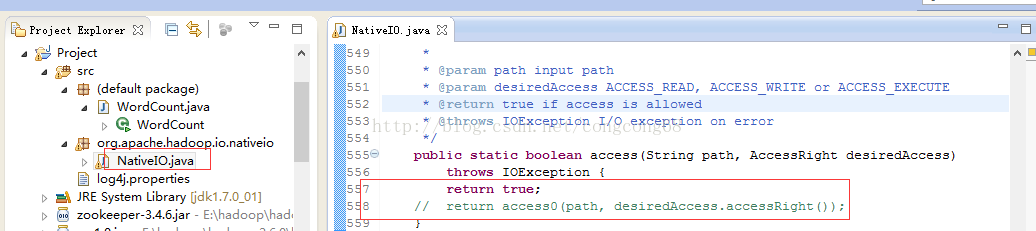
2 log4j:WARN No appenders could be found for logger (org.apache.hadoop.metrics2.lib.MutableMetricsFactory).
log4j:WARN Please initialize the log4j system properly.
log4j:WARN No appenders could be found for logger (org.apache.hadoop.metrics2.lib.MutableMetricsFactory).

log4j:WARN Please initialize the log4j system properly.

log4j:WARN See http://logging.apache.org/log4j/1.2/faq.html#noconfig for more info.

Exception in thread "main" org.apache.hadoop.mapred.FileAlreadyExistsException: Output directory hdfs://ssmaster:9000/output already exists

    at org.apache.hadoop.mapreduce.lib.output.FileOutputFormat.checkOutputSpecs(FileOutputFormat.java:)

    at org.apache.hadoop.mapreduce.JobSubmitter.checkSpecs(JobSubmitter.java:)

    at org.apache.hadoop.mapreduce.JobSubmitter.submitJobInternal(JobSubmitter.java:)

    at org.apache.hadoop.mapreduce.Job$.run(Job.java:)

    at org.apache.hadoop.mapreduce.Job$.run(Job.java:)

    at java.security.AccessController.doPrivileged(Native Method)

    at javax.security.auth.Subject.doAs(Subject.java:)

    at org.apache.hadoop.security.UserGroupInformation.doAs(UserGroupInformation.java:)

    at org.apache.hadoop.mapreduce.Job.submit(Job.java:)

    at org.apache.hadoop.mapreduce.Job.waitForCompletion(Job.java:)

    at mp.filetest.WordCount2.main(WordCount2.java:)
执行错误日志
原因: log4j.properties文件没有
解决: 照步骤做 4.2
3 Failed to locate the winutils binary in the hadoop binary path
java.io.IOException: Could not locate executable null\bin\winutils.exe in the
-- ::, WARN  [main] util.NativeCodeLoader (NativeCodeLoader.java:<clinit>()) - Unable to load native-hadoop library for your platform... using builtin-java classes where applicable

-- ::, ERROR [main] util.Shell (Shell.java:getWinUtilsPath()) - Failed to locate the winutils binary in the hadoop binary path

java.io.IOException: Could not locate executable null\bin\winutils.exe in the Hadoop binaries.

    at org.apache.hadoop.util.Shell.getQualifiedBinPath(Shell.java:)

    at org.apache.hadoop.util.Shell.getWinUtilsPath(Shell.java:)

    at org.apache.hadoop.util.Shell.<clinit>(Shell.java:)

    at org.apache.hadoop.util.StringUtils.<clinit>(StringUtils.java:)

    at org.apache.hadoop.security.Groups.parseStaticMapping(Groups.java:)

    at org.apache.hadoop.security.Groups.<init>(Groups.java:)

    at org.apache.hadoop.security.Groups.<init>(Groups.java:)

    at org.apache.hadoop.security.Groups.getUserToGroupsMappingService(Groups.java:)
原因:hadoop 2.6 windows插件包没配置好
解决:安装步骤3.2中配置
Z 总结:
加油,干得好。
后续:
照着参考里面的程序,跑一下,测试直接跑程序能否成功 done
有空弄明白 log4j.properties配置中各个参数含义
将Hadoop源码包导入项目中,以便跟踪调试
C 参考:
c.1 安装: Win7+Eclipse+Hadoop2.6.4开发环境搭建
c.2 安装: Hadoop学习笔记(4)-Linux ubuntu 下 Eclipse下搭建Hadoop2.6.4开发环境
c.3 错误处理:关于使用Hadoop MR的Eclipse插件开发时遇到Permission denied问题的解决办法
c.4 错误处理:解决Exception: org.apache.hadoop.io.nativeio.NativeIO$Windows.access0(Ljava/lang/String;I)Z 等一系列问题
[b0008] Windows 7 下 hadoop 2.6.4 eclipse 本地开发调试配置的更多相关文章
- Win10环境下Hadoop(单节点伪分布式)的安装与配置--bug(yarn的8088端口打不开+)
一.本文思路 [1].配置java环境–JDK12(Hadoop的底层实现语言是java,hadoop运行需要JDK环境) [2].安装Hadoop 1.解压hadop 2.配置hadoop环境变量 ...
- 64 位win 7或windows 8下的visual studio不能连接Oracle数据库调试网站的问题
在64 位win 7或windows 8系统下,visual studio直接F5运行网站调试,你会发现不能连接Oracle数据库,会报一个“ORA-06413: Connection not ope ...
- Windows环境下 Hadoop Error: JAVA_HOME is incorrectly set. 问题
最近尝试在windows开发MR程序并且提交Job,在解压缩好Hadoop,配置好环境变量后, 打开cmd 输入hadoop version 的时候出现以下错误: Error: JAVA_HOME i ...
- [转载]Windows环境下 Hadoop Error: JAVA_HOME is incorrectly set. 问题
最近尝试在windows开发MR程序并且提交Job,在解压缩好hadoop,配置好环境变量后, 打开cmd 输入hadoop version 的时候出现以下错误: Error: JAVA_HOME i ...
- 在windows环境下基于sublime text3的node.js开发环境搭建
首先安装sublime text3,百度一堆,自己找吧.理论上sublime text2应该也可以.我只能说一句:这个软件实在是太强悍了. 跨平台,丰富的插件体系,加上插件基本上就是一个强悍的ide了 ...
- Windows环境下安装pip,方便你的开发
1.在以下地址下载最新的PIP安装文件:http://pypi.python.org/pypi/pip#downloads 2.解压安装 3.下载Windows的easy installer,然后安装 ...
- windows系统下安装 node.js (node.js安装及环境配置)
node.js简介 Node.js 是一个基于 Chrome V8 引擎的 JavaScript 运行环境. Node.js 使用了一个事件驱动.非阻塞式 I/O 的模型,使其轻量又高效. Node. ...
- Python开发:Windows下Python+Eclipse+Pydev开发环境配置
一.配置前的准备: 1.安装jdk: 下载地址: https://www.oracle.com/technetwork/java/javase/downloads/index.html 2.安装Ecl ...
- Windows 系统下设置Nodejs NPM全局路径和环境变量配置
在nodejs的安装目录中找到node_modules\npm\.npmrc文件 修改如下即可: prefix = D:\tool\nodejs\node_globalcache = D:\tool\ ...
随机推荐
- maven仓库之第二篇
1. 什么是maven? 它是一个软件开发的管理工具,主要管理的工作是:依赖管理,项目构建. 2. 使用maven的好处? 能够集中管理jar包,提供一键构建. 3. maven的安装及配置 配置:M ...
- System.InvalidOperationException:This.NpgsqlTransaction has completed;it is no longer usable. at Npgsql.NpgsqlTransaction.CheckCompleted() in ...
关于报此异常,原因是事务不能循环提交,一个方法中事务只能提交一次. System.InvalidOperationException:This.NpgsqlTransaction has comple ...
- SAP 销售订单交货对成本中心记账
销售订单发货不计入主营业务成本,而是直接接入费用科目,与成本中心挂钩的业务经常发生.不少公司只是简单地处理交货,计入主营业务成本,然后财务再手工将成本归结到相关的成本中心.其实SAP系统是支持销售订单 ...
- bayaim_mysql5.6下table_open_cache参数
bayaim_mysql5.6下table_open_cache参数_2017年12月26日10:51:58 原创 作者:bayaim 时间:2017-12-26 10:57:17 1 0删除编辑 ( ...
- skip-broken to work around the problem rpm -Va --nofiles --nodigest
清除yum缓存 yum clean all 重新安装,见结尾[root@localhost ~]# yum install libstdc++.so.6Loaded plugins: fastestm ...
- MySql 表结构修改、约束条件、表关系
表结构修改(alter) 查看表的结构:desc 表名; 修改表名:alter table 表名 rename to 新表名; 修改字段名:alter table 表名 change 旧字段名 新字段 ...
- CUDA 编程相关;tensorflow GPU 编程;关键知识点记录;CUDA 编译过程;NVCC
本文章主要是记录,cuda 编程过程中遇到的相关概念,名字解释和问题:主要是是用来备忘: cuda PTX :并行线程执行(Parallel Thread eXecution,PTX)代码是编译后的G ...
- Educational Codeforces Round 71 (Rated for Div. 2)
传送门 A.There Are Two Types Of Burgers 签到. B.Square Filling 签到 C.Gas Pipeline 每个位置只有"高.低"两种状 ...
- python之大作业
一.题目要求 获得网页中A-Z所有名字并且爬取名字详情页中的信息,如姓名,性别,,说明等,并存放到csv中(网址:http://www.thinkbabynames.com/start/0/A) 现在 ...
- 《Spring Cloud微服务 入门 实战与进阶》
很少在周末发文,还是由于昨晚刚收到实体书,还是耐不住性子马上发文了. 一年前,耗时半年多的时间,写出了我的第一本书<Spring Cloud微服务-全栈技术与案例解析>. 时至今日,一年的 ...