
angular cli http请求封装+拦截器配置+ 接口配置文件
内容:接口配置文件、http请求封装 、拦截器验证登录
1、接口配置文件
app.api.ts
import { Component, OnInit } from '@angular/core';

/**

 * 接口配置文件

 * baseurl

 * urlList

 */

export class apiList implements OnInit {

  baseurl: any = '';

  urlList: any = {};

  constructor() {

    this.baseurl = 'http://127.0.0.1';

    this.urlList =  {

      'login': {

        path: '/login',

        params: {

          username: '',

          password: ''

        }

      },

      'getUser': {

        path: '/getUser',

        params: {

          id: ''

        }

      }

    }

  }

  ngOnInit() {}

}
上面模拟定义了两个接口
2、http请求封装
app.service.ts
import { Component, Injectable } from '@angular/core';

import { HttpClient, HttpParams } from '@angular/common/http';

import {apiList} from './app.api';  // 引入api配置文件

@Component({

  providers:[apiList]

})

@Injectable()

export class selfHttp {

  public restServer;

  public http;

  status = {

    '': '请求超时,请检查网络是否断开或者链接是否正确',

    "": "错误的请求。由于语法错误,该请求无法完成。",

    "": "未经授权。服务器拒绝响应。",

    "": "已禁止。服务器拒绝响应。",

    "": "未找到。无法找到请求的位置。",

    "": "方法不被允许。使用该位置不支持的请求方法进行了请求。",

    "": "不可接受。服务器只生成客户端不接受的响应。",

    "": "需要代理身份验证。客户端必须先使用代理对自身进行身份验证。",

    "": "请求超时。等待请求的服务器超时。",

    "": "冲突。由于请求中的冲突,无法完成该请求。",

    "": "过期。请求页不再可用。",

    "": "长度必需。未定义“内容长度”。",

    "": "前提条件不满足。请求中给定的前提条件由服务器评估为 false。",

    "": "请求实体太大。服务器不会接受请求,因为请求实体太大。",

    "": "请求 URI 太长。服务器不会接受该请求,因为 URL 太长。",

    "": "不支持的媒体类型。服务器不会接受该请求,因为媒体类型不受支持。",

    "": "HTTP 状态代码 {0}",

    "": "内部服务器错误。",

    "": "未实现。服务器不识别该请求方法,或者服务器没有能力完成请求。",

    "": "服务不可用。服务器当前不可用(过载或故障)。"

  };

  constructor(Http: HttpClient, public api: apiList) {

    console.log(this.api.baseurl);

    this.http = Http;

    this.restServer = this.api.baseurl;

  }

  public get(url, params?: Object, cb?: Function) {

    this.msg(url);

    let httpParams = new HttpParams();

    const vm = this;

    if (params) {

      for (const key in params) {

        if (params[key] === false || params[key]) {

          httpParams = httpParams.set(key, params[key]);

        }

      }

    }

    vm.http.get(vm.restServer + url, { params: httpParams })

      .subscribe(data => {

        cb(data);

      },(err)=>{

        console.log(this.status[err.status]);

      });

  }

  public post(url, data?: Object, cb?: Function, options?: Object) {

    this.msg(url);

    const vm = this;

    vm.http.post(vm.restServer + url, data, options)

      .subscribe(res => {

        cb(res);

      }, (err) => {

        console.log(err);

        console.log(this.status[err.status]);

       }, () => {

         //...请求完成

       }

      );

  }

  public put(url, data?: Object, cb?: Function, options?: Object) {

    this.msg(url);

    const vm = this;

    vm.http.put(vm.restServer + url, data, options)

      .subscribe(res => {

        cb(res);

      },(err)=>{

        console.log(this.status[err.status]);

      });

  }

  public delete(url, params?: Object, cb?: Function) {

    this.msg(url);

    let httpParams = new HttpParams();

    const vm = this;

    if (params) {

      for (const key in params) {

        if (params[key]) {

          httpParams = httpParams.set(key, params[key]);

        }

      }

    }

    vm.http.delete(vm.restServer + url, { params: httpParams })

      .subscribe(data => {

        cb(data);

      },(err)=>{

        console.log(this.status[err.status]);

      });

  }

  public msg(url) {

    console.log('/*')

    console.log(' **开始请求',url)

    console.log(' */')

  }

}
上面定义了几个请求的函数,已经提示信息的函数。
app.module.ts注入
import {apiList} from './common/app.api';

.

.

..

providers: [httpInterceptorProviders, apiList],
example.ts
import { Component, OnInit } from '@angular/core';

import { HttpHeaders } from '@angular/common/http';

import { selfHttp } from 'src/app/common/app.service';

import {apiList} from '../common/app.api';  // 引入

@Component({

  selector: 'app-article',

  templateUrl: './article.component.html',

  styleUrls: ['./article.component.css'],

  providers:[selfHttp, apiList]

})

export class ArticleComponent implements OnInit {

  httpOptions = {

    headers: new HttpHeaders({

      'Content-Type': 'application/json',

      'Authorization': 'my-auth-token'

    })

  };

  data: any;

  constructor(public http: selfHttp, public api: apiList) {

    console.log(this.api);

  }

  ngOnInit() {

    this.http.post(this.api.urlList.login.path, {username: , password:, other:}, res => {

      console.log('结果', res);

    }, this.httpOptions);

  }

}
然后访问的话就会
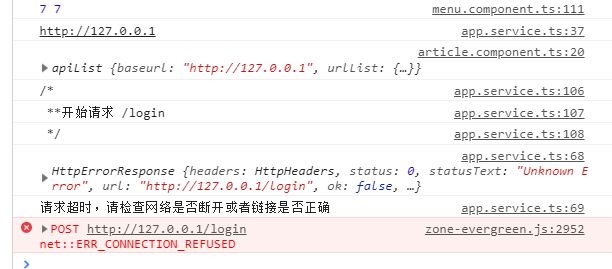
2、拦截器
app.myintercept.ts
/**

 * 拦截器验证token

 */

import { Injectable } from '@angular/core';

import {HttpInterceptor, HttpHandler, HttpRequest, HttpEvent,} from '@angular/common/http';

import { Router } from '@angular/router';

import { Observable,  } from 'rxjs';

import {apiList} from './app.api'

@Injectable()

export class InterceptorService implements HttpInterceptor {

    constructor( public router: Router,  public api: apiList) {

        // localStorage.setItem('access_token', 'xxxxxxxxxxxxx')

    };

    intercept(req: HttpRequest<any>, next: HttpHandler): Observable<HttpEvent<any>> {

        let authReq: any;

        // 实现第一次不拦截的方式:1. 指定接口不拦截  2. 判断本地localStorage

        let loginUrl = this.api.baseurl + this.api.urlList['login']['path'];

        if (req.url !== loginUrl) {

            if (localStorage.getItem('access_token')) {

                // console.log(2);

                const token = localStorage.getItem('access_token');

                authReq = req.clone({ setHeaders: { token } });

                return next.handle(authReq);

            } else {

                // 未登录  ==  access_token

                this.router.navigate(['/login']);

            }

        }

        authReq = req.clone({ setHeaders: {} });

        return next.handle(authReq);

    }

}
上面请求会验证是否有token,没有就跳转到登录页面。
定义拦截器收集文件

http-intercepts/index.ts
/**

 * 拦截器 收集

 * barrel

 */

import { HTTP_INTERCEPTORS } from '@angular/common/http';

import { InterceptorService } from '../app.myIntercept';

export const httpInterceptorProviders = [

    { provide: HTTP_INTERCEPTORS, useClass: InterceptorService, multi: true },

];
app.module.ts注入
import {httpInterceptorProviders} from 'src/app/common/http-interceptors/index'

.

.

.

.

providers: [httpInterceptorProviders, apiList],
现在如果进入页面请求,没有带token的话就会自动跳转到登录页面。
github: https://github.com/ft1107949255/BackSystem
angular cli http请求封装+拦截器配置+ 接口配置文件的更多相关文章
- Vue-admin工作整理(十六):Ajax-axios进行请求封装+拦截器
典型的工具类封装,增加拦截起来做相应的处理 user.js: import axios from './index' export const getUserInfo = ({ userId }) = ...
- 【转】AngularJs HTTP请求响应拦截器
任何时候,如果我们想要为请求添加全局功能,例如身份认证.错误处理等,在请求发送给服务器之前或服务器返回时对其进行拦截,是比较好的实现手段. angularJs通过拦截器提供了一个从全局层面进行处理的途 ...
- Struts2 拦截器配置以及实现
@(Java ThirdParty)[Struts|Interceptor] Struts2 拦截器配置以及实现 Struts2的拦截器应用于Action,可以在执行Action的方法之前,之后或者两 ...
- Spring 拦截器配置
Spring interceptor拦截器配置 Spring mvc的拦截器是通过handlerinterceptor来实现的 实现方式: 1.自定义一个类实现Spring的handlerinterc ...
- Struts2拦截器配置
1. 理解拦截器 1.1. 什么是拦截器: 拦截器,在AOP(Aspect-Oriented Programming)中用于在某个方法或字段被访问之前,进行拦截然后在之前或之后加入某些操作.拦截是AO ...
- Struts2-整理笔记(五)拦截器、拦截器配置
拦截器(Interceptor) 拦截器是Struts2最强大的特性之一,它是一种可以让用户在Action执行之前和Result执行之后进行一些功能处理的机制. 拦截器的优点 简化了Action的实现 ...
- SpringBoot整合Mybatis完整详细版二:注册、登录、拦截器配置
接着上个章节来,上章节搭建好框架,并且测试也在页面取到数据.接下来实现web端,实现前后端交互,在前台进行注册登录以及后端拦截器配置.实现简单的未登录拦截跳转到登录页面 上一节传送门:SpringBo ...
- Springboot中SpringMvc拦截器配置与应用(实战)
一.什么是拦截器,及其作用 拦截器(Interceptor): 用于在某个方法被访问之前进行拦截,然后在方法执行之前或之后加入某些操作,其实就是AOP的一种实现策略.它通过动态拦截Action调用的对 ...
- 转载 - Struts2拦截器配置
出处:http://blog.csdn.net/axin66ok/article/details/7321430 目录(?)[-] 理解拦截器 1 什么是拦截器 2 拦截器的实现原理 拦截器的配置 使 ...
随机推荐
- 使用Python为中秋节绘制一块美味的月饼
每逢佳节- 对于在外的游子,每逢佳节倍思亲.而对于996ICU的苦逼程序猿们,最期待的莫过于各种节假日能把自己丢在床上好好休息一下了.这几天各公司都陆续开始发中秋礼品了.朋友圈各种秀高颜值的月饼,所以 ...
- java.security.NoSuchProviderException: no such provider: BC 的问题解决
第一种方式 1.修改以下两个文件 %JDK_Home%\jre\lib\security\java.security %JRE_Home%\jre\lib\security\java.security ...
- js-编程练习题-输出年月日以及练习字符串分割,检索,转换整数(int)
这是在慕课网上看到的编程题-如有侵权,请联系本人删除. 当然:题是他们的,做题是我的...嘿嘿嘿 某班的成绩出来了,现在老师要把班级的成绩打印出来. 效果图: XXXX年XX月X日 星期X--班级总分 ...
- python 拷贝文件夹下的文件 到 另一个文件夹
import os,shutil def copy_search_file(srcDir, desDir): ls = os.listdir(srcDir) for line in ls: fileP ...
- mac os 搭建私有DNS 之 dnsmasq
- MAC OS 创建私有DNS 仓库 - 使用场景 实际工作中有一些私有的域名需要修改host才可以访问 例如:localhost.dev develop-test.dev - 安装方法 brew ...
- luogu P2640 神秘磁石
题目描述 1.若给他一个一维坐标系,那么他的磁力一定要在素数坐标的位置上才能发挥的最大(不管位置坐标的大小,只要是素数那么磁力就一样大) 2.若两个磁石相距为k,那么磁石间的破坏力将会达到当前磁力的峰 ...
- openstack Mitaka实验环境安装(centos系统)
本博文仅供参考,具体一定详细学习官方安装文档. 一 准备工作 二安装过程 1 安装NTP服务 2 安装openstack包 3 SQL数据库安装 4 安装消息队列 message queue 5 Me ...
- 正则replace 回调函数里接收的参数是什么?
前言 我们都知道 replace 在做替换处理方面会很常用,通常也是第一个会想到的方法.replace 第一个参数可以传入 string 或 RegExp,第二个参数可以传入 string 或 一个回 ...
- 基于 HTML5 + WebGL 的 3D 太阳系系统
前言 近年来随着引力波的发现.黑洞照片的拍摄.火星上存在水的证据发现等科学上的突破,以及文学影视作品中诸如<三体>.<流浪地球>.<星际穿越>等的传播普及,宇宙空间 ...
- Java读取Properties文件 Java加载配置Properties文件
static{ Properties prop = new Properties(); prop.load(Thread.currentThread().getContextClassLoader() ...