
Android五大布局详解——TableLayout(表格布局)
TableLayout
前面所学的LinearLayout和RelativeLayout两大布局已经完全适用于各种开发条件下,其他的布局仅供参考学习,毕竟知识就是力量,以后的开发过程中万一遇到也能游刃有余。
表格布局允许我们使用表格的方式来排列组件,就是行与列的方式。
简单描述
1.直接往TableLayout中添加组件,这个组件占满一行。
<?xml version="1.0" encoding="utf-8"?>

<TableLayout xmlns:android="http://schemas.android.com/apk/res/android"

    android:layout_width="match_parent"

    android:layout_height="match_parent"

    >

    <Button

        android:id="@+id/button"

        android:layout_width="wrap_content"

        android:layout_height="wrap_content"

        android:text="TableLayout"

        />

</TableLayout>
效果如图:

2.如果想要一行上有多个组件,就要添加一个TableRow的容器。
<?xml version="1.0" encoding="utf-8"?>

<TableLayout xmlns:android="http://schemas.android.com/apk/res/android"

    android:layout_width="match_parent"

    android:layout_height="match_parent"

    >

    <TableRow>

        <Button

            android:id="@+id/button_1"

            android:layout_width="wrap_content"

            android:layout_height="wrap_content"

            android:text="1"

            />

        <Button

            android:id="@+id/button_2"

            android:layout_width="wrap_content"

            android:layout_height="wrap_content"

            android:text="2"

            />

        <Button

            android:id="@+id/button_3"

            android:layout_width="wrap_content"

            android:layout_height="wrap_content"

            android:text="3"

            />

        <Button

            android:id="@+id/button_4"

            android:layout_width="wrap_content"

            android:layout_height="wrap_content"

            android:text="4"

            />

    </TableRow>

</TableLayout>
效果如图:
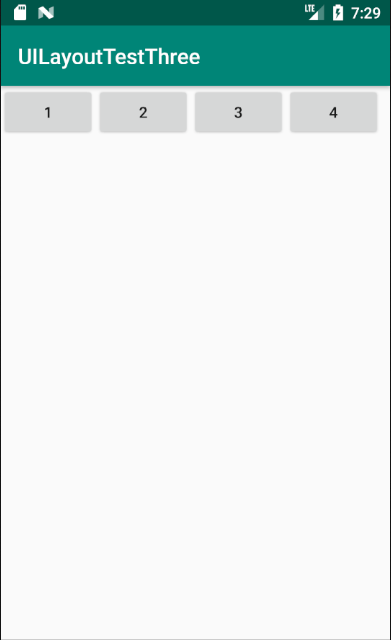
3.tablerow中的组件个数就决定了该行有多少列。
常用属性
1.android:collapseColumns:设置需要被隐藏的列的序号。比如android:collapseColumns="0,2",隐藏第一列和第三列。
<?xml version="1.0" encoding="utf-8"?>

<TableLayout xmlns:android="http://schemas.android.com/apk/res/android"

    android:layout_width="match_parent"

    android:layout_height="match_parent"

    android:collapseColumns="0,2"

    >

    <TableRow>

        <Button

            android:id="@+id/button_1"

            android:layout_width="wrap_content"

            android:layout_height="wrap_content"

            android:text="1"

            />

        <Button

            android:id="@+id/button_2"

            android:layout_width="wrap_content"

            android:layout_height="wrap_content"

            android:text="2"

            />

        <Button

            android:id="@+id/button_3"

            android:layout_width="wrap_content"

            android:layout_height="wrap_content"

            android:text="3"

            />

        <Button

            android:id="@+id/button_4"

            android:layout_width="wrap_content"

            android:layout_height="wrap_content"

            android:text="4"

            />

        <Button

            android:id="@+id/button_5"

            android:layout_width="wrap_content"

            android:layout_height="wrap_content"

            android:text="5"

            />

        <Button

            android:id="@+id/button_6"

            android:layout_width="wrap_content"

            android:layout_height="wrap_content"

            android:text="6"

            />

    </TableRow>

</TableLayout>
效果如图:

2.android:stretchColumns:设置允许被拉伸的列的列序号。比如android:stretchColumns="1",设置第二列可拉伸列,让该列填满这一行所有的剩余空间。
<?xml version="1.0" encoding="utf-8"?>

<TableLayout xmlns:android="http://schemas.android.com/apk/res/android"

    android:layout_width="match_parent"

    android:layout_height="match_parent"

    android:stretchColumns="1"

    >

    <TableRow>

        <Button

            android:id="@+id/button_1"

            android:layout_width="wrap_content"

            android:layout_height="wrap_content"

            android:text="1"

            />

        <Button

            android:id="@+id/button_2"

            android:layout_width="wrap_content"

            android:layout_height="wrap_content"

            android:text="2"

            />

        <Button

            android:id="@+id/button_3"

            android:layout_width="wrap_content"

            android:layout_height="wrap_content"

            android:text="3"

            />

    </TableRow>

</TableLayout>
效果如图:

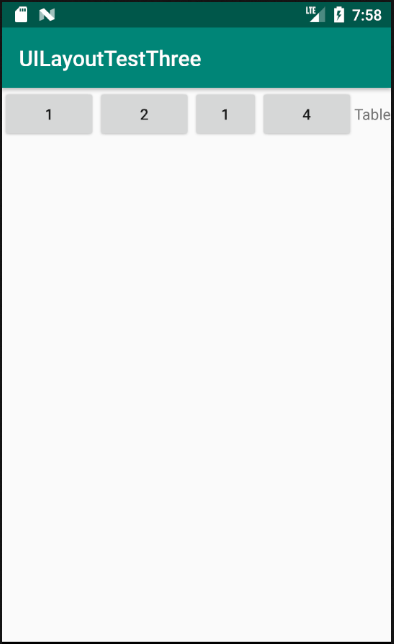
3.android:shrinkColumns:设置允许被收缩的列的列序号
<?xml version="1.0" encoding="utf-8"?>

<TableLayout xmlns:android="http://schemas.android.com/apk/res/android"

    android:layout_width="match_parent"

    android:layout_height="match_parent"

    android:shrinkColumns="2"

    >

    <TableRow>

        <Button

            android:id="@+id/button_1"

            android:layout_width="wrap_content"

            android:layout_height="wrap_content"

            android:text="1"

            />

        <Button

            android:id="@+id/button_2"

            android:layout_width="wrap_content"

            android:layout_height="wrap_content"

            android:text="2"

            />

        <Button

            android:id="@+id/button_3"

            android:layout_width="wrap_content"

            android:layout_height="wrap_content"

            android:text="1"

            />

        <Button

            android:id="@+id/button_4"

            android:layout_width="wrap_content"

            android:layout_height="wrap_content"

            android:text="4"

            />

        <TextView

            android:layout_width="wrap_content"

            android:layout_height="wrap_content"

            android:text="Table" />

    </TableRow>

</TableLayout>
运行结果如图:
demo
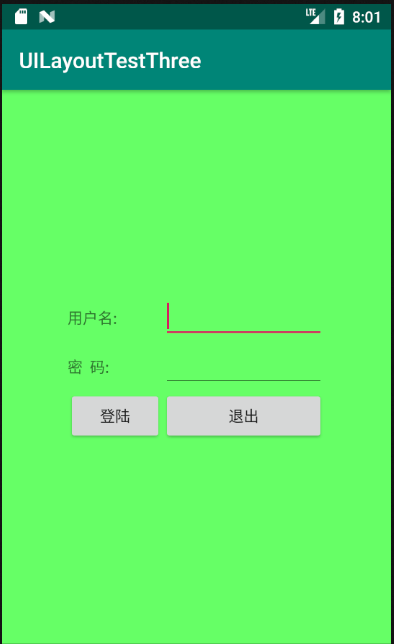
实现如图所示的界面
<?xml version="1.0" encoding="utf-8"?>

<TableLayout xmlns:android="http://schemas.android.com/apk/res/android"

    xmlns:tools="http://schemas.android.com/tools"

    android:id="@+id/TableLayout1"

    android:layout_width="match_parent"

    android:layout_height="match_parent"

    tools:context=".MainActivity"

    android:stretchColumns="0,3"

    android:gravity="center_vertical"

    android:background="#66FF66"

    >

    <TableRow>

        <TextView />

        <TextView

            android:layout_width="wrap_content"

            android:layout_height="wrap_content"

            android:text="用户名:"/>

        <EditText

            android:layout_width="wrap_content"

            android:layout_height="wrap_content"

            android:minWidth="150dp"/>

        <TextView />

    </TableRow>

    <TableRow>

        <TextView />

        <TextView

            android:layout_width="wrap_content"

            android:layout_height="wrap_content"

            android:text="密  码:"

            />

        <EditText

            android:layout_width="wrap_content"

            android:layout_height="wrap_content"

            android:minWidth="150dp"

            />

        <TextView />

    </TableRow>

    <TableRow>

        <TextView />

        <Button

            android:layout_width="wrap_content"

            android:layout_height="wrap_content"

            android:text="登陆"/>

        <Button

            android:layout_width="wrap_content"

            android:layout_height="wrap_content"

            android:text="退出"/>

        <TextView />

    </TableRow>

</TableLayout>
分析:
调用gravity属性,设置为center_vertical,让布局里面的组件在竖直方向上居中;将TableLayout中的第一和第四列设置为可拉伸;在每个TableRow中添加两个TextView,用于拉伸填满该行,这样可以让表格水平居中,android:stretchColumns="0,3" 设置为0和3,是为了让两边都充满,那么中间部分就可以居中了。
Android五大布局详解——TableLayout(表格布局)的更多相关文章
- Android 布局详解 -三表格布局(TableLayout)以及重要属性
TableLayout跟TableRow 是一组搭配应用的布局,TableLayout置底,TableRow在TableLayout的上方,而Button.TextView等控件就 ...
- Html5移动端页面自适应布局详解(阿里rem布局)
在移动设备上进行网页的重构或开发,首先得搞明白的就是移动设备上的viewport,通读网上的各种对于viewport的解释之后 大概viewport可以理解为三种 1.layout viewport ...
- Android 布局详解
Android 布局详解 1.重用布局 当一个布局文件被多处使用时,最好<include>标签来重用布局. 例如:workspace_screen.xml的布局文件,在另一个布局文件中被重 ...
- Grid 网格布局详解
Grid网格布局详解: Grid布局与Flex布局有着一定的相似性,Grid布局是将容器划分成行和列,产生单元格,可以看做是二维布局. 基本概念: 采用网格布局的区域,称为"容器" ...
- android:TableLayout表格布局详解
1.TableLayout简介2.TableLayout行列数的确定3.TableLayout可设置的属性详解4.一个包含4个TableLayout布局的实例及效果图一.Tablelayout简介 ...
- android:TableLayout表格布局详解
http://blog.csdn.net/justoneroad/article/details/6835915 这篇博文包括的内容:1.TableLayout简介2.TableLayout行列数的确 ...
- [置顶] Android系统五大布局详解Layout
我们知道Android系统应用程序一般是由多个Activity组成,而这些Activity以视图的形式展现在我们面前,视图都是由一个一个的组件构成的.组件就是我们常见的Button.TextEdit等 ...
- Android系统五大布局详解Layout
我们知道Android系统应用程序一般是由多个Activity组成,而这些Activity以视图的形式展现在我们面前, 视图都是由一个一个的组件构成的.组件就是我们常见的Button.TextEdit ...
- Android开发之详解五大布局
http://bbs.chinaunix.net/thread-3654213-1-1.html 为了适应各式各样的界面风格,Android系统提供了5种布局,这5种布局分别是: LinearLayo ...
随机推荐
- luogu P3572 [POI2014]PTA-Little Bird |单调队列
从1开始,跳到比当前矮的不消耗体力,否则消耗一点体力,每次询问有一个步伐限制,求每次最少耗费多少体力 #include<cstdio> #include<cstring> #i ...
- Spring Security OAuth2 Demo —— 隐式授权模式(Implicit)
本文可以转载,但请注明出处https://www.cnblogs.com/hellxz/p/oauth2_impilit_pattern.html 写在前面 在文章OAuth 2.0 概念及授权流程梳 ...
- CF579 - A Raisinng bacteria
You are a lover of bacteria. You want to raise some bacteria in a box. Initially, the box is empty. ...
- Docker系列-(2) 镜像制作与发布
上篇文章引入了Docker的基本原理和操作,本节文章主要介绍如何制作Docker镜像和发布. 镜像文件结构 Docker镜像的本质是一系列文件的集合,这些文件依次叠加,形成了最后的镜像文件,类似于下图 ...
- 测底稳定NIOS开发之一:将nios产生的编程文件转换成jic (连载)
将nios产生的编程文件转换成jic 前言: 基于某种原因,自从开始fpga开发和nios项目开发中,均为正常使用EDS IDE自带的flash programmer 进行成功的下载固化epcs程序. ...
- MySQL 数据查询小练习
作业 # 创建班级表 create table class ( cls_id int auto_increment primary key, cls_name varchar(10) not null ...
- Python的re模块,正则表达式书写方法
Python的re模块,正则表达式 #导入re模块 import re 1.match方法的使用: result = re.match(正则表达式,待匹配的字符串) 正则表达式写法: 第一部分: 字 ...
- LNMP-Nginx配置不记录静态文件、过期时间
用户访问web网站,通常日志文件会记录很多web站点上的一些静态文件信息,如果长期不处理,日志文件会越来越大,占用的系统资源也越大,此时就需要我们配置不记录静态文件和过期时间,减少日志文件记录过多不必 ...
- dockerfile-格式和使用
一.dockerfile格式 Dockerfile是一个包含用于组合映像的命令文本文档,可以使用在命令行中调用任何命令,Docker通过读取dockerfile中的指令自动生成映像.docker bu ...
- go中的关键字-reflect 反射
1. 什么是反射 Golang提供了一种机制,在编译时不知道类型的情况下,可更新变量.运行时查看值.调用方法以及直接对他们的布局进行操作的机制,称为反射. 2. 反射的使用 2.1 获取变量内部信息 ...