
Android五大布局详解——TableLayout(表格布局)
TableLayout
前面所学的LinearLayout和RelativeLayout两大布局已经完全适用于各种开发条件下,其他的布局仅供参考学习,毕竟知识就是力量,以后的开发过程中万一遇到也能游刃有余。
表格布局允许我们使用表格的方式来排列组件,就是行与列的方式。
简单描述
1.直接往TableLayout中添加组件,这个组件占满一行。
<?xml version="1.0" encoding="utf-8"?>

<TableLayout xmlns:android="http://schemas.android.com/apk/res/android"

    android:layout_width="match_parent"

    android:layout_height="match_parent"

    >

    <Button

        android:id="@+id/button"

        android:layout_width="wrap_content"

        android:layout_height="wrap_content"

        android:text="TableLayout"

        />

</TableLayout>
效果如图:

2.如果想要一行上有多个组件,就要添加一个TableRow的容器。
<?xml version="1.0" encoding="utf-8"?>

<TableLayout xmlns:android="http://schemas.android.com/apk/res/android"

    android:layout_width="match_parent"

    android:layout_height="match_parent"

    >

    <TableRow>

        <Button

            android:id="@+id/button_1"

            android:layout_width="wrap_content"

            android:layout_height="wrap_content"

            android:text="1"

            />

        <Button

            android:id="@+id/button_2"

            android:layout_width="wrap_content"

            android:layout_height="wrap_content"

            android:text="2"

            />

        <Button

            android:id="@+id/button_3"

            android:layout_width="wrap_content"

            android:layout_height="wrap_content"

            android:text="3"

            />

        <Button

            android:id="@+id/button_4"

            android:layout_width="wrap_content"

            android:layout_height="wrap_content"

            android:text="4"

            />

    </TableRow>

</TableLayout>
效果如图:
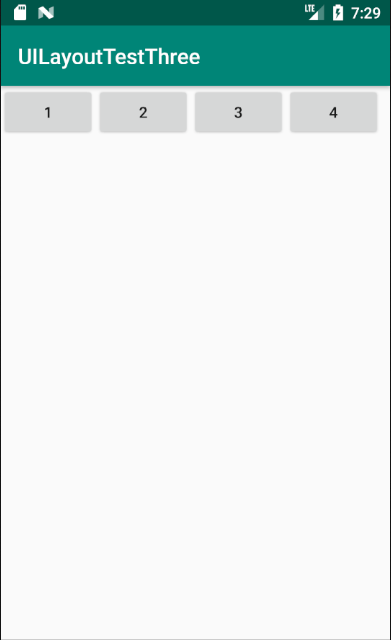
3.tablerow中的组件个数就决定了该行有多少列。
常用属性
1.android:collapseColumns:设置需要被隐藏的列的序号。比如android:collapseColumns="0,2",隐藏第一列和第三列。
<?xml version="1.0" encoding="utf-8"?>

<TableLayout xmlns:android="http://schemas.android.com/apk/res/android"

    android:layout_width="match_parent"

    android:layout_height="match_parent"

    android:collapseColumns="0,2"

    >

    <TableRow>

        <Button

            android:id="@+id/button_1"

            android:layout_width="wrap_content"

            android:layout_height="wrap_content"

            android:text="1"

            />

        <Button

            android:id="@+id/button_2"

            android:layout_width="wrap_content"

            android:layout_height="wrap_content"

            android:text="2"

            />

        <Button

            android:id="@+id/button_3"

            android:layout_width="wrap_content"

            android:layout_height="wrap_content"

            android:text="3"

            />

        <Button

            android:id="@+id/button_4"

            android:layout_width="wrap_content"

            android:layout_height="wrap_content"

            android:text="4"

            />

        <Button

            android:id="@+id/button_5"

            android:layout_width="wrap_content"

            android:layout_height="wrap_content"

            android:text="5"

            />

        <Button

            android:id="@+id/button_6"

            android:layout_width="wrap_content"

            android:layout_height="wrap_content"

            android:text="6"

            />

    </TableRow>

</TableLayout>
效果如图:

2.android:stretchColumns:设置允许被拉伸的列的列序号。比如android:stretchColumns="1",设置第二列可拉伸列,让该列填满这一行所有的剩余空间。
<?xml version="1.0" encoding="utf-8"?>

<TableLayout xmlns:android="http://schemas.android.com/apk/res/android"

    android:layout_width="match_parent"

    android:layout_height="match_parent"

    android:stretchColumns="1"

    >

    <TableRow>

        <Button

            android:id="@+id/button_1"

            android:layout_width="wrap_content"

            android:layout_height="wrap_content"

            android:text="1"

            />

        <Button

            android:id="@+id/button_2"

            android:layout_width="wrap_content"

            android:layout_height="wrap_content"

            android:text="2"

            />

        <Button

            android:id="@+id/button_3"

            android:layout_width="wrap_content"

            android:layout_height="wrap_content"

            android:text="3"

            />

    </TableRow>

</TableLayout>
效果如图:

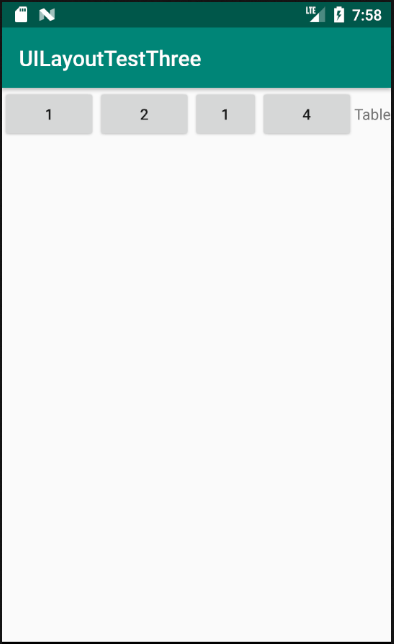
3.android:shrinkColumns:设置允许被收缩的列的列序号
<?xml version="1.0" encoding="utf-8"?>

<TableLayout xmlns:android="http://schemas.android.com/apk/res/android"

    android:layout_width="match_parent"

    android:layout_height="match_parent"

    android:shrinkColumns="2"

    >

    <TableRow>

        <Button

            android:id="@+id/button_1"

            android:layout_width="wrap_content"

            android:layout_height="wrap_content"

            android:text="1"

            />

        <Button

            android:id="@+id/button_2"

            android:layout_width="wrap_content"

            android:layout_height="wrap_content"

            android:text="2"

            />

        <Button

            android:id="@+id/button_3"

            android:layout_width="wrap_content"

            android:layout_height="wrap_content"

            android:text="1"

            />

        <Button

            android:id="@+id/button_4"

            android:layout_width="wrap_content"

            android:layout_height="wrap_content"

            android:text="4"

            />

        <TextView

            android:layout_width="wrap_content"

            android:layout_height="wrap_content"

            android:text="Table" />

    </TableRow>

</TableLayout>
运行结果如图:
demo
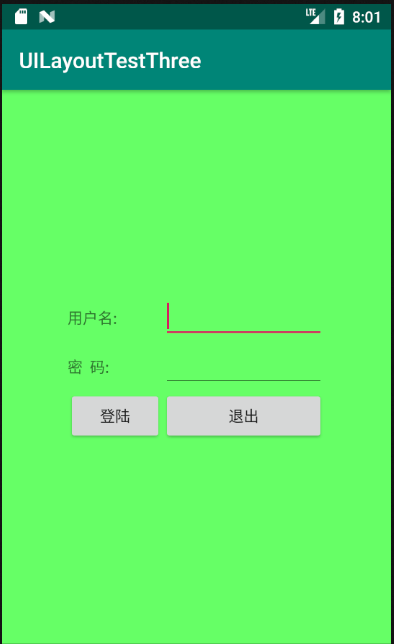
实现如图所示的界面
<?xml version="1.0" encoding="utf-8"?>

<TableLayout xmlns:android="http://schemas.android.com/apk/res/android"

    xmlns:tools="http://schemas.android.com/tools"

    android:id="@+id/TableLayout1"

    android:layout_width="match_parent"

    android:layout_height="match_parent"

    tools:context=".MainActivity"

    android:stretchColumns="0,3"

    android:gravity="center_vertical"

    android:background="#66FF66"

    >

    <TableRow>

        <TextView />

        <TextView

            android:layout_width="wrap_content"

            android:layout_height="wrap_content"

            android:text="用户名:"/>

        <EditText

            android:layout_width="wrap_content"

            android:layout_height="wrap_content"

            android:minWidth="150dp"/>

        <TextView />

    </TableRow>

    <TableRow>

        <TextView />

        <TextView

            android:layout_width="wrap_content"

            android:layout_height="wrap_content"

            android:text="密  码:"

            />

        <EditText

            android:layout_width="wrap_content"

            android:layout_height="wrap_content"

            android:minWidth="150dp"

            />

        <TextView />

    </TableRow>

    <TableRow>

        <TextView />

        <Button

            android:layout_width="wrap_content"

            android:layout_height="wrap_content"

            android:text="登陆"/>

        <Button

            android:layout_width="wrap_content"

            android:layout_height="wrap_content"

            android:text="退出"/>

        <TextView />

    </TableRow>

</TableLayout>
分析:
调用gravity属性,设置为center_vertical,让布局里面的组件在竖直方向上居中;将TableLayout中的第一和第四列设置为可拉伸;在每个TableRow中添加两个TextView,用于拉伸填满该行,这样可以让表格水平居中,android:stretchColumns="0,3" 设置为0和3,是为了让两边都充满,那么中间部分就可以居中了。
Android五大布局详解——TableLayout(表格布局)的更多相关文章
- Android 布局详解 -三表格布局(TableLayout)以及重要属性
TableLayout跟TableRow 是一组搭配应用的布局,TableLayout置底,TableRow在TableLayout的上方,而Button.TextView等控件就 ...
- Html5移动端页面自适应布局详解(阿里rem布局)
在移动设备上进行网页的重构或开发,首先得搞明白的就是移动设备上的viewport,通读网上的各种对于viewport的解释之后 大概viewport可以理解为三种 1.layout viewport ...
- Android 布局详解
Android 布局详解 1.重用布局 当一个布局文件被多处使用时,最好<include>标签来重用布局. 例如:workspace_screen.xml的布局文件,在另一个布局文件中被重 ...
- Grid 网格布局详解
Grid网格布局详解: Grid布局与Flex布局有着一定的相似性,Grid布局是将容器划分成行和列,产生单元格,可以看做是二维布局. 基本概念: 采用网格布局的区域,称为"容器" ...
- android:TableLayout表格布局详解
1.TableLayout简介2.TableLayout行列数的确定3.TableLayout可设置的属性详解4.一个包含4个TableLayout布局的实例及效果图一.Tablelayout简介 ...
- android:TableLayout表格布局详解
http://blog.csdn.net/justoneroad/article/details/6835915 这篇博文包括的内容:1.TableLayout简介2.TableLayout行列数的确 ...
- [置顶] Android系统五大布局详解Layout
我们知道Android系统应用程序一般是由多个Activity组成,而这些Activity以视图的形式展现在我们面前,视图都是由一个一个的组件构成的.组件就是我们常见的Button.TextEdit等 ...
- Android系统五大布局详解Layout
我们知道Android系统应用程序一般是由多个Activity组成,而这些Activity以视图的形式展现在我们面前, 视图都是由一个一个的组件构成的.组件就是我们常见的Button.TextEdit ...
- Android开发之详解五大布局
http://bbs.chinaunix.net/thread-3654213-1-1.html 为了适应各式各样的界面风格,Android系统提供了5种布局,这5种布局分别是: LinearLayo ...
随机推荐
- luogu P3111 [USACO14DEC]牛慢跑Cow Jog_Sliver |贪心+模拟
有N (1 <= N <= 100,000)头奶牛在一个单人的超长跑道上慢跑,每头牛的起点位置都不同.由于是单人跑道,所有他们之间不能相互超越.当一头速度快的奶牛追上另外一头奶牛的时候,他 ...
- MyBatis_多表关联查询_resultMap_单个对象_N+1方式实现
mapper 层 提供 StudentMapper 和 ClazzMapper, StudentMapper 查询所有学生信息, ClazzMapper 根据编号查询班级信息. 再 StudentMa ...
- Python学习笔记—自动化部署【新手必学】
前言本文的文字及图片来源于网络,仅供学习.交流使用,不具有任何商业用途,版权归原作者所有,如有问题请及时联系我们以作处理.作者:唯恋殊雨 目录 pexpect fabric pexpect P ...
- 使用iCamera 测试mt9d111 200w高分辨率摄像头小结
使用iCamera 测试mt9d111 200w高分辨率摄像头小结 先看下产品特性 安装效果 根据前面博客的经验,该摄像头,默认配置即有输出,分辨率为800*600,yuv 于是可以写 如果使用默认配 ...
- Day 04 作业
目录 作业 简述Python的五大数据类型的作用.定义方式.使用方法: 数字类型 字符串类型 列表 字典 布尔型 一行代码实现下述代码实现的功能: 写出两种交换x.y值的方式: 一行代码取出nick的 ...
- [从今天开始修炼数据结构]图的最短路径 —— 迪杰斯特拉算法和弗洛伊德算法的详解与Java实现
在网图和非网图中,最短路径的含义不同.非网图中边上没有权值,所谓的最短路径,其实就是两顶点之间经过的边数最少的路径:而对于网图来说,最短路径,是指两顶点之间经过的边上权值之和最少的路径,我们称路径上第 ...
- Python爬虫基础——re模块的提取和匹配
re是Python的一个第三方库. 为了能更直观的看出re的效果,我们先新建一个HTML网页文件(可直接复制): index.html <!DOCTYPE html> <html l ...
- hdu 2586 How far away?(LCA模板题+离线tarjan算法)
How far away ? Time Limit: 2000/1000 MS (Java/Others) Memory Limit: 32768/32768 K (Java/Others)To ...
- ES6 promise 使用示例
new Promise(function (resolve, reject) { $.ajax({ type : 'post', data : formData, dataType : 'json', ...
- 《Java基础知识》一维,二维数组的申明和使用
为什么要使用数组: 因为不使用数组计算多个变量的时候太繁琐,不利于数据的处理. -------- 数组也是一个变量,是存储一组相同类型的变量 声明一个变量就是在内存中划出一块合适的空间 声明一个数 ...