
ubuntu安装elasticsearch及head插件
1.安装elasticsearch,参考http://www.cnblogs.com/hanyinglong/p/5409003.html就可以了
简单描述下:
mkdir -p /usr/local/kencery/elasticsearch
groupadd elasticsearch
useradd -d /usr/local/kencery/elasticsearch -g elasticsearch -p elasticsearch elasticsearch
然后将tar包解压到elasticsearch目录下就可以了,我下载的版本是elasticsearch-6.2.4.tar.gz
启动时直接在bin目录下执行:./elasticsearch
有两个问题注意下,一是不要用root用户执行,二是有可能会遇到错误:
[]: max virtual memory areas vm.max_map_count [] is too low, increase to at least []
参考https://blog.csdn.net/jiankunking/article/details/65448030修改下/etc/sysctl.conf,记得改下elasticsearch.yml中的network.host以及端口配置,重启后就可以访问了:http://192.168.141.13:9200/
name    "4tlNeHN"
cluster_name    "elasticsearch"
cluster_uuid    "BYwLfhswS8O2y-WYXAKUsA"
version
number    "6.2.4"
build_hash    "ccec39f"
build_date    "2018-04-12T20:37:28.497551Z"
build_snapshot    false
lucene_version    "7.2.1"
minimum_wire_compatibility_version    "5.6.0"
minimum_index_compatibility_version    "5.0.0"
tagline    "You Know, for Search"
2.安装elasticsearch-head,这里敲下黑板,真的很麻烦,如果不了解,花费大半天时间也是很正常的,这里就直接说下最后成功的办法
2.1 elasticsearch 5.x之后不支持直接plugin安装head插件,而是将head作为一个独立的服务安装的,首先需要安装依赖的node,npm,grunt,参考https://blog.csdn.net/hard_boy/article/details/79565068,我是以root执行的,稍微有点不同:
apt-get install npm
apt-get install nodejs-legacy
npm install -g grunt
npm install -g grunt-cli
下载elasticsearch-head,我解压到目录/usr/local/kencery/elasticsearch-head,将目录用户改为elasticsearch
2.2 然后修改配置
2.2.1 修改head的连接地址 elasticsearch-head/_site/app.js
this.base_uri = this.config.base_uri || this.prefs.get("app-base_uri") || "http://localhost:9200";
将localhost改为自己的ip
2.2.2 修改服务器的监听地址elasticsearch-head/Gruntfile.js
connect: {
               server: {
                   options: {
                       port: ,
                       base: '.',
                       keepalive: true
                   }
               }
           }
options中添加 hostname: '*'
2.2.3 修改elasticseach的配置文件elasticsearch.yml, 修改对应的ip以及跨域的设置,添加:
http.cors.enabled: true
http.cors.allow-origin: "*"
2.3 在elasticsearch-head下运行: grunt server
2.3.1 但是会出现错误提示(当时命令敲的npm start,应该是一样的):
root@ubuntu:/usr/local/kencery/elasticsearch-head# npm start

> elasticsearch- start /usr/local/kencery/elasticsearch-head
> grunt server

grunt-cli: The grunt command line interface (v1.2.0)

Fatal error: Unable to find local grunt.

If you're seeing this message, grunt hasn't been installed locally to
your project. For more information about installing and configuring grunt,
please see the Getting Started guide:

http://gruntjs.com/getting-started

npm ERR! Linux --generic
npm ERR! argv "/usr/bin/nodejs" "/usr/bin/npm" "start"
npm ERR! node v4.2.6
npm ERR! npm  v3.5.2
npm ERR! code ELIFECYCLE
npm ERR! elasticsearch- start: `grunt server`
npm ERR! Exit status
npm ERR!
npm ERR! Failed at the elasticsearch- start script 'grunt server'.
npm ERR! Make sure you have the latest version of node.js and npm installed.
npm ERR! If you do, this is most likely a problem with the elasticsearch-head package,
npm ERR! not with npm itself.
npm ERR! Tell the author that this fails on your system:
npm ERR!     grunt server
npm ERR! You can get information on how to open an issue for this project with:
npm ERR!     npm bugs elasticsearch-head
npm ERR! Or if that isn't available, you can get their info via:
npm ERR!     npm owner ls elasticsearch-head
npm ERR! There is likely additional logging output above.

npm ERR! Please include the following file with any support request:
npm ERR!     /usr/local/kencery/elasticsearch-head/npm-debug.log
看提示大概有提到版本不是最新的问题,所以就抱着试一试的心态去升级npm以及node
参考https://www.cnblogs.com/ae6623/p/6242423.html
npm cache clean -f
npm install -g n
n stable
npm install npm@latest -g
再查看下版本,会看到
elasticsearch@ubuntu:~$ node -v
v10.4.0
elasticsearch@ubuntu:~$ npm -v
2.3.2 但是运行grunt server依然报错:
grunt hasn't been installed locally to your project
参考https://segmentfault.com/q/1010000004172559/a-1020000004193932,执行:
npm install grunt --save-dev
2.3.3 再次运行,依然报错:
elasticsearch@ubuntu:/usr/local/kencery/elasticsearch-head$ grunt server
>> Local Npm module "grunt-contrib-clean" not found. Is it installed?
>> Local Npm module "grunt-contrib-concat" not found. Is it installed?
>> Local Npm module "grunt-contrib-watch" not found. Is it installed?
>> Local Npm module "grunt-contrib-connect" not found. Is it installed?
>> Local Npm module "grunt-contrib-copy" not found. Is it installed?
>> Local Npm module "grunt-contrib-jasmine" not found. Is it installed?
Warning: Task "connect:server" not found. Use --force to continue.
然后我干脆把有关grunt的都装了一遍最新的:
npm install grunt@latest
npm install grunt-cli@latest
npm install grunt-contrib-copy@latest
npm install grunt-contrib-concat@latest
npm install grunt-contrib-uglify@latest
npm install grunt-contrib-clean@latest
npm install grunt-contrib-watch@latest
npm install grunt-contrib-connect@latest
npm install grunt-contrib-jasmine@latest
2.3.4 最后grunt server终于可以启动了:
elasticsearch@ubuntu:/usr/local/kencery/elasticsearch-head$ grunt server
(node:) ExperimentalWarning: The http2 module is an experimental API.
Running "connect:server" (connect) task
Waiting forever...
Started connect web server on http://localhost:9100
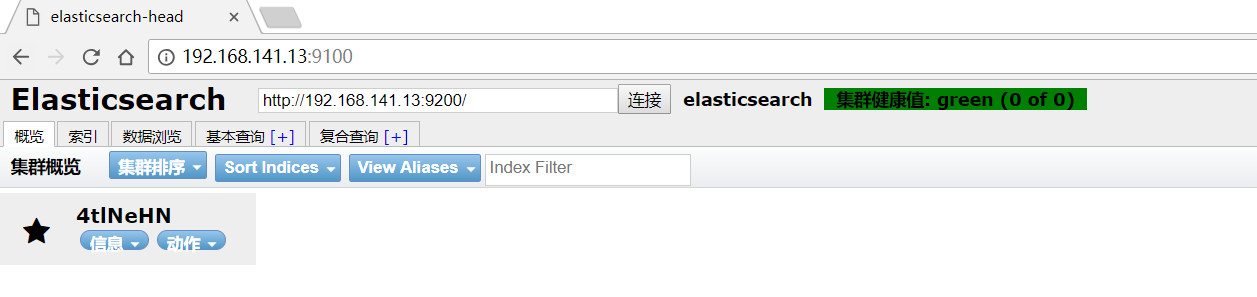
可以看到elasticsearch服务的端口是9200,head插件服务的端口是9100,我们访问head然后head再访问的elasticsearch。
可以新建索引试一下:

状态yellow还是有一些问题,并不影响使用,对于ES也只是刚接触,并没多少了解,后续使用过程中遇到问题再作纪录。
参考文章:
1.http://www.cnblogs.com/hanyinglong/p/5409003.html
2.https://blog.csdn.net/jiankunking/article/details/65448030
3.https://blog.csdn.net/hard_boy/article/details/79565068
4.https://www.cnblogs.com/ae6623/p/6242423.html
5.https://segmentfault.com/q/1010000004172559/a-1020000004193932
ubuntu安装elasticsearch及head插件的更多相关文章
- docker安装elasticsearch及head插件
使用 Docker 拉取ElasticSearch镜像 docker pull elasticsearch:7.0.0 查看镜像 ID docker images 运行 docker run -e E ...
- docker安装elasticsearch和head插件
使用 Docker 拉取ElasticSearch镜像 docker pull elasticsearch:7.0.0 查看镜像 ID docker images 运行 docker run -e E ...
- ubuntu安装elasticSearch及插件
原文地址:http://www.niu12.com/article/18 前提 1.安装好Java1.8以上环境并配置好JAVA_HOME(elasticsearch运行环境) 2.node环境6.5 ...
- ubuntu 安装elasticsearch
elasticsearch简介 环境准备 elasticsearch:7.0.0 kibana :7.0.0 安装 1.新创建普通用户 elasticsearch不能用root账号 ...
- 安装Elasticsearch中Head插件并使用
基础环境 Elasticsearch集群搭建请参考前一篇文章http://www.cnblogs.com/aubin/p/8012840.html 系统 节点名 IP 软件版本 CentOS7.3 e ...
- windows下安装ElasticSearch的Head插件
es5以上版本安装head需要安装node和grunt(之前的直接用plugin命令即可安装) (一)从地址:https://nodejs.org/en/download/ 下载相应系统的msi,双击 ...
- windows安装elasticsearch和elasticsearch-head插件
1.去官网下载最新软件 选择zip包,https://www.elastic.co/downloads/elasticsearch 2.下载node 必须 > 6.0已上 3.解压elastic ...
- Windows10安装Elasticsearch IK分词插件
安装插件 cmd切换到Elasticsearch安装目录下 C:\Users\Administrator>D: D:\>cd D:\Program Files\Elastic\Elasti ...
- win7安装Elasticsearch和Elasticsearch-Head插件
1.环境搭建 1)Java环境搭建可以参考相关的资料,这里不做详细介绍 2)nodejs环境搭建 到官方网站下载相应的zip包:https://nodejs.org/dist/v8.9.1/node- ...
随机推荐
- <java程序大集合>
1.以下关于开发java程序的描述错误的是(). A.开发java程序的步骤包括:编写源程序,编译,运行 B.编写的java源程序文件使用.java作为扩展名 C:java源文件经编译后,生成后娺为. ...
- EF Core的Code First 基础
一.创建实体类与映射类 通过NuGet引用Microsoft.EntityFrameworkCore 1.创建实体类 Code First可以通过为实体类字段添加相应特性,来创建对应的字段类型等,举例 ...
- 自定义SWT控件二之自定义多选下拉框
2.自定义下拉多选框 package com.view.control.select; import java.util.ArrayList; import java.util.HashMap; im ...
- windows server 2008 R2中建立ftp站点
在windows server 2008 R2中建立ftp站点,要遵循以下步骤: (1) 开启IIS中的ftp服务: (2) 在IIS中建立ftp站点. 具体过程如下: (1) 开启IIS中的ftp服 ...
- 湫湫系列故事——设计风景线 HDU - 4514
题目链接:https://vjudge.net/problem/HDU-4514 题意:判断没有没有环,如果没有环,通俗的讲就是找出一条最长的路,相当于一笔画能画多长. 思路:dfs判环. 最后就是没 ...
- weblogic 内存溢出解决 java.lang.OutOfMemoryError: PermGen space
解决办法: 1.在idea中,运行时给weblogic server中 VM options 配置增加内存的参数:-server -XX:PermSize=1024m -XX:MaxPermSize= ...
- java中线程安全,线程死锁,线程通信快速入门
一:多线程安全问题 ###1 引入 /* * 多线程并发访问同一个数据资源 * 3个线程,对一个票资源,出售 */ public class ThreadDemo { public static vo ...
- spark 入门教程合集
看到一篇不错的 spark 入门教程的合集,在此记录一下 http://www.cnblogs.com/shishanyuan/p/4699644.html
- hadoop安装解决之道
# 壹.故障现象 ```xml Microsoft Windows [版本 10.0.18362.239] (c) 2019 Microsoft Corporation.保留所有权利. C:\User ...
- Viper-Go一站式配置管理工具
什么是Viper Viper是一个方便Go语言应用程序处理配置信息的库.它可以处理多种格式的配置.它支持的特性: 设置默认值 从JSON.TOML.YAML.HCL和Java properties文件 ...