
NLP(二十) 利用词向量实现高维词在二维空间的可视化
原文链接:http://www.one2know.cn/nlp20/
- 准备
Alice in Wonderland数据集可用于单词抽取,结合稠密网络可实现其单词的可视化,这与编码器-解码器架构类似。 - 代码
from __future__ import print_function

from sklearn.model_selection import train_test_split

from sklearn.preprocessing import OneHotEncoder

import matplotlib.pyplot as plt

import nltk

import numpy as np

import pandas as pd

import random

from nltk.corpus import stopwords

from nltk.stem import WordNetLemmatizer

import string

from nltk import pos_tag

from nltk.stem import PorterStemmer

def preprocessing(text):

    text2 = " ".join("".join([" " if ch in string.punctuation else ch for ch in text]).split())

    tokens = [word for sent in nltk.sent_tokenize(text2) for word in nltk.word_tokenize(sent)]

    tokens = [word.lower() for word in tokens]

    stopwds = stopwords.words('english')

    tokens = [token for token in tokens if token not in stopwds]

    tokens = [word for word in tokens if len(word)>=3]

    stemmer = PorterStemmer()

    tokens = [stemmer.stem(word) for word in tokens]

    tagged_corpus = pos_tag(tokens)

    Noun_tags = ['NN','NNP','NNPS','NNS']

    Verb_tags = ['VB','VBD','VBG','VBN','VBP','VBZ']

    lemmatizer = WordNetLemmatizer()

    def prat_lemmatize(token,tag):

        if tag in Noun_tags:

            return lemmatizer.lemmatize(token,'n')

        elif tag in Verb_tags:

            return lemmatizer.lemmatize(token,'v')

        else:

            return lemmatizer.lemmatize(token,'n')

    pre_proc_text =  " ".join([prat_lemmatize(token,tag) for token,tag in tagged_corpus])

    return pre_proc_text

lines = []

fin = open("alice_in_wonderland.txt", "r") # fin = open("alice_in_wonderland.txt", "rb")

for line in fin:

    # line = line.strip().decode("ascii", "ignore").encode("utf-8")

    if len(line) == 0:

        continue

    lines.append(preprocessing(line))

fin.close()

import collections

counter = collections.Counter()

for line in lines:

    for word in nltk.word_tokenize(line):

        counter[word.lower()]+=1

word2idx = {w:(i+1) for i,(w,_) in enumerate(counter.most_common())}

idx2word = {v:k for k,v in word2idx.items()}

xs = []

ys = []

for line in lines:

    embedding = [word2idx[w.lower()] for w in nltk.word_tokenize(line)]

    triples = list(nltk.trigrams(embedding))

    w_lefts = [x[0] for x in triples]

    w_centers = [x[1] for x in triples]

    w_rights = [x[2] for x in triples]

    xs.extend(w_centers)

    ys.extend(w_lefts)

    xs.extend(w_centers)

    ys.extend(w_rights)

print (len(word2idx))

vocab_size = len(word2idx)+1

ohe = OneHotEncoder(n_values=vocab_size)

X = ohe.fit_transform(np.array(xs).reshape(-1, 1)).todense()

Y = ohe.fit_transform(np.array(ys).reshape(-1, 1)).todense()

Xtrain, Xtest, Ytrain, Ytest,xstr,xsts = train_test_split(X, Y,xs, test_size=0.3,random_state=42)

print(Xtrain.shape, Xtest.shape, Ytrain.shape, Ytest.shape)

from keras.layers import Input,Dense,Dropout

from keras.models import Model

np.random.seed(1)

BATCH_SIZE = 128

NUM_EPOCHS = 1

input_layer = Input(shape = (Xtrain.shape[1],),name="input")

first_layer = Dense(300,activation='relu',name = "first")(input_layer)

first_dropout = Dropout(0.5,name="firstdout")(first_layer)

second_layer = Dense(2,activation='relu',name="second")(first_dropout)

third_layer = Dense(300,activation='relu',name="third")(second_layer)

third_dropout = Dropout(0.5,name="thirdout")(third_layer)

fourth_layer = Dense(Ytrain.shape[1],activation='softmax',name = "fourth")(third_dropout)

history = Model(input_layer,fourth_layer)

history.compile(optimizer = "rmsprop",loss="categorical_crossentropy",metrics=["accuracy"])

history.fit(Xtrain, Ytrain, batch_size=BATCH_SIZE,epochs=NUM_EPOCHS, verbose=1,validation_split = 0.2)

# Extracting Encoder section of the Model for prediction of latent variables

encoder = Model(history.input,history.get_layer("second").output)

# Predicting latent variables with extracted Encoder model

reduced_X = encoder.predict(Xtest)

final_pdframe = pd.DataFrame(reduced_X)

final_pdframe.columns = ["xaxis","yaxis"]

final_pdframe["word_indx"] = xsts

final_pdframe["word"] = final_pdframe["word_indx"].map(idx2word)

rows = random.sample(list(final_pdframe.index), 100)

vis_df = final_pdframe.loc[rows]

labels = list(vis_df["word"])

xvals = list(vis_df["xaxis"])

yvals = list(vis_df["yaxis"])

plt.figure(figsize=(10, 10))

for i, label in enumerate(labels):

    x = xvals[i]

    y = yvals[i]

    plt.scatter(x, y)

    plt.annotate(label,xy=(x, y),xytext=(5, 2),textcoords='offset points',ha='right',va='bottom')

plt.xlabel("Dimension 1")

plt.ylabel("Dimension 2")

plt.show()
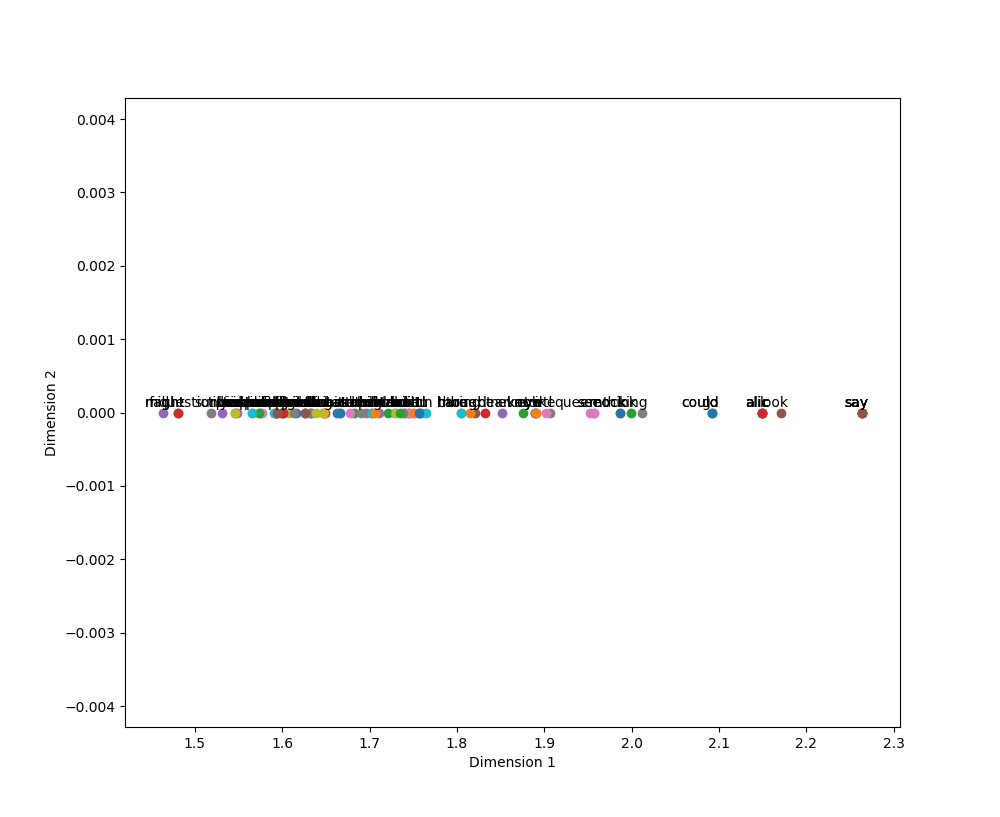
输出:不是二维的,为什么!!!看了两天不明白!
NLP(二十) 利用词向量实现高维词在二维空间的可视化的更多相关文章
- NLP︱词向量经验总结(功能作用、高维可视化、R语言实现、大规模语料、延伸拓展)
R语言由于效率问题,实现自然语言处理的分析会受到一定的影响,如何提高效率以及提升词向量的精度是在当前软件环境下,比较需要解决的问题. 笔者认为还存在的问题有: 1.如何在R语言环境下,大规模语料提高运 ...
- NLP︱高级词向量表达(二)——FastText(简述、学习笔记)
FastText是Facebook开发的一款快速文本分类器,提供简单而高效的文本分类和表征学习的方法,不过这个项目其实是有两部分组成的,一部分是这篇文章介绍的 fastText 文本分类(paper: ...
- Deep Learning In NLP 神经网络与词向量
0. 词向量是什么 自然语言理解的问题要转化为机器学习的问题,第一步肯定是要找一种方法把这些符号数学化. NLP 中最直观,也是到目前为止最常用的词表示方法是 One-hot Representati ...
- NLP教程(2) | GloVe及词向量的训练与评估
作者:韩信子@ShowMeAI 教程地址:http://www.showmeai.tech/tutorials/36 本文地址:http://www.showmeai.tech/article-det ...
- NLP之词向量
1.对词用独热编码进行表示的缺点 向量的维度会随着句子中词的类型的增大而增大,最后可能会造成维度灾难2.任意两个词之间都是孤立的,仅仅将词符号化,不包含任何语义信息,根本无法表示出在语义层面上词与词之 ...
- 文本情感分析(二):基于word2vec、glove和fasttext词向量的文本表示
上一篇博客用词袋模型,包括词频矩阵.Tf-Idf矩阵.LSA和n-gram构造文本特征,做了Kaggle上的电影评论情感分类题. 这篇博客还是关于文本特征工程的,用词嵌入的方法来构造文本特征,也就是用 ...
- NLP获取词向量的方法(Glove、n-gram、word2vec、fastText、ELMo 对比分析)
自然语言处理的第一步就是获取词向量,获取词向量的方法总体可以分为两种两种,一个是基于统计方法的,一种是基于语言模型的. 1 Glove - 基于统计方法 Glove是一个典型的基于统计的获取词向量的方 ...
- 词向量(one-hot/SVD/NNLM/Word2Vec/GloVe)
目录 词向量简介 1. 基于one-hot编码的词向量方法 2. 统计语言模型 3. 从分布式表征到SVD分解 3.1 分布式表征(Distribution) 3.2 奇异值分解(SVD) 3.3 基 ...
- 【paddle学习】词向量
http://spaces.ac.cn/archives/4122/ 关于词向量讲的很好 上边的形式表明,这是一个以2x6的one hot矩阵的为输入.中间层节点数为3的全连接神经网络层,但你看右 ...
随机推荐
- python 爬取豆瓣电影评论,并进行词云展示及出现的问题解决办法
本文旨在提供爬取豆瓣电影<我不是药神>评论和词云展示的代码样例 1.分析URL 2.爬取前10页评论 3.进行词云展示 1.分析URL 我不是药神 短评 第一页url https://mo ...
- Ubuntu+VMWare 学习中遇到的问题
1. 虚拟机中Ubuntu分辨率 / 设置分辨率出现Unknown Display VMware中Ubuntu 出现Unknown Display问题解决 1.1 命令无法保存分辨率设置: xrand ...
- Struts完成用户新增操作
点击新增客户出现该页面并完成前后台交互 代码逻辑分析: jsp 页面部分代码 <TABLE id=table_1 style="DISPLAY: none" cellSpac ...
- 手动编译PHP开发环境
目录 手动编译PHP开发环境 问题复盘 部署环境及配置 目标环境 安装部署环境开始 首先安装PHP 安装mysql 安装nginx 手动编译PHP开发环境 这是一篇来自深夜加班的手稿 问题复盘 你有没 ...
- 3PHP如何用PDO的连接方式方式导出mysql数据
首先连接mysql,具体看上一篇 接下来在try{}中加入以下代码 $query="select * from 你的数据表名称" //$query的内容给个SQL ...
- BFS DFS模板
转载于https://blog.csdn.net/alalalalalqp/article/details/9155419 BFS模板: #include<cstdio> #include ...
- C#使用代理IP发送请求
https://www.cnblogs.com/benbenfishfish/p/5830149.html 获取可代理的IP https://www.cnblogs.com/ShalenChe/p ...
- HTML发展历程
HTML是超文本标记语言的缩写,不同于C或JAVA等编程语言,HTML由标签组成.通过标签可以在网页中插入文字.图片.链接.音频.视频等元素,进而描述网页.和Windows一样,随着技术的发展,HTM ...
- 【java提高】(17)---Java 位运算符
Java 位运算符 &.|.^.~.<<.>> 以前学过有关java的运算符,不过开发了这么久也很少用过这个.现在由于开发需要,所以现在再来回顾整理下有关java的运算 ...
- 三层架构(MVC)实现简单登陆注册验证(含验证码)
前言在我的上一篇微博里我已经提出了登陆的方法,当时我采取的是纯servlet方式,因为当时刚接触到servlet,正好网上没有这方面的全面讲解,所以我就发飙了.不过在现实生产中我们大多采用的三层架构. ...