
filebench - File system and storage benchmark - 模拟生成各种各样的应用的负载 - A Model Based File System Workload Generator
兼容posix 接口的文件系统中我们不仅要测试 posix 接口是否兼容。随机读,随机写,顺序读,顺序写等读写模式下的性能。我们还要测试在不同工作负载条件下的文件系统的性能的情况;Filebench 是一款文件系统性能的自动化测试工具,它通过快速模拟真实应用服务器的负载来测试文件系统的性能。它不仅可以仿真文件系统微操作(如 copyfiles, createfiles, randomread, randomwrite ),而且可以仿真复杂的应用程序(如 varmail, fileserver, oltp, dss, webserver, webproxy )。 Filebench 比较适合用来测试文件服务器性能,但同时也是一款负载自动生成工具,也可用于文件系统的性能。所以filebench 是非常好用文件系统负载生成工具;

官方网站:
https://github.com/filebench/filebench
https://github.com/filebench/filebench/wiki
https://sourceforge.net/projects/filebench/
https://github.com/filebench/filebench/releases/download/1.5-alpha3/filebench-1.5-alpha3.zip
官网介绍:
Filebench is a file system and storage benchmark that can generate a large

variety of workloads. Unlike typical benchmarks it is extremely flexible and

allows to specify application's I/O behavior using its extensive Workload Model

Language (WML). Users can either describe desired workloads from scratch or use

(with or without modifications) workload personalities shipped with Filebench

(e.g., mail-, web-, file-, and database-server workloads). Filebench is equally

good for micro- and macro-benchmarking, quick to setup, and relatively easy to

use.
安装:
Make sure bison and lex are available in your system. Then, run traditional configure, make, and sudo make install commands.
fedora 上 使用 yum 工具,即可以安装稳定版;
安装最新版需要下载 flex 和 bison 等依赖;
yum install flex bison
$cd /usr/local/filebench-1.5-alpha3 (源文件所在的路径)

$./configure

$make

$sudo make install (注意:一定要安装 filebench 需要在/usr/local/share/filebench 下生成一些文件)
使用:
filebench 需要根据 WML 负载模型语言来进行描述负载,然后来进行执行。所以我们可以使用已经预定好的负载,也可以自己定义自己的负载模型,然后运行。具体如何进行定义负载大家可以参考如下链接:https://github.com/filebench/filebench/wiki/Workload-model-language ,也可以参考wiki 进行整理了解 filebench工具的使用;filebench在wml文件中指定测试的位置,我们可一个在.f文件中指定所要测试文件系统的挂载点;

命令:filebench -f /usr/local/share/filebench/workloads/fileserver.f
测试结果:

当然,我们不建议直接使用 原有的文件进行测试。我们可以在原有的wml文件基础上根据我们自己的使用场景来定义负载。
We do *not* recommend to directly use workload files from workloads/ or

/usr/local/share/filebench/workloads/ directories. The main reason is that these

workloads *are not properly sized* (e.g., in terms of the dataset sizes) to a

particular system. For instance, the initial dataset size of the webserver

workload is only slightly larger than 16MiB, which is typically not the size you

want to test the system containing multiple gigabytes of RAM with.
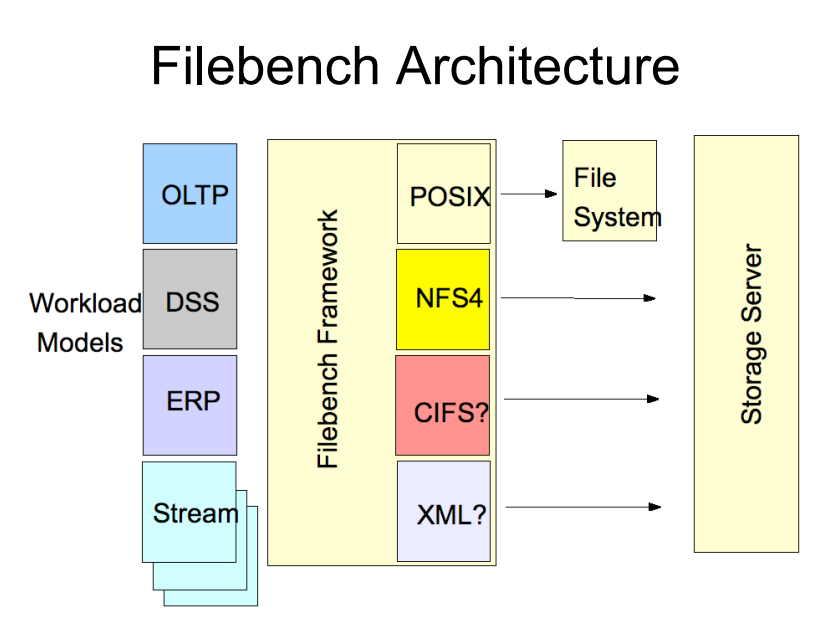
FileBench 架构:
其他参考文档:
https://www.usenix.org/legacy/event/lsf08/tech/FS_shepler.pdf
https://www.usenix.org/legacy/event/lsf08/tech/FS_shepler.pdf
https://blog.csdn.net/microsoft2014/article/details/60145433
https://www.jianshu.com/p/4fcd6b8a4236
保持更新,更多关于文件系统相关的知识,请关注 cnblogs.com/xuyaowen
filebench - File system and storage benchmark - 模拟生成各种各样的应用的负载 - A Model Based File System Workload Generator的更多相关文章
- OpenGL 用三角形模拟生成球面
在看OpenGL红皮书,看到生成球体这节,讲了很多,总感觉不如自己动手写一些代码来的实在,用OpenGL中三角形模拟球形生成.主要要点,模型视图变换,多边形表面环绕一致性,矩阵堆栈.先贴上代码. 虽然 ...
- linux平台模拟生成CAN设备
前言 使用socketCan的过程中有时候没有can接口设备,但是需要测试一下can接口程序是否有问题, 此时需要系统模拟生成can设备,本文介绍linux平台模拟生成CAN设备的方法. 实现步骤 1 ...
- linux 模拟生成 CAN 设备
/************************************************************************************** * linux 模拟生成 ...
- pandas 模拟生成数据集的快速方法
快速生成一个DataFrame的方法: #模拟生成数据集的方法 import pandas as pd import numpy as np boolean=[True,False] gender=[ ...
- 编译器错误消息: CS0012: 类型“System.Object”在未被引用的程序集中定义。必须添加对程序集“System.Runtime, Version=4.0.0.0, Culture=neutral, PublicKeyToken=b03f5f7f11d50a3a”的引用。
编译器错误消息: CS0012: 类型“System.Object”在未被引用的程序集中定义.必须添加对程序集“System.Runtime, Version=4.0.0.0, Culture=neu ...
- 对于应用需要记录某个方法耗时的场景,必须使用clock_gettime传入CLOCK_MONOTONIC参数,该参数获得的是自系统开机起单调递增的纳秒级别精度时钟,相比gettimeofday精度提高不少,并且不受NTP等外部服务影响,能准确更准确来统计耗时(java中对应的是System.nanoTime),也就是说所有使用gettimeofday来统计耗时(java中是System.curre
对于应用需要记录某个方法耗时的场景,必须使用clock_gettime传入CLOCK_MONOTONIC参数,该参数获得的是自系统开机起单调递增的纳秒级别精度时钟,相比gettimeofday精度提高 ...
- 解决报错:类型“System.Object”在未被引用的程序集中定义。必须添加对程序集“System.Runtime, Version=4.0.0.0, Culture=neutral, PublicKeyToken=b03f5f7f11d50a3a”的引用
Razor视图引擎中,使用部分视图编译报错 类型“System.Object”在未被引用的程序集中定义.必须添加对程序集“System.Runtime, Version=4.0.0.0, Cultur ...
- mysqld_safe error: log-error set to '/data/log/mysqld.log', however file don't exists. Create writable for user 'mysql'.The server quit without updating PID file (/data/mysql/mysqld.pid)
[oot@cent65 bin]# service mysqld startStarting MySQL.2019-10-28T15:56:47.786960Z mysqld_safe error: ...
- 【RS】Deep Learning based Recommender System: A Survey and New Perspectives - 基于深度学习的推荐系统:调查与新视角
[论文标题]Deep Learning based Recommender System: A Survey and New Perspectives ( ACM Computing Surveys ...
随机推荐
- less 学习笔记
一.介绍 Less (Leaner Style Sheets 简洁的样式表) 是一门向后兼容的 CSS 预处理语言,它扩展了CSS 语言. less is more. 好处: 1.具有部分编程语言的功 ...
- sparql 查询语句快速入门
介绍 RDF is a directed, labeled graph data format for representing information in the Web. RDF is ofte ...
- Mysql字符串截取_获取指定字符串中的数据
前言:本人遇到一个需求,需要在MySql的字段中截取一段字符串中的特定字符,类似于正则表达式的截取,苦于没有合适的方法,百度之后终于找到一个合适的方法:substring_index('www.sql ...
- telerik reporting 在.net core api 使用
工具要求:telerik reporting R3 2019..net core 2.2 .vs2017 最新版 从官网下载下来的的telerik reporting 的.net core 例子是 ...
- (转)两种高效过滤敏感词算法--DFA算法和AC自动机算法
原文:https://blog.csdn.net/u013421629/article/details/83178970 一道bat面试题:快速替换10亿条标题中的5万个敏感词,有哪些解决思路? 有十 ...
- 关于 Python_你一定没读过的8个技巧
介绍 Python 功能和小技巧的文章网上有无数篇,比如变量解压缩,partial 偏函数,枚举可迭代对象... 但关于 Python 我们能说的还有很多.所以今天我将向大家展示一些我知道和有使用过的 ...
- SSM框架之SpringMVC(3)常用注解
SpringMVC(3)常用注解 1. RequestParam注解 1.作用:把请求中指定名称的参数传递给控制器中的形参赋值 2.属性: 1.value:请求参数的每次 2.required ...
- 《Python3 网络爬虫开发实战》学习资料
<Python3 网络爬虫开发实战> 学习资料 百度网盘:https://pan.baidu.com/s/1PisddjC9e60TXlCFMgVjrQ
- 二、VUE项目BaseCms系列文章:项目目录结构介绍
一. 目录结构截图 二. 目录结构说明 - documents 存放项目相关的文档文件 - api api 数据接口目录 - assets 资源文件目录 - components ...
- 【Linux命令】用户身份(useradd,groupadd,usermod,passwd,userdel)
目录 用户身份 useradd userdel usermod groupadd groupdel passwd chage 用户身份 在linux系统中和windows一样有用户之分.root用户为 ...