
Spring Boot (十二): Spring Boot 邮件服务
最早我们发邮件的时候是使用 JavaMail 来发送邮件,而在 Spring Boot 中, Spring Boot 帮我们将 JavaMail 封装好了,是可以直接拿来使用的。
1. 依赖文件 pom.xml
代码清单:spring-boot-mail/pom.xml
<dependencies>

    <dependency>

        <groupId>org.springframework.boot</groupId>

        <artifactId>spring-boot-starter-mail</artifactId>

    </dependency>

    <dependency>

        <groupId>org.springframework.boot</groupId>

        <artifactId>spring-boot-starter-thymeleaf</artifactId>

    </dependency>

    <dependency>

        <groupId>org.springframework.boot</groupId>

        <artifactId>spring-boot-starter-test</artifactId>

        <scope>test</scope>

    </dependency>

</dependencies>
- spring-boot-starter-thymeleaf 引入这个模版引擎是因为我们在发送邮件的时候,各种格式使用 HTML 的方式更容易实现,同样我们也可以使用 freeMark , Spring Boot 同样为我们提供了依赖包。
2. 配置文件 application.yml
代码清单:
server:

  port: 8080

spring:

  application:

    name: spring-boot-mail

  mail:

    host: smtp.qq.com

    username: 136736247

    password: xxxxxx

    default-encoding: UTF-8

    fromAddr: 136736247@qq.com

    nickName: inwsy
这里我使用 QQ 邮箱作为邮件的发送方,其中的 password 并不是我们的 QQ 密码,这个密码需要我们在 QQ 邮箱的设置里面自己申请的。如下图:
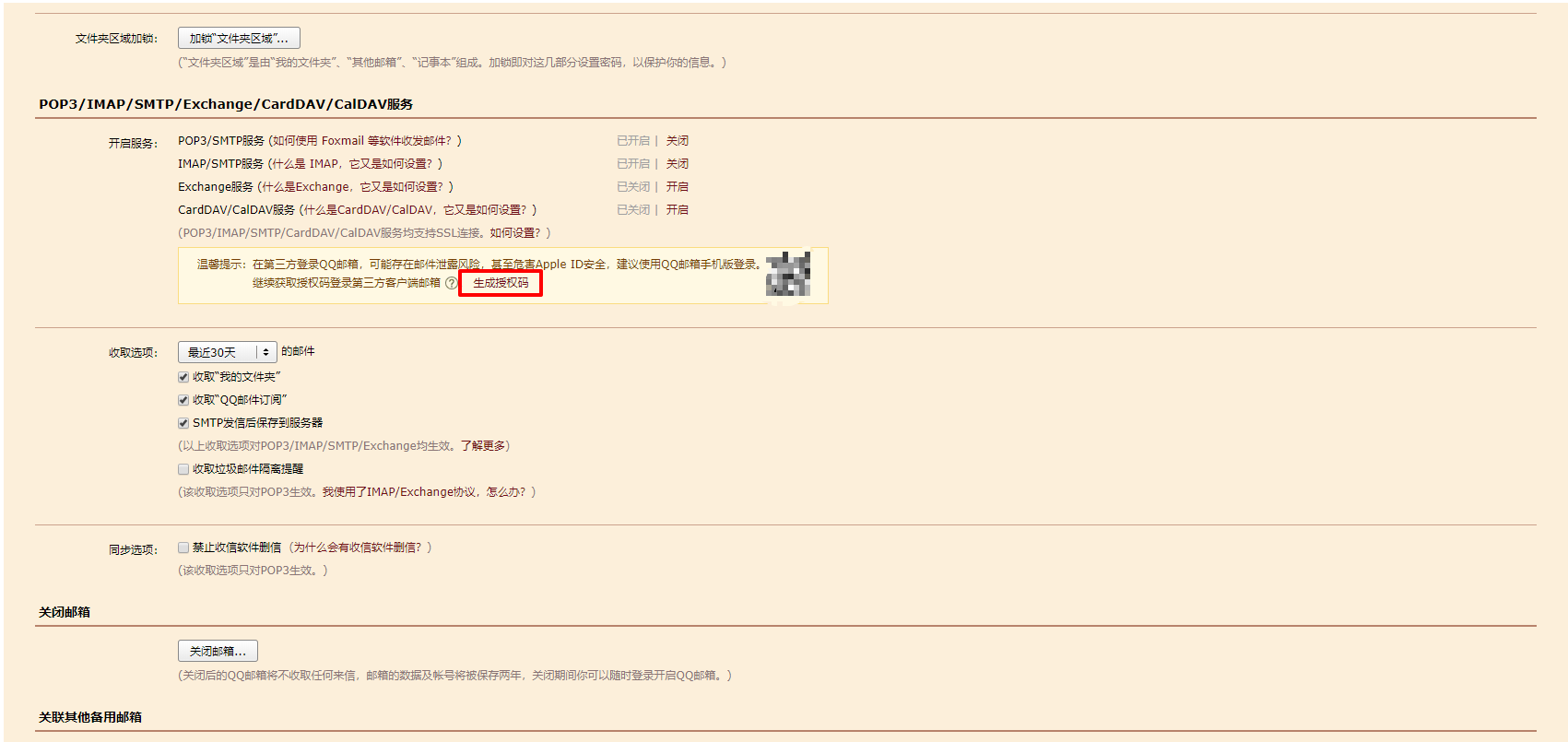
其中的 spring.mail.fromAddr 和 spring.mail.nickName 这两个配置是我自己配置的,并不是官方的配置,后续我会在代码中读这两个配置项。
3. 简易邮件发送
3.1 实现类
代码清单:spring-boot-mail/src/main/java/com/springboot/springbootmail/service/impl/MailServiceImpl.java
@Service

public class MailServiceImpl implements MailService {

    private final Logger logger = LoggerFactory.getLogger(this.getClass());

    @Autowired

    private JavaMailSender javaMailSender;

    @Value("${spring.mail.fromAddr}")

    private String from;

    @Value("${spring.mail.nickName}")

    private String nickName;

    @Override

    public void sendSimpleEmail(String to, String subject, String content) {

        SimpleMailMessage simpleMailMessage = new SimpleMailMessage();

        simpleMailMessage.setFrom(nickName + "<" + from + ">");

        simpleMailMessage.setTo(to);

        simpleMailMessage.setSubject(subject);

        simpleMailMessage.setText(content);

        try{

            javaMailSender.send(simpleMailMessage);

            logger.info("简易邮件发送成功");

        } catch(Exception e) {

            logger.error("简易邮件发送异常", e);

        }

    }

}
3.2 测试类
代码清单:spring-boot-mail/src/test/java/com/springboot/springbootmail/SpringBootMailApplicationTests.java
@Autowired

MailService mailService;

@Test

public void sendSimpleEmail() {

    mailService.sendSimpleEmail("inwsy@hotmail.com", "测试邮件题目", "测试邮件内容");

}
这里邮件发送至本人的 Hotmail 邮箱。
4. 发送 HTML 格式的邮件
4.1 实现类
代码清单:spring-boot-mail/src/main/java/com/springboot/springbootmail/service/impl/MailServiceImpl.java
@Override

public void sendHTMLEmail(String to, String subject, String content) {

    MimeMessage message = javaMailSender.createMimeMessage();

    try {

        MimeMessageHelper messageHelper = new MimeMessageHelper(message, true);

        messageHelper.setFrom(new InternetAddress(from, nickName, "UTF-8"));

        messageHelper.setTo(to);

        messageHelper.setSubject(subject);

        messageHelper.setText(content, true);

        javaMailSender.send(message);

        logger.info("HTML 模版邮件发送成功");

    } catch (MessagingException e) {

        logger.error("HTML 模版邮件发送失败", e);

    } catch (UnsupportedEncodingException e) {

        logger.error("收件地址编码异常", e);

    }

}
4.2 页面模版
代码清单:spring-boot-mail/src/main/resources/templates/email.html
<!DOCTYPE html>

<html lang="zh" xmlns:th="http://www.thymeleaf.org">

    <head>

        <meta charset="UTF-8"/>

        <title>邮件模版</title>

    </head>

    <body>

        这是邮件模版生成的邮件,可以点击链接查看详情。

        <a href="#" th:href="@{ http://www.geekdigging.com/ }">查看详情。</a>

        当前的Code为:<span th:text="${code}"></span>

    </body>

</html>
这里添加了动态内容 code ,在日常的开发中,我们使用发送验证码,动态生成内容是很有必要的。
4.3 测试类
代码清单:spring-boot-mail/src/test/java/com/springboot/springbootmail/SpringBootMailApplicationTests.java
@Test

public void sendHTMLTemplateMail() {

    Context context = new Context();

    context.setVariable("code", "123456");

    String emailHTMLContent = templateEngine.process("email", context);

    mailService.sendHTMLEmail("inwsy@hotmail.com", "测试 HTML 模版邮件", emailHTMLContent);

}
5. 发送带附件的邮件
5.1 实现类
代码清单:spring-boot-mail/src/main/java/com/springboot/springbootmail/service/impl/MailServiceImpl.java
@Override

public void sendAttachmentsMail(String to, String subject, String content, String fileName, String filePath) {

    MimeMessage message = javaMailSender.createMimeMessage();

    try {

        MimeMessageHelper messageHelper = new MimeMessageHelper(message, true);

        messageHelper.setFrom(new InternetAddress(from, nickName, "UTF-8"));

        messageHelper.setTo(to);

        messageHelper.setSubject(subject);

        messageHelper.setText(content, true);

        FileSystemResource file = new FileSystemResource(new File(filePath));

        messageHelper.addAttachment(fileName, file);

        javaMailSender.send(message);

        logger.info("带附件邮件发送成功");

    } catch (MessagingException e) {

        logger.error("带附件邮件发送失败", e);

    } catch (UnsupportedEncodingException e) {

        logger.error("收件地址编码异常", e);

    }

}
注意: 如果需要发送多个附件,写多个 messageHelper.addAttachment(fileName, file); 即可。
5.2 测试类
代码清单:spring-boot-mail/src/test/java/com/springboot/springbootmail/SpringBootMailApplicationTests.java
@Test

public void sendAttachmentsMail() {

    String fileName = "图片.jpg";

    String filePath = "C:\\Users\\inwsy\\Downloads\\0370279582fe3e2a8012060c896a5dd.jpg";

    mailService.sendAttachmentsMail("inwsy@hotmail.com", "测试带附件的邮件", "详细请查阅附件", fileName, filePath);

}
6. 小结
在实际的开发过程中,邮件发送失败是一件比较经常出现的事情,比如:网络堵塞、对方拒收等情况,一般在邮件系统的设计中,可以先将要发送的数据写入数据中,等发送完成后再修改标记位,再增加一个保障机制,例如增加一个定时任务,将一段时间内,发送失败并重试次数小于一定阀值的内容再次进行发送,如果邮件系统的压力过大,可以选择使用异步的方式来进行发送,比如使用消息队列进行承压。
7. 示例代码
7. 参考
http://www.ityouknow.com/springboot/2017/05/06/spring-boot-mail.html
Spring Boot (十二): Spring Boot 邮件服务的更多相关文章
- Spring学习(十二)-----Spring @PostConstruct和@PreDestroy实例
实现 初始化方法和销毁方法3种方式: 实现标识接口 InitializingBean,DisposableBean(不推荐使用,耦合性太高) 设置bean属性 Init-method destroy- ...
- Spring学习(十二)-----Spring Bean init-method 和 destroy-method实例
实现 初始化方法和销毁方法3种方式: 实现标识接口 InitializingBean,DisposableBean(不推荐使用,耦合性太高) 设置bean属性 Init-method destroy- ...
- Spring Boot(十二):spring boot如何测试打包部署
Spring Boot(十二):spring boot如何测试打包部署 一.开发阶段 1,单元测试 在开发阶段的时候最重要的是单元测试了,springboot对单元测试的支持已经很完善了. (1)在p ...
- Spring Boot 2.X(十三):邮件服务
前言 邮件服务在开发中非常常见,比如用邮件注册账号.邮件作为找回密码的途径.用于订阅内容定期邮件推送等等,下面就简单的介绍下邮件实现方式. 准备 一个用于发送的邮箱,本文是用腾讯的域名邮箱,可以自己搞 ...
- Spring Cloud(二):Eureka 服务注册中心
前言 服务治理 随着业务的发展,微服务应用也随之增加,这些服务的管理和治理会越来越难,并且集群规模.服务位置.服务命名都会发生变化,手动维护的方式极易发生错误或是命名冲突等问题.而服务治理正是为了解决 ...
- Java进阶(五十二)利用LOG4J生成服务日志
Java进阶(五十二)利用LOG4J生成服务日志 前言 由于论文写作需求,需要进行流程挖掘.前提是需要有真实的事件日志数据.真实的事件日志数据可以用来发现.监控和提升业务流程. 为了获得真实的事件日志 ...
- Spring Boot 2.x (十八):邮件服务一文打尽
前景介绍 在日常的工作中,我们经常会用到邮件服务,比如发送验证码,找回密码确认,注册时邮件验证等,所以今天在这里进行邮件服务的一些操作. 大致思路 我们要做的其实就是把Java程序作为一个客户端,然后 ...
- Spring Boot2 系列教程(三十二)Spring Boot 整合 Shiro
在 Spring Boot 中做权限管理,一般来说,主流的方案是 Spring Security ,但是,仅仅从技术角度来说,也可以使用 Shiro. 今天松哥就来和大家聊聊 Spring Boot ...
- spring boot(十五)spring boot+thymeleaf+jpa增删改查示例
快速上手 配置文件 pom包配置 pom包里面添加jpa和thymeleaf的相关包引用 <dependency> <groupId>org.springframework.b ...
- Spring Boot系列二 Spring @Async异步线程池用法总结
1. TaskExecutor Spring异步线程池的接口类,其实质是java.util.concurrent.Executor Spring 已经实现的异常线程池: 1. SimpleAsyncT ...
随机推荐
- 2018湖南多校第二场-20180407 Barareh on Fire
Description The Barareh village is on fire due to the attack of the virtual enemy. Several places ar ...
- C++数据类型(data type)介绍
在编写程序时,数据类型(data type)定义了使用存储空间的(内存)的方式. 程序员通过定义数据类型(data type),告诉特定存储空间这里要存储的数据类型是什么,以及你即将操作他的方式.(注 ...
- x86_64 Linux 运行时栈的字节对齐
前言 C语言的过程调用机制(即函数之间的调用)的一个关键特性(起始大多数编程语言也是如此)都是使用了栈数据结构提供的后进先出的内存管理原则.每一个函数的栈空间被称为栈帧,一个栈帧上包含了保存的寄存器. ...
- cf--703--A-- Mishka and Game
题目链接:http://codeforces.com/problemset/problem/703/A Mishka is a little polar bear. As known, little ...
- 【Offer】[56-2] 【数组中唯一只出现一次的数字】
题目描述 思路分析 测试用例 Java代码 代码链接 题目描述 在一个数组中除一个数字只出现一次之外,其他数字都出现了三次.请找出那个只出现一次的数字 [牛客网刷题地址]无 思路分析 如果一个数字出现 ...
- Java EE—最轻量级的企业框架?
确保高效发展进程的建议 很久以前,J2EE,特别是应用程序服务器被认为过于臃肿和"重量级".对于开发人员来说,使用此技术开发应用程序会非常繁琐且令人沮丧.但是,由于 J2EE 框架 ...
- java多线程之创建线程的4种方式及Future
Java使用Thread类代表线程,所有的线程对象都必须是Thread类或其子类的实例.Java可以用四种方式来创建线程: 继承Thread创建线程 实现Runnable接口创建线程 实现callab ...
- VUE Node模式下,如何改变菜单的颜色,如何将超长文字缩略显示,在鼠标进入后展开全部显示,鼠标移出则恢复缩略显示
VUE Node模式下,如何改变菜单的颜色,如何将超长文字缩略显示,在鼠标进入后展开全部显示,鼠标移出则恢复缩略显示: “事件”引起变量值的变化,系统引擎自动根据变量值的变化刷新页面 在VUE Nod ...
- SSM整合activiti框架
一:WorkFlow简介 1:什么是工作流工作流(Workflow),指“业务过程的部分或整体在计算机应用环境下的自动化”.是对工作流程及其各操作步骤之间业务规则的抽象.概括描述.在计算机中,工作流属 ...
- ThinkPHP 5.x远程命令执行漏洞复现
ThinkPHP 5.x远程命令执行漏洞复现 一.漏洞描述 2018年12月10日,ThinkPHP官方发布了安全更新,其中修复了ThinkPHP5框架的一个高危漏洞: https://blog.th ...