
SQLite的使用案例
示例图 :
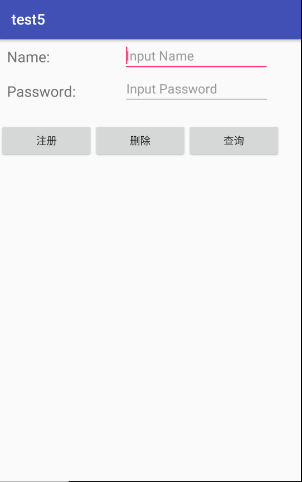
activity_main.xml :
<TextView
     android:id="@+id/t1"
     android:layout_width="wrap_content"
     android:layout_height="wrap_content"
     android:textSize="20dp"
     android:layout_marginTop="10dp"
     android:layout_marginLeft="10dp"
     android:text="Name:"/>

 <EditText
     android:id="@+id/text_name"
     android:layout_width="200dp"
     android:layout_height="wrap_content"
     android:hint="Input Name"
     android:layout_toRightOf="@+id/t1"
     android:layout_marginLeft="100dp"
     android:layout_marginRight="10dp"
     />
 <TextView
     android:id="@+id/t2"
     android:layout_width="wrap_content"
     android:layout_height="wrap_content"
     android:text="Password:"
     android:layout_marginTop="20dp"
     android:layout_marginLeft="10dp"
     android:layout_below="@+id/t1"
     android:textSize="20dp"/>
 <EditText
     android:id="@+id/text_password"
     android:layout_width="200dp"
     android:layout_height="wrap_content"
     android:hint="Input Password"
     android:layout_below="@+id/text_name"
     android:layout_toRightOf="@id/t2"
     android:layout_marginLeft="65dp"
     android:layout_marginRight="10dp"
     />
 <Button
     android:id="@+id/btn_reg"
     android:layout_width="128dp"
     android:layout_height="wrap_content"
     android:layout_below="@+id/t2"
     android:layout_marginTop="30dp"
     android:text="注册"

     />

 <Button
     android:id="@+id/btn_del"
     android:layout_width="128dp"
     android:layout_height="wrap_content"
     android:layout_below="@+id/t2"
     android:layout_marginTop="30dp"
     android:layout_toRightOf="@+id/btn_reg"
     android:text="删除"

     />
 <Button
     android:id="@+id/btn_sel"
     android:layout_width="128dp"
     android:layout_height="wrap_content"
     android:layout_below="@+id/t2"
     android:layout_marginTop="30dp"
     android:layout_toRightOf="@id/btn_del"
     android:text="查询"

     />
 <LinearLayout
     android:id="@+id/layout"
     android:layout_below="@id/btn_sel"
     android:layout_height="match_parent"
     android:orientation="vertical"
     android:layout_width="match_parent"
     >
 </LinearLayout>
</RelativeLayout>

MainActivity.java :
public class MainActivity extends AppCompatActivity implements View.OnClickListener{
    LinearLayout Layout ;
    EditText Name,Password;
    Button   bt_reg,bt_del,bt_sel;
    List<User> userList;
    private MyDatabaseHelper dbhelper;
    @Override
    protected void onCreate(Bundle savedInstanceState) {
        super.onCreate(savedInstanceState);
        setContentView(R.layout.activity_main);
        initView();
    }
    private void initView(){
        Layout=(LinearLayout) findViewById(R.id.layout);
        Name=(EditText)findViewById(R.id.text_name);
        Password=(EditText)findViewById(R.id.text_password);
        bt_reg=(Button)findViewById(R.id.btn_reg);
        bt_del=(Button)findViewById(R.id.btn_del);
        bt_sel=(Button)findViewById(R.id.btn_sel);
        bt_reg.setOnClickListener(this);
        bt_del.setOnClickListener(this);
        bt_sel.setOnClickListener(this);
        userList=new ArrayList<User>();

    }
    public void onClick(View view){
        switch (view.getId()) {

            case R.id.btn_reg:
                if (Name.getText().toString().matches("[a-zA-Z]*") && Name.getText().toString().length() > 5 && Name.getText().toString().length() < 13 && Password.getText().toString().matches("[0-9]*") && Password.getText().toString().length() > 2 && Password.getText().toString().length() < 7) {
                    dbhelper = new MyDatabaseHelper(this, "CREATE_USER.db", null, 1);
                    SQLiteDatabase db = dbhelper.getReadableDatabase();
                    db.execSQL("insert into user(name,password) values (?,?)", new String[]{Name.getText().toString(), Password.getText().toString()});
                    db.close();
                    Toast.makeText(MainActivity.this, "注册成功", Toast.LENGTH_SHORT).show();

                } else
                    Toast.makeText(MainActivity.this, "输入不合法", Toast.LENGTH_SHORT).show();
                break;

            case R.id.btn_del:
                if (Name.getText().toString().length() != 0 && Password.getText().toString().length() != 0) {
                    User user = null;
                    dbhelper = new MyDatabaseHelper(this, "CREATE_USER.db", null, 1);
                    SQLiteDatabase db = dbhelper.getReadableDatabase();
                    Cursor cursor = db.rawQuery("select * " + "from user where name=?", new String[]{Name.getText().toString()});
                    if (cursor.moveToFirst()) {
                        int id = cursor.getInt(cursor.getColumnIndex("id"));
                        String name = cursor.getString(cursor.getColumnIndex("name"));
                        String password = cursor.getString(cursor.getColumnIndex("password"));
                        user = new User(id, name, password);
                        cursor.close();

                        if (user.getPassword().equals(Password.getText().toString())) {
                            db.execSQL("delete from user where name=?", new String[]{Name.getText().toString()});
                            Toast.makeText(MainActivity.this, "删除成功", Toast.LENGTH_SHORT).show();

                        } else
                            Toast.makeText(MainActivity.this, "密码不正确", Toast.LENGTH_SHORT).show();

                        db.close();
                    }
                }
                else if(Name.getText().toString().length() != 0 && Password.getText().toString().length() == 0){
                    User user = null;
                    dbhelper = new MyDatabaseHelper(this, "CREATE_USER.db", null, 1);
                    SQLiteDatabase db = dbhelper.getReadableDatabase();
                    Cursor cursor = db.rawQuery("select * " + "from user where name=?", new String[]{Name.getText().toString()});
                    if (cursor.moveToFirst()) {
                        int id = cursor.getInt(cursor.getColumnIndex("id"));
                        String name = cursor.getString(cursor.getColumnIndex("name"));
                        String password = cursor.getString(cursor.getColumnIndex("password"));
                        user = new User(id, name, password);
                        cursor.close();
                        if (user.getName().equals(Name.getText().toString())) {
                            db.execSQL("delete from user where name=?", new String[]{Name.getText().toString()});
                            Toast.makeText(MainActivity.this, "删除成功", Toast.LENGTH_SHORT).show();

                        } else
                            Toast.makeText(MainActivity.this, "用户不存在", Toast.LENGTH_SHORT).show();

                        db.close();
                    }

                }
                break;

            case R.id.btn_sel:

                Layout.removeAllViews();

                if (Name.getText().toString().length() == 0 && Password.getText().toString().length() == 0) {
                    dbhelper = new MyDatabaseHelper(this, "CREATE_USER.db", null, 1);
                    SQLiteDatabase db = dbhelper.getReadableDatabase();
                    Cursor cursor = db.rawQuery("select * from user", null);

                    if (cursor.moveToFirst()) {
                        do {
                            int id = cursor.getInt(cursor.getColumnIndex("id"));
                            String name = cursor.getString(cursor.getColumnIndex("name"));
                            String password = cursor.getString(cursor.getColumnIndex("password"));
                            User user = new User(id, name, password);
                            userList.add(user);
                        } while (cursor.moveToNext());
                    }
                    for (User user : userList) {
                        TextView tv = new TextView(this);
                        tv.setText(user.toString());
                        tv.setTextSize(20);
                        Layout.addView(tv);
                    }
                    userList.clear();
                    cursor.close();
                    db.close();

                } else if (Name.getText().toString().length() != 0 && Password.getText().toString().length() == 0) {

                    dbhelper = new MyDatabaseHelper(this, "CREATE_USER.db", null, 1);
                    SQLiteDatabase db = dbhelper.getReadableDatabase();
                    Cursor cursor = db.rawQuery("select * " + "from user where name=?", new String[]{Name.getText().toString()});
                    User user = null;

                    if (cursor.moveToFirst()) {
                        int id = cursor.getInt(cursor.getColumnIndex("id"));
                        String name = cursor.getString(cursor.getColumnIndex("name"));
                        String password = cursor.getString(cursor.getColumnIndex("password"));
                        user = new User(id, name, password);
                        cursor.close();
                        db.close();

                        TextView tv = new TextView(this);
                        tv.setText(user.toString());
                        tv.setTextSize(20);
                        Layout.addView(tv);
                    }
                }

                else if (Name.getText().toString().length()!=0){
                    dbhelper=new MyDatabaseHelper(this,"CREATE_USER.db" ,null,1);
                    SQLiteDatabase db=dbhelper.getReadableDatabase();
                   Cursor cursor=db.rawQuery("select * " + "from user where name=?",new String[]{Name.getText().toString()});
                    User user=null;

                    if(cursor.moveToFirst()){
                        int id = cursor.getInt(cursor.getColumnIndex("id"));
                        String name = cursor.getString(cursor.getColumnIndex("name"));
                        String password =cursor.getString(cursor.getColumnIndex("password"));
                        user=new User(id,name,password);
                        cursor.close();
                        db.close();

                        if(user.getPassword().equals(Password.getText().toString())) {
                            TextView tv = new TextView(this);
                            tv.setText(user.toString());
                            tv.setTextSize(20);
                            Layout.addView(tv);
                        }
                       else if (Password.getText().toString().length()==0){
                            Toast.makeText(MainActivity.this,"用户不存在",Toast.LENGTH_SHORT).show();
                       }

                        else
                            Toast.makeText(MainActivity.this,"密码不正确",Toast.LENGTH_SHORT).show();
                    }}
                break;
        }}}
MyDatabaseHelper.java

public class MyDatabaseHelper extends SQLiteOpenHelper {
    public static final String CREATE_USER = "create table User("
            +"id integer primary key autoincrement,"
            +"name text not null,"
            +"password integer not null)";
    private Context mContext;
    public MyDatabaseHelper(Context context, String name, SQLiteDatabase.CursorFactory factory, int version){
        super(context , name ,factory,version);
        mContext = context;
    }
    @Override
    public void onCreate(SQLiteDatabase db){
        db.execSQL(CREATE_USER);
        Toast.makeText(mContext, "", Toast.LENGTH_SHORT).show();
    }
    @Override
    public void onUpgrade(SQLiteDatabase db,int oldVersion,int newVersion){
        db.execSQL("drop table if exists User");
        onCreate(db);
    }
}
User.java
public class User {
    private String name;
    private String password;
    private int id;

    public User(int id,String name,String password){
        super();
        this.id = id;
        this.name = name;
        this.password = password;
    }
    public void setId(int id){
        this.id = id;
    }
    public void setName(String name){
        this.name = name;
    }
    public void setPassword(String password){
        this.password = password;
    }
    public int getId(){
        return id;
    }
    public String getName(){
        return name;
    }
    public String getPassword(){
        return password;
    }
    public String toString() {
        return "Id:"+this.id+"    姓名:"+this.name+"    密码:"+this.password;
    }
}
SQLite的使用案例的更多相关文章
- OpenStreetMap数据清洗(SQL&MonogoDB版本)
目标:通过网上下载的OpenStreetMap.xml数据格式,将该文件的格式进行统计,清洗,并导出成CSV格式的文件,最后倒入到SQLite中 本案例中所需的包 import csv import ...
- 掘金 Android 文章精选合集
掘金 Android 文章精选合集 掘金官方 关注 2017.07.10 16:42* 字数 175276 阅读 50053评论 13喜欢 669 用两张图告诉你,为什么你的 App 会卡顿? - A ...
- 【Android自己定义View实战】之自己定义超简单SearchView搜索框
[Android自己定义View实战]之自己定义超简单SearchView搜索框 这篇文章是对之前文章的翻新,至于为什么我要又一次改动这篇文章?原因例如以下 1.有人举报我抄袭,原文链接:http:/ ...
- Android(java)学习笔记195:学生信息管理系统案例(SQLite + ListView)
1.首先说明一个知识点,通常我们显示布局文件xml都是如下: setContentView(R.layout.activity_main): 其实每一个xml布局文件就好像一个气球,我们可以使用Vie ...
- IOS UIPickView+sqlite 选择中国全部城市案例
1.案例简单介绍 通过读取文件.将中国全部城市写入sqlite数据库中,现通过UIPickView实现中国全部城市的选择,效果图例如以下所看到的 2.城市对象模型 中国全部城市数据请看http://b ...
- Android(java)学习笔记188:学生信息管理系统案例(SQLite + ListView)
1.首先说明一个知识点,通常我们显示布局文件xml都是如下: setContentView(R.layout.activity_main): 其实每一个xml布局文件就好像一个气球,我们可以使用Vie ...
- IOS Sqlite用户界面增删改查案例
1.案例简单介绍 对SQLite操作进行了简单的封装,将对数据表操作转变成对对象的操作,并通过UI界面完毕对用户表的增.删.改.查,执行界面例如以下图所看到的 a 2.项目project文件夹 Use ...
- SQLite数据库以及增删改查的案例
Android使用开源的与操作系统无关的SQL数据库——SQLite 一:在命令行下创建数据库: 1.启动模拟器后,打开命令行,执行adb shell 2.进入所在工程目录 3.执行sqlite3 m ...
- Android SQLite案例
重点掌握execSQL()和rawQuery()方法,rawQuery()方法用于执行select语句. SQLiteOpenHelper,实现了onCreate和onUpgrade方法. 第一次创建 ...
随机推荐
- apache本地服务器的配置流程
安装Apache 一.目的: 1. 能够有一个测试的服务器,不是所有的特殊网络服务都能找到免费的! 二.为什么是 "Apache" 1. 使用最广的 Web 服务器 2. Mac自 ...
- 不要困在自己建造的盒子里——写给.NET程序员(附精彩评论)
此文章的主旨是希望过于专注.NET程序员在做好工作.写好.NET程序的同时,能分拨出一点时间接触一下.NET之外的东西(例如10%-20%的时间),而不是鼓动大家什么都去学最后什么都学不精,更不是说. ...
- 编解码TIFF图像
解码: // Open a Stream and decode a TIFF image Stream imageStreamSource = new FileStream("tulipfa ...
- MongoDB对文档的操作
插入文档 db.COLLECTION_NAME.insert({doc1},{doc2},...) e.g.:db.collection.insert({name:'123',age:12},{nam ...
- C++的类型转换:static_cast、dynamic_cast、reinterpret_cast和const_cast(dynamic_cast还支持交叉转换,const_cast将一个类的const、volatile以及__unaligned属性去掉)
在C++中,存在类型转换,通常意味着存在缺陷(并非绝对).所以,对于类型转换,有如下几个原则:(1)尽量避免类型转换,包括隐式的类型转换(2)如果需要类型转换,尽量使用显式的类型转换,在编译期间转换( ...
- Qt在Windows下的三种编程环境搭建(图文并茂,非常清楚)good
尊重作者,支持原创,如需转载,请附上原地址:http://blog.csdn.net/libaineu2004/article/details/17363165 从QT官网可以得知其支持的平台.编译器 ...
- 获取其他进程中“Internet Explorer_TridentCmboBx”的内容
function GetTridentCmboBxText( // 获取其他进程中“Internet Explorer_TridentCmboBx”的内容 mHandle: THandle; // ...
- Delphi 使用双缓冲解决图片切换时的闪烁问题 good
var TempCanvas: TCanvas; BufDC: HDC; BufBitmap: HBITMAP; begin // 创建一个与显示设备兼容的内存设备 BufDC := CreateCo ...
- Google+团队如何测试移动应用 - from Google Testing Blog
How the Google+ Team Tests Mobile Apps by Eduardo Bravo Ortiz “移动第一”在当下已成为很多公司的口头禅.但是能够用一种合理的方法来测试移动 ...
- Oracle数据库备份和恢复的基本命令
Oracle数据库备份与恢复基本命令 1. 获取帮助 $ exp help=y $ imp help=y 2.三种工作方式 (1)交互式方式 $ exp 然后按提示输入所需要的参数 (2)命令行方式 ...