
Springboot+Mybatis的逆向工程
Mybatis逆向工程,自动生成 entity类和常用的增删改查方法。
- 1.pom.xml引入类
<!-- 通用mapper   用于mabatis封装的基础增删改查的功能-->
<dependency>
    <groupId>tk.mybatis</groupId>
    <artifactId>mapper-spring-boot-starter</artifactId>
    <version>2.1.5</version>
    <exclusions>
        <exclusion>
            <groupId>org.springframework.boot</groupId>
            <artifactId>spring-boot-starter-jdbc</artifactId><!--已引入了这个,故此处例外掉其默认自带的-->
        </exclusion>
    </exclusions>
</dependency>
<!-- 逆向工程 -->
<dependency>
    <groupId>org.mybatis.generator</groupId>
    <artifactId>mybatis-generator-core</artifactId>
    <version>1.3.5</version>
    <scope>provided</scope>
</dependency>
- 2.springboot入口类,引入换一下
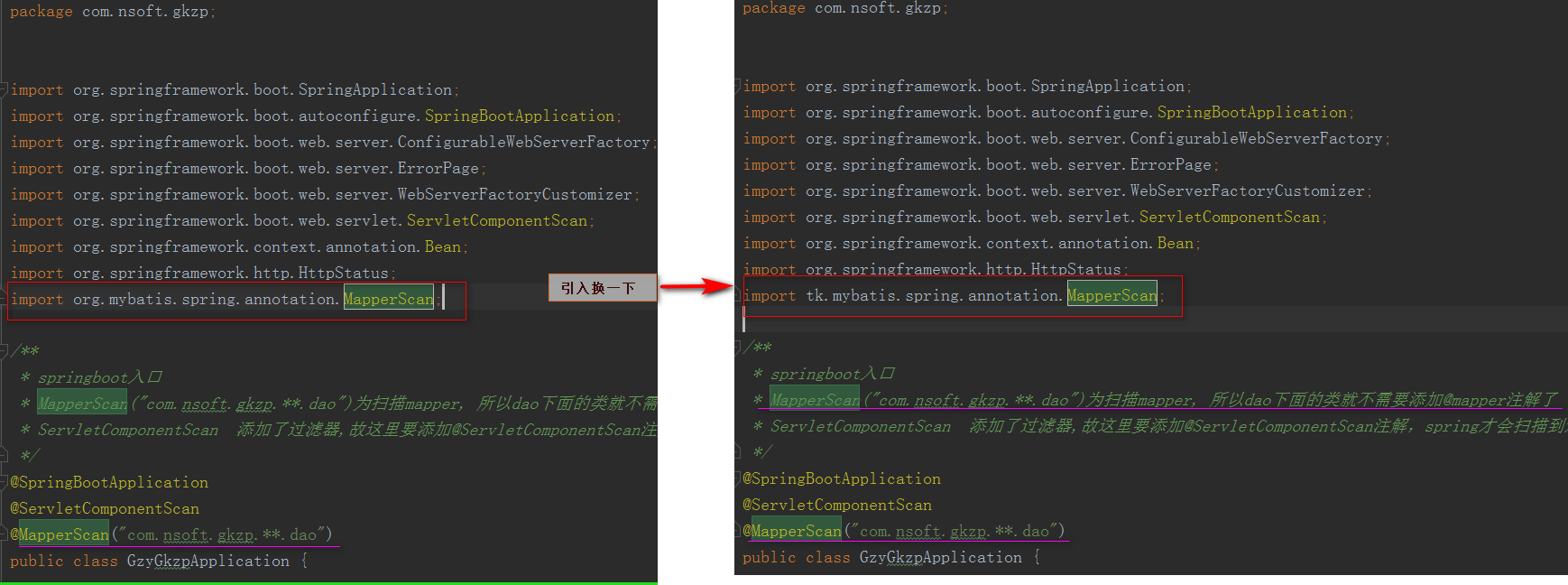
- 3.配置文件:\src\main\resources\resources\generatorConfig.xml
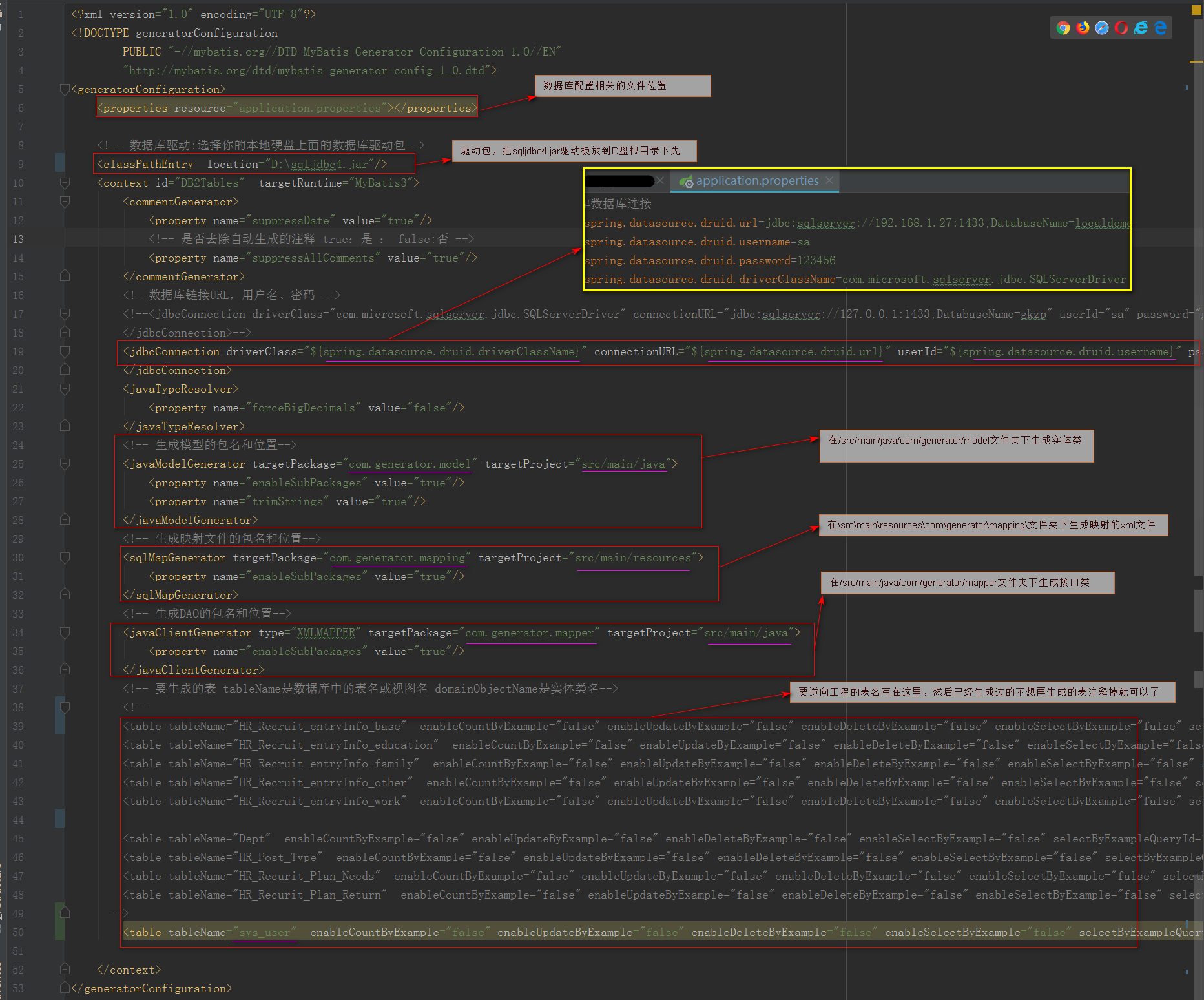
<?xml version="1.0" encoding="UTF-8"?>

<!DOCTYPE generatorConfiguration

        PUBLIC "-//mybatis.org//DTD MyBatis Generator Configuration 1.0//EN"

        "http://mybatis.org/dtd/mybatis-generator-config_1_0.dtd">

<generatorConfiguration>

    <properties resource="application.properties"></properties>

    <!-- 数据库驱动:选择你的本地硬盘上面的数据库驱动包-->

    <classPathEntry  location="D:\sqljdbc4.jar"/>

    <context id="DB2Tables"  targetRuntime="MyBatis3">

        <commentGenerator>

            <property name="suppressDate" value="true"/>

            <!-- 是否去除自动生成的注释 true:是 : false:否 -->

            <property name="suppressAllComments" value="true"/>

        </commentGenerator>

        <!--数据库链接URL,用户名、密码 -->

        <!--<jdbcConnection driverClass="com.microsoft.sqlserver.jdbc.SQLServerDriver" connectionURL="jdbc:sqlserver://127.0.0.1:1433;DatabaseName=gkzp" userId="sa" password="nsoft">

        </jdbcConnection>-->

        <jdbcConnection driverClass="${spring.datasource.druid.driverClassName}" connectionURL="${spring.datasource.druid.url}" userId="${spring.datasource.druid.username}" password="${spring.datasource.druid.password}">

        </jdbcConnection>

        <javaTypeResolver>

            <property name="forceBigDecimals" value="false"/>

        </javaTypeResolver>

        <!-- 生成模型的包名和位置-->

        <javaModelGenerator targetPackage="com.generator.model" targetProject="src/main/java">

            <property name="enableSubPackages" value="true"/>

            <property name="trimStrings" value="true"/>

        </javaModelGenerator>

        <!-- 生成映射文件的包名和位置-->

        <sqlMapGenerator targetPackage="com.generator.mapping" targetProject="src/main/resources">

            <property name="enableSubPackages" value="true"/>

        </sqlMapGenerator>

        <!-- 生成DAO的包名和位置-->

        <javaClientGenerator type="XMLMAPPER" targetPackage="com.generator.mapper" targetProject="src/main/java">

            <property name="enableSubPackages" value="true"/>

        </javaClientGenerator>

        <!-- 要生成的表 tableName是数据库中的表名或视图名 domainObjectName是实体类名-->

        <!--

        <table tableName="HR_Recruit_entryInfo_base"  enableCountByExample="false" enableUpdateByExample="false" enableDeleteByExample="false" enableSelectByExample="false" selectByExampleQueryId="false"></table>

        <table tableName="HR_Recruit_entryInfo_education"  enableCountByExample="false" enableUpdateByExample="false" enableDeleteByExample="false" enableSelectByExample="false" selectByExampleQueryId="false"></table>

        <table tableName="HR_Recruit_entryInfo_family"  enableCountByExample="false" enableUpdateByExample="false" enableDeleteByExample="false" enableSelectByExample="false" selectByExampleQueryId="false"></table>

        <table tableName="HR_Recruit_entryInfo_other"  enableCountByExample="false" enableUpdateByExample="false" enableDeleteByExample="false" enableSelectByExample="false" selectByExampleQueryId="false"></table>

        <table tableName="HR_Recruit_entryInfo_work"  enableCountByExample="false" enableUpdateByExample="false" enableDeleteByExample="false" enableSelectByExample="false" selectByExampleQueryId="false"></table>

        <table tableName="Dept"  enableCountByExample="false" enableUpdateByExample="false" enableDeleteByExample="false" enableSelectByExample="false" selectByExampleQueryId="false"></table>

        <table tableName="HR_Post_Type"  enableCountByExample="false" enableUpdateByExample="false" enableDeleteByExample="false" enableSelectByExample="false" selectByExampleQueryId="false"></table>

        <table tableName="HR_Recurit_Plan_Needs"  enableCountByExample="false" enableUpdateByExample="false" enableDeleteByExample="false" enableSelectByExample="false" selectByExampleQueryId="false"></table>

        <table tableName="HR_Recurit_Plan_Return"  enableCountByExample="false" enableUpdateByExample="false" enableDeleteByExample="false" enableSelectByExample="false" selectByExampleQueryId="false"></table>

      -->

        <table tableName="sys_user"  enableCountByExample="false" enableUpdateByExample="false" enableDeleteByExample="false" enableSelectByExample="false" selectByExampleQueryId="false"></table>

    </context>

</generatorConfiguration>
源代码
- 4.配置Java类
\src\main\java\com\nsoft\gkzp\system\sysuser\service\SysUserServiceImpl.java
File configFile文件参数指定generatorConfig.xml配置文件位置
package com.nsoft.gkzp.util;

import org.mybatis.generator.api.MyBatisGenerator;

import org.mybatis.generator.config.Configuration;

import org.mybatis.generator.config.xml.ConfigurationParser;

import org.mybatis.generator.internal.DefaultShellCallback;

import java.io.File;

import java.util.ArrayList;

import java.util.List;

public class GeneratorSqlmap {

    public void generator() throws Exception {

        List<String> warnings = new ArrayList<String>();

        boolean overwrite = true;

        //指定 逆向工程配置文件

        File configFile = new File("./src/main/resources/resources/generatorConfig.xml");

        ConfigurationParser cp = new ConfigurationParser(warnings);

        Configuration config = cp.parseConfiguration(configFile);

        DefaultShellCallback callback = new DefaultShellCallback(overwrite);

        MyBatisGenerator myBatisGenerator = new MyBatisGenerator(config,callback, warnings);

        myBatisGenerator.generate(null);

    }

    /**

     * 运行这个main方法就可以进行逆向工程

     * @param args

     * @throws Exception

     */

    public static void main(String[] args) throws Exception {

        try {

            GeneratorSqlmap generatorSqlmap = new GeneratorSqlmap();

            generatorSqlmap.generator();

        } catch (Exception e) {

            e.printStackTrace();

        }

    }

}
运行上面的main方法,就会自动生成三个文件(以sys_User表为例)(如下图)

create table sys_user(

    id              int                identity(1,1)  primary key not null,    --id主键 自增长

    loginName     nvarchar(50)    NOT NULL ,                                    --登录用户名

    password      nvarchar(50)    NOT NULL ,                                    --登录密码

    email          nvarchar(255)    ,                                        --用户邮箱    (邮箱登录)

    phone         nvarchar(15)  ,                                        --用户手机号(手机号登录)

    createTime    datetime default CONVERT(varchar(100), GETDATE(), 20),    --用户创建时间

    pwdChangeTime datetime default CONVERT(varchar(100), GETDATE(), 20),    --改密码时间(初始值为用户创建时间)

    code          varchar(255) ,                                            --'激活码'

    usertype      int            NOT NULL default 2,                            --用户类型(0系统管理员 1、内网用户 2、普通用户)

    state          int           NOT NULL default 0 ,                        --用户激活状态:0表示未激活,1表示激活

    nstatusid      int default 1                                                --用户状态 0无效 1有效

);
表sys_user
另:SysUser实体类中,例如loginname字段均为小写的,如果表字段设计为login_name的话,生成的实体类此字段映射为loginName,就会大写。同理表名也是如此。
- 5.实际应用
生成后,可以将
5.1 接口类SysUserMapper.java、映射文件UserMapper.xml 两个文件删除了,用不到。 实体类SysUser.java复制粘贴到你要放实际放的地方就可以了。
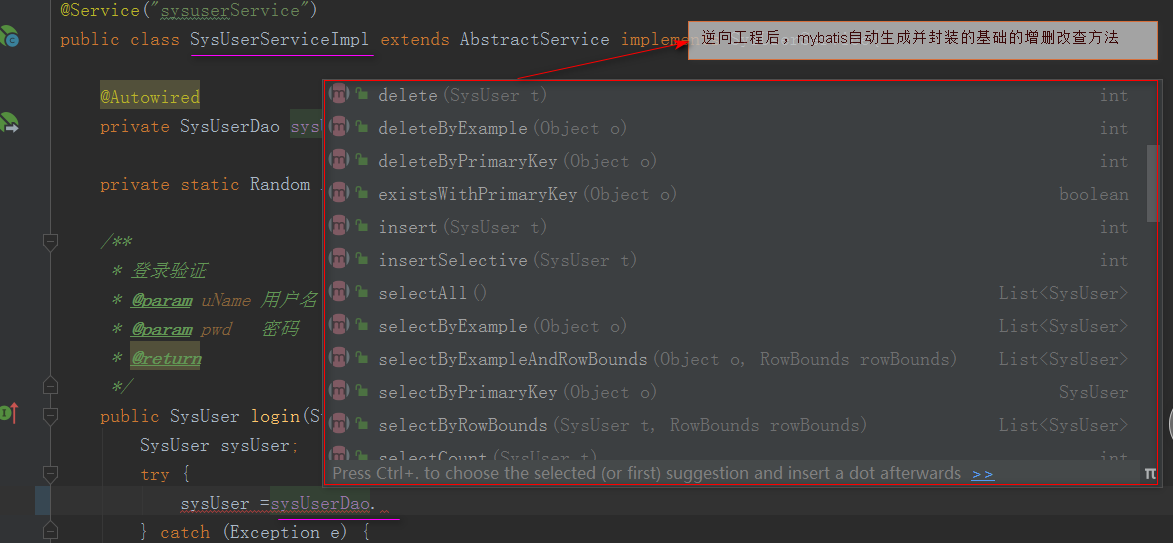
5.2 实际的dao层接口类继承 Mapper<com.generator.model.SysUser> ,继承后,基础的增删改查操作mybatis已经自动生成并封装,不需要写了,这里只写其他业务逻辑方法就可以了。
注意:1).这里<com.generator.model.SysUser>为你生成实体类存放位置,如你在4.1步骤将SysUser.java实体类复制粘贴到其他位置,那么这里就写新位置的路径
2). 继承的Mapper为 tk.mybatis.mapper.common.Mapper。

在service实现类,就可以直接使用mybatis自动生成并封装的基础的增删改成操作,如下图。
Springboot+Mybatis的逆向工程的更多相关文章
- SpringBoot+Mybatis+Generator 逆向工程使用(二)
Mybatis-Genarator 逆向工程使用 个人开发环境 java环境:Jdk1.8.0_60 编译器:IntelliJ IDEA 2017.1.4 mysql驱动:mysql-connecto ...
- 项目转移时发生的错误<springboot+mybatis(xml逆向工程自动生成)>
org.springframework.beans.factory.UnsatisfiedDependencyException: Error creating bean with name 'app ...
- Java逆向工程SpringBoot + Mybatis Generator + MySQL
Java逆向工程SpringBoot+ Mybatis Generator + MySQL Meven pop.xml文件添加引用: <dependency> <groupId> ...
- SpringBoot+Mybatis+Maven+MySQL逆向工程实现增删改查
SpringBoot+Mybatis+MySQL+MAVEN逆向工程实现增删改查 这两天简单学习了下SpringBoot,发现这玩意配置起来是真的方便,相比于SpringMVC+Spring的配置简直 ...
- idea+springboot+mybatis逆向工程
前提:使用idea开发,基于springboot.用到了mybatis的逆向工程 因为之前用eclipse开发ssm比较多,现在转idea 使用springboot 踩了一些坑,在这记录一下~ 注意事 ...
- springboot实现mybaitis逆向工程
springboot实现mybaitis逆向工程 首先引入依赖,一共需要两个依赖(一个是mybaits依赖,一个是mybatis逆向工程插件) <dependency> <group ...
- 第五章 springboot + mybatis(转载)
本编博客转发自:http://www.cnblogs.com/java-zhao/p/5350021.html springboot集成了springJDBC与JPA,但是没有集成mybatis,所以 ...
- mybatis的逆向工程
mybatis的逆向工程是很大的减少了程序员对代码的编写工作,由于mybatis是半自动的sql语句使用,我们在项目中一般都是采用逆向工程来生成mybatis的文件,mapper接口相当于我们平常所说 ...
- 第九章 springboot + mybatis + 多数据源 (AOP实现)
在第八章 springboot + mybatis + 多数据源代码的基础上,做两点修改 1.ShopDao package com.xxx.firstboot.dao; import org.spr ...
随机推荐
- 洛谷p1747好奇怪的游戏题解
题目 永远不要怀疑劳动人民的智慧! 把快读里最后的return直接返回零的 我已经不是第一次写错了! 我要是再写错我就****** 主要是逆向思维,把从两个点往(1, 1)走想成从(1, 1)点往这两 ...
- 【CSP-S膜你考】 A
A 题面 对于给定的一个正整数n, 判断n是否能分成若干个正整数之和 (可以重复) , 其中每个正整数都能表示成两个质数乘积. 输入格式 第一行一个正整数 q,表示询问组数. 接下来 q 行,每行一个 ...
- WGS 全基因组测序数据分析
1. DNA测序技术 https://www.jianshu.com/p/6122cecec54a 2.FASTA和FASTQ文件格式 https://www.jianshu.com/p/50ff30 ...
- ACT开发初步(二)——XML
由于pc无法发文,先挖坑,慢慢填
- Docker ubuntn 使用apt-get update报错
在docker 容器中执行apt-get update有时候会报错,当然造成错误的原因有很多情况,具体情况具体分析, APT Hash sum mismatch错误的常见解决方法总结这篇博客写的不错, ...
- java web开发入门汇总
servlet 用java语言开发动态资源网站的技术,在doGet方法中拼接显示html,在doPost方法中提交数据.类似于.net的ashx技术. servlet生成的class文件存放在tomc ...
- solr配置同义词,停止词,和扩展词库(IK分词器为例)
定义 同义词:搜索结果里出现的同义词.如我们输入”还行”,得到的结果包括同义词”还可以”. 停止词:在搜索时不用出现在结果里的词.比如is .a .are .”的”,“得”,“我” 等,这些词会在句子 ...
- Python学习教程(十)精选 TOP45 值得学习的Python项目
精选 TOP45 值得学习的Python项目 [导读]热门资源博客 Mybridge AI 比较了 18000 个关于 Python 的项目,并从中精选出 45 个最具竞争力的项目.我们进行了翻译,在 ...
- Matlab 整数线性规划问题模型代码
整数线性规划问题的基本内容 整数线性规划解决的是自变量在一定的线性约束条件下,使得线性目标函数求得最大值或者最小值的问题.其中自变量只能取整数.特别地,当自变量只能取0或者1时,称之为 0-1 整数规 ...
- vue-router学习笔记(一)
学习vue-router首先要认识的两个属性 $router 和 $route. $router指的是router实例,$route则是当前激活的路由信息对象,是只读属性,不可更改,但是可以watch ...