
pandas-21 Series和Dataframe的画图方法
pandas-21 Series和Dataframe的画图方法
前言
在pandas中,无论是series还是dataframe都内置了.plot()方法,可以结合plt.show()进行很方便的画图。
Series.plot() 和 Dataframe.plot()参数
data : Series
kind : str
‘line’ : line plot (default)
‘bar’ : vertical bar plot
‘barh’ : horizontal bar plot
‘hist’ : histogram
‘box’ : boxplot
‘kde’ : Kernel Density Estimation plot
‘density’ : same as ‘kde’
‘area’ : area plot
‘pie’ : pie plot
指定画图的类型,是线形图还是柱状图等
label 添加标签
title 添加标题
……(后接一大堆可选参数)
详情请查阅:[官方文档传送门](http://pandas.pydata.org/pandas-docs/stable/reference/api/pandas.Series.plot.html?highlight=series plot#pandas.Series.plot)
Dataframe.plot()参数 也是大同小异:
详情请查阅:官方文档传送门
Series.plot()代码demo
import matplotlib.pyplot as plt

import pandas as pd

import numpy as np

from  pandas import Series

# 创建一个随机种子, 把生成的值固定下来

np.random.seed(666)

s1 = Series(np.random.randn(1000)).cumsum()

s2 = Series(np.random.randn(1000)).cumsum()

# series 中 也包含了 plot 方法

s1.plot(kind = 'line', grid = True, label = 'S1', title = 'xxx')

s2.plot(label = 's2')

plt.legend()

plt.show() # 图1

# 通过 子图的 方式,可视化 series

figure, ax = plt.subplots(2, 1)

ax[0].plot(s1)

ax[1].plot(s2)

plt.legend()

plt.show() # 图2

# 通过 series中的plot方法进行指定是哪一个子图

fig, ax = plt.subplots(2, 1)

s1.plot(ax = ax[1], label = 's1')

s2.plot(ax = ax[0], label = 's2')

plt.legend()

plt.show() # 图3

1234567891011121314151617181920212223242526272829303132333435
图1:

图2:
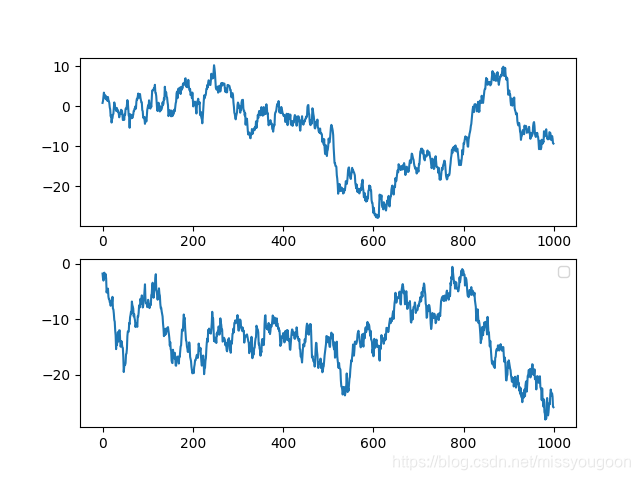
图3:
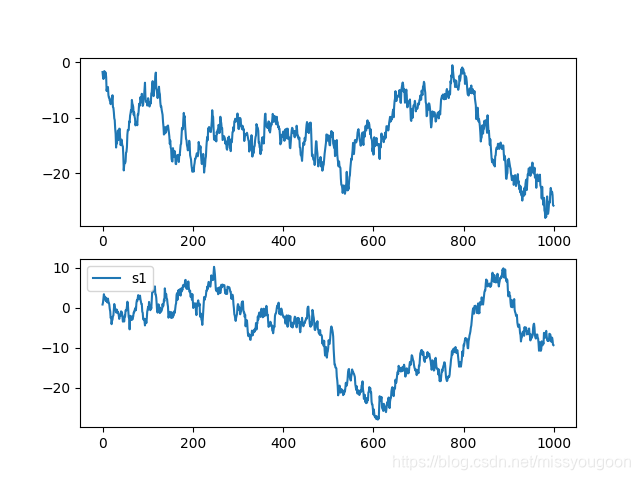
Dataframe.plot()代码demo
import numpy as np

import pandas as pd

import matplotlib.pyplot as plt

from pandas import Series, DataFrame

np.random.seed(666)

df = DataFrame(

    np.random.randint(1, 10, 40).reshape(10, 4),

    columns = ['A', 'B', 'C', 'D']

)

print(df)

'''

   A  B  C  D

0  3  7  5  4

1  2  1  9  8

2  6  3  6  6

3  5  9  5  5

4  1  1  5  1

5  5  6  8  2

6  1  1  7  7

7  1  4  3  3

8  7  1  7  1

9  4  7  4  3

'''

# Dataframe 也有个内置方法 plot

df.plot(kind = 'bar') # kind = 'bar'

plt.show() # 图1

# 横向的柱状图

df.plot(kind = 'barh') # kind = 'barh' 可以是一个横向的柱状图

plt.show() # 图2

# 将每个column的柱状图堆叠起来

df.plot(kind = 'bar', stacked = True)

plt.show() # 图3

# 填充的图

df.plot(kind = 'area')

plt.show() # 图4

# 可以进行选择

b = df.iloc[6] # 这时候的b是一个series

b.plot() # 可以看出x轴就是colume的name

plt.show() # 图5

# 可以将所有的行全部画在一张图里

for i in df.index:

    df.iloc[i].plot(label = str(i))

plt.legend()

plt.show() # 图6

# 对一列进行画图

df['A'].plot()

plt.show() # 图7

# 多列画图,同上

# 注意:默认是按照column来进行画图的,

# 如果需要按照 index 画图,可以将 dataframe 转置一下

df.T.plot()

plt.show() # 图8

1234567891011121314151617181920212223242526272829303132333435363738394041424344454647484950515253545556575859606162
图1:

图2:

图3:

图4:

图5:
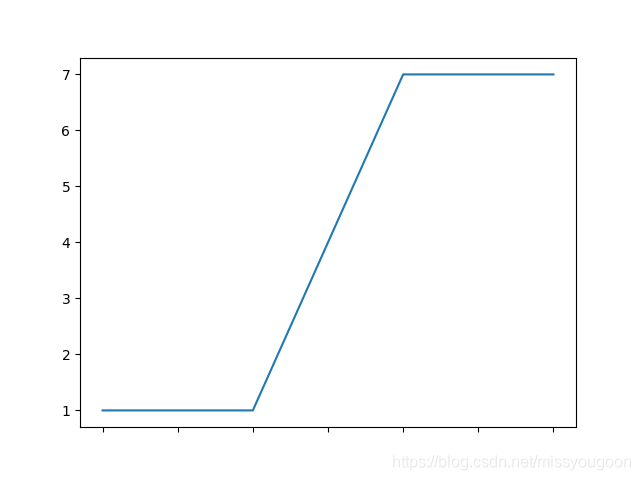
图6:
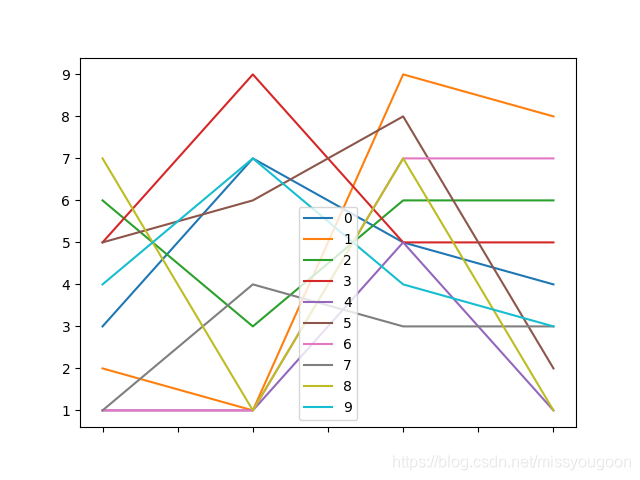
图7:

图8:

pandas-21 Series和Dataframe的画图方法的更多相关文章
- 利用Python进行数据分析(7) pandas基础: Series和DataFrame的简单介绍
一.pandas 是什么 pandas 是基于 NumPy 的一个 Python 数据分析包,主要目的是为了数据分析.它提供了大量高级的数据结构和对数据处理的方法. pandas 有两个主要的数据结构 ...
- Python之Pandas中Series、DataFrame
Python之Pandas中Series.DataFrame实践 1. pandas的数据结构Series 1.1 Series是一种类似于一维数组的对象,它由一组数据(各种NumPy数据类型)以及一 ...
- Python之Pandas中Series、DataFrame实践
Python之Pandas中Series.DataFrame实践 1. pandas的数据结构Series 1.1 Series是一种类似于一维数组的对象,它由一组数据(各种NumPy数据类型)以及一 ...
- 利用Python进行数据分析(8) pandas基础: Series和DataFrame的基本操作
一.reindex() 方法:重新索引 针对 Series 重新索引指的是根据index参数重新进行排序. 如果传入的索引值在数据里不存在,则不会报错,而是添加缺失值的新行. 不想用缺失值,可以用 ...
- pandas基础: Series和DataFrame的简单介绍
一.pandas 是什么 pandas 是基于 NumPy 的一个 Python 数据分析包,主要目的是为了数据分析.它提供了大量高级的数据结构和对数据处理的方法. pandas 有两个主要的数据结构 ...
- pandas学习series和dataframe基础
PANDAS 的使用 一.什么是pandas? 1.python Data Analysis Library 或pandas 是基于numpy的一种工具,该工具是为了解决数据分析人物而创建的. 2.p ...
- Pandas中Series和DataFrame的索引
在对Series对象和DataFrame对象进行索引的时候要明确这么一个概念:是使用下标进行索引,还是使用关键字进行索引.比如list进行索引的时候使用的是下标,而dict索引的时候使用的是关键字. ...
- [Python] Pandas 中 Series 和 DataFrame 的用法笔记
目录 1. Series对象 自定义元素的行标签 使用Series对象定义基于字典创建数据结构 2. DataFrame对象 自定义行标签和列标签 使用DataFrame对象可以基于字典创建数据结构 ...
- Python数据分析-Pandas(Series与DataFrame)
Pandas介绍: pandas是一个强大的Python数据分析的工具包,是基于NumPy构建的. Pandas的主要功能: 1)具备对其功能的数据结构DataFrame.Series 2)集成时间序 ...
随机推荐
- 使用ftp搭建yum仓库
此次操作在VMware Workstation虚拟机的CentOS7.5下进行 这里使用两台Linux主机,下表是它们所使用的操作系统以及IP地址. 两台Linux主机所使用的操作系统以及IP地址 操 ...
- Python面试题(4)
1.Python下多线程的限制以及多进程中传递参数的方式 Python多线程有个全局解释器锁,这个锁的意思是任一时间只能有一个线程运用解释器.并发不是并行. 多进程间同享数据,能够运用multipro ...
- 201871010102-《面向对象程序设计(java)》第6-7周学习总结
博文正文开头:(2分) 项目 内容 这个作业属于哪个课程 https://www.cnblogs.com/nwnu-daizh/ 这个作业的要求在哪里 https://www.cnblogs.com/ ...
- unity texture贴图纹理
文章内一些内容引用自作者:Aimar_Johnny http://blog.csdn.net/lzhq1982/article/details/75045358 导入png图片,默认显示如下 Text ...
- opencart忘记登录密码怎么办
今天一位客户问opencart忘记登录密码怎么办,他们公司内部有几位员工同时在管理,可能是哪位同事把密码给改了没有跟大家说,现在都登录不了.这个只能数据库修改了.进入opencart的数据库,找到oc ...
- Qt常用类——QWidget
QWidget类是所有用户界面对象的基类. Widget是用户界面的基本单元:它从窗口系统接收鼠标,键盘和其他事件,并在屏幕上绘制自己. 每个Widget都是矩形的,它们按照Z-order进行排序.
- 洛谷 p3870 开关 线段树模板
这两天学了很长时间于是做了一道水题 我就用了模板,就连任何优化都没有 就AC了,复杂度也很爆炸10个点1500多毫秒 这个题就是把lazy[]改成记录下修改的次数,每次修改的时候mod 2,因为反过来 ...
- nuxtjs如何部署cdn及区分发布环境
1.部署cdn nuxt build 后的前端资源都会存放在.nuxt/dist/ 文件夹下面 img 目录存放的是使用到的图片资源,无论是开发中存放在 assets 文件夹里的,还是static里 ...
- 【Activiti学习之八】Spring整合Activiti
环境 JDK 1.8 MySQL 5.6 Tomcat 8 idea activiti 5.22 activiti-explorer是官方提供的一个演示项目,可以使用页面管理Activiti流程.ac ...
- odoo前端必填提示