
springboot模板(Freemarker与Thymeleaf)
Thymeleaf模板
Thymeleaf就是html页面
导入pom依赖
 <dependency>

             <groupId>org.springframework.boot</groupId>

             <artifactId>spring-boot-starter-thymeleaf</artifactId>

         </dependency>
Spring Boot官方文档建议在开发时将缓 存关闭,那就在application.yml文件中加入:
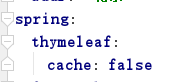
正式环境还是要将缓存开启的
实体类
User
 package com.javaxl.springboot01.entity;

 import lombok.Data;

 /**

  * @author XuFanQi

  * @site

  * @company

  * @create 2019-11-26 15:37

  */

 @Data

 public class User {

     private Integer uid;

     private String uname;

     private String pwd;

     public User(Integer uid, String uname, String pwd) {

         this.uid = uid;

         this.uname = uname;

         this.pwd = pwd;

     }

     public User() {

     }

 }
Controller层
userController
 package com.javaxl.springboot01.controller;

 import com.javaxl.springboot01.entity.User;

 import org.springframework.stereotype.Controller;

 import org.springframework.web.bind.annotation.RequestMapping;

 import javax.servlet.http.HttpServletRequest;

 import java.util.ArrayList;

 import java.util.List;

 /**

  * @author XuFanQi

  * @site

  * @company

  * @create 2019-11-26 15:39

  */

 @Controller

 @RequestMapping("/thymeleaf")

 public class userController {

     @RequestMapping("/list")

     public String hello(HttpServletRequest request){

         /**

          * 1.获取单个值

          * 2.能够在html页面竞争遍历展示

          * 3.如何在HTML页面转义代码块

          */

         request.setAttribute("msg","传输单个字符串! !  !");

         List<User> userList = new ArrayList<>();

         userList.add(new User(1,"zs","123456"));

         userList.add(new User(2,"ls","1234567"));

         userList.add(new User(3,"ww","1234568"));

         request.setAttribute("userList",userList);

         request.setAttribute("htmlStr","<span style='color:red'>转义html代码块</span>");

         return "list";

     }

 }
list.html页面
(注意:
<html xmlns:th="http://www.thymeleaf.org">
)
 <!DOCTYPE html>

 <html xmlns:th="http://www.thymeleaf.org">

 <head>

     <meta charset="UTF-8">

     <title>thymeleaf模板介绍</title>

 </head>

 <body>

 <div th:text = "${msg}"></div>

 <table width="60%" border="1">

     <tr>

         <td>ID</td>

         <td>Uname</td>

         <td>Pwd</td>

     </tr>

     <tr th:each="u : ${userList}">

         <td th:text="${u.uid}"></td>

         <td th:text="${u.uname}"></td>

         <td th:text="${u.pwd}"></td>

     </tr>

 </table>

 <div th:utext="${htmlStr}"></div>

 </body>

 </html>
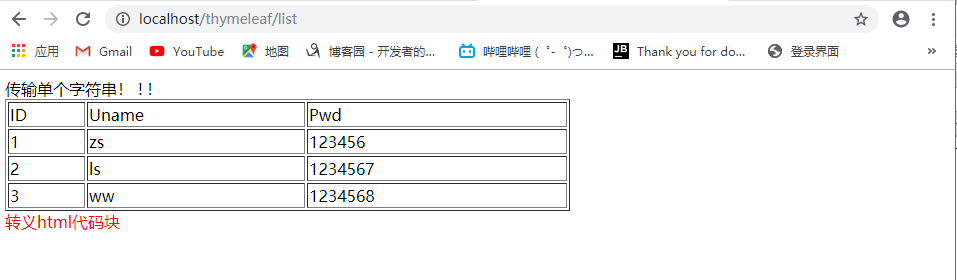
浏览器访问
Freemarker模板
首先导入pom依赖
 <dependency>

     <groupId>org.springframework.boot</groupId>

     <artifactId>spring-boot-starter-freemarker</artifactId>

    </dependency>

 <!--可以不加,但是做项目的时候可能会用-->

  <resources>

             <!--解决mybatis-generator-maven-plugin运行时没有将XxxMapper.xml文件放入target文件夹的问题-->

             <resource>

                 <directory>src/main/java</directory>

                 <includes>

                     <include>**/*.xml</include>

                 </includes>

             </resource>

             <!--freemarker模板也读取需要注释标红地方-->

             <resource>

                 <directory>src/main/resources</directory>

                 <includes>

                     <!--<include>*.properties</include>-->

                     <!--<include>*.xml</include>-->

                     <!--<include>*.yml</include>-->

                 </includes>

             </resource>

         </resources>
配置application.yml
 server:

   servlet:

     context-path: /spr

   port: 80

 user:

   uname: zs

   pwd: 123456

   age: 18

   sex: "男"

   addr: "北京"

 spring:

   thymeleaf:

     cache: false

   freemarker:

     # 设置模板后缀名

     suffix: .ftl

     # 设置文档类型

     content-type: text/html

     # 设置页面编码格式

     charset: UTF-8

     # 设置页面缓存

     cache: false

     # 设置ftl文件路径,默认是/templates,为演示效果添加role

     template-loader-path: classpath:/templates/freemarker

     mvc:

       static-path-pattern: /static/**
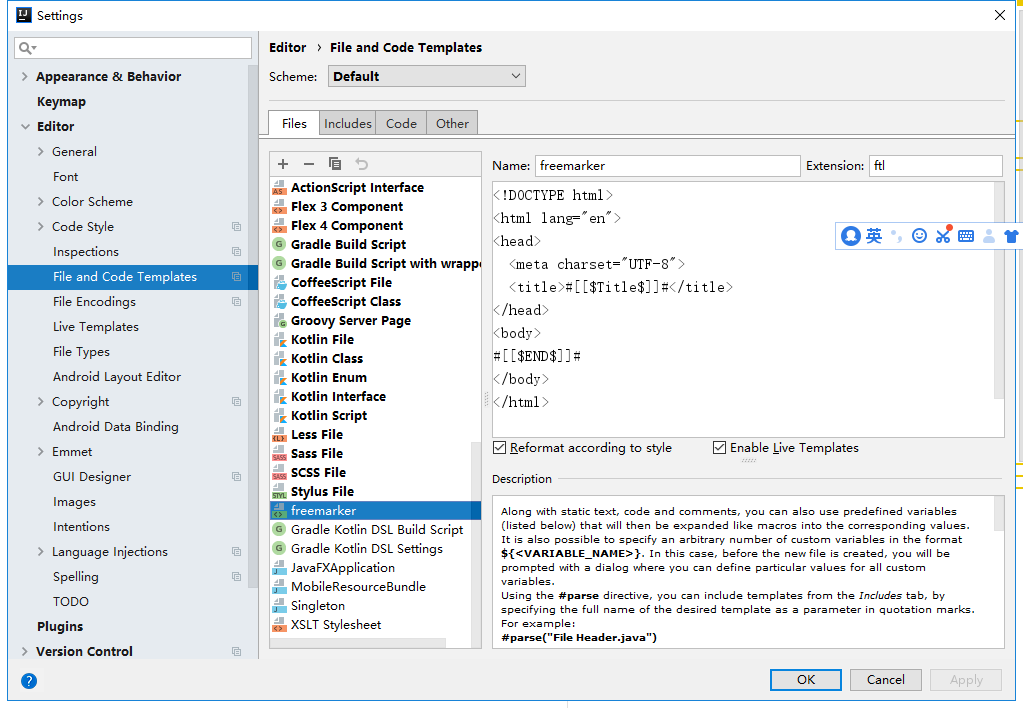
配置freemarker.ftl
前台页面
list.ftl
 <!DOCTYPE html>

 <html lang="en">

 <head>

     <meta charset="UTF-8">

     <title>Title</title>

 </head>

 <body>

 <h2>取值</h2>

 <h3>提供默认值</h3>

 welcome 【${name!'未知'}】 to freemarker!

 <h3>exists用在逻辑判断</h3>

 <#if name?exists>

     ${name}

 </#if>

 <h2>条件</h2>

 <#if sex=='girl'>

         女

 <#elseif sex=='boy'>

         男

 <#else>

         保密

 </#if>

 <h2>循环</h2>

 <table border="1px" width="600px">

     <thead>

     <tr>

         <td>ID</td>

         <td>角色名</td>

         <td>描述</td>

     </tr>

     </thead>

     <tbody>

     <#list roles as role>

     <tr>

         <td>${role.rid}</td>

         <td>${role.roleName}</td>

         <td>${role.desc}</td>

     </tr>

     </#list>

     </tbody>

 </table>

 <h2>include</h2>

 <#include 'foot.ftl'>

 <h2>局部变量(assign)/全局变量(global)</h2>

  <#assign ctx1>

      ${springMacroRequestContext.contextPath}

  </#assign>

 <#global ctx2>

     ${springMacroRequestContext.contextPath}

 </#global>

 ss

 ${ctx1}和${ctx2}

 ss

 </body>

 </html>
foot.ftl
 <!DOCTYPE html>

 <html lang="en">

 <head>

     <meta charset="UTF-8">

     <title>Title</title>

 </head>

 <body>

 版权

 </body>

 </html>
实体类
Role
 package com.javaxl.springboot01.entity;

 import lombok.Data;

 /**

  * @author XuFanQi

  * @site

  * @company

  * @create 2019-11-26 16:53

  */

 @Data

 public class Role {

     private Integer rid;

     private String roleName;

     private String desc;

     public Role(Integer rid, String roleName, String desc) {

         this.rid = rid;

         this.roleName = roleName;

         this.desc = desc;

     }

     public Role() {

     }

 //    public Integer getRid() {

 //        return rid;

 //    }

 //

 //    public void setRid(Integer rid) {

 //        this.rid = rid;

 //    }

 //

 //    public String getRoleName() {

 //        return roleName;

 //    }

 //

 //    public void setRoleName(String roleName) {

 //        this.roleName = roleName;

 //    }

 //

 //    public String getDesc() {

 //        return desc;

 //    }

 //

 //    public void setDesc(String desc) {

 //        this.desc = desc;

 //    }

 }
Controller层
RoleController
 package com.javaxl.springboot01.controller;

 import com.javaxl.springboot01.entity.Role;

 import org.springframework.stereotype.Controller;

 import org.springframework.web.bind.annotation.RequestMapping;

 import org.springframework.web.servlet.ModelAndView;

 import java.util.ArrayList;

 import java.util.List;

 /**

  * @author XuFanQi

  * @site

  * @company

  * @create 2019-11-26 16:49

  */

 @Controller

 @RequestMapping("/freemarker")

 public class RoleController {

     @RequestMapping("/role/list")

     public ModelAndView roleList(){

         ModelAndView mav = new ModelAndView();

         mav.setViewName("/list");

         mav.addObject("name",null);

         mav.addObject("sex","gay");

         List list = new ArrayList();

         list.add(new Role(1,"老师","教书育人"));

         list.add(new Role(2,"学生","知识改变命运"));

         mav.addObject("roles",list);

         return mav;

     }

     @RequestMapping("toLogin")

     public String toLogin(){

         return "login";

     }

 }
浏览器访问

springboot模板(Freemarker与Thymeleaf)的更多相关文章
- springboot之freemarker 和thymeleaf模板web开发
Spring Boot 推荐使用Thymeleaf.FreeMarker.Velocity.Groovy.Mustache等模板引擎.不建议使用JSP. 一.Spring Boot 中使用Thymel ...
- SpringBoot集成freemarker和thymeleaf模板
1.在MAVEN工程POM.XML中引入依赖架包 <!-- 引入 freemarker 模板依赖 --> <dependency> <groupId>org.spr ...
- SpringBoot学习笔记(4)----SpringBoot中freemarker、thymeleaf的使用
1. freemarker引擎的使用 如果你使用的是idea或者eclipse中安装了sts插件,那么在新建项目时就可以直接指定试图模板 如图: 勾选freeMarker,此时springboot项目 ...
- SpringBoot集成Freemarker与Thymeleaf
一:概括 pom.xml添加依赖 配置application.yml HTML页面使用表达式 二:Freemarker模板引擎 1.添加依赖 <!-- ftl模板引擎 --> <de ...
- spring boot ----> 常用模板freemarker和thymeleaf
===========================freemarker=================================== freemarker 官网:https://freem ...
- springboot配置server相关配置&整合模板引擎Freemarker、thymeleaf&thymeleaf基本用法&thymeleaf 获取项目路径 contextPath 与取session中信息
1.Springboot配置server相关配置(包括默认tomcat的相关配置) 下面的配置也都是模板,需要的时候在application.properties配置即可 ############## ...
- springboot集成模板引擎freemarker和thymeleaf
freemarkder和thymeleaf都是java的模板引擎,这里只介绍这两种模板引擎如何在sprongboot中配置: 1. freemarkder 1.1 在pom.xml中添加依赖包 < ...
- 170703、springboot编程之模板使用(thymeleaf、freemarker)
官方不推荐集成jsp,关于使用jsp模板我这里就不赘述,如果有需要的,请自行百度! thymeleaf的使用 1.在pom中增加thymeleaf支持 <dependency> <g ...
- Springboot模板(thymeleaf、freemarker模板)
目的: 1.thymeleaf模板 2.Freemarker模板 thymeleaf模板 thymeleaf 的优点: 支持html5标准,页面无须部署到servlet开发到服务器上,直接通过浏览器就 ...
随机推荐
- Spring Cloud Alibaba Sentinel对RestTemplate的支持
Spring Cloud Alibaba Sentinel 支持对 RestTemplate 的服务调用使用 Sentinel 进行保护,在构造 RestTemplate bean的时候需要加上 @S ...
- LeetCode 142:环形链表 II Linked List Cycle II
给定一个链表,返回链表开始入环的第一个节点. 如果链表无环,则返回 null. 为了表示给定链表中的环,我们使用整数 pos 来表示链表尾连接到链表中的位置(索引从 0 开始). 如果 pos 是 - ...
- GV900 Political Explanation
GV900 Political Explanation, 2017/201830 October, 2018Homework assignment 2Due Week 7 (13 November)W ...
- ubuntu 16.04 上编译和安装C++机器学习工具包mlpack并编写mlpack-config.cmake | tutorial to compile and install mplack on ubuntu 16.04
本文首发于个人博客https://kezunlin.me/post/1cd6a04d/,欢迎阅读最新内容! tutorial to compile and install mplack on ubun ...
- yum 找不到程序,yum更换国内阿里源
使用百度云服务器,发现百度yum源非常不稳定,果断采用阿里源,操作步骤如下: 一.备份 $ cd /etc/yum.repos.d/ $ mv baidu-bcm.repo baidu-bcm.rep ...
- Mysql综述--数据是如何读存的?(2)
页的结构 页是一种InnoDB管理存储空间的基本单位,它一般大小在16kb左右.实际上存在着许多不同类型的页,我们这次主要介绍的页是用来存储数据的,也叫做索引页. 接下来看看索引页的结构图: 比较重要 ...
- js 复制 标签中的内容 方法
<span id='id'>hello world</span><input type='button' onClick='copy("id")' v ...
- 【机器学习笔记】ID3构建决策树
好多算法之类的,看理论描述,让人似懂非懂,代码走一走,现象就了然了. 引: from sklearn import tree names = ['size', 'scale', 'fruit', 'b ...
- hashmap与hashtable的本质区别
HashMap 底层数据结构是哈希表.线程不安全,效率高 哈希表依赖两个方法:hashCode()和equals() 执行顺序: ...
- centos下非yum方式安装docker环境
1.下载docker源码包 docker官网地址: https://download.docker.com/linux/static/stable/ 选择.tgz的包下载,例如:https://dow ...