
TensorFlow Lite for Android示例
一、TensorFlow Lite
TensorFlow Lite 是用于移动设备和嵌入式设备的轻量级解决方案。TensorFlow Lite 支持 Android、iOS 甚至树莓派等多种平台。
二、tflite格式
TensorFlow 生成的模型是无法直接给移动端使用的,需要离线转换成.tflite文件格式。
tflite 存储格式是 flatbuffers。
FlatBuffers 是由Google开源的一个免费软件库,用于实现序列化格式。它类似于Protocol Buffers、Thrift、Apache Avro。
因此,如果要给移动端使用的话,必须把 TensorFlow 训练好的 protobuf 模型文件转换成 FlatBuffers 格式。官方提供了 toco 来实现模型格式的转换。
三、API
TensorFlow Lite 提供了 C ++ 和 Java 两种类型的 API。无论哪种 API 都需要加载模型和运行模型。
而 TensorFlow Lite 的 Java API 使用了 Interpreter 类(解释器)来完成加载模型和运行模型的任务。后面的例子会看到如何使用 Interpreter。
四、TensorFlow Lite实现手写数字识别
下面的 demo 中已经包含了 mnist.tflite 模型文件。(如果没有的话,需要自己训练保存成pb文件,再转换成tflite 格式)
    // The tensorflow lite file

    private lateinit var tflite: Interpreter

    // Input byte buffer

    private lateinit var inputBuffer: ByteBuffer

    // Output array [batch_size, 10]

    private lateinit var mnistOutput: Array<FloatArray>

    init {

        try {

            tflite = Interpreter(loadModelFile(activity))

            inputBuffer = ByteBuffer.allocateDirect(

                    BYTE_SIZE_OF_FLOAT * DIM_BATCH_SIZE * DIM_IMG_SIZE_X * DIM_IMG_SIZE_Y * DIM_PIXEL_SIZE)

            inputBuffer.order(ByteOrder.nativeOrder())

            mnistOutput = Array(DIM_BATCH_SIZE) { FloatArray(NUMBER_LENGTH) }

            Log.d(TAG, "Created a Tensorflow Lite MNIST Classifier.")

        } catch (e: IOException) {

            Log.e(TAG, "IOException loading the tflite file failed.")

        }

    }
从 asserts 文件中加载 mnist.tflite 模型:
    /**

     * Load the model file from the assets folder

     */

    @Throws(IOException::class)

    private fun loadModelFile(activity: Activity): MappedByteBuffer {

        val fileDescriptor = activity.assets.openFd(MODEL_PATH)

        val inputStream = FileInputStream(fileDescriptor.fileDescriptor)

        val fileChannel = inputStream.channel

        val startOffset = fileDescriptor.startOffset

        val declaredLength = fileDescriptor.declaredLength

        return fileChannel.map(FileChannel.MapMode.READ_ONLY, startOffset, declaredLength)

    }
真正识别手写数字是在 classify() 方法:
val digit = mnistClassifier.classify(Bitmap.createScaledBitmap(paintView.bitmap, PIXEL_WIDTH, PIXEL_WIDTH, false))
classify() 方法包含了预处理用于初始化 inputBuffer、运行 mnist 模型、识别出数字。
    /**

     * Classifies the number with the mnist model.

     *

     * @param bitmap

     * @return the identified number

     */

    fun classify(bitmap: Bitmap): Int {

        if (tflite == null) {

            Log.e(TAG, "Image classifier has not been initialized; Skipped.")

        }

        preProcess(bitmap)

        runModel()

        return postProcess()

    }

    /**

     * Converts it into the Byte Buffer to feed into the model

     *

     * @param bitmap

     */

    private fun preProcess(bitmap: Bitmap?) {

        if (bitmap == null || inputBuffer == null) {

            return

        }

        // Reset the image data

        inputBuffer.rewind()

        val width = bitmap.width

        val height = bitmap.height

        // The bitmap shape should be 28 x 28

        val pixels = IntArray(width * height)

        bitmap.getPixels(pixels, 0, width, 0, 0, width, height)

        for (i in pixels.indices) {

            // Set 0 for white and 255 for black pixels

            val pixel = pixels[i]

            // The color of the input is black so the blue channel will be 0xFF.

            val channel = pixel and 0xff

            inputBuffer.putFloat((0xff - channel).toFloat())

        }

    }

    /**

     * Run the TFLite model

     */

    private fun runModel() = tflite.run(inputBuffer, mnistOutput)

    /**

     * Go through the output and find the number that was identified.

     *

     * @return the number that was identified (returns -1 if one wasn't found)

     */

    private fun postProcess(): Int {

        for (i in 0 until mnistOutput[0].size) {

            val value = mnistOutput[0][i]

            if (value == 1f) {

                return i

            }

        }

        return -1

    }
对于 Android 有一个地方需要注意,必须在 app 模块的 build.gradle 中添加如下的语句,否则无法加载模型。
android {

    ......

    aaptOptions {

        noCompress "tflite"

    }

}
效果:
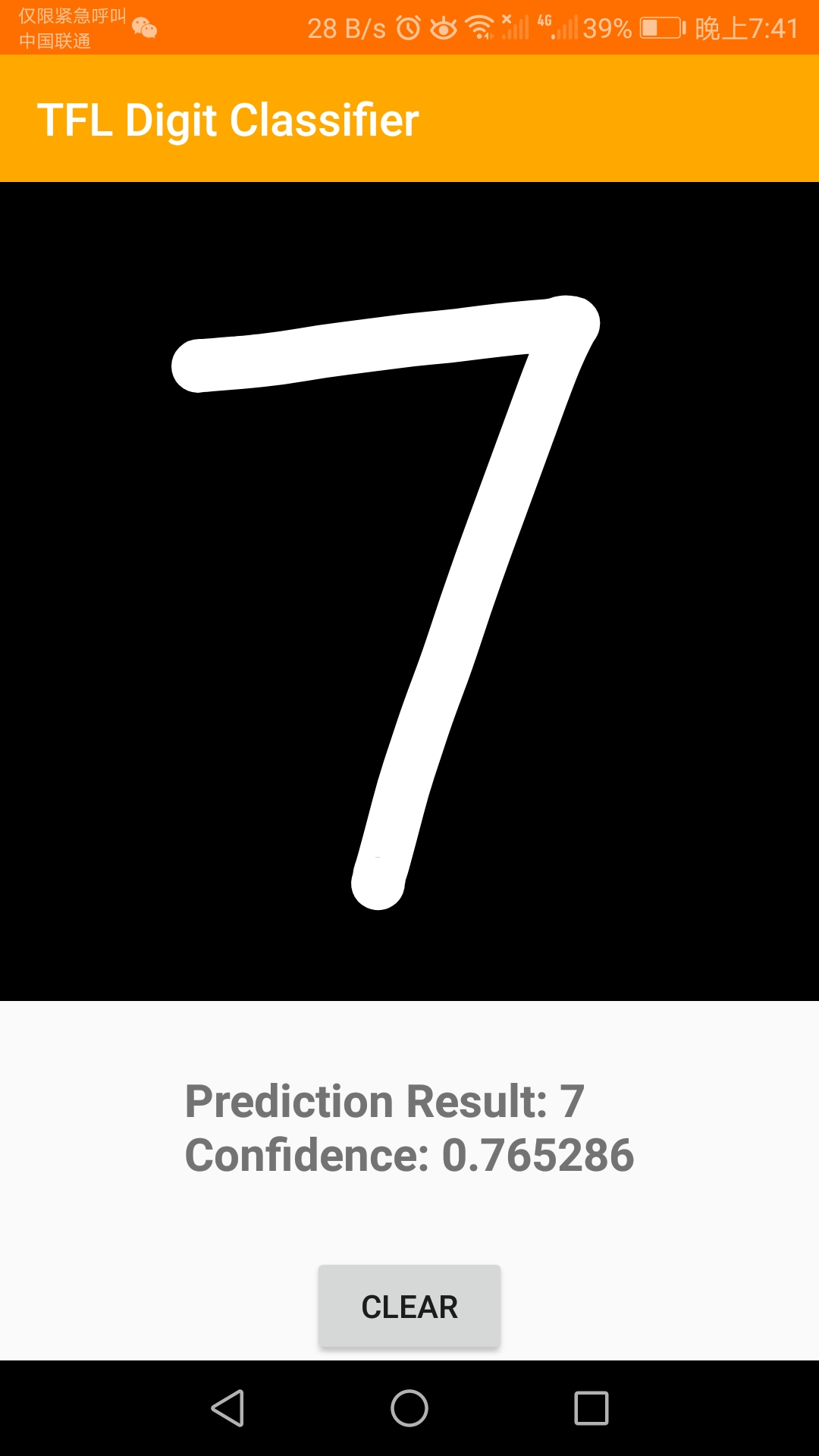
五、总结
本文 demo 的 github 地址:https://github.com/fengzhizi715/TFLite-MnistDemo
当然,也可以跑一下官方的例子:https://github.com/tensorflow/tensorflow/tree/master/tensorflow/lite/examples/android/app
虽然准确度都不咋地。。。
更多有趣的TensorFlow Lite示例:https://www.tensorflow.org/lite/examples/
TensorFlow Lite for Android示例的更多相关文章
- TensorFlow Lite demo——就是为嵌入式设备而存在的,底层调用NDK神经网络API,注意其使用的tf model需要转换下,同时提供java和C++ API,无法使用tflite的见后
Introduction to TensorFlow Lite TensorFlow Lite is TensorFlow’s lightweight solution for mobile and ...
- android NDK 神经网络API——是给tensorflow lite调用的底层API,应用开发者使用tensorflow lite即可
eural Networks API In this document show more Understanding the Neural Networks API Runtime Neural N ...
- object detection模型转换成TensorFlow Lite,在Android应用
环境 tensorflow = 1.12.0 bazel = 0.18.1 ubuntu = 16.04 python = 3.6.2 安装 bazel (0.18.1) 如果tensorflow是1 ...
- 移动端目标识别(3)——使用TensorFlow Lite将tensorflow模型部署到移动端(ssd)之Running on mobile with TensorFlow Lite (写的很乱,回头更新一个简洁的版本)
承接移动端目标识别(2) 使用TensorFlow Lite在移动设备上运行 在本节中,我们将向您展示如何使用TensorFlow Lite获得更小的模型,并允许您利用针对移动设备优化 ...
- 移动端目标识别(1)——使用TensorFlow Lite将tensorflow模型部署到移动端(ssd)之TensorFlow Lite简介
平时工作就是做深度学习,但是深度学习没有落地就是比较虚,目前在移动端或嵌入式端应用的比较实际,也了解到目前主要有 caffe2,腾讯ncnn,tensorflow,因为工作用tensorflow比较多 ...
- 在 Flutter 中使用 TensorFlow Lite 插件实现文字分类
如果您希望能有一种简单.高效且灵活的方式把 TensorFlow 模型集成到 Flutter 应用里,那请您一定不要错过我们今天介绍的这个全新插件 tflite_flutter.这个插件的开发者是 G ...
- Tensorflow Lite从入门到精通
TensorFlow Lite 是 TensorFlow 在移动和 IoT 等边缘设备端的解决方案,提供了 Java.Python 和 C++ API 库,可以运行在 Android.iOS 和 Ra ...
- 谷歌发布 TensorFlow Lite [官方网站,文档]
机器学习社区:http://tensorflow123.com/ 简介 TensorFlow Lite TensorFlow Lite 是 TensorFlow 针对移动和嵌入式设备的轻量级解决方案. ...
- 移动端目标识别(2)——使用TENSORFLOW LITE将TENSORFLOW模型部署到移动端(SSD)之TF Lite Developer Guide
TF Lite开发人员指南 目录: 1 选择一个模型 使用一个预训练模型 使用自己的数据集重新训练inception-V3,MovileNet 训练自己的模型 2 转换模型格式 转换tf.GraphD ...
随机推荐
- sql server 批量备份数据库及删除N天前的备份数据
很多时候,我们都需要将数据库进行备份,当服务器上数据库较多时,不可能一个数据库创建一个定时任务进行备份,这时,就需要进行批量的数据库备份操作,好了,废话不多说,具体实现语句如下: 1 2 3 4 5 ...
- HTTP之URL的快捷方式
URL快捷方式 ==================摘自<HTTP权威指南>======================= WEB客户端可以理解并使用几种URL快捷方式.相对URL是在某职 ...
- 改写URL的查询字符串QUERY_STRING[URL重定向问号问题](转)
查询字符串是指URL请求中"问号"后面的部分.比如,http://mysite/?foo=bar 中粗体部分就是查询字符串,其中变量名是foo,值是bar. 'last|L' (最 ...
- js展示long型精度问题解决(server端解决)
问题:后端返回了个Long型的数据,在前端展示时最后2位变为00了 例如返回Long型的数据为75874464836881101,结果接口返回变为75874464836881100了 解决方法: 1. ...
- 浅析libuv源码-node事件轮询解析(2)
上一篇讲了轮询的边角料,这篇进入正题.(竟然真有人看我博客,上两个图给你们整理下思路) 这是轮询总流程图. 下图为本节内容简图. Poll for I/O The loop blocks for I/ ...
- 「vue基础」一篇浅显易懂的 Vue 路由使用指南( Vue Router 下)
大家好,在上一篇系列文章里,我们一起学习了路由的基本配置,如何创建路由和传参,本篇文章我们一起学习下 Navigation 导航和路由守卫的相关内容. Navigation 如果要改变当前路径,我们可 ...
- spring好文章整理
彻底搞明白Spring中的自动装配和Autowired IDEA编译spring 5源码 Spring源码——IDEA读Spring源码环境搭建 导入spring源码org.springframewo ...
- nginx 配置反向代理,负载均衡实战解析
前言:NGINX的反向代理和负载均衡是网站架构中经常用到的一种高并发,高可用的方案,下面我们直接实战操作,当然理论也是要的. 一.反向代理 过程:反向代理:客户端 一>代理 <一> ...
- MongoDB下载+安装+配置+错误解决方法
下载 官网下载: https://www.mongodb.com/download-center/community Server=>Download 安装 下载完成后安装 建议下载根目录(下过 ...
- JAVA操作InfluxDB的一个Demo
一.基础连接类 package com.test.repository.utils; import com.dcits.domain.entry.bo.common.InfluxDbRow; impo ...