
Lucene 6.5.0 入门Demo
Lucene 6.5.0 要求jdk 1.8
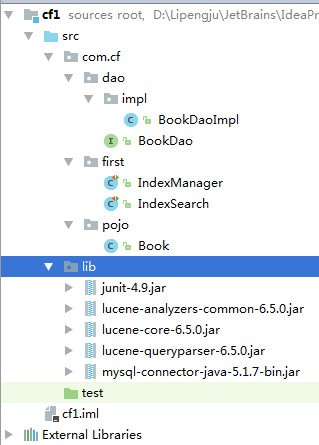
1.目录结构;
2.数据库环境;

private int id;

private String name;

private float price;

private String pic;

private String description
3.
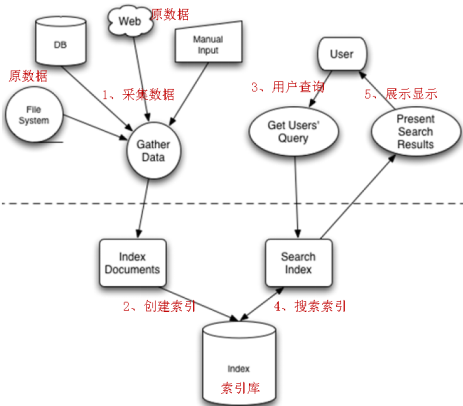
Lucene是Apache的一个全文检索引擎工具包,它不能独立运行,不能单独对外提供服务。
/**

 * Created by  on 2017/4/25.

 */

public class IndexManager {

    @Test

    public void createIndex() throws Exception {

        // 采集数据

        BookDao dao = new BookDaoImpl();

        List<Book> list = dao.queryBooks();

        // 将采集到的数据封装到Document对象中

        List<Document> docList = new ArrayList<Document>();

        Document document;

        for (Book book : list) {

            document = new Document();

            // store:如果是yes,则说明存储到文档域中

            // 图书ID

            // Field id = new TextField("id", book.getId().toString(), Store.YES);

            Field id = new TextField("id", Integer.toString(book.getId()), Field.Store.YES);

            // 图书名称

            Field name = new TextField("name", book.getName(), Field.Store.YES);

            // 图书价格

            Field price = new TextField("price", Float.toString(book.getPrice()), Field.Store.YES);

            // 图书图片地址

            Field pic = new TextField("pic", book.getPic(), Field.Store.YES);

            // 图书描述

            Field description = new TextField("description", book.getDescription(), Field.Store.YES);

            // 将field域设置到Document对象中

            document.add(id);

            document.add(name);

            document.add(price);

            document.add(pic);

            document.add(description);

            docList.add(document);

        }

        //JDK 1.7以后 open只能接收Path/////////////////////////////////////////////////////

        // 创建分词器,标准分词器

        Analyzer analyzer = new StandardAnalyzer();

        // 创建IndexWriter

        // IndexWriterConfig cfg = new IndexWriterConfig(Version.LUCENE_6_5_0,analyzer);

        IndexWriterConfig cfg = new IndexWriterConfig(analyzer);

        // 指定索引库的地址

//         File indexFile = new File("D:\\L\a\Eclipse\\lecencedemo\\");

//         Directory directory = FSDirectory.open(indexFile);

        Directory directory = FSDirectory.open(FileSystems.getDefault().getPath("D:\\Lpj\\JetBrains\\lucenceIndex1\\"));

        IndexWriter writer = new IndexWriter(directory, cfg);

      writer.deleteAll(); //清除以前的index

        // 通过IndexWriter对象将Document写入到索引库中

        for (Document doc : docList) {

            writer.addDocument(doc);

        }

        // 关闭writer

        writer.close();

    }

}
/**

 * Created by  on 2017/4/25.

 */

public class IndexSearch {

    private void doSearch(Query query) {

        // 创建IndexSearcher

        // 指定索引库的地址

        try {

//			File indexFile = new File("D:\\Lpj\\Eclipse\\lecencedemo\\");

//			Directory directory = FSDirectory.open(indexFile);

            // 1、创建Directory

            //JDK 1.7以后 open只能接收Path

            Directory directory = FSDirectory.open(FileSystems.getDefault().getPath("D:\\Lpj\\JetBrains\\lucenceIndex1\\"));

            IndexReader reader = DirectoryReader.open(directory);

            IndexSearcher searcher = new IndexSearcher(reader);

            // 通过searcher来搜索索引库

            // 第二个参数:指定需要显示的顶部记录的N条

            TopDocs topDocs = searcher.search(query, 10);

            // 根据查询条件匹配出的记录总数

            int count = topDocs.totalHits;

            System.out.println("匹配出的记录总数:" + count);

            // 根据查询条件匹配出的记录

            ScoreDoc[] scoreDocs = topDocs.scoreDocs;

            for (ScoreDoc scoreDoc : scoreDocs) {

                // 获取文档的ID

                int docId = scoreDoc.doc;

                // 通过ID获取文档

                Document doc = searcher.doc(docId);

                System.out.println("商品ID:" + doc.get("id"));

                System.out.println("商品名称:" + doc.get("name"));

                System.out.println("商品价格:" + doc.get("price"));

                System.out.println("商品图片地址:" + doc.get("pic"));

                System.out.println("==========================");

                // System.out.println("商品描述:" + doc.get("description"));

            }

            // 关闭资源

            reader.close();

        } catch (IOException e) {

            e.printStackTrace();

        }

    }

    @Test

    public void indexSearch() throws Exception {

        // 创建query对象

        Analyzer analyzer = new StandardAnalyzer();

        // 使用QueryParser搜索时,需要指定分词器,搜索时的分词器要和索引时的分词器一致

        // 第一个参数:默认搜索的域的名称

        QueryParser parser = new QueryParser("description", analyzer);

        // 通过queryparser来创建query对象

        // 参数:输入的lucene的查询语句(关键字一定要大写)

        Query query = parser.parse("description:java AND lucene");

        doSearch(query);

    }

Lucene 6.5.0 入门Demo的更多相关文章
- Lucene 6.5.0 入门Demo(2)
参考文档:http://lucene.apache.org/core/6_5_0/core/overview-summary.html#overview.description 对于path路径不是很 ...
- vue入门 0 小demo (挂载点、模板、实例)
vue入门 0 小demo (挂载点.模板) 用直接的引用vue.js 首先 讲几个基本的概念 1.挂载点即el:vue 实例化时 元素挂靠的地方. 2.模板 即template:vue 实例化时挂 ...
- Omnet++ 4.0 入门实例教程
http://blog.sina.com.cn/s/blog_8a2bb17d01018npf.html 在网上找到的一个讲解omnet++的实例, 是4.0下面实现的. 我在4.2上试了试,可以用. ...
- spring web flow 2.0入门(转)
Spring Web Flow 2.0 入门 一.Spring Web Flow 入门demo(一)简单页面跳转 附源码(转) 二.Spring Web Flow 入门demo(二)与业务结合 附源码 ...
- 【SSH系列】初识spring+入门demo
学习过了hibernate,也就是冬天,经过一个冬天的冬眠,当春风吹绿大地,万物复苏,我们迎来了spring,在前面的一系列博文中,小编介绍hibernate的相关知识,接下来的博文中,小编将继续介绍 ...
- 基于springboot构建dubbo的入门demo
之前记录了构建dubbo入门demo所需的环境以及基于普通maven项目构建dubbo的入门案例,今天记录在这些的基础上基于springboot来构建dubbo的入门demo:众所周知,springb ...
- lua入门demo(HelloWorld+redis读取)
1. lua入门demo 1.1. 入门之Hello World!! 由于我习惯用docker安装各种软件,这次的lua脚本也是运行在docker容器上 openresty是nginx+lua的各种模 ...
- netty入门demo(一)
目录 前言 正文 代码部分 服务端 客服端 测试结果一: 解决粘包,拆包的问题 总结 前言 最近做一个项目: 大概需求: 多个温度传感器不断向java服务发送温度数据,该传感器采用socket发送数据 ...
- canal入门Demo
关于canal具体的原理,以及应用场景,可以参考开发文档:https://github.com/alibaba/canal 下面给出canal的入门Demo (一)部署canal服务器 可以参考官方文 ...
随机推荐
- git - GNU 交互工具
语法 git [options] [path1] [path2] gitps [options] gitview [options] filename 注意 GIT 包 的 主要 配置文件 是 .gi ...
- Luogu P2664 树上游戏 dfs+树上统计
题目: P2664 树上游戏 分析: 本来是练习点分治的时候看到了这道题.无意中发现题解中有一种方法可以O(N)解决这道题,就去膜拜了一下. 这个方法是,假如对于某一种颜色,将所有这种颜色的点全部删去 ...
- c++-string-1
解答注意: 我写的时候考虑了: 1) " my"(设置flag,为true时表示上一个是非空格字符) 2) "hello John"(最后不是空格结尾, ...
- 数据结构之--图(Graphics)
1.1:图的定义和术语 图是一种比线性表和树更为复杂的数据结构.在线性表中,数据元素之间仅有线性关系,每个元素仅有一个直接前驱和一个直接后继:在树形结构中,数据元素之间有着明显的层次关系,并且每一 ...
- poj 3783
Balls Time Limit: 1000MS Memory Limit: 65536K Total Submissions: 1196 Accepted: 783 Description ...
- cs229_part2
part2 这节课主要讲的是生成式模型,那么与这个生成式模型相对于的就是我们上节课所讲那几个辨别式模型.所以生成式模型和辨别式模型的区别是什么呢.我先给出数学上的定义: 这是我们上节课线性回归所用的给 ...
- git commit 含有中文的代码,提示Warnning:Your console font probably doesn't support Unicode.......
git 提交代码是会遇到以下问题, git commit 代码时提示: Warning: Your console font probably doesn't support Unicode. If ...
- UVa 11987 并查集 Almost Union-Find
原文戳这 与以往的并查集不同,这次需要一个删除操作.如果是叶子节点还好,直接修改父亲指针就好. 但是如果要是移动根节点,指向它的所有子节点也会跟着变化. 所以要增加一个永远不会被修改的虚拟根节点,这样 ...
- centos 安装 yum apt
以下地址 http://download.csdn.NET/detail/mimi00x/8081263 执行安装命令 rpm -i rpmforge-release-0.5.3-1.el7.rf.x ...
- 【01】markdown语法
[02]段落和换行 一个 Markdown 段落是由一个或多个连续的文本行组成,它的前后要有一个以上的空行(空行的定义是显示上看起来像是空的,便会被视为空行.比方说,若某一行只包含空格和制表符,则该行 ...