
soapUI系列之—-03 Groovy脚本常用方法2
------Groovy脚本常用方法
1.解析Json数据脚本
//groovy读取json的方式很简单,re.body.businessinfo.c2rate读取c2rate对应的值

import groovy.json.JsonSlurper

def xresponse = testRunner.testCase.testSteps["Request"].testRequest.response.contentAsString

def slurper = new JsonSlurper()

def re = slurper.parseText(xresponse)

def num=re.body.businessinfo.size()

log.info(re.body.businessinfo.c2rate)
例:Json格式
{
"body":{
"businessinfo":{
"c1rate":"0.00",
"c2rate":"12.00",
"c4rate":"21.00",
"c5rate":"0.00",
"c6rate":"0.00",
"c8rate":"0.00",
"d1rate":"0.00",
"d2rate":"0.00",
"riskcode":"0355",
"ruleid":"R32000213878_11-0"
}
},
"head":{
"error_code":"0000",
"error_message":"成功",
"request_type":"???",
"response_code":"0"
}
}
2.获取reponse
//Get response

def groovyUtils = new GroovyUtils( context )

def holder = groovyUtils.getXmlHolder('inquire#Response')

//Parse return value

def data = holder.getNodeValue("//return")

log.info(data)
3. 导入需要用到的方法和脚本:例如MD5方法、groovy.json.JsonSlurper方法
例如:import groovy.json.JsonSlurper //导入groovy.json包中的JsonSlurper方法
4. 调用 Groovy,java 的jar包的方法
import pub.Text

// 调用 Groovy 的jar包中方法, //此包必须与jar包中的包名一致

def text = new Text()

text.writeFile("D:\\1.log", "test")
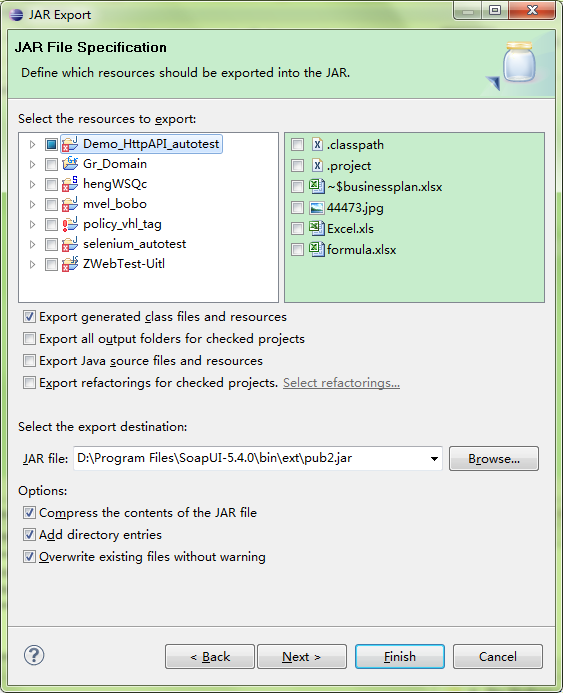
操作方法:选中工程->Export-> JAR
这里打jar包时候要注意
1)\WebContent\META-INF\MANIFEST.MF 这个文件打到jar包中去(这个文件描述了该Jar文件的很多信息)
2)要打的是class文件,即要选择Export generated class files and resources
5. 使用Groovy脚本执行接口请求
import com.eviware.soapui.impl.wsdl.testcase.WsdlTestRunContext

CURRENT_TESTCASE = testRunner.testCase

TEST_SUITE = CURRENT_TESTCASE.parent

def testStep = TEST_SUITE.getTestCaseByName('TestSuite').getTestStepByName('login')

def testStepContext = new WsdlTestRunContext(testStep)

def result = testStep.run(testRunner, testStepContext)

log.info result.responseContent
调用另一个TestSuite中的teststep脚本如下:
def testproject = testRunner.testCase.testSuite.project
def testcase = testproject.testSuites['PublicCase'].testCases['TestCase1']
testcase.testSteps["CreateService1"].run(testRunner, context)
调用本TestSuite中的TestStep脚本如下:
testRunner.runTestStepByName("Login")
testRunner.runTestStepByName("CreateAPI1-Scenario2")
6. 步骤跳转脚本
testRunner.gotoStepByName("Step2") 跳转到指定步骤
testRunner.runTestStepByName("Step2") 运行指定步骤或脚本
7. 得到32位的UUID
import java.util.UUID

//得到32位的UUID

//格式为:xxxxxxxx-xxxx-xxxx-xxxx-xxxxxxxxxxxx (8-4-4-4-12)

def uuids = UUID.randomUUID().toString().toLowerCase()

//得到去除横线的UUID

def uuids = UUID.randomUUID().toString().replace("-", "").toLowerCase();
8. 获取cookie并添加到对应的请求中
import com.eviware.soapui.support.types.StringToStringMap

def cookiesList = testRunner.testCase.getTestStepByName("login").testRequest.response.responseHeaders["Set-Cookie"]

log.info cookiesList

//Get the cookie

String cookieNew = cookiesList.get(0)

log.info "cookie : "+cookieNew

//Put cookie to a StringMap

def cookieMap = new StringToStringMap()

cookieMap.put("Cookie",cookieNew)

testRunner.testCase.getTestStepByName("filter").testRequest.setRequestHeaders(cookieMap);
其他参考资料:
soapUI系列之—-03 Groovy脚本常用方法2的更多相关文章
- soapUI系列之—-02 Groovy脚本常用方法
------Groovy脚本常用方法 1. 设置参数值:setPropertyValuea. 设置 project level property//set to project level prope ...
- [SoapUI] Post请求Body里面限制特殊字符(&、%),Groovy脚本里特殊字符需要添加“\”转义($)。
SoapUI的Post请求,在body里面不能包含(&.%),如果含有这些特殊字符,请求会报错:在添加的Groovy脚本里有些特殊字符需要使用“\”转义($),不然也会报错.
- soapUI参数中文乱码问题解决方法 (groovy脚本中文乱码)
soapUI参数中文乱码问题解决方法 可能方案1: 字体不支持中文,将字体修改即可: file-preferences-editor settings-select font 修改字体,改成能显示中文 ...
- excel文件的groovy脚本在SoapUI中进行数据驱动测试
SoapUI Pro具有从外部文件读取数据的功能,例如:excel,csv等.但SoapUI不提供从excel文件读取数据的功能.因此,为了从SoapUI中的excel文件中读取数据,我们需要在gro ...
- SSAS系列——【03】多维数据(多维数据集对象)
原文:SSAS系列--[03]多维数据(多维数据集对象) 1.什么是Cube? 简单 Cube 对象由基本信息.维度和度量值组组成. 基本信息包括多维数据集的名称.多维数据集的默认度量值.数据源和存储 ...
- 180807-Quick-Task 动态脚本支持框架之Groovy脚本加载执行
Quick-Task 动态脚本支持框架之Groovy脚本加载执行 上一篇简答说了如何判断有任务动态添加.删除或更新,归于一点就是监听文件的变化,判断目录下的Groovy文件是否有新增删除和改变,从而判 ...
- Groovy脚本-通用SQL开关
备注:使用Groovy语言进行编写,看不懂的同学请先了解Groovy脚本. Groovy学习地址:https://www.cnblogs.com/tiechui2015/p/10828457.html ...
- [Tomcat 源码分析系列] (二) : Tomcat 启动脚本-catalina.bat
概述 Tomcat 的三个最重要的启动脚本: startup.bat catalina.bat setclasspath.bat 上一篇咱们分析了 startup.bat 脚本 这一篇咱们来分析 ca ...
- jenkins2 groovy脚本参考
使用plugin生成groovy脚本,或者参考已有的groovy脚本. 文章来自:http://www.ciandcd.com文中的代码来自可以从github下载: https://github.co ...
随机推荐
- 【mybatis】mybatis数据源源码剖析(JNDI、POOLED、UNPOOLED)
一.概述 二.创建 mybatis数据源的创建过程稍微有些曲折. 1. 数据源的创建过程: 2. mybatis支持哪些数据源,也就是dataSource标签的type属性可以写哪些合法的参数? 弄清 ...
- OpenJudge-百练-2755
这道题用递归写的话还是很好写的,我们设递归函数的名称为Ways(w,k) . 它的含义就是,w的大小,取k个物品,有多少种方式. 我们可以知道递归的边界条件就是当w的大小为0的时候,我们的方法数只有一 ...
- 教你轻松在React Native中使用自定义iconfont
在react-native项目中我们一般使用到 react-native-vector-icons(这里不介绍如何使用react-native-vector-icons按照官方文档即可)但是当reac ...
- winform中ComboBox控件的简单使用
在开发winform中用到了ComboBox,但是发现和asp.net中的DropDownList差别比我想象中的大. 给ComboBox添加数据总结的有两种方法(绑定数据库在这里不说): 第一种方法 ...
- ORACLE-023:令人烦恼的 ora-01722 无效数字
https://blog.csdn.net/yysyangyangyangshan/article/details/51762746
- Leetcode 318.最大单词长度乘积
最大单词长度乘积 . 示例 1: 输入: ["abcw","baz","foo","bar","xtfn&qu ...
- zoj 2850 Beautiful Meadow
Beautiful Meadow Time Limit: 2 Seconds Memory Limit: 65536 KB Tom's Meadow Tom has a meadow in ...
- zoj 1383 Binary Numbers
Binary Numbers Time Limit: 2 Seconds Memory Limit: 65536 KB Given a positive integer n, print o ...
- 【转】关于大型网站技术演进的思考(二十一)--网站静态化处理—web前端优化—下【终篇】(13)
本篇继续web前端优化的讨论,开始我先讲个我所知道的一个故事,有家大型的企业顺应时代发展的潮流开始投身于互联网行业了,它们为此专门设立了一个事业部,不过该企业把这个事业部里的人事成本,系统运维成本特别 ...
- 【贪心+DFS】D. Field expansion
http://codeforces.com/contest/799/problem/D [题意] 给定长方形的两条边h和w,你可以从给出的n个数字中随意选出一个x,把h或者w乘上x(每个x最多用一次) ...