
REMOVE A WINDOWS SERVICE
You can easily remove a Windows service from the Windows registry using a simple command prompt command called SC.
SC is the command line utility which interacts with the Windows Service Controller and can be used to manage services on either a remote or local Windows machine.
You will need to find the name of the service you would like to remove before you can issue the SC command to remove it. You can either use the Windows Service console or the sc query command to find the name of a service.
Click the Start menu and type in Services and click the WindowsServices console in the list. Find your service by name and double click it to see the Properties window. The service name can be seen at the top of the form. The below example shows the Skype Updaterservice.
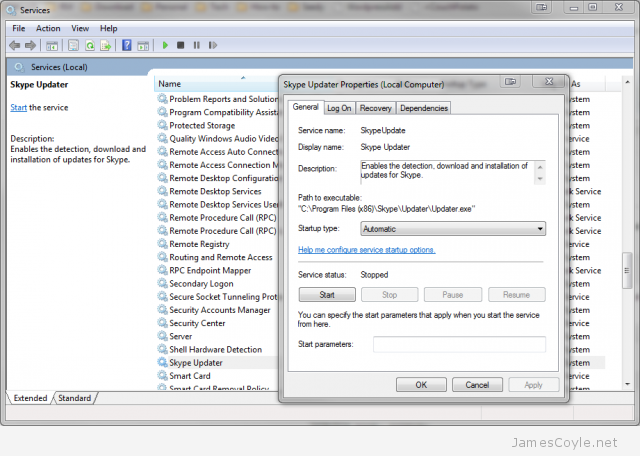
To use the sc query command to find your service name, open up a command prompt and type the below command.
sc query
Find the SERVICE_NAME attribute of your required service.
Once you have the service name, you will need to stop the service before you can delete it. Issue the sc stop command followed by the service name. The below example show how to stop the SkypeUpdate service.
sc stop SkypeUpdate
Finally, you can issue the sc delete command to remove the service.
sc remove SkypeUpdate
原文地址: http://www.jamescoyle.net/tag/windows
REMOVE A WINDOWS SERVICE的更多相关文章
- node.js应用生成windows service的plugin——winser
from:http://xiaomijsj.blog.163.com/blog/static/89685520135854036206/ 针对项目中windows server machine 不断重 ...
- 使用Python写Windows Service服务程序
1.背景 如果你想用Python开发Windows程序,并让其开机启动等,就必须写成windows的服务程序Windows Service,用Python来做这个事情必须要借助第三方模块pywin32 ...
- 使用ASP.NET实现Windows Service定时执行任务
转载http://blog.csdn.net/yanghua_kobe/article/details/6937816 我们怎样才能在服务器上使用asp.net定时执行任务而不需要安装windows ...
- A basic Windows service in C++ (CppWindowsService)
A basic Windows service in C++ (CppWindowsService) This code sample demonstrates creating a basic Wi ...
- 让自己的C++程序(非服务程序)运行为一个windows service
因为项目的一些变化和原因,需要把数据处理的一个后台程序创建为一个windows服务,运行以下命令能创建成功: sc create "MyApp Service Name" binP ...
- Mysql安装错误:Install/Remove of the Service Denied!解决办法
Mysql安装错误:Install/Remove of the Service Denied!解决办法 在windos 的cmd下安装mysql 在mysql的bin目录下面执行: mysqld -- ...
- python实现windows Service服务程序
python实现windows Service服务程序 win32serviceutil.ServiceFramework是封装得很好的Windows服务框架,本文通过继承它来实现. 通过SvcDoR ...
- Windows 7 下将 Tomcat Java 程序设置为 Windows Service
方法: Windows key + r -> Run dialog cmd -> console cd apache-tomcat-[version]/bin service.bat in ...
- C#创建、安装、卸载、调试Windows Service(Windows 服务)的简单教程
前言:Microsoft Windows 服务能够创建在它们自己的 Windows 会话中可长时间运行的可执行应用程序.这些服务可以在计算机启动时自动启动,可以暂停和重新启动而且不显示任何用户界面.这 ...
随机推荐
- setTimeout不可靠的修正办法及clearTimeout
javascript里的这两个定时器函数,大家一定耳熟能详: setTimeout("函数()",毫秒)就是开启一个计时器,指定毫秒后执行该函数一次. 有关定时器,javascri ...
- 正向代理tinyproxy使用总结
使用tinyproxy的问题背景: 其实以前代理一直用的是apache,后来,那次有个任务要给ios的推送设置代理,任务很紧急,可是apache报错. 原因如下:APNS发送通知的端口2195,但是A ...
- Redhat enterpise6 安装unix2dos/dos2unix
初用unix2dos,在rhel6 上 用yum install unix2dos , 提示源不可用, 那好吧, 就去rpm包网:http://rpm.pbone.net/ 下载了一个unix2dos ...
- Fibonacci数的后9位
import java.math.*; import java.util.*; public class Main{ /** * @param args */ public static void m ...
- 关于树论【LCA树上倍增算法】
补了一发LCA,表示这东西表面上好像简单,但是细节真挺多. 我学的是树上倍增,倍增思想很有趣~~(爸爸的爸爸叫奶奶.偶不,爷爷)有一个跟st表非常类似的东西,f[i][j]表示j的第2^i的祖先,就是 ...
- DOM方式解析xml实例2
老样子,javabean实体类: import java.io.*; public class Book implements Serializable { private int id; priva ...
- C# WinForm开发系列 - Form/Window
Form是WinForm开发中非常重要的一个控件, 本文将包含如何制作一个关于对话框,系统载入提示窗体, 创建类似于QQ提示框以及创建不规则窗体等(文章及相关代码搜集自网络,仅供学习参考,版权属于原作 ...
- IJ:IntelliJ IDEA安装
ylbtech-IJ:IntelliJ IDEA安装 响应速度快 1.返回顶部 1. 2. 3. 4. 5. 6. 7. 2. 接受协议,激活IJ返回顶部 1. 2. 3. 4. 5. 6.0. 6. ...
- TCP、UDP和HTTP关系
TCP/IP是个协议组,可分为三个层次:网络层.传输层和应用层.IP:网络层协议: TCP和UDP:传输层协议:TCP提供有保证的数据传输,UDP不提供. HTTP:应用层协议(超文本传输协议): 如 ...
- centos安装PHP扩展(bcmath)
Centos下搭完Mysql+Apache+PHP后,发现有些网页打开是空白的.将php.ini里面的参数 error_reporting = E_ALL,display_errors = On,di ...