
【JavaScript】浅析ajax的使用
目录结构:
1,Ajax简介
Ajax是Asynchronous JavaScript and XML(异步的JavaScript和XML)的简介,Ajax并不是一门新的编程语言,而是一种使用现有标准的新方法。它能够在不重新加载整个页面的情况下,可以与服务器交换数据并更新部分网页内容。
2,Ajax工作原理
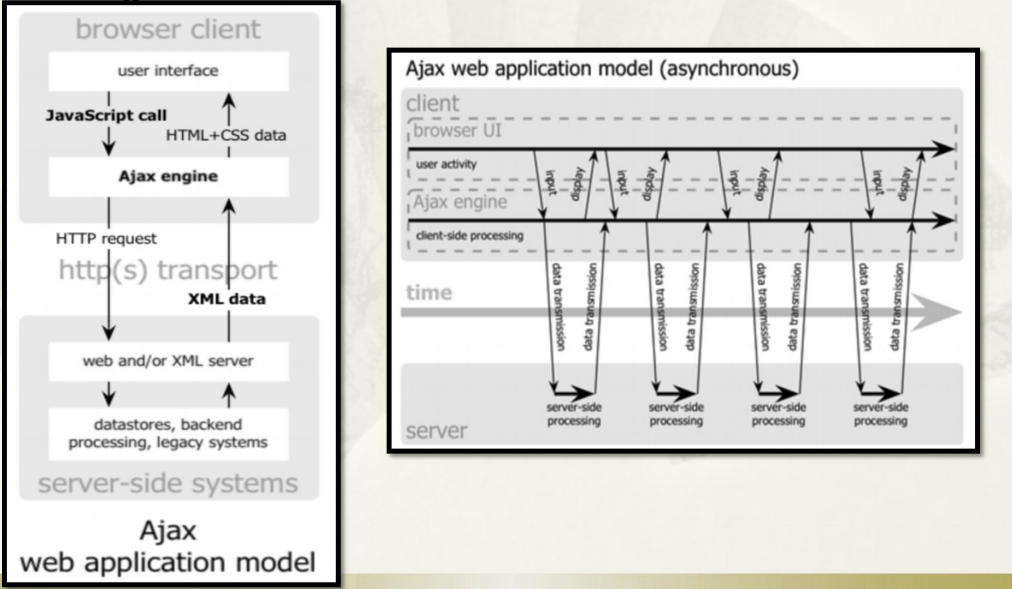
通过这个原理图,我们可以看出我们写的javascript代码首先会经过ajax引擎,由ajax引擎负责和server进行通信,再将通信的结果返回给浏览器。这样就不需要刷新整个网页,从而实现向服务器请求数据。
3,Ajax的使用步骤
3.1,使用原生js
1.创建XMLHttpRequest对象
所有现代的浏览器都内建了XMLHttpRequest对象,创建的语法为: var xmlhttp=new XMLHttpRequest(); 。
老版本的IE5,IE6使用ActiveX对象,语法为: var xmlhttp=new ActiveXObject("Microsoft.XMLHTTP"); 。
2.传入回调函数onreadystatechange
xmlhttp.onreadystatechange=function(){

    if(xmlhttp.readyState==4 && xmlhttp.status==200){

         //document.getElementById("myDiv").innerHTML=xmlhttp.responseText;

        }

}
readState的状态码:
- 0: 请求未初始化
- 1: 服务器连接已建立
- 2: 请求已接收
- 3: 请求处理中
- 4: 请求已完成,且响应已就绪
status的状态码:
- 200: 请求成功
- 302:请求重定向
- 404: 资源未找到
- 500:服务器错误
3.向服务器发送请求
xmlhttp.open(Method,URL,async);

xmlhttp.send();
这里涉及到参数的问题,如果是使用POST请求提交参数,那么参数需要在send()方法中传入,如果使用GET请求提交参数,那么参数需要拼接到URL后面。
4.案例
html文件:
<!DOCTYPE html>

<html>

<head>

<meta charset="UTF-8">

<title>用户登录</title>

<script type="text/javascript">

function userSubmit(){

    //创建对象

    var xmlhttp;

    if(window.XMLHttpRequest){

        xmlhttp = new XMLHttpRequest();

    }else{

        xmlhttp = new ActiveXObject("Microsoft.XMLHTTP");

    }

    //传入回调函数onreadystatechange

    xmlhttp.onreadystatechange=function(){

        if(xmlhttp.readyState==4 && xmlhttp.status==200){//请求成功

            document.getElementById("logininfo").innerHTML=xmlhttp.responseText;

        }

    }

    //发送请求

    xmlhttp.open("POST","login.do",true);

    //如果希望通过POST传输数据,那么应该先通过setRequestHeader()添加Http头数据

    xmlhttp.setRequestHeader("Content-type","application/x-www-form-urlencoded");

    var unamevalue=document.getElementById("unameid").value;

    var upassvalue=document.getElementById("upassid").value;

    xmlhttp.send("uname="+unamevalue+"&upass="+upassvalue);

}

</script>

</head>

<body>

<div>

请输入用户名:<input type="text" id="unameid" name="uname"/><p><p>

请输入密码:<input type="password" id="upassid" name="upass"/><p><p>

<input type="button" value="点击我" onclick="userSubmit()"/><p><P>

<span id="logininfo"></span>

</div>

</body>

</html>
login.html
servlet文件:
package cn.user.login;

import java.io.IOException;

import javax.servlet.ServletException;

import javax.servlet.annotation.WebServlet;

import javax.servlet.http.HttpServlet;

import javax.servlet.http.HttpServletRequest;

import javax.servlet.http.HttpServletResponse;

/**

 */

@WebServlet("/login.do")

public class UserLogin extends HttpServlet {

    /**

     * @see HttpServlet#doGet(HttpServletRequest request, HttpServletResponse response)

     */

    protected void doGet(HttpServletRequest request, HttpServletResponse response) throws ServletException, IOException {

        request.setCharacterEncoding("utf-8");

        response.setCharacterEncoding("utf-8");

        String name=request.getParameter("uname");

        String password=request.getParameter("upass");

        //进行数据库的查询,对比name和password

        //此处省略对数据库的查询,使用name=张三,password=123456;

        if("张三".equals(name) && "123456".equals(password)){

            response.getWriter().append("登录成功");

        }

    }

    protected void doPost(HttpServletRequest request, HttpServletResponse response) throws ServletException, IOException {

        doGet(request,response);

    }

}
userLogin.java
上面的代码如果需要使用GET请求(参数应该拼接到url上),那么将上面的文件改为,
html文件:
<!DOCTYPE html>

<html>

<head>

<meta charset="UTF-8">

<title>用户登录</title>

<script type="text/javascript">

function userSubmit(){

    //创建对象

    var xmlhttp;

    if(window.XMLHttpRequest){

        xmlhttp = new XMLHttpRequest();

    }else{

        xmlhttp = new ActiveXObject("Microsoft.XMLHTTP");

    }

    //传入回调函数onreadystatechange

    xmlhttp.onreadystatechange=function(){

        if(xmlhttp.readyState==4 && xmlhttp.status==200){//请求成功

            document.getElementById("logininfo").innerHTML=xmlhttp.responseText;

        }

    }

    var unamevalue=document.getElementById("unameid").value;

    var upassvalue=document.getElementById("upassid").value;

    //发送请求

    xmlhttp.open("GET","login.do?uname="+unamevalue+"&upass="+upassvalue,true);

    xmlhttp.send();

}

</script>

</head>

<body>

<div>

请输入用户名:<input type="text" id="unameid" name="uname"/><p><p>

请输入密码:<input type="password" id="upassid" name="upass"/><p><p>

<input type="button" value="点击我" onclick="userSubmit()"/><p><P>

<span id="logininfo"></span>

</div>

</body>

</html>
login.html
servlet文件:
package cn.user.login;

import java.io.IOException;

import javax.servlet.ServletException;

import javax.servlet.annotation.WebServlet;

import javax.servlet.http.HttpServlet;

import javax.servlet.http.HttpServletRequest;

import javax.servlet.http.HttpServletResponse;

/**

 */

@WebServlet("/login.do")

public class UserLogin extends HttpServlet {

    /**

     * @see HttpServlet#doGet(HttpServletRequest request, HttpServletResponse response)

     */

    protected void doGet(HttpServletRequest request, HttpServletResponse response) throws ServletException, IOException {

        response.setCharacterEncoding("utf-8");

        String name=new String(request.getParameter("uname").getBytes("ISO-8859-1"),"utf-8");

        String password=new String(request.getParameter("upass").getBytes("ISO-8859-1"),"utf-8");

        //进行数据库的查询,对比name和password

        //此处省略对数据库的查询,使用name=张三,password=123456;

        if("张三".equals(name) && "123456".equals(password)){

            response.getWriter().append("登录成功");

        }else{

            response.getWriter().append("登录失败");

        }

    }

    protected void doPost(HttpServletRequest request, HttpServletResponse response) throws ServletException, IOException {

        doGet(request,response);

    }

}
userLogin.java
3.2,使用JQuery
上面使用原生的js代码过于繁琐,jQuery对ajax进行了封装,提供了方法,比如常用的:$.ajax(),$.get(),$.post(),$.getJSON()方法。
下面使用$.ajax()函数进行演示:
html代码:
<!DOCTYPE html>

<html>

<head>

<meta charset="UTF-8">

<title>ajax测试</title>

<script src="http://cdn.static.runoob.com/libs/jquery/1.10.2/jquery.min.js"></script>

<script type="text/javascript">

$(function(){

    $(".submitButton").click(function(){

        $.ajax({

            url:"login.do?uname="+$(".unameclass").val()+"&upass="+$(".unamepass").val(),

            type:"GET",

            dataType:"JSON",

            async:"true",

            success:function(res){

                $(".logininfo").html(res.result.logininfo);

            },

            error:function(xhr){

                alert("错误提示: " + xhr.status + " " + xhr.statusText);

            }

        });

    });

})

</script>

</head>

<body>

<div>

 用户名:<input type="text" class="unameclass" /><p><p>

 密码:<input type="text" class="unamepass" /><p><p>

 <input type="button" value="提交" class="submitButton"/><p><p>

 <span class="logininfo"></span>

</div>

</body>

</html>
login.html
servlet代码:
package cn.user.login;

import java.io.IOException;

import java.util.HashMap;

import java.util.Map;

import javax.servlet.ServletException;

import javax.servlet.annotation.WebServlet;

import javax.servlet.http.HttpServlet;

import javax.servlet.http.HttpServletRequest;

import javax.servlet.http.HttpServletResponse;

import com.google.gson.Gson;

/**

 */

@WebServlet("/login.do")

public class UserLogin extends HttpServlet {

    protected void doGet(HttpServletRequest request, HttpServletResponse response) throws ServletException, IOException {

        response.setCharacterEncoding("utf-8");

        String name=new String(request.getParameter("uname").getBytes("ISO-8859-1"),"utf-8");

        String password=new String(request.getParameter("upass").getBytes("ISO-8859-1"),"utf-8");

        //进行数据库的查询,对比name和password

        //此处省略对数据库的查询,使用name=张三,password=123456;

        int errorCode;//错误码,0表示无错误,1表示有错误

        Map map1=new HashMap<>();

        Map<String,String> map2=new HashMap<String,String>();

        if("张三".equals(name) && "123456".equals(password)){

            errorCode=0;

            map2.put("logininfo", "登录成功");

        }else{

            errorCode=1;

            map2.put("logininfo", "登录失败");

        }

        map1.put("errorcode", errorCode);

        map1.put("result", map2);

        //将Map集合转化为JSON字符串

        String strjson=new Gson().toJson(map1);

        response.getWriter().append(strjson);

    }

    protected void doPost(HttpServletRequest request, HttpServletResponse response) throws ServletException, IOException {

        doGet(request,response);

    }

}
userLogin.java
上面的servlet代码,将Map集合转化为了json字符串,首先需要导入 gson-2.3.1.jar 包,关于这种方式笔者在下面还会讲解。如果我们不采用Map集合转化为json字符串的方式,那么我们也手动拼接字符串的方法,只不过这种方法在处理数据量大的json数据时,显得力不从心。
4,JQuery中常用的Ajax函数
4.1, $.ajax()函数
在上面的案例中,我们也使用了ajax函数,那里是使用GET请求的方式,下面我们使用POST方式
html页面:
<!DOCTYPE html>

<html>

<head>

<meta charset="UTF-8">

<title>ajax测试</title>

<script src="http://cdn.static.runoob.com/libs/jquery/1.10.2/jquery.min.js"></script>

<script type="text/javascript">

$(function(){

    $(".submitButton").click(function(){

        $.ajax({

            url:"login.do",

            type:"POST",

            data:{"uname":$(".unameclass").val(),"upass":$(".unamepass").val()},

            dataType:"JSON",

            async:"true",

            success:function(res){

                $(".logininfo").html(res.result.logininfo);

            },

            error:function(xhr){

                alert("错误提示: " + xhr.status + " " + xhr.statusText);

            }

        });

    });

})

</script>

</head>

<body>

<div>

 用户名:<input type="text" class="unameclass" /><p><p>

 密码:<input type="text" class="unamepass" /><p><p>

 <input type="button" value="提交" class="submitButton"/><p><p>

 <span class="logininfo"></span>

</div>

</body>

</html>
login.html
servlet页面:
package cn.user.login;

import java.io.IOException;

import java.util.HashMap;

import java.util.Map;

import javax.servlet.ServletException;

import javax.servlet.annotation.WebServlet;

import javax.servlet.http.HttpServlet;

import javax.servlet.http.HttpServletRequest;

import javax.servlet.http.HttpServletResponse;

import com.google.gson.Gson;

/**

 */

@WebServlet("/login.do")

public class UserLogin extends HttpServlet {

    protected void doGet(HttpServletRequest request, HttpServletResponse response) throws ServletException, IOException {

        response.setCharacterEncoding("utf-8");

        request.setCharacterEncoding("utf-8");

        String name=request.getParameter("uname");

        String password=request.getParameter("upass");

        //进行数据库的查询,对比name和password

        //此处省略对数据库的查询,使用name=张三,password=123456;

        int errorCode;//错误码,0表示无错误,1表示有错误

        Map map1=new HashMap<>();

        Map<String,String> map2=new HashMap<String,String>();

        if("张三".equals(name) && "123456".equals(password)){

            errorCode=0;

            map2.put("logininfo", "登录成功");

        }else{

            errorCode=1;

            map2.put("logininfo", "登录失败");

        }

        map1.put("errorcode", errorCode);

        map1.put("result", map2);

        //将Map集合转化为JSON字符串

        String strjson=new Gson().toJson(map1);

        response.getWriter().append(strjson);

    }

    protected void doPost(HttpServletRequest request, HttpServletResponse response) throws ServletException, IOException {

        doGet(request,response);

    }

}
4.2, $.get()函数
这个函数表明请求数据的方式为GET,请求的数据但是不需要添加到url中,该函数中专门有参数接受参数。
html页面:
<!DOCTYPE html>

<html>

<head>

<meta charset="UTF-8">

<title>ajax测试</title>

<script src="http://cdn.static.runoob.com/libs/jquery/1.10.2/jquery.min.js"></script>

<script type="text/javascript">

$(function(){

    $(".submitButton").click(function(){

        $.get(

            "login.do",

            {"uname":$(".unameclass").val(),"upass":$(".unamepass").val()},

            function(res){

                $(".logininfo").html(res.result.logininfo);

            },

            "JSON"

        );

    });

})

</script>

</head>

<body>

<div>

 用户名:<input type="text" class="unameclass" /><p><p>

 密码:<input type="text" class="unamepass" /><p><p>

 <input type="button" value="提交" class="submitButton"/><p><p>

 <span class="logininfo"></span>

</div>

</body>

</html>
login.html
servlet页面:
package cn.user.login;

import java.io.IOException;

import java.util.HashMap;

import java.util.Map;

import javax.servlet.ServletException;

import javax.servlet.annotation.WebServlet;

import javax.servlet.http.HttpServlet;

import javax.servlet.http.HttpServletRequest;

import javax.servlet.http.HttpServletResponse;

import com.google.gson.Gson;

/**

 */

@WebServlet("/login.do")

public class UserLogin extends HttpServlet {

    protected void doGet(HttpServletRequest request, HttpServletResponse response) throws ServletException, IOException {

        response.setCharacterEncoding("utf-8");

        String name=new String(request.getParameter("uname").getBytes("ISO-8859-1"),"utf-8");

        String password=new String(request.getParameter("upass").getBytes("ISO-8859-1"),"utf-8");

        //进行数据库的查询,对比name和password

        //此处省略对数据库的查询,使用name=张三,password=123456;

        int errorCode;//错误码,0表示无错误,1表示有错误

        Map map1=new HashMap<>();

        Map<String,String> map2=new HashMap<String,String>();

        if("张三".equals(name) && "123456".equals(password)){

            errorCode=0;

            map2.put("logininfo", "登录成功");

        }else{

            errorCode=1;

            map2.put("logininfo", "登录失败");

        }

        map1.put("errorcode", errorCode);

        map1.put("result", map2);

        //将Map集合转化为JSON字符串

        String strjson=new Gson().toJson(map1);

        response.getWriter().append(strjson);

    }

    protected void doPost(HttpServletRequest request, HttpServletResponse response) throws ServletException, IOException {

        doGet(request,response);

    }

}
userlogin.java
4.3, $.post()函数
html页面:
<!DOCTYPE html>

<html>

<head>

<meta charset="UTF-8">

<title>ajax测试</title>

<script src="http://cdn.static.runoob.com/libs/jquery/1.10.2/jquery.min.js"></script>

<script type="text/javascript">

$(function(){

    $(".submitButton").click(function(){

        $.post(

                "login.do",

                {"uname":$(".unameclass").val(),"upass":$(".unamepass").val()},

                function(res){

                    $(".logininfo").html(res.result.logininfo);

                },

                "JSON"

        );

    });

})

</script>

</head>

<body>

<div>

 用户名:<input type="text" class="unameclass" /><p><p>

 密码:<input type="text" class="unamepass" /><p><p>

 <input type="button" value="提交" class="submitButton"/><p><p>

 <span class="logininfo"></span>

</div>

</body>

</html>
login.html
servlet页面:
package cn.user.login;

import java.io.IOException;

import java.util.HashMap;

import java.util.Map;

import javax.servlet.ServletException;

import javax.servlet.annotation.WebServlet;

import javax.servlet.http.HttpServlet;

import javax.servlet.http.HttpServletRequest;

import javax.servlet.http.HttpServletResponse;

import com.google.gson.Gson;

/**

 */

@WebServlet("/login.do")

public class UserLogin extends HttpServlet {

    protected void doGet(HttpServletRequest request, HttpServletResponse response) throws ServletException, IOException {

        response.setCharacterEncoding("utf-8");

        request.setCharacterEncoding("utf-8");

        String name=request.getParameter("uname");

        String password=request.getParameter("upass");

        //进行数据库的查询,对比name和password

        //此处省略对数据库的查询,使用name=张三,password=123456;

        int errorCode;//错误码,0表示无错误,1表示有错误

        Map map1=new HashMap<>();

        Map<String,String> map2=new HashMap<String,String>();

        if("张三".equals(name) && "123456".equals(password)){

            errorCode=0;

            map2.put("logininfo", "登录成功");

        }else{

            errorCode=1;

            map2.put("logininfo", "登录失败");

        }

        map1.put("errorcode", errorCode);

        map1.put("result", map2);

        //将Map集合转化为JSON字符串

        String strjson=new Gson().toJson(map1);

        response.getWriter().append(strjson);

    }

    protected void doPost(HttpServletRequest request, HttpServletResponse response) throws ServletException, IOException {

        doGet(request,response);

    }

}
userLogin.java
4.4, $.getJSON()函数
这个函数就是指定$.get()函数返回数据的类型是JSON,只需要将$.get()函数案例中html页面改为:
<!DOCTYPE html>

<html>

<head>

<meta charset="UTF-8">

<title>ajax测试</title>

<script src="http://cdn.static.runoob.com/libs/jquery/1.10.2/jquery.min.js"></script>

<script type="text/javascript">

$(function(){

    $(".submitButton").click(function(){

        $.getJSON(

            "login.do",

            {"uname":$(".unameclass").val(),"upass":$(".unamepass").val()},

            function(res){

                $(".logininfo").html(res.result.logininfo);

            },

        );

    });

})

</script>

</head>

<body>

<div>

 用户名:<input type="text" class="unameclass" /><p><p>

 密码:<input type="text" class="unamepass" /><p><p>

 <input type="button" value="提交" class="submitButton"/><p><p>

 <span class="logininfo"></span>

</div>

</body>

</html>
login.html
5.Ajax + Jquery 提交文件和其他数据
html如下:
<form id="data" method="post" enctype="multipart/form-data">

    <input type="text" name="first" value="Bob" />

    <input type="text" name="middle" value="James" />

    <input type="text" name="last" value="Smith" />

    <input name="image" type="file" />

    <button>Submit</button>

</form>
Ajax + jquery提交方式:
$("form#data").submit(function(e) {

                e.preventDefault();

                var formData = new FormData($("form#data")[0]);

                $.ajax({

                    url: window.location.pathname,

                    type: "POST",

                    data: formData,

                    dataType: "JSON",

                    cache: false,

                    contentType: false,

                    processData: false,

                    async: "true",

                    success: function (res) {

                        console.log(res);

                    },

                    error: function (xhr) {

                        alert("错误提示: " + xhr.status + " " + xhr.statusText);

                    }

                });

});
【JavaScript】浅析ajax的使用的更多相关文章
- 最新JavaScript、Ajax典藏级学习资料下载分类汇总 (2011年12月21日更新)
其他网站开发相关资料 超强HTML和xhtml,CSS精品学习资料下载汇总 最新htm ...
- 初识JavaScript,Ajax,jQuery,并比较三者关系
一.基本认识 1.JavaScript 定义: javaScript的简写形式就是JS,是由Netscape公司开发的一种脚本语言,一种广泛用于客户端Web开发的脚本语言,常用来给HTML网页添加动态 ...
- JavaScript实现Ajax小结
置顶文章:<纯CSS打造银色MacBook Air(完整版)> 上一篇:<TCP的三次握手和四次挥手> 作者主页:myvin 博主QQ:851399101(点击QQ和博主发起临 ...
- 掌握 Ajax,第 2 部分: 使用 JavaScript 和 Ajax 发出异步请求
转http://www.ibm.com/developerworks/cn/xml/wa-ajaxintro2/ 掌握 Ajax,第 2 部分: 使用 JavaScript 和 Ajax 发出异步请求 ...
- javascript版Ajax请求
什么是Ajax请求,Ajax也就是“Asynchronous JavaScript and XML”(异步JavaScript和XML),无刷新数据读取.能减少流量的消耗,也提高了浏览的流畅性,给用户 ...
- Javascript与Ajax
不使用jquery来处理ajax请求该怎么做? 首先要明确html中的某些数据需要从服务端获得,也就是客户端向服务端请求(request)数据,服务端就响应(response)这个请求,把客户端要的数 ...
- javascript进阶——Ajax
统的Web 页面和应用中,用户每点击页面上的某个部分,浏览器就会向服务器发出一个请求,等待服务器做出响应,然后返回一个完整新网页,但在大多数情况下用户不得不忍受页面闪烁和长时间的等待.随着Web技术的 ...
- Javascript and AJAX with Yii(在yii 中使用 javascript 和ajax)
英文原文:http://www.yiiframework.com/wiki/394/javascript-and-ajax-with-yii /*** http://www.yiiframework. ...
- javascript实现ajax
什么是 ajax ajax 即“Asynchronous JavaScript and XML”(异步 JavaScript 和 XML),也就是无刷新数据读取. http 请求 首先需要了解 htt ...
- JavaScript和ajax 跨域的案例
今天突然想看下JavaScript和ajax 跨域问题,然后百度看了一下,写一个demo出来 <!DOCTYPE html> <html xmlns="http://www ...
随机推荐
- LintCode: Number of Islands
分析:经典连通分量问题 图: 节点:所有1的位置 边:两个相邻的1的位置有一条边 BFS/DFS (DFS使用递归,代码较短) 选一个没标记的点,然后搜索,扩展4个邻居(如果有),直到不能扩展 每一次 ...
- File /hbase could only be replicated to 0 nodes instead of minReplication (=1). There are 30 datanode(s) running and no node(s) are excluded in this operation.
原因: hdfs-site.xml中的配置为: <property> <name>dfs.datanode.du.reserved</name> <value ...
- tempermonkey相关
@match不支持参数和端口配置,瞬间软了
- Redis问题MISCONF Redis is configured to save RDB snapshots....
Redis问题MISCONF Redis is configured to save RDB snapshots, but is currently not able to persist on di ...
- http 请求报文
1.报文 2.http请求方法 restful接口 post:创建 put:更新
- PgSql备份pg_dump与还原手记pg_restore
真没有想到,以前一直是PostgreSQL使用者,突然需要库移植又成了头一招了!原来它与mysql命令行操作区别还挺大.不用怕,但绝对要细心,因为数据库操作是网站的核心,一旦出现损坏或丢失,后果就非常 ...
- CDC方式及优缺点
什么是数据抽取? 数据抽取是指从源数据源系统抽取目的数据源系统需要的数据.实际应用中,数据源较多采用的是关系数据库.数据抽取的方式分为全量抽取和增量抽取 全量抽取类似于数据迁移或数据复制,它将数据源中 ...
- java 八种基本数据类型之初始值、取值范围、对应的封装类
CreateTime--2017年12月6日10:03:53 Author:Marydon 一.java数据类型之基本数据类型 (二)八种基本数据类型的特征 import java.math.Bi ...
- PCL中的OpenNI点云获取框架(OpenNI Grabber Framework in PCL)
从PCL 1.0开始,PCL(三维点云处理库Point Cloud Library)提供了一个通用采集接口,这样可以方便地连接到不同的设备及其驱动.文件格式和其他数据源.PCL集成的第一个数据获取驱动 ...
- DXL之通过程序修改Domino的设计
Domino R6中,可以将设计元素导出并产生一个DXL(Domino XML)文档,导出以后,我们可以通过程序代码将DXL文档进行修改,再将修改后的代码导入到Domino数据库.这种方式可以修改设计 ...