
Spring Boot 整合 FastDFS 客户端
原文地址:Spring Boot 整合 FastDFS 客户端
博客地址:http://www.extlight.com
一、前言
前两篇介绍整体上介绍了通过 Nginx 和 FastDFS 的整合来实现文件服务器。但是,在实际开发中对图片或文件的操作都是通过应用程序来完成的,因此,本篇将介绍 Spring Boot 整合 FastDFS 客户端来实现对图片/文件服务器的访问。
如果有不了解 FastDFS 的读者可以先浏览《FastDFS 环境搭建》 和 《Nginx 整合 FastDFS 实现文件服务器》 来普及内容,或是另行查阅网上相关资料。
二、整合编码
2.1 添加依赖
<dependency>

	<groupId>org.springframework.boot</groupId>

	<artifactId>spring-boot-starter-web</artifactId>

</dependency>

<dependency>

	<groupId>org.springframework.boot</groupId>

	<artifactId>spring-boot-starter-test</artifactId>

	<scope>test</scope>

</dependency>

<dependency>

    <groupId>org.springframework.boot</groupId>

    <artifactId>spring-boot-devtools</artifactId>

    <optional>true</optional>

    <scope>true</scope>

</dependency>

<dependency>

    <groupId>com.github.tobato</groupId>

    <artifactId>fastdfs-client</artifactId>

    <version>1.26.3</version>

</dependency>

<dependency>

    <groupId>commons-io</groupId>

    <artifactId>commons-io</artifactId>

    <version>2.6</version>

</dependency>

<dependency>

    <groupId>org.springframework.boot</groupId>

    <artifactId>spring-boot-starter-thymeleaf</artifactId>

</dependency>
上边的 fastdfs-client 是并非 FastDFS Client 原作者编写的整合包,具体详情可以访问 https://github.com/tobato/FastDFS_Client。
2.2 application.properties
server.port=8080

# fastDFS 配置

fdfs.so-timeout=1501

fdfs.connect-timeout=601

fdfs.thumb-image.width=150

fdfs.thumb-image.height=150

fdfs.web-server-url=192.168.10.110/

fdfs.tracker-list[0]=192.168.10.110:22122
2.3 后端代码
- 加载 FastDFS 配置类:
@Configuration

@Import(FdfsClientConfig.class)

// 解决jmx重复注册bean的问题

@EnableMBeanExport(registration = RegistrationPolicy.IGNORE_EXISTING)

public class ComponetImport {

    // 导入依赖组件

}
- FastDFS 工具类:
@Component

public class FastDFSClient {

    private final Logger logger = LoggerFactory.getLogger(FastDFSClient.class);

    @Autowired

    private FastFileStorageClient storageClient;

    @Autowired

    private FdfsWebServer fdfsWebServer;

    /**

     * 上传文件

     * @param file 文件对象

     * @return 文件访问地址

     * @throws IOException

     */

    public String uploadFile(MultipartFile file) throws IOException {

        StorePath storePath = storageClient.uploadFile(file.getInputStream(),file.getSize(), FilenameUtils.getExtension(file.getOriginalFilename()),null);

        return getResAccessUrl(storePath);

    }

    /**

     * 上传文件

     * @param file 文件对象

     * @return 文件访问地址

     * @throws IOException

     */

    public String uploadFile(File file) throws IOException {

        FileInputStream inputStream = new FileInputStream (file);

        StorePath storePath = storageClient.uploadFile(inputStream,file.length(), FilenameUtils.getExtension(file.getName()),null);

        return getResAccessUrl(storePath);

    }

    /**

     * 将一段字符串生成一个文件上传

     * @param content 文件内容

     * @param fileExtension

     * @return

     */

    public String uploadFile(String content, String fileExtension) {

        byte[] buff = content.getBytes(Charset.forName("UTF-8"));

        ByteArrayInputStream stream = new ByteArrayInputStream(buff);

        StorePath storePath = storageClient.uploadFile(stream,buff.length, fileExtension,null);

        return getResAccessUrl(storePath);

    }

    // 封装图片完整URL地址

    private String getResAccessUrl(StorePath storePath) {

        String fileUrl = fdfsWebServer.getWebServerUrl() + storePath.getFullPath();

        return fileUrl;

    }

    /**

     * 下载文件

     * @param fileUrl 文件url

     * @return

     */

    public byte[]  download(String fileUrl) {

    	 String group = fileUrl.substring(0, fileUrl.indexOf("/"));

         String path = fileUrl.substring(fileUrl.indexOf("/") + 1);

         byte[] bytes = storageClient.downloadFile(group, path, new DownloadByteArray());

         return bytes;

    }

    /**

     * 删除文件

     * @param fileUrl 文件访问地址

     * @return

     */

    public void deleteFile(String fileUrl) {

        if (StringUtils.isEmpty(fileUrl)) {

            return;

        }

        try {

            StorePath storePath = StorePath.praseFromUrl(fileUrl);

            storageClient.deleteFile(storePath.getGroup(), storePath.getPath());

        } catch (FdfsUnsupportStorePathException e) {

            logger.warn(e.getMessage());

        }

    }

}
- controller 类:
@RestController

@RequestMapping("/fdfs")

public class FastDFSController {

	@Autowired

	private FastDFSClient fdfsClient;

	/**

	 * 文件上传

	 * @param file

	 * @return

	 * @throws Exception

	 */

	@RequestMapping("/upload")

	public Map<String,Object> upload(MultipartFile file) throws Exception{

		String url = fdfsClient.uploadFile(file);

		Map<String,Object> result = new HashMap<>();

		result.put("code", 200);

		result.put("msg", "上传成功");

		result.put("url", url);

		return result;

	}

	/**

	 * 文件下载

	 * @param fileUrl  url 开头从组名开始

	 * @param response

	 * @throws Exception

	 */

	@RequestMapping("/download")

	public void  download(String fileUrl, HttpServletResponse response) throws Exception{

		byte[] data = fdfsClient.download(fileUrl);

		response.setCharacterEncoding("UTF-8");

		response.setHeader("Content-disposition", "attachment;filename=" + URLEncoder.encode("test.jpg", "UTF-8"));

		// 写出

		ServletOutputStream outputStream = response.getOutputStream();

		IOUtils.write(data, outputStream);

	}

}
2.4 前端页面
<!DOCTYPE html>

<html xmlns:th="http://www.thymeleaf.org">

<head>

<meta charset="UTF-8">

<title>文件上传</title>

<link rel="stylesheet" th:href="@{/css/bootstrap.css}">

<style>

	form {

		margin-top: 30px;

	}

</style>

</head>

<body>

	<div class="container">

		<div class="row">

			<div class="col-md-4 col-sm-4"></div>

			<div class="col-md-4 col-sm-4">

				<h2> FastDFS 文件上传</h2>

			<form th:action="@{/fdfs/upload}" method="post" enctype="multipart/form-data">

			  <div class="form-group">

			    <input type="file" name="file" id="exampleInputFile">

			  </div>

			  <button type="submit" class="btn btn-default">上传</button>

			</form>

			</div>

			<div class="col-md-4 col-sm-4"></div>

		</div>

	</div>

</body>

</html>
三、测试
本篇只测试文件上传和访问的效果,演示图如下:
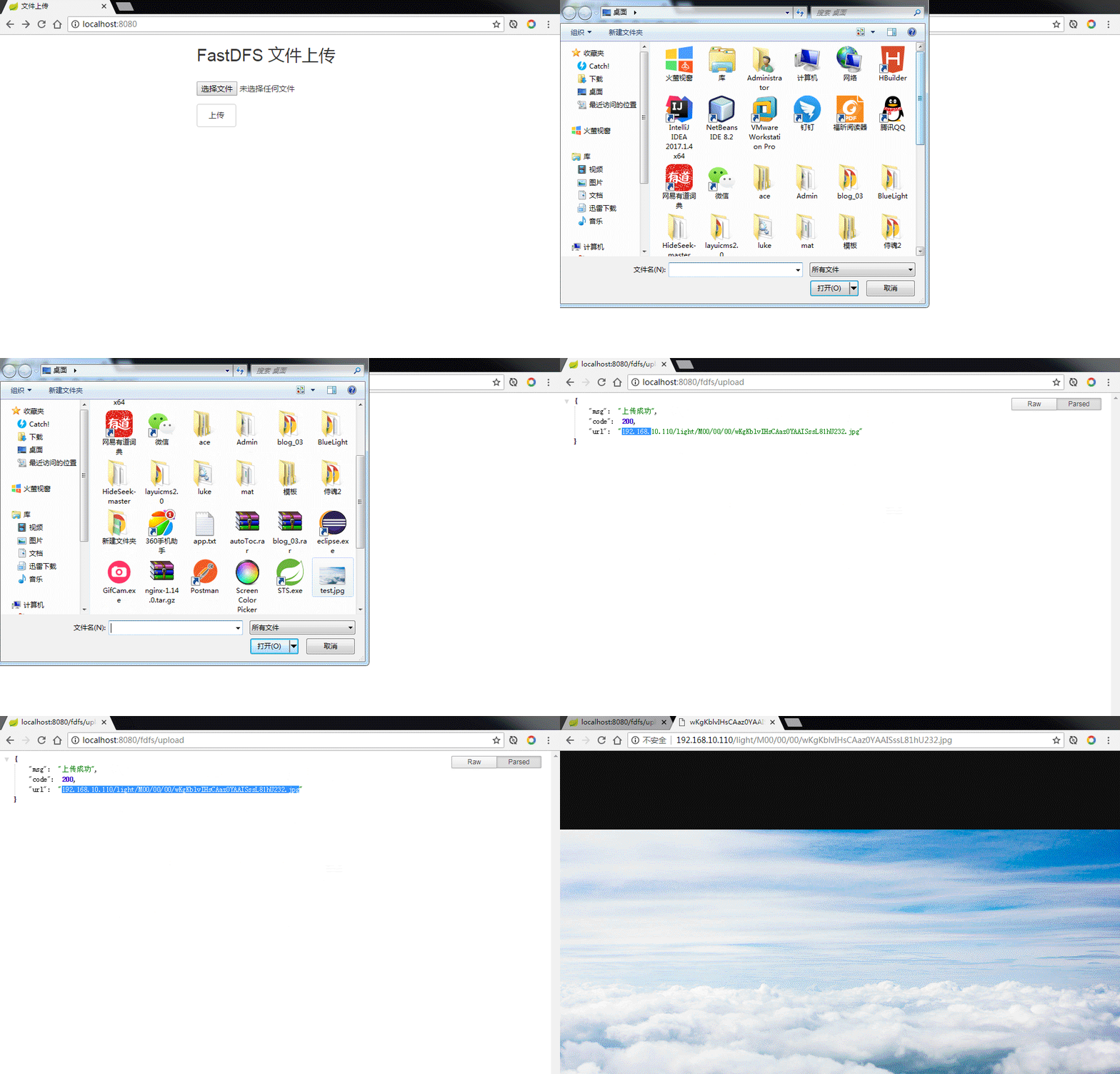
整合成功~~
Spring Boot 整合 FastDFS 客户端的更多相关文章
- Spring Kafka整合Spring Boot创建生产者客户端案例
每天学习一点点 编程PDF电子书.视频教程免费下载:http://www.shitanlife.com/code 创建一个kafka-producer-master的maven工程.整个项目结构如下: ...
- Spring Boot 整合 Elasticsearch,实现 function score query 权重分查询
摘要: 原创出处 www.bysocket.com 「泥瓦匠BYSocket 」欢迎转载,保留摘要,谢谢! 『 预见未来最好的方式就是亲手创造未来 – <史蒂夫·乔布斯传> 』 运行环境: ...
- Spring Kafka和Spring Boot整合实现消息发送与消费简单案例
本文主要分享下Spring Boot和Spring Kafka如何配置整合,实现发送和接收来自Spring Kafka的消息. 先前我已经分享了Kafka的基本介绍与集群环境搭建方法.关于Kafka的 ...
- Spring Boot整合Elasticsearch
Spring Boot整合Elasticsearch Elasticsearch是一个全文搜索引擎,专门用于处理大型数据集.根据描述,自然而然使用它来存储和搜索应用程序日志.与Logstash和K ...
- (转)Spring Boot(十八):使用 Spring Boot 集成 FastDFS
http://www.ityouknow.com/springboot/2018/01/16/spring-boot-fastdfs.html 上篇文章介绍了如何使用 Spring Boot 上传文件 ...
- Spring Boot初识(4)- Spring Boot整合JWT
一.本文介绍 上篇文章讲到Spring Boot整合Swagger的时候其实我就在思考关于接口安全的问题了,在这篇文章了我整合了JWT用来保证接口的安全性.我会先简单介绍一下JWT然后在上篇文章的基础 ...
- Spring Boot(十八):使用 Spring Boot 集成 FastDFS
上篇文章介绍了如何使用 Spring Boot 上传文件,这篇文章我们介绍如何使用 Spring Boot 将文件上传到分布式文件系统 FastDFS 中. 这个项目会在上一个项目的基础上进行构建. ...
- Spring Boot(十八):使用Spring Boot集成FastDFS
Spring Boot(十八):使用Spring Boot集成FastDFS 环境:Spring Boot最新版本1.5.9.jdk使用1.8.tomcat8.0 功能:使用Spring Boot将文 ...
- spring boot整合Swagger2
Swagger 是一个规范和完整的框架,用于生成.描述.调用和可视化RESTful风格的 Web 服务.总体目标是使客户端和文件系统作为服务器以同样的速度来更新.文件的方法,参数和模型紧密集成到服务器 ...
随机推荐
- 微信小程序跨页面获取数据示例
index.wxml <navigator class="navs" url="{{urls}}"> 中国 </navigator> i ...
- 推荐八款.Net优秀的开源CMS 内容管理系统
1,老牌内容管理系统SiteServer CMS 推荐指数:5 SiteServer CMS 是.NET平台的CMS系统,也是一款拥有十年历史与广泛知名度的CMS系统,2017年5月初迈出了自成立以 ...
- bzoj1084&&洛谷2331[SCOI2005]最大子矩阵
题解: 分类讨论 当m=1的时候,很简单的dp,这里就不再复述了 当m=2的时候,设dp[i][j][k]表示有k个子矩阵,第一列有i个,第二列有j个 然后枚举一下当前子矩阵,状态转移 代码: #in ...
- Python Django 前后端数据交互 之 HttpRequest、HttpResponse、render、redirect
在使用三神装的时候,首先当然是得要导入它们: from django.shortcuts import HttpResponse, render, redirect 一.HttpRequest捕获 ...
- 配置pycharm 一键安装 requirements.txt,一键生成requirements.txt
如上配置 打开项目,在requirements.txt上点右键,就可以安装了. 安装效果如下: 可以看出运行的命令是 C:\Python\Python36/scripts/pip install ...
- L1-042 日期格式化
世界上不同国家有不同的写日期的习惯.比如美国人习惯写成“月-日-年”,而中国人习惯写成“年-月-日”.下面请你写个程序,自动把读入的美国格式的日期改写成中国习惯的日期. 输入格式: 输入在一行中按照“ ...
- DevExpress v18.1新版亮点——WinForms篇(八)
用户界面套包DevExpress v18.1日前终于正式发布,本站将以连载的形式为大家介绍各版本新增内容.本文将介绍了DevExpress WinForms v18.1 的新功能,快来下载试用新版本! ...
- select * from v$reserved_words
select * from v$reserved_words 查询库中所有关键字
- Andriod Studio 解决问题 Failed to resolve: com.android.support:appcompat-v7:28.+
Andriod Studio报错提示: Error:(26, 13) Failed to resolve: com.android.support:appcompat-v7:28.+ 原因:Andri ...
- nw 系统托盘的添加方式,以及ajax失效问题
1.nw 系统托盘的添加方式 /** ------------------------------------------------------------ 最小化托盘 -------------- ...