
Bootstrap风格button
一直非常喜欢Bootstrap的按钮风格,仿照Bootstrap做了一套按钮。在ie6/7/8/9/10/11、chrome、firefox下能正常使用。
ie6/7/8不支持css3的样式。按钮在这些模式下没有圆角效果。在ie6/7下使用button标签能显示正常效果,使用其它标签存在文字偏移和背景显示不完整。
按钮支持div/span/input/button等元素,大小分为rhui-btn-large、rhui-btn、rhui-btn-small和rhui-btn-min四个级别,效果例如以下
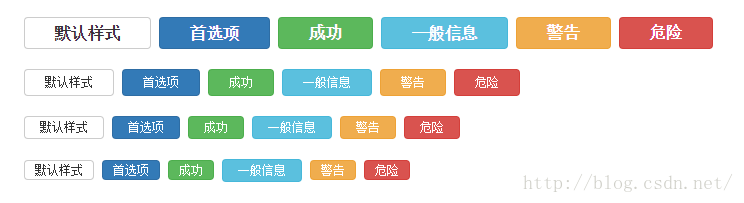
所有代码
<!DOCTYPE html>

<html>

<head>

	<meta http-equiv="Content-Type" content="text/html; charset=UTF-8" />

	<title>仿Bootstrap按钮</title>

	<style type="text/css">

		.rhui-btn {

			display: inline-block;

			margin: 0;

			padding: 0 20px;

			outline-style: none;

			border: 1px solid #ccc;

			border-radius: 4px;

			background-color: #fff;

			background-image: none;

			color: #333;

			vertical-align: middle;

			text-align: center;

			text-decoration: none;

			white-space: nowrap;

			font-size: 12px;

			line-height: 25px;

			cursor: pointer;

			/* ie6/ie7 inline-block hack */

			*zoom: 1;

			*display: inline;

		}

		.rhui-btn:hover {

			border-color: #adadad;

			background-color: #e6e6e6;

		}

		.rhui-btn-large {

			padding: 0 30px;

			font-weight: 700;

			font-size: 16px;

			line-height: 30px;

		}

		.rhui-btn-small {

			padding: 0 15px;

			line-height: 21px;

		}

		.rhui-btn-min {

			padding: 0 10px;

			line-height: 18px;

		}

		.rhui-btn-primary {

			border-color: #2e6da4;

			background-color: #337ab7;

			color: #fff;

		}

		.rhui-btn-primary:hover {

			border-color: #204d74;

			background-color: #286090;

		}

		.rhui-btn-success {

			border-color: #4cae4c;

			background-color: #5cb85c;

			color: #fff;

		}

		.rhui-btn-success:hover {

			border-color: #398439;

			background-color: #449d44;

			color: #fff;

		}

		.rhui-btn-info {

			border-color: #46b8da;

			background-color: #5bc0de;

			color: #fff;

		}

		.rhui-btn-info:hover {

			border-color: #269abc;

			background-color: #31b0d5;

		}

		.rhui-btn-warning {

			border-color: #eea236;

			background-color: #f0ad4e;

			color: #fff;

		}

		.rhui-btn-warning:hover {

			border-color: #d58512;

			background-color: #ec971f;

		}

		.rhui-btn-danger {

			border-color: #d43f3a;

			background-color: #d9534f;

			color: #fff;

		}

		.rhui-btn-danger:hover {

			border-color: #ac2925;

			background-color: #c9302c;

		}

	</style>

</head>

<body>

	<div style="margin: 20px;">

		<div class="rhui-btn rhui-btn-large">默认样式</div>

		<a class="rhui-btn rhui-btn-large rhui-btn-primary" href="#">首选项</a>

		<input type="button" class="rhui-btn rhui-btn-large rhui-btn-success" value="成功" />

		<span class="rhui-btn rhui-btn-large rhui-btn-info">一般信息</span>

		<button class="rhui-btn rhui-btn-large rhui-btn-warning">警告</button>

		<button class="rhui-btn rhui-btn-large rhui-btn-danger">危急</button>

	</div>

	<div style="margin: 20px;">

		<div class="rhui-btn">默认样式</div>

		<a class="rhui-btn rhui-btn-primary" href="#">首选项</a>

		<input type="button" class="rhui-btn rhui-btn-success" value="成功" />

		<span class="rhui-btn rhui-btn-info">一般信息</span>

		<button class="rhui-btn rhui-btn-warning">警告</button>

		<button class="rhui-btn rhui-btn-danger">危急</button>

	</div>

	<div style="margin: 20px;">

		<div class="rhui-btn rhui-btn-small">默认样式</div>

		<a class="rhui-btn rhui-btn-small rhui-btn-primary" href="#">首选项</a>

		<input type="button" class="rhui-btn rhui-btn-small rhui-btn-success" value="成功" />

		<span class="rhui-btn rhui-btn-small rhui-btn-info">一般信息</span>

		<button class="rhui-btn rhui-btn-small rhui-btn-warning">警告</button>

		<button class="rhui-btn rhui-btn-small rhui-btn-danger">危急</button>

	</div>

	<div style="margin: 20px;">

		<div class="rhui-btn rhui-btn-min">默认样式</div>

		<a class="rhui-btn rhui-btn-min rhui-btn-primary" href="#">首选项</a>

		<input type="button" class="rhui-btn rhui-btn-min rhui-btn-success" value="成功" />

		<span class="rhui-btn rhui-btn-small rhui-btn-info">一般信息</span>

		<button class="rhui-btn rhui-btn-min rhui-btn-warning">警告</button>

		<button class="rhui-btn rhui-btn-min rhui-btn-danger">危急</button>

	</div>

</body>

</html>
Bootstrap风格button的更多相关文章
- 自己写的基于bootstrap风格的弹框插件
自己写的一款基于bootstrap风格的弹框插件,暂时只有确认框.提示框.后续功能扩展.bug修改再更新. ;(function($){ //默认参数 var PARAMS; var DEFAULTP ...
- 一不小心写了个bootstrap风格下拉控件 JqueryUI + bootstrap
受够了EasyUI的封闭,Bootstrap虽然华丽但是功能太渣,闲着无聊写个下拉控件玩玩吧,不喜勿喷哈... 第一步:先设计下我的下拉控件的样子 1.既然是bootstrap风格的,我想应该是这样的 ...
- Bootstrap风格zTree树形菜单插件
这是一款bootstrap风格jQuery zTree树形菜单插件,支持自定义编辑.添加列表菜单.删除列表等功能的jQuery树形菜单代码.在线演示 具体代码实现: <!DOCTYPE html ...
- 【ztree系列——图标的修改】Bootstrap风格的ztree
前段时间项目中需要用树形结构,在选取的时候参考了很多插件,经过很多尝试,最后又回归到了ztree上.以前用的界面框架是EasyUI,但是它的树结构在实现起来有点复杂,并且功能不是特别完善.dtree在 ...
- Blazor组件提交全记录: FullScreen 全屏按钮/全屏服务 (BootstrapBlazor - Bootstrap 风格的 Blazor UI 组件库)
Blazor 简介 Blazor 是一个使用 .NET 生成的交互式客户端 Web UI 的框架.和前端同学所熟知的 Vue.React.Angular 有巨大差异. 其最大的特色是使用 C# 代码( ...
- bootstrap风格的multiselect插件——类似邮箱收件人样式
在开发颗粒云邮箱的过程中,遇到了一个前端的问题,就是邮箱收件人的那个multiselect的input输入框.不仅能够多选,还要能够支持ajax搜索,把联系人搜索出来.就是类似下面的这个东西: 网上找 ...
- 一个Bootstrap风格的分页控件
http://www.cnblogs.com/wangwei123/p/3682626.html 主题 jQueryBootstrap 一个Bootstrap风格的分页控件,对于喜欢Bootstr ...
- jQuery分页插件jBootstrapPage,一个Bootstrap风格的分页插件
一个Bootstrap风格的分页控件,对于喜欢Bootstrap简洁美观和扁平化的同学可以关注jBootstrapPage, 目前jBootstrapPage最新版为V0.1,后续还有更多功能需要完善 ...
- 将markdown格式转化为bootstrap风格html
前言:这些年markdown格式的文件很流行,像github里project说明文档都是用markdown格式编写. 一方面,我们能够通过pandoc将markdown文件转换为html,这样将htm ...
随机推荐
- vs 2010 :类型化数据集DataSet应用
1.启动服务器资源管理器,建立数据库连接 2.在项目中创建数据集 3.为数据集添加表对象 4.为表适配器tableAdapter添加参数化查询 5.修改表适配器的主查询,或添加其他查询 Update: ...
- spring-boot 速成(8) 集成druid+mybatis
spring-boot与druid.mybatis集成(包括pageHelper分页插件), 要添加以下几个依赖项: compile('mysql:mysql-connector-java:6.0.5 ...
- [原创]SOAPUI工具介绍
[原创]SOAPUI工具介绍 一 官方网站:http://www.soapui.org/二 下载地址:http://sourceforge.net/projects/soapui/files/三 so ...
- drp错误集锦---“Cannot return from outside a function or method”
好久都不动的项目,今天打开项目突然是红色感叹号.详细错误表现为: 也就是说,如今MyEclipse已经不识别在JSP页面中使用的return方法了(并且不止一处这种警告),那怎么办?????顿时闹钟一 ...
- WinForm MDIParent如何防止重复打开
DI,全称是多文档界面(Multiple Document Interface),主要应用于基于图形用户界面的系统中.其目的是同时打开和显示多个文档,便于参考和编辑资料. 下面是一个WinForm M ...
- Idea2018激活破解
原文:https://www.imsxm.com/2018/07/idea-2018-1-5-crack-patcher.html 最近更新了Intellij IDEA到2018.1.5之后,使用之前 ...
- A look at WeChat security
原文地址:http://blog.emaze.net/2013/09/a-look-at-wechat-security.html TL;DR: Any (unprivileged) applicat ...
- C#编程(六十)----------LINQ的概述
LINQ的概述 LINQ的全名为语言继承查询,是VS2008个.NET3.5版中一款突破性的创新,他再对象领域和数据领域之间架起了一座桥梁.使用LINQ能大大加快对于对象数据等等的查询,加快效率. 由 ...
- 禁止浏览器backspace键(退格键)时跳转页面(extjs,javascript)
Ext实现方式: //方法一 var key = new Ext.KeyMap(document,{ key: 8, fn: function(obj,e){ var type = e ...
- 【tensorflow】1.安装Tensorflow开发环境,安装Python 的IDE--PyCharm
================================================== 安装Tensorflow开发环境,安装Python 的IDE--PyCharm 1.PyCharm ...