
【第十一章】 springboot + mongodb(简单查询)
1、mongodb在mac上的安装
- 下载mongodb,https://www.mongodb.org/
- 解压缩到一个指定文件夹,如:/Users/enniu1/Desktop/zjg/mongodb-osx-x86_64-3.2.6(这是我的mongodb的版本)
- 配置PATH
- 输入命令:"vi ~/.bash_profile"
- 添加如下两句配置:
1 export MONGO_HOME=/Users/enniu1/Desktop/zjg/mongodb-osx-x86_64-3.2.6
2 export PATH=$PATH:$MONGO_HOME/bin
- 创建数据目录
- 输入命令:"sudo mkdir -p /data/db"
- 赋予数据目录权限
- 输入命令:"sudo chmod 777 /data/db"
- 启动
- 输入命令:"mongod"
- 退出:Ctrl+c
注意两个错:
- 如果没有创建目录直接启动,会报错http://stackoverflow.com/questions/7948789/mongodb-mongod-complains-that-there-is-no-data-db-folder
- 如果没有赋予数据目录权限,会报错http://stackoverflow.com/questions/15229412/unable-to-create-open-lock-file-data-mongod-lock-errno13-permission-denied
参考:https://docs.mongodb.org/manual/tutorial/install-mongodb-on-os-x/
2、代码(4个部分)
2.1、com.xxx.firstboot.domain.Custome
package com.xxx.firstboot.domain;

import org.springframework.data.annotation.Id;

/**
 * 测试mongodb
 */
public class Customer {
    /**
     * cid:该字段用于mongodb的"_id"索引
     * 1、需要@Id注解
     * 2、取名无所谓,反正在mongodb中最后都会转化为"_id"
     * 3、定义为String类型,如果定义为Integer可能索引只会是0,会出现key重复导致数据库插不进去的情况;
     * 4、该类型也是MongoRepository泛型中主键的ID
     */
    @Id
    private String cid;
    private String firstname;
    private String secondname;

    public String getCid() {
        return cid;
    }

    public void setCid(String cid) {
        this.cid = cid;
    }

    public String getFirstname() {
        return firstname;
    }

    public void setFirstname(String firstname) {
        this.firstname = firstname;
    }

    public String getSecondname() {
        return secondname;
    }

    public void setSecondname(String secondname) {
        this.secondname = secondname;
    }

}
说明:生成的colletion(类似于MySQL中的表)就是domain类的简单类名,eg.customer。
注意:
- cid:该字段用于mongodb的"_id"索引
- 需要@Id注解
- 取名无所谓,反正在mongodb中最后都会转化为"_id"
- 定义为String类型,如果定义为Integer可能索引只会是0,会出现key重复导致数据库插不进去的情况
- 该类型也是MongoRepository泛型中主键的ID
package com.xxx.firstboot.mongo;

import java.util.List;

import org.springframework.data.mongodb.repository.MongoRepository;

import com.xxx.firstboot.domain.Customer;

/**
 * MongoRepository<Customer, Integer>
 * 第一个参数:T 操作的vo
 * 第二个参数:ID T的主键类型
 * 作用:该接口实现了CRUD方法
 *
 * 注意:
 * 1、由于boot使用了spring-data-mongodb,所以我们不需要写该接口的实现,
 *   当我们运行程序的时候,spring-data-mongodb会动态创建
 * 2、findBySecondname命名是有讲究的,Secondname(是Customer的属性)若改为lastname就会报找不到属性lastname的错误
 */
public interface CustomerRepository extends MongoRepository<Customer, String> {
    public Customer findByFirstname(String firstname);
    public List<Customer> findBySecondname(String secondname);
2.2、com.xxx.firstboot.mongo.CustomerRepository
package com.xxx.firstboot.mongo;

import java.util.List;
import org.springframework.data.mongodb.repository.MongoRepository;
import com.xxx.firstboot.domain.Customer;

/**
 * MongoRepository<Customer, Integer>
 * 第一个参数:T 操作的vo
 * 第二个参数:ID T的主键类型
 * 作用:该接口实现了CRUD方法
 *
 * 注意:
 * 1、由于boot使用了spring-data-mongodb,所以我们不需要写该接口的实现,
 *   当我们运行程序的时候,spring-data-mongodb会动态创建
 * 2、findBySecondname命名是有讲究的,Secondname(是Customer的属性)若改为lastname就会报找不到属性lastname的错误
 */
public interface CustomerRepository extends MongoRepository<Customer, String> {
    public Customer findByFirstname(String firstname);
    public List<Customer> findBySecondname(String secondname);
}
说明:该接口就是我们的业务接口。
注意:
- 继承MongoRepository<T, ID>接口
- T:操作的domain,例如com.xxx.firstboot.domain.Customer
- ID:T的主键类型(@ID修饰的属性),通常就是String
- 该接口的实现类也实现了CRUD操作
- 我们的接口只需要定义方法的定义,不需要做实现,spring-data-mongodb会在程序运行的时候动态创
- 方法的命名是有讲究的,与domain的属性有关(可以再测测)
package com.xxx.firstboot.web;

import java.util.List;

import org.springframework.beans.factory.annotation.Autowired;
import org.springframework.web.bind.annotation.RequestMapping;
import org.springframework.web.bind.annotation.RequestMethod;
import org.springframework.web.bind.annotation.RequestParam;
import org.springframework.web.bind.annotation.RestController;

import com.xxx.firstboot.domain.Customer;
import com.xxx.firstboot.mongo.CustomerRepository;

import io.swagger.annotations.Api;
import io.swagger.annotations.ApiOperation;

@RestController
@RequestMapping("/customer")
@Api("customer相关的API,用于测试mongodb")
public class CustomerController {

    @Autowired
    private CustomerRepository customerRepository;

    @ApiOperation("增加一个Customer")
    @RequestMapping(value = "/addCustomer", method = RequestMethod.GET)
    public Customer addCustomer(@RequestParam("firstname") String firstname,
                                @RequestParam("secondname") String secondname) {
        Customer customer = new Customer();
        customer.setFirstname(firstname);
        customer.setSecondname(secondname);
        return customerRepository.save(customer);
    }

    @ApiOperation("获取所有的Customer")
    @RequestMapping(value = "/getAllCustomer", method = RequestMethod.GET)
    public List<Customer> getAllCustomer() {
        return customerRepository.findAll();
    }

    @ApiOperation("根据firstname获取Customer")
    @RequestMapping(value = "/getCustomerByFirstname", method = RequestMethod.GET)
    public Customer getCustomerByFirstname(@RequestParam("firstname") String firstname) {
        return customerRepository.findByFirstname(firstname);
    }

    @ApiOperation("根据secondname获取多个Customer")
    @RequestMapping(value = "/getCustomerBySecondname", method = RequestMethod.GET)
    public List<Customer> getCustomerBySecondname(@RequestParam("secondname") String secondname) {
        return customerRepository.findBySecondname(secondname);
    }

    @ApiOperation("根据id删除Customer")
    @RequestMapping(value = "/deleteCustomerById", method = RequestMethod.GET)
    public boolean deleteCustomerById(@RequestParam("cid") String cid) {
        customerRepository.delete(cid);
        return true;
    }
2.3、com.xxx.firstboot.web.CustomerController
package com.xxx.firstboot.web;

import java.util.List;
import org.springframework.beans.factory.annotation.Autowired;
import org.springframework.web.bind.annotation.RequestMapping;
import org.springframework.web.bind.annotation.RequestMethod;
import org.springframework.web.bind.annotation.RequestParam;
import org.springframework.web.bind.annotation.RestController;
import com.xxx.firstboot.domain.Customer;
import com.xxx.firstboot.mongo.CustomerRepository;
import io.swagger.annotations.Api;
import io.swagger.annotations.ApiOperation;

@RestController
@RequestMapping("/customer")
@Api("customer相关的API,用于测试mongodb")
public class CustomerController {

    @Autowired
    private CustomerRepository customerRepository;

    @ApiOperation("增加一个Customer")
    @RequestMapping(value = "/addCustomer", method = RequestMethod.GET)
    public Customer addCustomer(@RequestParam("firstname") String firstname,
                                @RequestParam("secondname") String secondname) {
        Customer customer = new Customer();
        customer.setFirstname(firstname);
        customer.setSecondname(secondname);
        return customerRepository.save(customer);
    }

    @ApiOperation("获取所有的Customer")
    @RequestMapping(value = "/getAllCustomer", method = RequestMethod.GET)
    public List<Customer> getAllCustomer() {
        return customerRepository.findAll();
    }

    @ApiOperation("根据firstname获取Customer")
    @RequestMapping(value = "/getCustomerByFirstname", method = RequestMethod.GET)
    public Customer getCustomerByFirstname(@RequestParam("firstname") String firstname) {
        return customerRepository.findByFirstname(firstname);
    }

    @ApiOperation("根据secondname获取多个Customer")
    @RequestMapping(value = "/getCustomerBySecondname", method = RequestMethod.GET)
    public List<Customer> getCustomerBySecondname(@RequestParam("secondname") String secondname) {
        return customerRepository.findBySecondname(secondname);
    }

    @ApiOperation("根据id删除Customer")
    @RequestMapping(value = "/deleteCustomerById", method = RequestMethod.GET)
    public boolean deleteCustomerById(@RequestParam("cid") String cid) {
        customerRepository.delete(cid);
        return true;
    }
}
说明:直接注入我们自己的业务接口,然后进行相应的操作即可。
此时,就可以进行测试了。只是此时使用的都是mongodb的默认信息。
- host:localhost
- port:27017
- 数据库:test
- collection:customer(domain类的简单类名)
2.4、application.properties
1 #mongodb note:mongo3.x will not use host and port,only use uri
2 spring.data.mongodb.host=192.168.21.54
3 spring.data.mongodb.port=27017
4 spring.data.mongodb.uri=mongodb://192.168.21.54:27017/myfirstMongodb
说明:如果需要指定host、port、数据库,需要在application.properties文件中配置以上信息。
注意:
- 配置必须以"spring.data.mongodb"为前缀
- 如果是mongo3.x的话,host和port没用,需要uri。(未测过)
- uri = mongodb://host:port/数据库
- mongo2.x支持以上两种配置方式
- mongo3.x仅支持uri方式
3、测试
启动应用,启动mongo服务进程,打开swagger,使用robomongo或者mongobooster客户端观察mongodb存储情况。
没有在application.properties中设置属性。
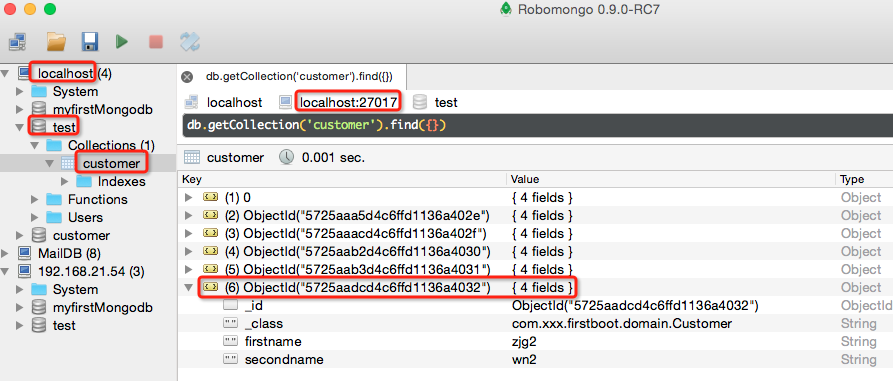
设置属性后,

参考:
https://spring.io/guides/gs/accessing-data-mongodb/ 其中的例子就是对sample代码的解释
http://www.jianshu.com/p/e59cd2dc5274 关于mongodb主键
https://docs.spring.io/spring-boot/docs/current/reference/html/boot-features-nosql.html 关于mongo2.x与3.x对host、port、uri配置的支持。
http://blog.didispace.com/springbootmongodb/ 主键为Long uri用户名、密码配置
【第十一章】 springboot + mongodb(简单查询)的更多相关文章
- 第十一章 springboot + mongodb(简单查询)
1.mongodb在mac上的安装 下载mongodb,https://www.mongodb.org/ 解压缩到一个指定文件夹,如:/Users/enniu1/Desktop/zjg/mongodb ...
- 第十二章 springboot + mongodb(复杂查询)
简单查询:使用自定义的XxxRepository接口即可.(见 第十一章 springboot + mongodb(简单查询)) 复杂查询:使用MongoTemplate以及一些查询条件构建类(Bas ...
- SpringBoot | 第三十一章:MongoDB的集成和使用
前言 上一章节,简单讲解了如何集成Spring-data-jpa.本章节,我们来看看如何集成NoSQL的Mongodb.mongodb是最早热门非关系数据库的之一,使用也比较普遍.最适合来存储一些非结 ...
- MongoDB简单查询语句<平时使用语录,持续更新>
MongoDB查询语句 --查询近三个月的客户使用量 aggregate:使用聚合 match:过滤 group分组 -- mysql中select org_code as 近三个月使用商户 ...
- 第二十一章 springboot + 定时任务
1.application.properties #cron job.everysecond.cron=0/1 * * * * * job.everytensecond.cron=0/10 * * * ...
- 【第十二章】 springboot + mongodb(复杂查询)
简单查询:使用自定义的XxxRepository接口即可.(见 第十一章 springboot + mongodb(简单查询)) 复杂查询:使用MongoTemplate以及一些查询条件构建类(Bas ...
- SpringBoot学习笔记(十一:使用MongoDB存储文件 )
@ 目录 一.MongoDB存储文件 1.MongoDB存储小文件 2.MongoDB存储大文件 2.1.GridFS存储原理 2.2.GridFS使用 2.2.1.使用shell命令 2.2.2.使 ...
- java MongoDB查询(一)简单查询
前言 MongoDB的java驱动提供了查询的功能,查询条件也是bson对象,这篇就看下怎么进行简单的数据查询 1.数据结构 集合:firstCollection 数据内容: { "_id& ...
- 落网数据库简单查询接口 caddy+php7+mongodb
落网数据库简单查询接口 一个简单的DEMO,使用了caddy + php7 + mongodb 数据库&接口设计 来自 https://github.com/Aedron/Luoo.spide ...
- mongodb的简单查询
此篇文章简单的记录一下mongodb 的简单查询操作. 一.数据准备: db.persons.insertMany([ {'userId':1,name:'张三','age':20,'scores': ...
随机推荐
- JS模块化编程(一)
需求背景 // 实际开发常需要将一些公用方法打包放在一个js文件,写法大致如下 function f1(){ // ... } function f2(){ ...
- SqlServer--bat批处理执行sql语句1-osql
首先需要知道,此处使用的批处理命令是osql ,如果安装了SqlServer,目录类似: D:\Program Files\Microsoft SQL Server\100\Tools\Binn 脚本 ...
- 【剑指offer】矩形覆盖
一.题目: 我们可以用2*1的小矩形横着或者竖着去覆盖更大的矩形.请问用n个2*1的小矩形无重叠地覆盖一个2*n的大矩形,总共有多少种方法? 二.思路: 斐波那契数列 三.代码:
- Django之分页功能
Django提供了一个新的类来帮助你管理分页数据,这个类存放在django/core/paginator.py.它可以接收列表.元组或其它可迭代的对象. 基本语法 class Paginator(ob ...
- 正态分布及3Sigma原理
针对这个问题,用一两句话是难以说清楚的,这是数理统计学的内容,当质量特性呈正态分布时(实际上,当样本足够大时,二项分布.泊松分布等均趋近于正态分布),3Sigma水平代表了99.73%的合格率
- 自实现jQuery版分页插件
本篇博客的分页插件是在2017-11-10 的一篇博客的基础上改造的(原博客地址:原生js版分页插件),主要是优化了分页按钮的排列和显示样式,取消首页和末页的箭头按钮,改为数字按钮,并始终把它们分别固 ...
- EPD的驱动
整个e-ink技术的生产流程:1997年从MIT媒体实验室走出来的E-INK公司成立并专注于研发具有良好阅读体验的电子纸.其中最著名的产品就是Vizplex 电子墨水.E-INK提供电子墨水给Pane ...
- UVM中的driver组件
一般UVM环境中的Driver组件,派生自uvm_driver. uvm_dirver派生自uvm_component. class uvm_driver #(type REQ = uvm_sequ ...
- Trove系列(一)—入门篇
概述DBaaS是目前云计算服务的重要部分,数据库作为一种特殊的应用程序,在应用中普遍存在.而其独特性不仅在于普遍性,而且其性能对应用的表现是至关重要的.数据库的通用性和重要性使得维护一个健壮的数据库实 ...
- POJ 1836
刚开始二分写错了 wa了很久 这个二分 的好好想想 #include <iostream> #include<cstdio> #include<string.h> ...