
【ASP.NET Web API教程】5.2 发送HTML表单数据:URL编码的表单数据
原文:【ASP.NET Web API教程】5.2 发送HTML表单数据:URL编码的表单数据
注:本文是【ASP.NET Web API系列教程】的一部分,如果您是第一次看本系列教程,请先看前面的内容。
5.2 Sending HTML Form Data
5.2 发送HTML表单数据
本文引自:http://www.asp.net/web-api/overview/working-with-http/sending-html-form-data,-part-1
By Mike Wasson|June 15, 2012
作者:Mike Wasson | 日期:2012-6-15
Part 1: Form-urlencoded Data
第1部分:URL编码的表单数据
This article shows how to post form-urlencoded data to a Web API controller.
本文显示如何向Web API控制器递交URL编码的表单数据。
- Overview of HTML Forms
HTML表单概述 - Sending Complex Types
发送复合类型 - Sending Form Data via AJAX
通过AJAX发送表单数据 - Sending Simple Types
发送简单类型
Overview of HTML Forms
HTML表单概述
HTML forms use either GET or POST to send data to the server. The method attribute of the form element gives the HTTP method:
HTML表单使用GET或POST将数据发送给服务器。form元素的method标签属性给出HTTP方法:
<form action="api/values" method="post">
The default method is GET. If the form uses GET, the form data is encoded in the URI as a query string. If the form uses POST, the form data is placed in the request body. For POSTed data, the enctype attribute specifies the format of the request body:
默认方法是GET。如果form使用GET,表单数据作为查询字符串被编码到URI中。如果form使用POST,表单数据被放在请求体中。对于POST的数据,enctype标签属性会指明请求体的格式:
| enctype | Description 描述 |
|---|---|
| application/x-www-form-urlencoded | Form data is encoded as name/value pairs, similar to a URI query string. This is the default format for POST. 表单数据被编码成“名字/值”对,类似于URI查询字符串。这是POST的默认格式。 |
| multipart/form-data | Form data is encoded as a multipart MIME message. Use this format if you are uploading a file to the server. 表单数据被编码成多部分MIME消息。如果把文件上传到服务器,使用的是这种格式。 |
MIME指Multipurpose Internet Mail Extensions — 多用途互联网邮件扩展,它是通过网络传递邮件消息的一个互联网标准。MIME规定了用于表示各种数据类型的符号化方法。在HTTP协议中,对HTTP消息的内容类型也采用了MIME的这种表示数据类型的方法。上述enctype标签属性意为“编码类型”,就是用来指定HTTP消息的Content-Type(内容类型)报头属性。给这个标签属性所指定的值必须是MIME对Content-Type所规定的值之一。上表中便是MIME中关于内容类型的其中两个值。更多内容请参阅MIME的有关资料 — 译者注
Part 1 of this article looks at x-www-form-urlencoded format. Part 2 describes multipart MIME.
本文的第1部分考察x-www-form-urlencoded格式。第2部分描述多部分MIME。
Sending Complex Types
发送复合类型
Typically, you will send a complex type, composed of values taken from several form controls. Consider the following model that represents a status update:
典型地,你要发送的是一个复合类型,它由几个表单控件的值所组成。考虑以下表示状态更新的一个模型:
namespace FormEncode.Models

{

    using System;

    using System.ComponentModel.DataAnnotations;


    public class Update

    {

        [Required]

        [MaxLength(140)]

        public string Status { get; set; }


        public DateTime Date { get; set; }

    }

}
Here is a Web API controller that accepts an Update object via POST.
以下是通过POST接收Update对象的一个Web API控制器。
namespace FormEncode.Controllers

{

    using FormEncode.Models;

    using System;

    using System.Collections.Generic;

    using System.Net;

    using System.Net.Http;

    using System.Web;

    using System.Web.Http;


    public class UpdatesController : ApiController

    {

        static readonly Dictionary<Guid, Update> updates = new Dictionary<Guid, Update>();


        [HttpPost]

        [ActionName("Complex")]

        public HttpResponseMessage PostComplex(Update update)

        {

            if (ModelState.IsValid && update != null)

            {

                // Convert any HTML markup in the status text.

                // 转换status文本中的HTML标记。

                update.Status = HttpUtility.HtmlEncode(update.Status);


                // Assign a new ID.

                // 赋一个新的ID。

                var id = Guid.NewGuid();

                updates[id] = update;


                // Create a 201 response.

                // 创建一个201响应。

                var response = new HttpResponseMessage(HttpStatusCode.Created)

                {

                    Content = new StringContent(update.Status)

                };

                response.Headers.Location =

                    new Uri(Url.Link("DefaultApi", new { action = "status", id = id }));

                return response;

            }

            else

            {

                return Request.CreateResponse(HttpStatusCode.BadRequest);

            }

        }


        [HttpGet]

        public Update Status(Guid id)

        {

            Update update;

            if (updates.TryGetValue(id, out update))

            {

                return update;

            }

            else

            {

                throw new HttpResponseException(HttpStatusCode.NotFound);

            }

        }

    }

}
This controller uses action-based routing, so the route template is "api/{controller}/{action}/{id}". The client will post the data to "/api/updates/complex".
这个控制器使用了“基于动作的路由(本系列教程的第4.1小节 — 译者注)”,因此,路由模板是“api/{controller}/{action}/{id}”。客户端会把这些数据递交给“/api/updates/complex”。
Now let’s write an HTML form for users to submit a status update.
现在,让我们编写一个用户递交状态更新的HTML表单。
<h1>Complex Type</h1>

<form id="form1" method="post" action="api/updates/complex"

    enctype="application/x-www-form-urlencoded">

    <div>

        <label for="status">Status</label>

    </div>

    <div>

        <input name="status" type="text" />

    </div>

    <div>

        <label for="date">Date</label>

    </div>

    <div>

        <input name="date" type="text" />

    </div>

    <div>

        <input type="submit" value="Submit" />

    </div>

</form>
Notice that the action attribute on the form is the URI of our controller action. Here is the form with some values entered in:
注意,form的action标签属性是控制器动作的URI。以下是已经输入了一些值的表单:
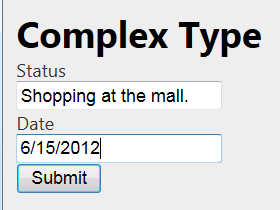
图5-6. 输入了一些数据的表单
When the user clicks Submit, the browser sends an HTTP request similar to the following:
当用户点击“Submit”时,浏览器发送一个类似于以下数据的HTML请求:
POST http://localhost:38899/api/updates/complex HTTP/1.1

Accept: text/html, application/xhtml+xml, */*

User-Agent: Mozilla/5.0 (compatible; MSIE 9.0; Windows NT 6.1; WOW64; Trident/5.0)

Content-Type: application/x-www-form-urlencoded

Content-Length: 47


status=Shopping+at+the+mall.&date=6%2F15%2F2012
Notice that the request body contains the form data, formatted as name/value pairs. Web API automatically converts the name/value pairs into an instance of the Update class.
注意,请求体包含了表单数据,被格式化成“名字/值”对。Web API会自动地把“名字/值”对转换成Update类的实例。
Sending Form Data via AJAX
通过AJAX发送表单数据
When a user submits a form, the browser navigates away from the current page and renders the body of the response message. That’s OK when the response is an HTML page. With a web API, however, the response body is usually either empty or contains structured data, such as JSON. In that case, it makes more sense to send the form data using an AJAX request, so that the page can process the response.
当用户递交表单时,浏览器会离开当前页面,并渲染响应消息体。当响应是HTML页面时,这没问题。然而,对于Web API,响应体通常是空的,或是如JSON那样的结构化数据。在这种情况下,用AJAX请求发送表单数据,以使页面能够处理响应,会更有意义些。
The following code shows how to post form data using jQuery.
以下代码演示如何用jQuery递交表单数据。
 <script type="text/javascript">

    $("#form1").submit(function () {

        var jqxhr = $.post('api/updates/complex', $('#form1').serialize())

            .success(function () {

                var loc = jqxhr.getResponseHeader('Location');

                var a = $('<a/>', { href: loc, text: loc });

                $('#message').html(a);

            })

            .error(function () {

                $('#message').html("Error posting the update.");

            });

        return false;

    });

</script>
The jQuery submit function replaces the form action with a new function. This overrides the default behavior of the Submit button. The serialize function serializes the form data into name/value pairs. To send the form data to the server, call $.post().
jQuery的submit函数用一个新函数替换了表单的action。它重写了Submit按钮的默认行为。serialize函数把表单数据序列化成“名字/值”对。为了将表单数据发送给服务器,调用$.post()。
When the request completes, the .success() or .error() handler displays an appropriate message to the user.
当请求完成时,.success()或.error()处理器会给用户显示一条相应的消息(见图5-7)。
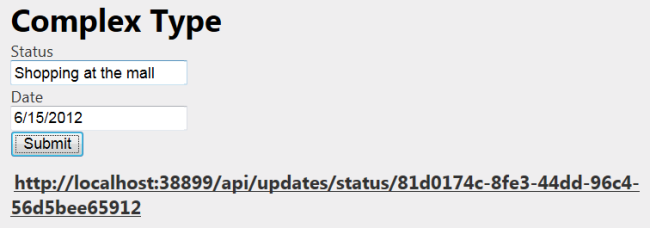
图5-7. 通过AJAX发送表单数据
Sending Simple Types
发送简单类型
In the previous sections, we sent a complex type, which Web API deserialized to an instance of a model class. You can also send simple types, such as a string.
在前一小节中,我们发送的是复合类型,Web API会将其解序列化成一个模型类实例。你也可以发送简单类型,如字符串。
Before sending a simple type, consider wrapping the value in a complex type instead. This gives you the benefits of model validation on the server side, and makes it easier to extend your model if needed.
在发送简单类型之前,请考虑将值封装成复合类型。其好处是你可以在服务器端进行模型验证,并在必要时扩展模型。
The basic steps to send a simple type are the same, but there are two subtle differences. First, in the controller, you must decorate the parameter name with the FromBody attribute.
发送简单类型的基本步骤是相同的,但有两个细微的差别。第一,在控制器中,你必须用FromBody注解属性来修饰参数名。
[HttpPost]

[ActionName("Simple")]

public HttpResponseMessage PostSimple([FromBody] string value)

{

    if (value != null)

    {

        Update update = new Update()

        {

            Status = HttpUtility.HtmlEncode(value),

            Date = DateTime.UtcNow

        };


        var id = Guid.NewGuid();

        updates[id] = update;


        var response = new HttpResponseMessage(HttpStatusCode.Created)

        {

            Content = new StringContent(update.Status)

        };

        response.Headers.Location =

            new Uri(Url.Link("DefaultApi", new { action = "status", id = id }));

        return response;

    }

    else

    {

        return Request.CreateResponse(HttpStatusCode.BadRequest);

    }
By default, Web API tries to get simple types from the request URI. The FromBody attribute tells Web API to read the value from the request body.
默认地,Web API试图通过请求的URI获取简单类型。FromBody注解属性告诉Web API从请求体读取这个值。
Web API reads the response body at most once, so only one parameter of an action can come from the request body. If you need to get multiple values from the request body, define a complex type.
Web API最多读取响应体一次,因此只有动作的一个参数可以获自请求体。如果需要从请求体得到多个值,需要定义复合类型。
Second, the client needs to send the value with the following format:
第二,客户端需要用以下格式发送这个值:
=value
Specifically, the name portion of the name/value pair must be empty for a simple type. Not all browsers support this for HTML forms, but you create this format in script as follows:
特别地,“名字/值”对的值部分对于简单类型必须为空。并不是所有浏览器对HTML表单都支持这种格式,但你在脚本中按下列方式创建了格式:
$.post('api/updates/simple', { "": $('#status1').val() });
Here is an example form:
以下是一个示例表单:
<h1>Simple Type</h1>

<form id="form2">

    <div>

        <label for="status">Status</label>

    </div>

    <div>

        <input id="status1" type="text" />

    </div>

    <div>

        <input type="submit" value="Submit" />

    </div>

</form>
And here is the script to submit the form value. The only difference from the previous script is the argument passed into the post function.
以下是递交表单值的脚本。与前面的脚本唯一的差别是在post函数中传递的参数。
$('#form2').submit(function () {

    var jqxhr = $.post('api/updates/simple', { "": $('#status1').val() })

        .success(function () {

            var loc = jqxhr.getResponseHeader('Location');

            var a = $('<a/>', { href: loc, text: loc });

            $('#message').html(a);

        })

        .error(function () {

            $('#message').html("Error posting the update.");

        });

    return false;

});
You can use the same approach to send an array of simple types:
可以用同样的办法发送简单类型的数组:
$.post('api/updates/postlist', { "": ["update one", "update two", "update three"] });
Additional Resources
其它资源
Part 2: File Upload and Multipart MIME
第2部分:文件上传与多部分MIME格式(本系列教程的第5.3小节 — 译者注)
看完此文如果觉得有所收获,请给个推荐
【ASP.NET Web API教程】5.2 发送HTML表单数据:URL编码的表单数据的更多相关文章
- 【ASP.NET Web API教程】5.3 发送HTML表单数据:文件上传与多部分MIME
原文:[ASP.NET Web API教程]5.3 发送HTML表单数据:文件上传与多部分MIME 注:本文是[ASP.NET Web API系列教程]的一部分,如果您是第一次看本系列教程,请先看前面 ...
- 【ASP.NET Web API教程】3.2 通过.NET客户端调用Web API(C#)
原文:[ASP.NET Web API教程]3.2 通过.NET客户端调用Web API(C#) 注:本文是[ASP.NET Web API系列教程]的一部分,如果您是第一次看本博客文章,请先看前面的 ...
- 【ASP.NET Web API教程】2.3.7 创建首页
原文:[ASP.NET Web API教程]2.3.7 创建首页 注:本文是[ASP.NET Web API系列教程]的一部分,如果您是第一次看本博客文章,请先看前面的内容. Part 7: Crea ...
- 【ASP.NET Web API教程】2.3.6 创建产品和订单控制器
原文:[ASP.NET Web API教程]2.3.6 创建产品和订单控制器 注:本文是[ASP.NET Web API系列教程]的一部分,如果您是第一次看本博客文章,请先看前面的内容. Part 6 ...
- 【ASP.NET Web API教程】2.3.5 用Knockout.js创建动态UI
原文:[ASP.NET Web API教程]2.3.5 用Knockout.js创建动态UI 注:本文是[ASP.NET Web API系列教程]的一部分,如果您是第一次看本博客文章,请先看前面的内容 ...
- 【ASP.NET Web API教程】2.3.4 创建Admin视图
原文:[ASP.NET Web API教程]2.3.4 创建Admin视图 注:本文是[ASP.NET Web API系列教程]的一部分,如果您是第一次看本博客文章,请先看前面的内容. Part 4: ...
- 【ASP.NET Web API教程】2.3.3 创建Admin控制器
原文:[ASP.NET Web API教程]2.3.3 创建Admin控制器 注:本文是[ASP.NET Web API系列教程]的一部分,如果您是第一次看本博客文章,请先看前面的内容. Part 3 ...
- 【ASP.NET Web API教程】2.1 创建支持CRUD操作的Web API
原文 [ASP.NET Web API教程]2.1 创建支持CRUD操作的Web API 2.1 Creating a Web API that Supports CRUD Operations2.1 ...
- 【ASP.NET Web API教程】5.5 ASP.NET Web API中的HTTP Cookie
原文:[ASP.NET Web API教程]5.5 ASP.NET Web API中的HTTP Cookie 5.5 HTTP Cookies in ASP.NET Web API 5.5 ASP.N ...
随机推荐
- IOS的处理touch事件处理(按照手指的移动移动一个圆,开发环境用的ios7,storyboard)
先看下页面的效果图: 首先定义这个ball它有两个属性和两个方法: @property(nonatomic) CGPoint location; @property(nonatomic) CGFloa ...
- 云计算与虚拟化以及IaaS, PaaS和SaaS
概述: 包括:服务器虚拟化.桌面虚拟化.应用虚拟化: 云计算只是用到了虚拟化的技术: soa dubbo结构,阿里巴巴的开源架构: netstat -ntlp; 云服务”现在已经快成了一个家喻户晓的词 ...
- 基于Qt的FreeType字体轮廓解析
一.本文目的 以前的文档中.详细的介绍了FreeType开源字体引擎库的基础知识.基本用法.但并未详细的阐明在TurboCG中.是如何解析出一个文字的轮廓的,本文集中阐述.怎么样使用FreeType开 ...
- Java I/O流-ObjectInputStream、ObjectOutputStream
一.整体代码 ObjectStreamDemo.java import java.io.File; import java.io.FileInputStream; import java.io.Fil ...
- J2EE应用服务器计数器
常用的J2EE应用服务器包括Weblogic.WebSphere和Tomcat等,以下是以WebLogic为例给出的计数器. 类别 计数器名称 计数器描述 JVM Heap Size JVM堆大小,该 ...
- Android 之SparseArray<E>详解
SparseArray是android里为<Interger,Object>这样的Hashmap而专门写的class,目的是提高效率,其核心是折半查找函数(binarySearch) pr ...
- checkbox探究
介绍checkbox checkbox: A check box. You must use the value attribute to define the value submitted by ...
- CentOS 6.4 + 曙光DS200 IPSan组建FTP服务器
CentOS 6.4 + 曙光DS200 IPSan组建FTP服务器 http://write.blog.csdn.net/postedit/10911105#本系列文章由ex_net(张建波)编写, ...
- HTTP协议--简析
HTTP--超文本传输协议(HyperText Transfer Protocol)是互联网上应用最为广泛的一种网络协议,是所有的www文件都必须遵守的标准. 要想成为优秀的web开发人员,必须熟悉H ...
- Ubuntu下使用sshfs挂载远程目录到本地(和Windows挂载盘一样)
访问局域网中其他Ubuntu机器,在不同机器间跳来跳去,很是麻烦,如果能够把远程目录映射到本地无疑会大大方面使用,就像Windows下的网络映射盘一样.在Linux的世界无疑也会有这种机制和方式,最近 ...