
kivy Create an application
http://kivy.org/docs/guide/basic.html#quickstart
I followed this tutorial about how to create basic kivy application
*********************
Creating a kivy application is as simple as:
- sub-classing the App class
- implementing its build() method so it returns a Widget instance (the root of your widget tree)
- instantiating this class, and calling its run() method.
Here is an example of a minimal application:
import kivy

kivy.require('1.0.6') # replace with your current kivy version !

from kivy.app import App

from kivy.uix.label import Label

class MyApp(App):

    def build(self):

        return Label(text='Hello world')

if __name__ == '__main__':

    MyApp().run()
You can save this to a text file, main.py for example, and run it.
*********************
LETS EXPLAIN IT!
##################
Kivy App Life Cycle
First off, let’s get familiar with the Kivy app life cycle.
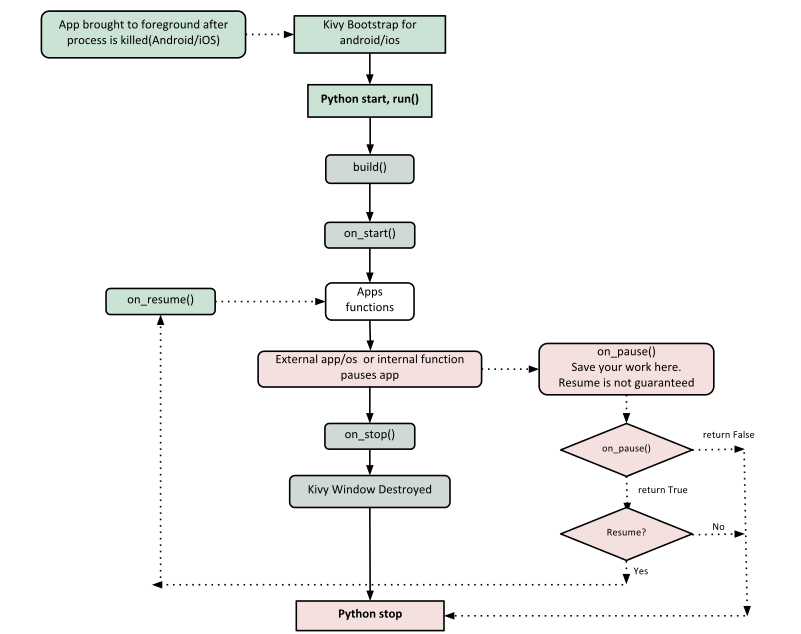
As you can see above, for all intents and purposes, our entry point into our App is the run() method, and in our case that is “MyApp().run()”. We will get back to this, but let’s start from the third line:
from kivy.app import App
It’s required that the base Class of your App inherits from the App class. It’s present in the kivy_installation_dir/kivy/app.py.
Note
Go ahead and open up that file if you want to delve deeper into what the Kivy App class does. We encourage you to open the code and read through it. Kivy is based on Python and uses Sphinx for documentation, so the documentation for each class is in the actual file.
Similarly on line 2:
from kivy.uix.label import Label
One important thing to note here is the way packages/classes are laid out. The uix module is the section that holds the user interface elements like layouts and widgets.
Moving on to line 5:
class MyApp(App):
This is where we are defining the Base Class of our Kivy App. You should only ever need to change the name of your app MyApp in this line.
Further on to line 7:
def build(self):
As highlighted by the image above, show casing the Kivy App Life Cycle, this is the function where you should initialize and return your Root Widget. This is what we do on line 8:
return Label(text='Hello world')
Here we initialize a Label with text ‘Hello World’ and return it’s instance. This Label will be the Root Widget of this App.
Note
Python uses indentation to denote code blocks, therefore take note that in the code provided above, at line 9 the class and function definition ends.
Now on to the portion that will make our app run at line 11 and 12:
if __name__ == '__main__':

    MyApp().run()
Here the class MyApp is initialized and it’s run() method called. This initializes and starts our Kivy application.
##################
kivy Create an application的更多相关文章
- kivy create a package for Android
Now that you've successfully coded an app. Now you want to deploy it to Android. So now we would nee ...
- maven command to create your application
How do I make my first Maven project? We are going to jump headlong into creating your first Maven p ...
- Java SE series:1. environment configure and Hello world! [We use compiler and packager to create an application!]
1. cli (command line interface) and gui (graphic user interface) use javahome path, search classpath ...
- [NativeScript] Create new application and run emulator
Install: npm i -g nativescript Create: tns create <app_name> --ng Run: tns emulate ios List al ...
- Create First Application
Node.js创建第一个应用 Node.js开发的目的就是为了用JavaScript编写Web服务器程序, 在使用Node.js时,不仅仅是在实现一个应用,同时还实现了整个HTTP服务器.在创建Nod ...
- How do I create an IIS application and application pool using InnoSetup script
Create an IIS application. Create a new IIS application pool and set it's .NET version to 4. Set the ...
- python3使用kivy生成安卓程序
技术背景 虽然现在苹果占据了很大一部分的市场,但是从销量数据来看,安卓还是占据了人口的高地.这里我们介绍一个用python的kivy+buildozer来进行安卓APP开发的简单教程,从整个过程中来看 ...
- cocos2d-x打飞机实例总结(一):程序入口分析和AppDelegate,Application,ApplicationProtocol三个类的分析
首先,是个敲代码的,基本上都知道程序的入口是main函数,显然,就算在cocos2d-x框架中也一样 我们看看main函数做了什么 #include "main.h" #inclu ...
- 应用程序域(Application Domain)
应用程序域为隔离正在运行的应用程序提供了一种灵活而安全的方法. 应用程序域通常由运行时宿主创建和操作. 有时,您可能希望应用程序以编程方式与应用程序域交互,例如想在不停止应用程序运行的情况下卸载某个组 ...
随机推荐
- C# WebBrowser 代理的使用
原文:C# WebBrowser 代理的使用 The WebBrowser control is just an embeddded IE Control, I believe any setting ...
- C语言库函数大全及应用实例十一
原文:C语言库函数大全及应用实例十一 [编程资料]C语言库函数大全及应用实例十一 函数名: setbkcolor 功 能 ...
- Retrofit相关资料
高速Android开发系列网络篇之Retrofithttp://www.w3c.com.cn/%E5%BF%AB%E9%80%9Fandroid%E5%BC%80%E5%8F%91%E7%B3%BB% ...
- 如何优雅的研究 RGSS3 (七) 加入LOGO屏幕
对于游戏 LOGO 屏幕. 首先设计 LOGO Scene类.我们知道,现场类 Scene_Base 子类. 让我们回顾一下现场的作品. 首先运行开始处理.其次是开始治疗.然后停止更新屏幕,最后,治疗 ...
- ASP.NET MVC IOC 之Ninject攻略
ASP.NET MVC IOC 之Ninject攻略 一.为什么要使用Ninject? 很多其它类型的IOC容器过于依赖配置文件,老是配置,总感觉有点不爽,而且要使用assembly-qualifie ...
- 如何打造100亿SDK累计覆盖量的大数据系统
作为推送行业领导者,截止目前个推SDK累计安装覆盖量达100亿(含海外),接入应用超过43万,独立终端覆盖超过10亿 (含海外).个推系统每天会产生大量的日志和数据,面临许多数据处理方面的挑战. 首先 ...
- Array(数组)的使用
方法 说明 Concat() 连接2个或多个数组,并返回结果 Push() 向数组末尾添加一个或多个元素,并返回新的长度 Reverse() 颠倒数组中元素的顺序 Sort() 对数组的元素进行排序 ...
- 使用typeof方法反射属性和方法
Type type = typeof(System.Int32);//获得int类型的Type对象 foreach (MethodInfo method in type.GetMethods())// ...
- linux时间校准设置,解决与本地时间不一致问题
时间安装脚本 从NTP上把时间同步到本地 cp /usr/share/zoneinfo/Asia/Shanghai /etc/localtime 更新本地时间 ntpdate us.pool.nt ...
- [Usaco2008 Open] Clear And Present Danger 寻宝之路[最短路][水]
Description 农夫约翰正驾驶一条小艇在牛勒比海上航行. 海上有N(1≤N≤100)个岛屿,用1到N编号.约翰从1号小岛出发,最后到达N号小岛.一 张藏宝图上说,如果他的路程上 ...