
HyperLedger Fabric 1.4 生产环境使用ca生成msp和tls(12)
在上一章:Fabric kafka生产环境部署的基础上部署Fabric CA,使用Fabric CA进行生成公私钥和证书等文件,全部替换cryptogen工具,包括生成TLS相关的私钥和证书等文件。
Fabric kafka生产环境部署有三个组织,分别为orderer(排序)组织和两个Peer(节点)组织,对应的ID为example.com、org1.example.com和org2.example.com。为了让生产环境Fabric CA具有扩展性和安全性,存在一个逻辑的根CA(RootCA)和三个中间CA(Intermedia CA),三个中间CA(Intermedia CA)都隶属根CA(RootCA)。
三个中间CA(Intermedia CA)分别负责orderer(排序)组织和两个Peer(节点)组织的公私钥和证书生成。当有新的组织加入,只需再生成一个中间CA(Intermedia CA)接入到根CA(RootCA)下,不会影响其它中间CA(Intermedia CA),生产环境CA网络拓扑图如下:

根据生产环境CA网络拓扑图,实现生产环境CA的部署及生成上一章:Fabric kafka生产环境部署所需要公私钥、证书及TLS证书等文件。
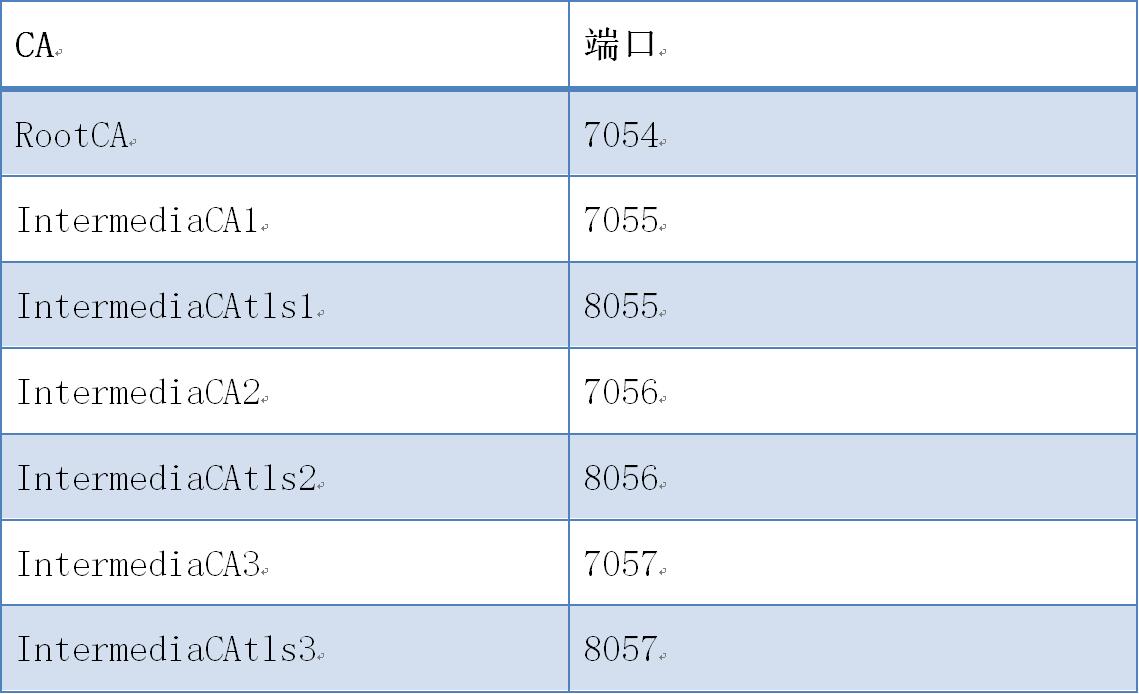
生产环境CA部署到上一章:Fabric kafka生产环境部署的kafka3(192.168.235.6)服务器上;由于四CA都在同一台电脑,端口号不能使用同一个,对应的端口号如下表:
运行和配置步骤如下:
(一) CA服务启动
1. RootCA启动
1) 创建目录
# cd $GOPATH/src/github.com/hyperledger/fabric-ca/bin

# mkdir ca-server

# cd ca-server
2) 初始化CA服务
# fabric-ca-server init -b admin:adminpw --home ./rootca
3) 启动CA服务
【命令行启动】
# fabric-ca-server start -b admin:adminpw --home ./rootca --cfg.affiliations.allowremove --cfg.identities.allowremove
【docker启动】
拷贝文件docker-rootca.yml到ca-server目录
# docker-compose -f docker-rootca.yaml up -d
2. IntermediaCA1启动
1) 初始化CA服务
# fabric-ca-server init -b admin1:adminpw1 -u http://admin:adminpw@localhost:7054 --home ./intermediaca1

# vi ./intermediaca1/fabric-ca-server-config.yaml

修改

port:
2) 启动CA服务
【命令行启动】
# fabric-ca-server start -b admin1:adminpw1 -u http://admin:adminpw@localhost:7054 --home ./intermediaca1 --cfg.affiliations.allowremove --cfg.identities.allowremove
【docker启动】
拷贝文件docker-intermediaca1.yml到ca-server目录
# docker-compose -f docker-intermediaca1.yaml up -d
3. IntermediaCAtls1启动
1) 初始化CA服务
# fabric-ca-server init -b admin1:adminpw1 -u http://admin:adminpw@localhost:7054 --home ./intermediacatls1

# vi ./intermediacatls1/fabric-ca-server-config.yaml

修改

port:
2) 启动CA服务
【命令行启动】
# fabric-ca-server start -b admin1:adminpw1 -u http://admin:adminpw@localhost:7054 --home ./intermediacatls1 --cfg.affiliations.allowremove --cfg.identities.allowremove
【docker启动】
拷贝文件docker-intermediaca1.yml到ca-server目录
# docker-compose -f docker-intermediacatls1.yaml up -d
4. IntermediaCA2启动
1) 初始化CA服务
# fabric-ca-server init -b admin2:adminpw2 -u http://admin:adminpw@localhost:7054 --home ./intermediaca2

# vi ./intermediaca2/fabric-ca-server-config.yaml

修改

port:
2) 启动CA服务
【命令行启动】
# fabric-ca-server start -b admin2:adminpw2 -u http://admin:adminpw@localhost:7054 --home ./intermediaca2 --cfg.affiliations.allowremove --cfg.identities.allowremove
【docker启动】
拷贝文件docker-intermediaca2.yml到ca-server目录
# docker-compose -f docker-intermediaca2.yaml up -d
5. IntermediaCAtls2启动
1) 初始化CA服务
# fabric-ca-server init -b admin2:adminpw2 -u http://admin:adminpw@localhost:7054 --home ./intermediacatls2

# vi ./intermediacatls2/fabric-ca-server-config.yaml

修改

port:
2) 启动CA服务
【命令行启动】
# fabric-ca-server start -b admin2:adminpw2 -u http://admin:adminpw@localhost:7054 --home ./intermediacatls2 --cfg.affiliations.allowremove --cfg.identities.allowremove
【docker启动】
拷贝文件docker-intermediaca2.yml到ca-server目录
# docker-compose -f docker-intermediacatls2.yaml up -d
6. IntermediaCA3启动
1) 初始化CA服务
# fabric-ca-server init -b admin3:adminpw3 -u http://admin:adminpw@localhost:7054 --home ./intermediaca3

# vi ./intermediaca3/fabric-ca-server-config.yaml

修改

port:
2) 启动CA服务
【命令行启动】
# fabric-ca-server start -b admin3:adminpw3 -u http://admin:adminpw@localhost:7054 --home ./intermediaca3 --cfg.affiliations.allowremove --cfg.identities.allowremove
【docker启动】
拷贝文件docker-intermediaca3.yml到ca-server目录
# docker-compose -f docker-intermediaca3.yaml up -d
7. IntermediaCAtls3启动
1) 初始化CA服务
# fabric-ca-server init -b admin3:adminpw3 -u http://admin:adminpw@localhost:7054 --home ./intermediacatls3

# vi ./intermediacatls3/fabric-ca-server-config.yaml

修改

port:
2) 启动CA服务
【命令行启动】
# fabric-ca-server start -b admin3:adminpw3 -u http://admin:adminpw@localhost:7054 --home ./intermediacatls3 --cfg.affiliations.allowremove --cfg.identities.allowremove
【docker启动】
拷贝文件docker-intermediaca3.yml到ca-server目录
# docker-compose -f docker-intermediacatls3.yaml up -d
(二) IntermediaCA1生成证书
1. 生成example.com的msp
1) 登记example.com
# cd /opt/gopath/src/github.com/hyperledger/fabric-ca/bin/ca-server

# fabric-ca-client enroll -M ./crypto-config/ordererOrganizations/example.com/msp -u http://admin1:adminpw1@localhost:7055 --home ./fabric-ca-client
2) 添加联盟成员
# fabric-ca-client affiliation list -M ./crypto-config/ordererOrganizations/example.com/msp -u http://admin1:adminpw1@localhost:7055 --home ./fabric-ca-client

# fabric-ca-client affiliation remove --force org1 -M ./crypto-config/ordererOrganizations/example.com/msp -u http://admin1:adminpw1@localhost:7055 --home ./fabric-ca-client

# fabric-ca-client affiliation remove --force org2 -M ./crypto-config/ordererOrganizations/example.com/msp -u http://admin1:adminpw1@localhost:7055 --home ./fabric-ca-client

# fabric-ca-client affiliation add com -M ./crypto-config/ordererOrganizations/example.com/msp -u http://admin1:adminpw1@localhost:7055 --home ./fabric-ca-client

# fabric-ca-client affiliation add com.example -M ./crypto-config/ordererOrganizations/example.com/msp -u http://admin1:adminpw1@localhost:7055 --home ./fabric-ca-client
2. 生成Admin@example.com的msp
1) 注册Admin@example.com
# fabric-ca-client register --id.name Admin@example.com --id.type client --id.affiliation "com.example" --id.attrs '"hf.Registrar.Roles=client,orderer,peer,user","hf.Registrar.DelegateRoles=client,orderer,peer,user",hf.Registrar.Attributes=*,hf.GenCRL=true,hf.Revoker=true,hf.AffiliationMgr=true,hf.IntermediateCA=true,role=admin:ecert' --id.secret= --csr.cn=example.com --csr.hosts=['example.com'] -M ./crypto-config/ordererOrganizations/example.com/msp -u http://admin1:adminpw1@localhost:7055 --home ./fabric-ca-client
2) 登记Admin@example.com
# fabric-ca-client enroll -u http://Admin@example.com:123456@localhost:7055 --csr.cn=example.com --csr.hosts=['example.com'] -M ./crypto-config/ordererOrganizations/example.com/users/Admin@example.com/msp --home ./fabric-ca-client
3) 生成msp
# mkdir ./fabric-ca-client/crypto-config/ordererOrganizations/example.com/users/Admin@example.com/msp/admincerts

# cp ./fabric-ca-client/crypto-config/ordererOrganizations/example.com/users/Admin@example.com/msp/signcerts/cert.pem ./fabric-ca-client/crypto-config/ordererOrganizations/example.com/users/Admin@example.com/msp/admincerts

# mkdir ./fabric-ca-client/crypto-config/ordererOrganizations/example.com/msp/admincerts

# cp ./fabric-ca-client/crypto-config/ordererOrganizations/example.com/users/Admin@example.com/msp/signcerts/cert.pem ./fabric-ca-client/crypto-config/ordererOrganizations/example.com/msp/admincerts
3. 生成orderer0.example.com的msp和tls
1) 注册orderer0.example.com
# fabric-ca-client register --id.name orderer0.example.com --id.type orderer --id.affiliation "com.example" --id.attrs '"role=orderer",ecert=true' --id.secret= --csr.cn=orderer0.example.com --csr.hosts=['orderer0.example.com'] -M ./crypto-config/ordererOrganizations/example.com/msp -u http://admin1:adminpw1@localhost:7055 --home ./fabric-ca-client
2) 登记orderer0.example.com
# fabric-ca-client enroll -u http://orderer0.example.com:123456@localhost:7055 --csr.cn=orderer0.example.com --csr.hosts=['orderer0.example.com'] -M ./crypto-config/ordererOrganizations/example.com/orderers/orderer0.example.com/msp --home ./fabric-ca-client
3) 生成msp
# mkdir ./fabric-ca-client/crypto-config/ordererOrganizations/example.com/orderers/orderer0.example.com/msp/admincerts

# cp ./fabric-ca-client/crypto-config/ordererOrganizations/example.com/users/Admin@example.com/msp/signcerts/cert.pem ./fabric-ca-client/crypto-config/ordererOrganizations/example.com/orderers/orderer0.example.com/msp/admincerts
4. 生成orderer1.example.com的msp
1) 注册orderer1.example.com
# fabric-ca-client register --id.name orderer1.example.com --id.type orderer --id.affiliation "com.example" --id.attrs '"role=orderer",ecert=true' --id.secret= --csr.cn=orderer1.example.com --csr.hosts=['orderer1.example.com'] -M ./crypto-config/ordererOrganizations/example.com/msp -u http://admin1:adminpw1@localhost:7055 --home ./fabric-ca-client
2) 登记orderer1.example.com
# fabric-ca-client enroll -u http://orderer1.example.com:123456@localhost:7055 --csr.cn=orderer1.example.com --csr.hosts=['orderer1.example.com'] -M ./crypto-config/ordererOrganizations/example.com/orderers/orderer1.example.com/msp --home ./fabric-ca-client
3) 生成msp
# mkdir ./fabric-ca-client/crypto-config/ordererOrganizations/example.com/orderers/orderer1.example.com/msp/admincerts

# cp ./fabric-ca-client/crypto-config/ordererOrganizations/example.com/users/Admin@example.com/msp/signcerts/cert.pem ./fabric-ca-client/crypto-config/ordererOrganizations/example.com/orderers/orderer1.example.com/msp/admincerts
5. 生成orderer2.example.com的msp
1) 注册orderer2.example.com
# fabric-ca-client register --id.name orderer2.example.com --id.type orderer --id.affiliation "com.example" --id.attrs '"role=orderer",ecert=true' --id.secret= --csr.cn=orderer2.example.com --csr.hosts=['orderer2.example.com'] -M ./crypto-config/ordererOrganizations/example.com/msp -u http://admin1:adminpw1@localhost:7055 --home ./fabric-ca-client
2) 登记orderer2.example.com
# fabric-ca-client enroll -u http://orderer2.example.com:123456@localhost:7055 --csr.cn=orderer2.example.com --csr.hosts=['orderer2.example.com'] -M ./crypto-config/ordererOrganizations/example.com/orderers/orderer2.example.com/msp --home ./fabric-ca-client
3) 生成msp
# mkdir ./fabric-ca-client/crypto-config/ordererOrganizations/example.com/orderers/orderer2.example.com/msp/admincerts

# cp ./fabric-ca-client/crypto-config/ordererOrganizations/example.com/users/Admin@example.com/msp/signcerts/cert.pem ./fabric-ca-client/crypto-config/ordererOrganizations/example.com/orderers/orderer2.example.com/msp/admincerts
(三) IntermediaCAtls1生成证书
1. 生成example.com的msp
1) 登记example.com
# cd /opt/gopath/src/github.com/hyperledger/fabric-ca/bin/ca-server

# fabric-ca-client enroll -M ./crypto-config/ordererOrganizations/example.com/tls -u http://admin1:adminpw1@localhost:8055 --home ./fabric-ca-client
2) 添加联盟成员
# fabric-ca-client affiliation list -M ./crypto-config/ordererOrganizations/example.com/tls -u http://admin1:adminpw1@localhost:8055 --home ./fabric-ca-client

# fabric-ca-client affiliation remove --force org1 -M ./crypto-config/ordererOrganizations/example.com/tls -u http://admin1:adminpw1@localhost:8055 --home ./fabric-ca-client

# fabric-ca-client affiliation remove --force org2 -M ./crypto-config/ordererOrganizations/example.com/tls -u http://admin1:adminpw1@localhost:8055 --home ./fabric-ca-client

# fabric-ca-client affiliation add com -M ./crypto-config/ordererOrganizations/example.com/tls -u http://admin1:adminpw1@localhost:8055 --home ./fabric-ca-client

# fabric-ca-client affiliation add com.example -M ./crypto-config/ordererOrganizations/example.com/tls -u http://admin1:adminpw1@localhost:8055 --home ./fabric-ca-client
2. 生成Admin@example.com的tls
1) 注册Admin@example.com
# fabric-ca-client register --id.name Admin@example.com --id.type client --id.affiliation "com.example" --id.attrs '"hf.Registrar.Roles=client,orderer,peer,user","hf.Registrar.DelegateRoles=client,orderer,peer,user",hf.Registrar.Attributes=*,hf.GenCRL=true,hf.Revoker=true,hf.AffiliationMgr=true,hf.IntermediateCA=true,role=admin:ecert' --id.secret= --csr.cn=example.com --csr.hosts=['example.com'] -M ./crypto-config/ordererOrganizations/example.com/tls -u http://admin1:adminpw1@localhost:8055 --home ./fabric-ca-client
2) 登记Admin@example.com
# fabric-ca-client enroll -d --enrollment.profile tls -u http://Admin@example.com:123456@localhost:8055 --csr.cn=example.com --csr.hosts=['example.com'] -M ./crypto-config/ordererOrganizations/example.com/users/Admin@example.com/tls --home ./fabric-ca-client
3) 生成tls
# cp ./fabric-ca-client/crypto-config/ordererOrganizations/example.com/users/Admin@example.com/tls/tlsintermediatecerts/tls-localhost-.pem ./fabric-ca-client/crypto-config/ordererOrganizations/example.com/users/Admin@example.com/tls/ca.crt

# cp ./fabric-ca-client/crypto-config/ordererOrganizations/example.com/users/Admin@example.com/tls/signcerts/cert.pem ./fabric-ca-client/crypto-config/ordererOrganizations/example.com/users/Admin@example.com/tls/client.crt

# cp ./fabric-ca-client/crypto-config/ordererOrganizations/example.com/users/Admin@example.com/tls/keystore/xxxxxxx_sk ./fabric-ca-client/crypto-config/ordererOrganizations/example.com/users/Admin@example.com/tls/client.key
3. 生成orderer0.example.com的msp和tls
1) 注册orderer0.example.com
# fabric-ca-client register --id.name orderer0.example.com --id.type orderer --id.affiliation "com.example" --id.attrs '"role=orderer",ecert=true' --id.secret= --csr.cn=orderer0.example.com --csr.hosts=['orderer0.example.com'] -M ./crypto-config/ordererOrganizations/example.com/tls -u http://admin1:adminpw1@localhost:8055 --home ./fabric-ca-client
2) 登记orderer0.example.com
# fabric-ca-client enroll -d --enrollment.profile tls -u http://orderer0.example.com:123456@localhost:8055 --csr.cn=orderer0.example.com --csr.hosts=['orderer0.example.com'] -M ./crypto-config/ordererOrganizations/example.com/orderers/orderer0.example.com/tls --home ./fabric-ca-client
3) 生成tls
# cp ./fabric-ca-client/crypto-config/ordererOrganizations/example.com/orderers/orderer0.example.com/tls/tlsintermediatecerts/tls-localhost-.pem ./fabric-ca-client/crypto-config/ordererOrganizations/example.com/orderers/orderer0.example.com/tls/ca.crt

# cp ./fabric-ca-client/crypto-config/ordererOrganizations/example.com/orderers/orderer0.example.com/tls/signcerts/cert.pem ./fabric-ca-client/crypto-config/ordererOrganizations/example.com/orderers/orderer0.example.com/tls/server.crt

# cp ./fabric-ca-client/crypto-config/ordererOrganizations/example.com/orderers/orderer0.example.com/tls/keystore/xxxxxxx_sk ./fabric-ca-client/crypto-config/ordererOrganizations/example.com/orderers/orderer0.example.com/tls/server.key
4. 生成orderer1.example.com的msp
1) 注册orderer1.example.com
# fabric-ca-client register --id.name orderer1.example.com --id.type orderer --id.affiliation "com.example" --id.attrs '"role=orderer",ecert=true' --id.secret= --csr.cn=orderer1.example.com --csr.hosts=['orderer1.example.com'] -M ./crypto-config/ordererOrganizations/example.com/tls -u http://admin1:adminpw1@localhost:8055 --home ./fabric-ca-client
2) 登记orderer1.example.com
# fabric-ca-client enroll -d --enrollment.profile tls -u http://orderer1.example.com:123456@localhost:8055 --csr.cn=orderer1.example.com --csr.hosts=['orderer1.example.com'] -M ./crypto-config/ordererOrganizations/example.com/orderers/orderer1.example.com/tls --home ./fabric-ca-client
3) 生成tls
# cp ./fabric-ca-client/crypto-config/ordererOrganizations/example.com/orderers/orderer1.example.com/tls/tlsintermediatecerts/tls-localhost-.pem ./fabric-ca-client/crypto-config/ordererOrganizations/example.com/orderers/orderer1.example.com/tls/ca.crt

# cp ./fabric-ca-client/crypto-config/ordererOrganizations/example.com/orderers/orderer1.example.com/tls/signcerts/cert.pem ./fabric-ca-client/crypto-config/ordererOrganizations/example.com/orderers/orderer1.example.com/tls/server.crt

# cp ./fabric-ca-client/crypto-config/ordererOrganizations/example.com/orderers/orderer1.example.com/tls/keystore/xxxxxxx_sk ./fabric-ca-client/crypto-config/ordererOrganizations/example.com/orderers/orderer1.example.com/tls/server.key
5. 生成orderer2.example.com的msp
1) 注册orderer2.example.com
# fabric-ca-client register --id.name orderer2.example.com --id.type orderer --id.affiliation "com.example" --id.attrs '"role=orderer",ecert=true' --id.secret= --csr.cn=orderer2.example.com --csr.hosts=['orderer2.example.com'] -M ./crypto-config/ordererOrganizations/example.com/tls -u http://admin1:adminpw1@localhost:8055 --home ./fabric-ca-client
2) 登记orderer2.example.com
# fabric-ca-client enroll -d --enrollment.profile tls -u http://orderer2.example.com:123456@localhost:8055 --csr.cn=orderer2.example.com --csr.hosts=['orderer2.example.com'] -M ./crypto-config/ordererOrganizations/example.com/orderers/orderer2.example.com/tls --home ./fabric-ca-client
3) 生成tls
# cp ./fabric-ca-client/crypto-config/ordererOrganizations/example.com/orderers/orderer2.example.com/tls/tlsintermediatecerts/tls-localhost-.pem ./fabric-ca-client/crypto-config/ordererOrganizations/example.com/orderers/orderer2.example.com/tls/ca.crt

# cp ./fabric-ca-client/crypto-config/ordererOrganizations/example.com/orderers/orderer2.example.com/tls/signcerts/cert.pem ./fabric-ca-client/crypto-config/ordererOrganizations/example.com/orderers/orderer2.example.com/tls/server.crt

# cp ./fabric-ca-client/crypto-config/ordererOrganizations/example.com/orderers/orderer2.example.com/tls/keystore/xxxxxxx_sk ./fabric-ca-client/crypto-config/ordererOrganizations/example.com/orderers/orderer2.example.com/tls/server.key
(四) IntermediaCA2生成证书
1. 生成org1.example.com的msp
1) 登记org1.example.com
# fabric-ca-client enroll --csr.cn=org1.example.com --csr.hosts=['org1.example.com'] -M ./crypto-config/peerOrganizations/org1.example.com/msp -u http://admin2:adminpw2@localhost:7056 --home ./fabric-ca-client
2) 添加联盟成员
# fabric-ca-client affiliation list -M ./crypto-config/peerOrganizations/org1.example.com/msp -u http://admin2:adminpw2@localhost:7056 --home ./fabric-ca-client

# fabric-ca-client affiliation remove --force org1 -M ./crypto-config/peerOrganizations/org1.example.com/msp -u http://admin2:adminpw2@localhost:7056 --home ./fabric-ca-client

# fabric-ca-client affiliation remove --force org2 -M ./crypto-config/peerOrganizations/org1.example.com/msp -u http://admin2:adminpw2@localhost:7056 --home ./fabric-ca-client

# fabric-ca-client affiliation add com -M ./crypto-config/peerOrganizations/org1.example.com/msp -u http://admin2:adminpw2@localhost:7056 --home ./fabric-ca-client

# fabric-ca-client affiliation add com.example -M ./crypto-config/peerOrganizations/org1.example.com/msp -u http://admin2:adminpw2@localhost:7056 --home ./fabric-ca-client

# fabric-ca-client affiliation add com.example.org1 -M ./crypto-config/peerOrganizations/org1.example.com/msp -u http://admin2:adminpw2@localhost:7056 --home ./fabric-ca-client
2. 生成Admin@example.com的msp
1) 注册Admin@example.com
# fabric-ca-client register --id.name Admin@org1.example.com --id.type client --id.affiliation "com.example.org1" --id.attrs '"hf.Registrar.Roles=client,orderer,peer,user","hf.Registrar.DelegateRoles=client,orderer,peer,user",hf.Registrar.Attributes=*,hf.GenCRL=true,hf.Revoker=true,hf.AffiliationMgr=true,hf.IntermediateCA=true,role=admin:ecert' --id.secret= --csr.cn=org1.example.com --csr.hosts=['org1.example.com'] -M ./crypto-config/peerOrganizations/org1.example.com/msp -u http://admin2:adminpw2@localhost:7056 --home ./fabric-ca-client
2) 登记Admin@example.com
# fabric-ca-client enroll -u http://Admin@org1.example.com:123456@localhost:7056 --csr.cn=org1.example.com --csr.hosts=['org1.example.com'] -M ./crypto-config/peerOrganizations/org1.example.com/users/Admin@org1.example.com/msp --home ./fabric-ca-client
3) 生成msp
# mkdir ./fabric-ca-client/crypto-config/peerOrganizations/org1.example.com/users/Admin@org1.example.com/msp/admincerts

# cp ./fabric-ca-client/crypto-config/peerOrganizations/org1.example.com/users/Admin@org1.example.com/msp/signcerts/cert.pem ./fabric-ca-client/crypto-config/peerOrganizations/org1.example.com/users/Admin@org1.example.com/msp/admincerts

# mkdir ./fabric-ca-client/crypto-config/peerOrganizations/org1.example.com/msp/admincerts

# cp ./fabric-ca-client/crypto-config/peerOrganizations/org1.example.com/users/Admin@org1.example.com/msp/signcerts/cert.pem ./fabric-ca-client/crypto-config/peerOrganizations/org1.example.com/msp/admincerts
3. 生成peer0.org1.example.com的msp
1) 注册peer0.org1.example.com
# fabric-ca-client register --id.name peer0.org1.example.com --id.type peer --id.affiliation "com.example.org1" --id.attrs '"role=peer",ecert=true' --id.secret= --csr.cn=peer0.org1.example.com --csr.hosts=['peer0.org1.example.com'] -M ./crypto-config/peerOrganizations/org1.example.com/msp -u http://admin2:adminpw2@localhost:7056 --home ./fabric-ca-client
2) 登记peer0.org1.example.com
# fabric-ca-client enroll -u http://peer0.org1.example.com:123456@localhost:7056 --csr.cn=peer0.org1.example.com --csr.hosts=['peer0.org1.example.com'] -M ./crypto-config/peerOrganizations/org1.example.com/peers/peer0.org1.example.com/msp --home ./fabric-ca-client
3) 生成msp
# mkdir ./fabric-ca-client/crypto-config/peerOrganizations/org1.example.com/peers/peer0.org1.example.com/msp/admincerts

# cp ./fabric-ca-client/crypto-config/peerOrganizations/org1.example.com/users/Admin@org1.example.com/msp/signcerts/cert.pem ./fabric-ca-client/crypto-config/peerOrganizations/org1.example.com/peers/peer0.org1.example.com/msp/admincerts
4. 生成peer1.org1.example.com的msp
1) 注册peer1.org1.example.com
# fabric-ca-client register --id.name peer1.org1.example.com --id.type peer --id.affiliation "com.example.org1" --id.attrs '"role=peer",ecert=true' --id.secret= --csr.cn=peer1.org1.example.com --csr.hosts=['peer1.org1.example.com'] -M ./crypto-config/peerOrganizations/org1.example.com/msp -u http://admin2:adminpw2@localhost:7056 --home ./fabric-ca-client
2) 登记peer1.org1.example.com
# fabric-ca-client enroll -u http://peer1.org1.example.com:123456@localhost:7056 --csr.cn=peer1.org1.example.com --csr.hosts=['peer1.org1.example.com'] -M ./crypto-config/peerOrganizations/org1.example.com/peers/peer1.org1.example.com/msp --home ./fabric-ca-client
3) 生成msp
# mkdir ./fabric-ca-client/crypto-config/peerOrganizations/org1.example.com/peers/peer1.org1.example.com/msp/admincerts

# cp ./fabric-ca-client/crypto-config/peerOrganizations/org1.example.com/users/Admin@org1.example.com/msp/signcerts/cert.pem ./fabric-ca-client/crypto-config/peerOrganizations/org1.example.com/peers/peer1.org1.example.com/msp/admincerts
(五) IntermediaCAtls2生成证书
1. 生成org1.example.com的msp
1) 登记org1.example.com
# fabric-ca-client enroll --csr.cn=org1.example.com --csr.hosts=['org1.example.com'] -M ./crypto-config/peerOrganizations/org1.example.com/tls -u http://admin2:adminpw2@localhost:8056 --home ./fabric-ca-client
2) 添加联盟成员
# fabric-ca-client affiliation list -M ./crypto-config/peerOrganizations/org1.example.com/tls -u http://admin2:adminpw2@localhost:8056 --home ./fabric-ca-client

# fabric-ca-client affiliation remove --force org1 -M ./crypto-config/peerOrganizations/org1.example.com/tls -u http://admin2:adminpw2@localhost:8056 --home ./fabric-ca-client

# fabric-ca-client affiliation remove --force org2 -M ./crypto-config/peerOrganizations/org1.example.com/tls -u http://admin2:adminpw2@localhost:8056 --home ./fabric-ca-client

# fabric-ca-client affiliation add com -M ./crypto-config/peerOrganizations/org1.example.com/tls -u http://admin2:adminpw2@localhost:8056 --home ./fabric-ca-client

# fabric-ca-client affiliation add com.example -M ./crypto-config/peerOrganizations/org1.example.com/tls -u http://admin2:adminpw2@localhost:8056 --home ./fabric-ca-client

# fabric-ca-client affiliation add com.example.org1 -M ./crypto-config/peerOrganizations/org1.example.com/tls -u http://admin2:adminpw2@localhost:8056 --home ./fabric-ca-client
2. 生成Admin@example.com的msp
1) 注册Admin@example.com
# fabric-ca-client register --id.name Admin@org1.example.com --id.type client --id.affiliation "com.example.org1" --id.attrs '"hf.Registrar.Roles=client,orderer,peer,user","hf.Registrar.DelegateRoles=client,orderer,peer,user",hf.Registrar.Attributes=*,hf.GenCRL=true,hf.Revoker=true,hf.AffiliationMgr=true,hf.IntermediateCA=true,role=admin:ecert' --id.secret= --csr.cn=org1.example.com --csr.hosts=['org1.example.com'] -M ./crypto-config/peerOrganizations/org1.example.com/tls -u http://admin2:adminpw2@localhost:8056 --home ./fabric-ca-client
2) 登记Admin@example.com
# fabric-ca-client enroll -d --enrollment.profile tls -u http://Admin@org1.example.com:123456@localhost:8056 --csr.cn=org1.example.com --csr.hosts=['org1.example.com'] -M ./crypto-config/peerOrganizations/org1.example.com/users/Admin@org1.example.com/tls --home ./fabric-ca-client
3) 生成tls
# cp ./fabric-ca-client/crypto-config/peerOrganizations/org1.example.com/users/Admin@org1.example.com/tls/tlsintermediatecerts/tls-localhost-.pem ./fabric-ca-client/crypto-config/peerOrganizations/org1.example.com/users/Admin@org1.example.com/tls/ca.crt

# cp ./fabric-ca-client/crypto-config/peerOrganizations/org1.example.com/users/Admin@org1.example.com/tls/signcerts/cert.pem ./fabric-ca-client/crypto-config/peerOrganizations/org1.example.com/users/Admin@org1.example.com/tls/client.crt

# cp ./fabric-ca-client/crypto-config/peerOrganizations/org1.example.com/users/Admin@org1.example.com/tls/keystore/xxxxxxx_sk ./fabric-ca-client/crypto-config/peerOrganizations/org1.example.com/users/Admin@org1.example.com/tls/client.key
3. 生成peer0.org1.example.com的msp
1) 注册peer0.org1.example.com
# fabric-ca-client register --id.name peer0.org1.example.com --id.type peer --id.affiliation "com.example.org1" --id.attrs '"role=peer",ecert=true' --id.secret= --csr.cn=peer0.org1.example.com --csr.hosts=['peer0.org1.example.com'] -M ./crypto-config/peerOrganizations/org1.example.com/tls -u http://admin2:adminpw2@localhost:8056 --home ./fabric-ca-client
2) 登记peer0.org1.example.com
# fabric-ca-client enroll -d --enrollment.profile tls -u http://peer0.org1.example.com:123456@localhost:8056 --csr.cn=peer0.org1.example.com --csr.hosts=['peer0.org1.example.com'] -M ./crypto-config/peerOrganizations/org1.example.com/peers/peer0.org1.example.com/tls --home ./fabric-ca-client
3) 生成tls
# cp ./fabric-ca-client/crypto-config/peerOrganizations/org1.example.com/peers/peer0.org1.example.com/tls/tlsintermediatecerts/tls-localhost-.pem ./fabric-ca-client/crypto-config/peerOrganizations/org1.example.com/peers/peer0.org1.example.com/tls/ca.crt

# cp ./fabric-ca-client/crypto-config/peerOrganizations/org1.example.com/peers/peer0.org1.example.com/tls/signcerts/cert.pem ./fabric-ca-client/crypto-config/peerOrganizations/org1.example.com/peers/peer0.org1.example.com/tls/server.crt

# cp ./fabric-ca-client/crypto-config/peerOrganizations/org1.example.com/peers/peer0.org1.example.com/tls/keystore/xxxxxxx_sk ./fabric-ca-client/crypto-config/peerOrganizations/org1.example.com/peers/peer0.org1.example.com/tls/server.key
4. 生成peer1.org1.example.com的tls
1) 注册peer1.org1.example.com
# fabric-ca-client register --id.name peer1.org1.example.com --id.type peer --id.affiliation "com.example.org1" --id.attrs '"role=peer",ecert=true' --id.secret= --csr.cn=peer1.org1.example.com --csr.hosts=['peer1.org1.example.com'] -M ./crypto-config/peerOrganizations/org1.example.com/tls -u http://admin2:adminpw2@localhost:8056 --home ./fabric-ca-client
2) 登记peer1.org1.example.com
# fabric-ca-client enroll -d --enrollment.profile tls -u http://peer1.org1.example.com:123456@localhost:8056 --csr.cn=peer1.org1.example.com --csr.hosts=['peer1.org1.example.com'] -M ./crypto-config/peerOrganizations/org1.example.com/peers/peer1.org1.example.com/tls --home ./fabric-ca-client
3) 生成tls
# cp ./fabric-ca-client/crypto-config/peerOrganizations/org1.example.com/peers/peer1.org1.example.com/tls/tlsintermediatecerts/tls-localhost-.pem ./fabric-ca-client/crypto-config/peerOrganizations/org1.example.com/peers/peer1.org1.example.com/tls/ca.crt

# cp ./fabric-ca-client/crypto-config/peerOrganizations/org1.example.com/peers/peer1.org1.example.com/tls/signcerts/cert.pem ./fabric-ca-client/crypto-config/peerOrganizations/org1.example.com/peers/peer1.org1.example.com/tls/server.crt

# cp ./fabric-ca-client/crypto-config/peerOrganizations/org1.example.com/peers/peer1.org1.example.com/tls/keystore/xxxxxxx_sk ./fabric-ca-client/crypto-config/peerOrganizations/org1.example.com/peers/peer1.org1.example.com/tls/server.key
(六) IntermediaCA3生成证书
1. 生成org2.example.com的msp
1) 登记org2.example.com
# fabric-ca-client enroll --csr.cn=org2.example.com --csr.hosts=['org2.example.com'] -M ./crypto-config/peerOrganizations/org2.example.com/msp -u http://admin3:adminpw3@localhost:7057 --home ./fabric-ca-client
2) 添加联盟成员
# fabric-ca-client affiliation list -M ./crypto-config/peerOrganizations/org2.example.com/msp -u http://admin3:adminpw3@localhost:7057 --home ./fabric-ca-client

# fabric-ca-client affiliation remove --force org1 -M ./crypto-config/peerOrganizations/org2.example.com/msp -u http://admin3:adminpw3@localhost:7057 --home ./fabric-ca-client

# fabric-ca-client affiliation remove --force org2 -M ./crypto-config/peerOrganizations/org2.example.com/msp -u http://admin3:adminpw3@localhost:7057 --home ./fabric-ca-client

# fabric-ca-client affiliation add com -M ./crypto-config/peerOrganizations/org2.example.com/msp -u http://admin3:adminpw3@localhost:7057 --home ./fabric-ca-client

# fabric-ca-client affiliation add com.example -M ./crypto-config/peerOrganizations/org2.example.com/msp -u http://admin3:adminpw3@localhost:7057 --home ./fabric-ca-client

# fabric-ca-client affiliation add com.example.org2 -M ./crypto-config/peerOrganizations/org2.example.com/msp -u http://admin3:adminpw3@localhost:7057 --home ./fabric-ca-client
2. 生成Admin@example.com的msp
1) 注册Admin@example.com
# fabric-ca-client register --id.name Admin@org2.example.com --id.type client --id.affiliation "com.example.org2" --id.attrs '"hf.Registrar.Roles=client,orderer,peer,user","hf.Registrar.DelegateRoles=client,orderer,peer,user",hf.Registrar.Attributes=*,hf.GenCRL=true,hf.Revoker=true,hf.AffiliationMgr=true,hf.IntermediateCA=true,role=admin:ecert' --id.secret= --csr.cn=org2.example.com --csr.hosts=['org2.example.com'] -M ./crypto-config/peerOrganizations/org2.example.com/msp -u http://admin3:adminpw3@localhost:7057 --home ./fabric-ca-client
2) 登记Admin@example.com
# fabric-ca-client enroll -u http://Admin@org2.example.com:123456@localhost:7057 --csr.cn=org2.example.com --csr.hosts=['org2.example.com'] -M ./crypto-config/peerOrganizations/org2.example.com/users/Admin@org2.example.com/msp --home ./fabric-ca-client
3) 生成msp
# mkdir ./fabric-ca-client/crypto-config/peerOrganizations/org2.example.com/users/Admin@org2.example.com/msp/admincerts

# cp ./fabric-ca-client/crypto-config/peerOrganizations/org2.example.com/users/Admin@org2.example.com/msp/signcerts/cert.pem ./fabric-ca-client/crypto-config/peerOrganizations/org2.example.com/users/Admin@org2.example.com/msp/admincerts

# mkdir ./fabric-ca-client/crypto-config/peerOrganizations/org2.example.com/msp/admincerts

# cp ./fabric-ca-client/crypto-config/peerOrganizations/org2.example.com/users/Admin@org2.example.com/msp/signcerts/cert.pem ./fabric-ca-client/crypto-config/peerOrganizations/org2.example.com/msp/admincerts
3. 生成peer0.org2.example.com的msp
1) 注册peer0.org2.example.com
# fabric-ca-client register --id.name peer0.org2.example.com --id.type peer --id.affiliation "com.example.org2" --id.attrs '"role=peer",ecert=true' --id.secret= --csr.cn=peer0.org2.example.com --csr.hosts=['peer0.org2.example.com'] -M ./crypto-config/peerOrganizations/org2.example.com/msp -u http://admin3:adminpw3@localhost:7057 --home ./fabric-ca-client
2) 登记peer0.org2.example.com
# fabric-ca-client enroll -u http://peer0.org2.example.com:123456@localhost:7057 --csr.cn=peer0.org2.example.com --csr.hosts=['peer0.org2.example.com'] -M ./crypto-config/peerOrganizations/org2.example.com/peers/peer0.org2.example.com/msp --home ./fabric-ca-client
3) 生成msp
# mkdir ./fabric-ca-client/crypto-config/peerOrganizations/org2.example.com/peers/peer0.org2.example.com/msp/admincerts

# cp ./fabric-ca-client/crypto-config/peerOrganizations/org2.example.com/users/Admin@org2.example.com/msp/signcerts/cert.pem ./fabric-ca-client/crypto-config/peerOrganizations/org2.example.com/peers/peer0.org2.example.com/msp/admincerts

.    生成peer1.org2.example.com的msp
1) 注册peer1.org2.example.com
# fabric-ca-client register --id.name peer1.org2.example.com --id.type peer --id.affiliation "com.example.org2" --id.attrs '"role=peer",ecert=true' --id.secret= --csr.cn=peer1.org2.example.com --csr.hosts=['peer1.org2.example.com'] -M ./crypto-config/peerOrganizations/org2.example.com/msp -u http://admin3:adminpw3@localhost:7057 --home ./fabric-ca-client
2) 登记peer1.org2.example.com
# fabric-ca-client enroll -u http://peer1.org2.example.com:123456@localhost:7057 --csr.cn=peer1.org2.example.com --csr.hosts=['peer1.org2.example.com'] -M ./crypto-config/peerOrganizations/org2.example.com/peers/peer1.org2.example.com/msp --home ./fabric-ca-client
3) 生成msp
# mkdir ./fabric-ca-client/crypto-config/peerOrganizations/org2.example.com/peers/peer1.org2.example.com/msp/admincerts

# cp ./fabric-ca-client/crypto-config/peerOrganizations/org2.example.com/users/Admin@org2.example.com/msp/signcerts/cert.pem ./fabric-ca-client/crypto-config/peerOrganizations/org2.example.com/peers/peer1.org2.example.com/msp/admincerts
(七) IntermediaCAtls3生成证书
1. 生成org2.example.com的msp
1) 登记org2.example.com
# fabric-ca-client enroll --csr.cn=org2.example.com --csr.hosts=['org2.example.com'] -M ./crypto-config/peerOrganizations/org2.example.com/tls -u http://admin3:adminpw3@localhost:8057 --home ./fabric-ca-client
2) 添加联盟成员
# fabric-ca-client affiliation list -M ./crypto-config/peerOrganizations/org2.example.com/tls -u http://admin3:adminpw3@localhost:8057 --home ./fabric-ca-client

# fabric-ca-client affiliation remove --force org1 -M ./crypto-config/peerOrganizations/org2.example.com/tls -u http://admin3:adminpw3@localhost:8057 --home ./fabric-ca-client

# fabric-ca-client affiliation remove --force org2 -M ./crypto-config/peerOrganizations/org2.example.com/tls -u http://admin3:adminpw3@localhost:8057 --home ./fabric-ca-client

# fabric-ca-client affiliation add com -M ./crypto-config/peerOrganizations/org2.example.com/tls -u http://admin3:adminpw3@localhost:8057 --home ./fabric-ca-client

# fabric-ca-client affiliation add com.example -M ./crypto-config/peerOrganizations/org2.example.com/tls -u http://admin3:adminpw3@localhost:8057 --home ./fabric-ca-client

# fabric-ca-client affiliation add com.example.org2 -M ./crypto-config/peerOrganizations/org2.example.com/tls -u http://admin3:adminpw3@localhost:8057 --home ./fabric-ca-client
2. 生成Admin@example.com的msp
1) 注册Admin@example.com
# fabric-ca-client register --id.name Admin@org2.example.com --id.type client --id.affiliation "com.example.org2" --id.attrs '"hf.Registrar.Roles=client,orderer,peer,user","hf.Registrar.DelegateRoles=client,orderer,peer,user",hf.Registrar.Attributes=*,hf.GenCRL=true,hf.Revoker=true,hf.AffiliationMgr=true,hf.IntermediateCA=true,role=admin:ecert' --id.secret= --csr.cn=org2.example.com --csr.hosts=['org2.example.com'] -M ./crypto-config/peerOrganizations/org2.example.com/tls -u http://admin3:adminpw3@localhost:8057 --home ./fabric-ca-client
2) 登记Admin@example.com
# fabric-ca-client enroll -d --enrollment.profile tls -u http://Admin@org2.example.com:123456@localhost:8057 --csr.cn=org2.example.com --csr.hosts=['org2.example.com'] -M ./crypto-config/peerOrganizations/org2.example.com/users/Admin@org2.example.com/tls --home ./fabric-ca-client
1) 生成tls
# cp ./fabric-ca-client/crypto-config/peerOrganizations/org2.example.com/users/Admin@org2.example.com/tls/tlsintermediatecerts/tls-localhost-.pem ./fabric-ca-client/crypto-config/peerOrganizations/org2.example.com/users/Admin@org2.example.com/tls/ca.crt

# cp ./fabric-ca-client/crypto-config/peerOrganizations/org2.example.com/users/Admin@org2.example.com/tls/signcerts/cert.pem ./fabric-ca-client/crypto-config/peerOrganizations/org2.example.com/users/Admin@org2.example.com/tls/client.crt

# cp ./fabric-ca-client/crypto-config/peerOrganizations/org2.example.com/users/Admin@org2.example.com/tls/keystore/xxxxxxx_sk ./fabric-ca-client/crypto-config/peerOrganizations/org2.example.com/users/Admin@org2.example.com/tls/client.key
3. 生成peer0.org2.example.com的tls
1) 注册peer0.org2.example.com
# fabric-ca-client register --id.name peer0.org2.example.com --id.type peer --id.affiliation "com.example.org2" --id.attrs '"role=peer",ecert=true' --id.secret= --csr.cn=peer0.org2.example.com --csr.hosts=['peer0.org2.example.com'] -M ./crypto-config/peerOrganizations/org2.example.com/tls -u http://admin3:adminpw3@localhost:8057 --home ./fabric-ca-client
2) 登记peer0.org2.example.com
# fabric-ca-client enroll -d --enrollment.profile tls -u http://peer0.org2.example.com:123456@localhost:8057 --csr.cn=peer0.org2.example.com --csr.hosts=['peer0.org2.example.com'] -M ./crypto-config/peerOrganizations/org2.example.com/peers/peer0.org2.example.com/tls --home ./fabric-ca-client
3) 生成tls
# cp ./fabric-ca-client/crypto-config/peerOrganizations/org2.example.com/peers/peer0.org2.example.com/tls/tlsintermediatecerts/tls-localhost-.pem ./fabric-ca-client/crypto-config/peerOrganizations/org2.example.com/peers/peer0.org2.example.com/tls/ca.crt

# cp ./fabric-ca-client/crypto-config/peerOrganizations/org2.example.com/peers/peer0.org2.example.com/tls/signcerts/cert.pem ./fabric-ca-client/crypto-config/peerOrganizations/org2.example.com/peers/peer0.org2.example.com/tls/server.crt

# cp ./fabric-ca-client/crypto-config/peerOrganizations/org2.example.com/peers/peer0.org2.example.com/tls/keystore/xxxxxxx_sk ./fabric-ca-client/crypto-config/peerOrganizations/org2.example.com/peers/peer0.org2.example.com/tls/server.key
4. 生成peer1.org2.example.com的tls
1) 注册peer1.org2.example.com
# fabric-ca-client register --id.name peer1.org2.example.com --id.type peer --id.affiliation "com.example.org2" --id.attrs '"role=peer",ecert=true' --id.secret= --csr.cn=peer1.org2.example.com --csr.hosts=['peer1.org2.example.com'] -M ./crypto-config/peerOrganizations/org2.example.com/tls -u http://admin3:adminpw3@localhost:8057 --home ./fabric-ca-client
2) 登记peer1.org2.example.com
# fabric-ca-client enroll -d --enrollment.profile tls -u http://peer1.org2.example.com:123456@localhost:8057 --csr.cn=peer1.org2.example.com --csr.hosts=['peer1.org2.example.com'] -M ./crypto-config/peerOrganizations/org2.example.com/peers/peer1.org2.example.com/tls --home ./fabric-ca-client
3) 生成tls
# cp ./fabric-ca-client/crypto-config/peerOrganizations/org2.example.com/peers/peer1.org2.example.com/tls/tlsintermediatecerts/tls-localhost-.pem ./fabric-ca-client/crypto-config/peerOrganizations/org2.example.com/peers/peer1.org2.example.com/tls/ca.crt

# cp ./fabric-ca-client/crypto-config/peerOrganizations/org2.example.com/peers/peer1.org2.example.com/tls/signcerts/cert.pem ./fabric-ca-client/crypto-config/peerOrganizations/org2.example.com/peers/peer1.org2.example.com/tls/server.crt

# cp ./fabric-ca-client/crypto-config/peerOrganizations/org2.example.com/peers/peer1.org2.example.com/tls/keystore/xxxxxxx_sk ./fabric-ca-client/crypto-config/peerOrganizations/org2.example.com/peers/peer1.org2.example.com/tls/server.key
网易云课堂视频在线教学,地址:https://study.163.com/course/introduction/1209401942.htm
HyperLedger Fabric 1.4 生产环境使用ca生成msp和tls(12)的更多相关文章
- HyperLedger Fabric 1.4 生产环境动态添加组织及节点
网易云课堂视频在线教学,地址:https://study.163.com/course/introduction/1209401942.htm 1.1 操作概述 在“kafka生产环境部署” ...
- Centos7 HyperLedger Fabric 1.4 生产环境部署
Kafka生产环境部署案例采用三个排序(orderer)服务.四个kafka.三个zookeeper和四个节点(peer)组成,共准备八台服务器,每台服务器对应的服务如下所示: kafka案例网络拓扑 ...
- 基于Debian搭建Hyperledger Fabric 2.4开发环境及运行简单案例
相关实验源码已上传:https://github.com/wefantasy/FabricLearn 前言 在基于truffle框架实现以太坊公开拍卖智能合约中我们已经实现了以太坊智能合约的编写及部署 ...
- HyperLedger Fabric 1.4 基础环境搭建(7)
学习了前面几章理论知识后,本章开始介绍实践操作,先介绍Fabric基础环境搭建,采用的操作系统为Centos 7 64位,依次介绍Docker安装.Docker-Compose安装.GO语言环境安装. ...
- Hyperledger Fabric 1.4 快速环境搭建
自己的硕士研究方向和区块链有关,工程上一直以IBM的Hyperledger Fabric为基础进行开发,对该项目关注也有两年了.目前迎来了Hyperledger Fabric v1.4,这也是Fabr ...
- 区块链 Hyperledger Fabric v1.0.0 环境搭建
前言:最近项目涉及到超级账本,在有些理论知识的基础上,需要整一套环境来. 这是一个特别要注意的事情,笔者之前按照网络上推荐,大部分都是推荐ubuntu系统的,于是下载Ubuntu系统(16.04.5和 ...
- HyperLedger Fabric 1.4 kafka生产环境部署(11.1)
11.1 Kafka模式简介 上一章介绍的Solo模式只存在一个排序(orderer)服务,是一种中心化结构,一旦排序(orderer)服务出现了问题,整个区块链网络将会崩溃,为了能在正式 ...
- Hyperledger Fabric 部署在多个主机上
前言 在实验Hyperledger Fabric无排序组织以Raft协议启动多个Orderer服务.TLS组织运行维护Orderer服务中,我们已经完成了使用提供 TLS-CA 服务的 council ...
- Hyperledger Fabric开发(二):创建网络
运行fabric-samples项目中的一个例子:first-network,创建第一个网络(Building Your First Network). 该网络共有4个peer节点,划分为2个组织(o ...
随机推荐
- Hibernate初探之一对多映射 及 myeclipse自动生成hibernate文件方法
实现单向一对多: 1)在one方的实体中添加保存many方的集合 2)在one方的配置文件中添加<one-to-many>配置 实现单向多对一: 1)在many方的实体中添加one方的引用 ...
- 连接IBM MQ原因码报2035的错误解决办法
我们的系统使用了ibm mq,用户用来向国家局上报文件和接收文件,前几天用户说上报一直不成功.由于 开发这块程序的人已经辞职了,我觉定在我的机器部署一套,研究一下.我的思路: 在我的机器上安装mq,建 ...
- ST表学习总结
前段时间做16年多校联合赛的Contest 1的D题(HDU 5726)时候遇到了多次查询指定区间的gcd值的问题,疑惑于用什么样的方式进行处理,最后上网查到了ST表,开始弄得晕头转向,后来才慢慢找到 ...
- SpringBoot学习(三)IDEA
一.什么是JPA JPA(Java Persistence API)定义了一系列对象持久化的标准,目前实现这一规范的产品有Hibernate.TopLink等. 二.Mysql数据库示例 1.在app ...
- dropout总结
1.伯努利分布:伯努利分布亦称“零一分布”.“两点分布”.称随机变量X有伯努利分布, 参数为p(0<p<1),如果它分别以概率p和1-p取1和0为值.EX= p,DX=p(1-p). 2. ...
- 在Mac上安装office2016破解版
2018.01.09更新 2017.03.13 更新 2017.02.21 更新 2017.01.16 更新 前言 在Mac上怎么能没有制作文档/表格/ppt的工具呢?在windows上有office ...
- subline关联linux系统
一. 插件安装用Package Control安装插件按下Ctrl+Shift+P调出命令面板输入install 调出 Install Package 选项并回车,然后输入sftp,下拉列表中会出现一 ...
- Flask—10-项目部署(02)
项目部署 WEB工作原理 客户端(chrom) <=> WEB服务器(nginx) <=> WSGI(uWSGI) <=> Python(Flask) <=& ...
- 快速排序_c++
快速排序_c++ GitHub 文解 快速排序正如其名,是一种排序速度较快的排序算法. 其核心思想: 取数组的第一个数,确定其在整个数组中的位置. 以刚刚的数值所确定的位置经数组分为两个部分. 再分别 ...
- 通过 openURL 方法跳转至设置 - iOS
iOS 10 以下系统版本可以通过 openURL 的方式跳转至指定的设置界面,code 如下: NSURL *url = [NSURL URLWithString:@"prefs:root ...