
Solr第二讲——SolrJ客户端的使用与案例
一、Solrj的使用
1.什么是Solrj
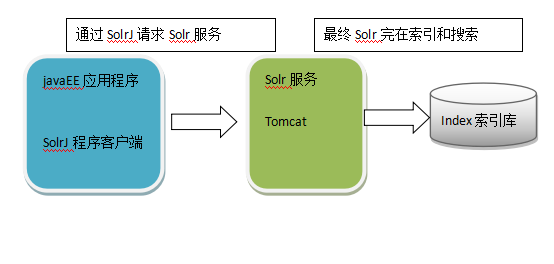
solrj是访问Solr服务的java客户端(就像通过jedis操作redis一样),提供索引和搜索的请求方法,SolrJ通常在嵌入在业务系统中,通过SolrJ的API接口操作Solr服务,如下图:
2.如何使用
需要的是solrj的包与拓展服务包

使用solrj完成索引的维护:
在solr中,索引库中都会存在一个唯一键,如果一个Document的id存在,则执行修改操作,如果不存在,则执行添加操作。
添加/修改索引:
1、 创建HttpSolrServer对象,通过它和Solr服务器建立连接。
2、 创建SolrInputDocument对象,然后通过它来添加域。
3、 通过HttpSolrServer对象将SolrInputDocument添加到索引库。
4、 提交。
@Test

    public void addDocument() throws Exception {

        // 1、 创建HttpSolrServer对象,通过它和Solr服务器建立连接。

        // 参数:solr服务器的访问地址

        HttpSolrServer server = new HttpSolrServer("http://localhost:8080/solr/");

        // 2、 创建SolrInputDocument对象,然后通过它来添加域。

        SolrInputDocument document = new SolrInputDocument();

        // 第一个参数:域的名称,域的名称必须是在schema.xml中定义的

        // 第二个参数:域的值

        // 注意:id的域不能少

        document.addField("id", "c0001");

        document.addField("title_ik", "使用solrJ添加的文档");

        document.addField("content_ik", "文档的内容");

        document.addField("product_name", "商品名称");

        // 3、 通过HttpSolrServer对象将SolrInputDocument添加到索引库。

        server.add(document);

        // 4、 提交。

        server.commit();

    }
在界面查询索引查看效果:使用域名:名称,例如 id:c001的格式

根据ID删除索引
@Test

    public void deleteDocument() throws Exception {

        // 1、 创建HttpSolrServer对象,通过它和Solr服务器建立连接。

        // 参数:solr服务器的访问地址

        HttpSolrServer server = new HttpSolrServer(

                "http://localhost:8080/solr/");

        // 根据ID删除

        server.deleteById("c0001");

        // 提交

        server.commit();

    }
根据条件删除
@Test

    public void deleteDocumentByQuery() throws Exception {

        // 1、 创建HttpSolrServer对象,通过它和Solr服务器建立连接。

        // 参数:solr服务器的访问地址

        HttpSolrServer server = new HttpSolrServer(

                "http://localhost:8080/solr/");

        // 根据ID删除

        server.deleteByQuery("id:c0001");

        // 全部删除

        // server.deleteByQuery("*:*");

        // 提交

        server.commit();

    }
查询索引
@Test

    public void queryIndex() throws Exception {

        // 创建HttpSolrServer对象,通过它和Solr服务器建立连接。

        // 参数:solr服务器的访问地址

        HttpSolrServer server = new HttpSolrServer(

                "http://localhost:8080/solr/");

        // 创建SolrQuery对象

        SolrQuery query = new SolrQuery();

        // 设置查询条件,名称“q”是固定的且必须 的

        query.set("q", "id:2");

        // 调用server的查询方法,查询索引库

        QueryResponse response = server.query(query);

        // 查询结果

        SolrDocumentList results = response.getResults();

        // 查询结果总数

        long cnt = results.getNumFound();

        System.out.println("查询结果总数:" + cnt);

        for (SolrDocument solrDocument : results) {

            System.out.println(solrDocument.get("id"));

            System.out.println(solrDocument.get("product_name"));

            System.out.println(solrDocument.get("product_price"));

            System.out.println(solrDocument.get("product_catalog_name"));

            System.out.println(solrDocument.get("product_picture"));

        }

    }
复杂查询
@Test

    public void queryIndex2() throws Exception {

        // 创建HttpSolrServer对象,通过它和Solr服务器建立连接。

        // 参数:solr服务器的访问地址

        HttpSolrServer server = new HttpSolrServer("http://localhost:8080/solr/");

        // 创建SolrQuery对象

        SolrQuery query = new SolrQuery();

        // 设置查询条件

        query.setQuery("钻石");

        // 设置过滤条件

        query.setFilterQueries("product_catalog_name:幽默杂货");

        // 设置排序

        query.setSort("product_price", ORDER.desc);

        // 设置分页信息

        query.setStart(0);

        query.setRows(10);

        // 设置显得的域的列表

        query.setFields("id", "product_name", "product_price",

                "product_catalog_name", "product_picture");

        // 设置默认搜索域

        query.set("df", "product_name");

        // 设置高亮

        query.setHighlight(true);

        query.addHighlightField("product_name");

        query.setHighlightSimplePre("<em>");

        query.setHighlightSimplePost("</em>");

        // 调用server的查询方法,查询索引库

        QueryResponse response = server.query(query);

        // 查询结果

        SolrDocumentList results = response.getResults();

        // 查询结果总数

        long cnt = results.getNumFound();

        System.out.println("查询结果总数:" + cnt);

        for (SolrDocument solrDocument : results) {

            System.out.println(solrDocument.get("id"));

            String productName = (String) solrDocument.get("product_name");

            //获取高亮列表

            Map<String, Map<String, List<String>>> highlighting = response

                    .getHighlighting();

            //获得本文档的高亮信息

            List<String> list = highlighting.get(solrDocument.get("id")).get(

                    "product_name");

            //如果有高亮,则把商品名称赋值为有高亮的那个名称

            if (list != null) {

                productName = list.get(0);

            }

            System.out.println(productName);

            System.out.println(solrDocument.get("product_price"));

            System.out.println(solrDocument.get("product_catalog_name"));

            System.out.println(solrDocument.get("product_picture"));

        }

    }
Solr第二讲——SolrJ客户端的使用与案例的更多相关文章
- 使用SolrJ客户端管理SolrCloud(Solr集群)
1.使用SolrJ客户端管理SolrCloud(Solr集群). package com.taotao.search.service; import java.io.IOException; impo ...
- 购物商城学习--第二讲(maven工程介绍)
接下来第二讲介绍整体工程如何使用maven搭建的. 使用maven管理工程的好处: jar包的管理: 工程之间的依赖管理: 自动打包 maven常见打包方式:jar.war和pom三种.jar工程,是 ...
- MySQL实战45讲学习笔记:日志系统(第二讲)
一.重要的日志模块:redo log 1.通过酒店掌柜记账思路刨析redo log工作原理 2.InnoDB 的 redo log 是固定大小的 只要赊账记录在了粉板上或写了账本上,之后即使掌柜忘记了 ...
- (转)【风宇冲】Unity3D教程宝典之AssetBundles:第二讲
原创文章如需转载请注明:转载自风宇冲Unity3D教程学院 AssetBundles第二讲:AssetBundles与脚本 所有Unity的As ...
- solr 学习之solrJ
solrJ是访问Solr服务的JAVA客户端,提供索引和搜索的请求方法,SolrJ通常嵌入在业务系统中,通过solrJ的API接口操作Solr服务. <!-- https://mvnreposi ...
- WebApp 安全风险与防护课堂(第二讲)开课了!
本文由葡萄城技术团队于原创并首发 转载请注明出处:葡萄城官网,葡萄城为开发者提供专业的开发工具.解决方案和服务,赋能开发者. 在昨天的公开课中,由于参与的小伙伴们积极性和热情非常高,我们的讲师Carl ...
- POI教程之第二讲:创建一个时间格式的单元格,处理不同内容格式的单元格,遍历工作簿的行和列并获取单元格内容,文本提取
第二讲 1.创建一个时间格式的单元格 Workbook wb=new HSSFWorkbook(); // 定义一个新的工作簿 Sheet sheet=wb.createSheet("第一个 ...
- Stanford机器学习---第二讲. 多变量线性回归 Linear Regression with multiple variable
原文:http://blog.csdn.net/abcjennifer/article/details/7700772 本栏目(Machine learning)包括单参数的线性回归.多参数的线性回归 ...
- 【军哥谈CI框架】之入门教程之第二讲:分析CI结构和CI是怎么工作的
[军哥谈CI框架]之入门教程之第二讲:分析CI结构和CI是怎么工作的 之入门教程之第二讲:分析CI结构和CI是如何工作的大家好!上一节,我们共同部署了一个CI网站,做到这一点非常简单,但是,亲们, ...
随机推荐
- vscode:配置git
1.下载git,并找到安装git的文件位置,并找到git文件夹下面的Bin文件夹 2.配置环境变量 位置:右击‘计算机’->属性->高级系统设置->环境变量 最后点击确定即可 ...
- ubuntu 18.4 鼠标右键菜单 添加文件
执行以下指令,在template文件夹中,增加一个空文件 touch ~/Templates/Empty\ Document
- 请教前辈:关于JS的一个奇怪的错误,不知是解析顺序造成的,还是什么原因。。
各位前辈好,如题,不知道是HTML解析顺序造成的,还是JS预编译的结果(见注释). 烦请各位前辈进行指导. <!DOCTYPE html> <html> <head> ...
- Bootstrap Multiselect
Getting Started Link the Required Files First, the jQuery library needs to be included. Then Twitter ...
- java动态代理的实现以及原理
1.前言 之前对动态代理的技术只是表面上理解,没有形成一个体系,这里总结一下,整个动态代理的实现以及实现原理,以表述的更清楚一些. 2.动态代理的实现应用到的技术 1.动态编译技术,可以使用Java自 ...
- 关于Hibernate的报错org.hibernate.MappingException: Unknown entity
部分异常,如下 org.hibernate.MappingException: Unknown entity: com.zcd.hibernate.oneToMany.Teamat org.hiber ...
- PowerDNS简单教程(3):管理篇
目录: PowerDNS简单教程(1):安装篇 http://www.cnblogs.com/anpengapple/p/5205130.html PowerDNS简单教程(2):功能篇 http:/ ...
- 2018 Multi-University Training Contest 4 Problem B. Harvest of Apples 【莫队+排列组合+逆元预处理技巧】
任意门:http://acm.hdu.edu.cn/showproblem.php?pid=6333 Problem B. Harvest of Apples Time Limit: 4000/200 ...
- git终端操作
1.提交 git add . git commit -m "test" git push origini master 2.分支 创建feature_x分支,并切换到feature ...
- 设计模式——责任链(chain of responsibiltiy)
责任链模式在面向对象程式设计里是一种软件设计模式,它包含了一些命令对象和一系列的处理对象. 每一个处理对象决定它能处理哪些命令对象,它也知道如何将它不能处理的命令对象传递给该链中的下一个处理对象.也就 ...