
olivettifaces数据集实现人脸识别代码
数据集: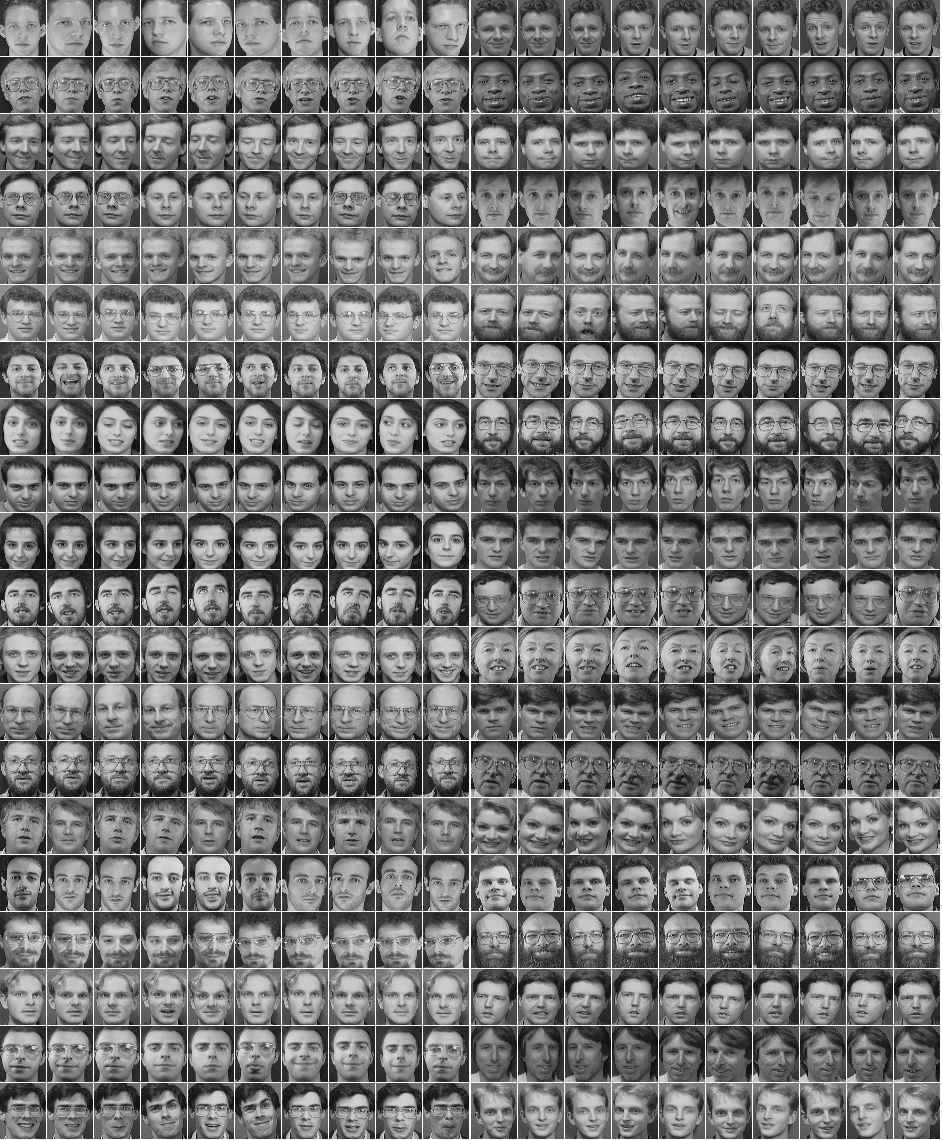
# -*- coding: utf-8 -*-

"""

Created on Wed Apr 24 18:21:21 2019

@author: 92958

"""

import os

import numpy as np

import tensorflow as tf

import matplotlib.pyplot as plt

import matplotlib.image as mpimg

import matplotlib.patches as patches

import numpy

from PIL import Image

dataset_path='./olivettifaces.gifa'

#获取dataset

def load_data(dataset_path):

    img = Image.open(dataset_path)

    # 定义一个20 × 20的训练样本,一共有40个人,每个人都10张样本照片

    img_ndarray = np.asarray(img, dtype='float64') / 256

    #img_ndarray = np.asarray(img, dtype='float32') / 32

    # 记录脸数据矩阵,57 * 47为每张脸的像素矩阵

    faces = np.empty((400, 57 * 47))

    for row in range(20):

        for column in range(20):

            faces[20 * row + column] = np.ndarray.flatten(

                img_ndarray[row * 57: (row + 1) * 57, column * 47 : (column + 1) * 47]

            )

    label = np.zeros((400, 40))

    for i in range(40):

        label[i * 10: (i + 1) * 10, i] = 1

    # 将数据分成训练集,验证集,测试集

    train_data = np.empty((320, 57 * 47))

    train_label = np.zeros((320, 40))

    vaild_data = np.empty((40, 57 * 47))

    vaild_label = np.zeros((40, 40))

    test_data = np.empty((40, 57 * 47))

    test_label = np.zeros((40, 40))

    for i in range(40):

        train_data[i * 8: i * 8 + 8] = faces[i * 10: i * 10 + 8]

        train_label[i * 8: i * 8 + 8] = label[i * 10: i * 10 + 8]

        vaild_data[i] = faces[i * 10 + 8]

        vaild_label[i] = label[i * 10 + 8]

        test_data[i] = faces[i * 10 + 9]

        test_label[i] = label[i * 10 + 9]

    train_data = train_data.astype('float32')

    vaild_data = vaild_data.astype('float32')

    test_data = test_data.astype('float32')

    return [

        (train_data, train_label),

        (vaild_data, vaild_label),

        (test_data, test_label)

    ]

def convolutional_layer(data, kernel_size, bias_size, pooling_size):

    kernel = tf.get_variable("conv", kernel_size, initializer=tf.random_normal_initializer())

    bias = tf.get_variable('bias', bias_size, initializer=tf.random_normal_initializer())

    conv = tf.nn.conv2d(data, kernel, strides=[1, 1, 1, 1], padding='SAME')

    linear_output = tf.nn.relu(tf.add(conv, bias))

    pooling = tf.nn.max_pool(linear_output, ksize=pooling_size, strides=pooling_size, padding="SAME")

    return pooling

def linear_layer(data, weights_size, biases_size):

    weights = tf.get_variable("weigths", weights_size, initializer=tf.random_normal_initializer())

    biases = tf.get_variable("biases", biases_size, initializer=tf.random_normal_initializer())

    return tf.add(tf.matmul(data, weights), biases)

def convolutional_neural_network(data):

    # 根据类别个数定义最后输出层的神经元

    n_ouput_layer = 40

    kernel_shape1=[5, 5, 1, 32]

    kernel_shape2=[5, 5, 32, 64]

    full_conn_w_shape = [15 * 12 * 64, 1024]

    out_w_shape = [1024, n_ouput_layer]

    bias_shape1=[32]

    bias_shape2=[64]

    full_conn_b_shape = [1024]

    out_b_shape = [n_ouput_layer]

    data = tf.reshape(data, [-1, 57, 47, 1])

    # 经过第一层卷积神经网络后,得到的张量shape为:[batch, 29, 24, 32]

    with tf.variable_scope("conv_layer1") as layer1:

        layer1_output = convolutional_layer(

            data=data,

            kernel_size=kernel_shape1,

            bias_size=bias_shape1,

            pooling_size=[1, 2, 2, 1]

        )

    # 经过第二层卷积神经网络后,得到的张量shape为:[batch, 15, 12, 64]

    with tf.variable_scope("conv_layer2") as layer2:

        layer2_output = convolutional_layer(

            data=layer1_output,

            kernel_size=kernel_shape2,

            bias_size=bias_shape2,

            pooling_size=[1, 2, 2, 1]

        )

    with tf.variable_scope("full_connection") as full_layer3:

        # 讲卷积层张量数据拉成2-D张量只有有一列的列向量

        layer2_output_flatten = tf.contrib.layers.flatten(layer2_output)

        layer3_output = tf.nn.relu(

            linear_layer(

                data=layer2_output_flatten,

                weights_size=full_conn_w_shape,

                biases_size=full_conn_b_shape

            )

        )

        # layer3_output = tf.nn.dropout(layer3_output, 0.8)

    with tf.variable_scope("output") as output_layer4:

        output = linear_layer(

            data=layer3_output,

            weights_size=out_w_shape,

            biases_size=out_b_shape

        )

    return output;

def train_facedata(dataset, model_dir,model_path):

    # train_set_x = data[0][0]

    # train_set_y = data[0][1]

    # valid_set_x = data[1][0]

    # valid_set_y = data[1][1]

    # test_set_x = data[2][0]

    # test_set_y = data[2][1]

    # X = tf.placeholder(tf.float32, shape=(None, None), name="x-input")  # 输入数据

    # Y = tf.placeholder(tf.float32, shape=(None, None), name='y-input')  # 输入标签

    batch_size = 40

    # train_set_x, train_set_y = dataset[0]

    # valid_set_x, valid_set_y = dataset[1]

    # test_set_x, test_set_y = dataset[2]

    train_set_x = dataset[0][0]

    train_set_y = dataset[0][1]

    valid_set_x = dataset[1][0]

    valid_set_y = dataset[1][1]

    test_set_x = dataset[2][0]

    test_set_y = dataset[2][1]

    X = tf.placeholder(tf.float32, [batch_size, 57 * 47])

    Y = tf.placeholder(tf.float32, [batch_size, 40])

    predict = convolutional_neural_network(X)

    cost_func = tf.reduce_mean(tf.nn.softmax_cross_entropy_with_logits(logits=predict, labels=Y))

    optimizer = tf.train.AdamOptimizer(1e-2).minimize(cost_func)

    # 用于保存训练的最佳模型

    saver = tf.train.Saver()

    #model_dir = './model'

    #model_path = model_dir + '/best.ckpt'

    with tf.Session() as session:

        # 若不存在模型数据,需要训练模型参数

        if not os.path.exists(model_path + ".index"):

            session.run(tf.global_variables_initializer())

            best_loss = float('Inf')

            for epoch in range(20):

                epoch_loss = 0

                for i in range((int)(np.shape(train_set_x)[0] / batch_size)):

                    x = train_set_x[i * batch_size: (i + 1) * batch_size]

                    y = train_set_y[i * batch_size: (i + 1) * batch_size]

                    _, cost = session.run([optimizer, cost_func], feed_dict={X: x, Y: y})

                    epoch_loss += cost

                print(epoch, ' : ', epoch_loss)

                if best_loss > epoch_loss:

                    best_loss = epoch_loss

                    if not os.path.exists(model_dir):

                        os.mkdir(model_dir)

                        print("create the directory: %s" % model_dir)

                    save_path = saver.save(session, model_path)

                    print("Model saved in file: %s" % save_path)

        # 恢复数据并校验和测试

        saver.restore(session, model_path)

        correct = tf.equal(tf.argmax(predict,1), tf.argmax(Y,1))

        valid_accuracy = tf.reduce_mean(tf.cast(correct,'float'))

        print('valid set accuracy: ', valid_accuracy.eval({X: valid_set_x, Y: valid_set_y}))

        test_pred = tf.argmax(predict, 1).eval({X: test_set_x})

        test_true = np.argmax(test_set_y, 1)

        test_correct = correct.eval({X: test_set_x, Y: test_set_y})

        incorrect_index = [i for i in range(np.shape(test_correct)[0]) if not test_correct[i]]

        for i in incorrect_index:

            print('picture person is %i, but mis-predicted as person %i'

                %(test_true[i], test_pred[i]))

        plot_errordata(incorrect_index, "olivettifaces.gif")

#画出在测试集中错误的数据

def plot_errordata(error_index, dataset_path):

    img = mpimg.imread(dataset_path)

    plt.imshow(img)

    currentAxis = plt.gca()

    for index in error_index:

        row = index // 2

        column = index % 2

        currentAxis.add_patch(

            patches.Rectangle(

                xy=(

                     47 * 9 if column == 0 else 47 * 19,

                     row * 57

                    ),

                width=47,

                height=57,

                linewidth=1,

                edgecolor='r',

                facecolor='none'

            )

    )

    plt.savefig("result.png")

    plt.show()

def main():

    dataset_path = "olivettifaces.gif"

    data = load_data(dataset_path)

    model_dir = './model'

    model_path = model_dir + '/best.ckpt'

    train_facedata(data, model_dir, model_path)

if __name__ == "__main__" :

    main()
控制台信息:
runfile('F:/python/TensorFlow/人脸识别/olive1.py', wdir='F:/python/TensorFlow/人脸识别')
WARNING:tensorflow:From C:\Users\92958\Anaconda3\lib\site-packages\tensorflow\python\framework\op_def_library.py:263: colocate_with (from tensorflow.python.framework.ops) is deprecated and will be removed in a future version.
Instructions for updating:
Colocations handled automatically by placer.
WARNING: The TensorFlow contrib module will not be included in TensorFlow 2.0.
For more information, please see:
- https://github.com/tensorflow/community/blob/master/rfcs/20180907-contrib-sunset.md
- https://github.com/tensorflow/addons
If you depend on functionality not listed there, please file an issue.
WARNING:tensorflow:From C:\Users\92958\Anaconda3\lib\site-packages\tensorflow\contrib\layers\python\layers\layers.py:1624: flatten (from tensorflow.python.layers.core) is deprecated and will be removed in a future version.
Instructions for updating:
Use keras.layers.flatten instead.
WARNING:tensorflow:From F:/python/TensorFlow/人脸识别/olive1.py:158: softmax_cross_entropy_with_logits (from tensorflow.python.ops.nn_ops) is deprecated and will be removed in a future version.
Instructions for updating:
Future major versions of TensorFlow will allow gradients to flow
into the labels input on backprop by default.
See tf.nn.softmax_cross_entropy_with_logits_v2.
0 : 2671140.984375
create the directory: ./model
Model saved in file: ./model/best.ckpt
1 : 610905.9375
Model saved in file: ./model/best.ckpt
2 : 181258.35693359375
Model saved in file: ./model/best.ckpt
3 : 54391.228271484375
Model saved in file: ./model/best.ckpt
4 : 24234.38525390625
Model saved in file: ./model/best.ckpt
5 : 9868.018524169922
Model saved in file: ./model/best.ckpt
6 : 3433.5851974487305
Model saved in file: ./model/best.ckpt
7 : 826.4495697021484
Model saved in file: ./model/best.ckpt
8 : 200.12329292297363
Model saved in file: ./model/best.ckpt
9 : 194.84842109680176
Model saved in file: ./model/best.ckpt
10 : 63.74338483810425
Model saved in file: ./model/best.ckpt
11 : 10.006996154785156
Model saved in file: ./model/best.ckpt
12 : 7.118054211139679
Model saved in file: ./model/best.ckpt
13 : 0.0
Model saved in file: ./model/best.ckpt
14 : 0.0
15 : 0.0
16 : 0.0
17 : 0.0
18 : 0.0
19 : 0.0
WARNING:tensorflow:From C:\Users\92958\Anaconda3\lib\site-packages\tensorflow\python\training\saver.py:1266: checkpoint_exists (from tensorflow.python.training.checkpoint_management) is deprecated and will be removed in a future version.
Instructions for updating:
Use standard file APIs to check for files with this prefix.
INFO:tensorflow:Restoring parameters from ./model/best.ckpt
valid set accuracy: 0.8
picture person is 4, but mis-predicted as person 8
picture person is 18, but mis-predicted as person 14
picture person is 21, but mis-predicted as person 27
picture person is 35, but mis-predicted as person 17

原文:https://blog.csdn.net/hanghangaidoudou/article/details/79347080
olivettifaces数据集实现人脸识别代码的更多相关文章
- opencv人脸识别代码
opencv人脸识别C++代码 /* * Copyright (c) 2011,2012. Philipp Wagner <bytefish[at]gmx[dot]de>. * Relea ...
- 百度Aip人脸识别之python代码
用python来做人脸识别代码量少 思路清晰, 在使用之前我们需要在我们的配置的编译器中通过pip install baidu-aip 即可 from aip import AipFace 就可以开 ...
- CNN卷积神经网络人脸识别
图片总共40个人,每人10张图片,每张图片高57,宽47.共400张图片. 读取图片的py文件 import numpyimport pandasfrom PIL import Imagefrom k ...
- 人脸识别FaceNet+TensorFlow
一.本文目标 利用facenet源码实现从摄像头读取视频,实时检测并识别视频中的人脸.换句话说:把facenet源码中contributed目录下的real_time_face_recognition ...
- [译]Kubernetes 分布式应用部署和人脸识别 app 实例
原文地址:KUBERNETES DISTRIBUTED APPLICATION DEPLOYMENT WITH SAMPLE FACE RECOGNITION APP 原文作者:skarlso 译文出 ...
- Python3利用Dlib19.7实现摄像头人脸识别的方法
0.引言 利用python开发,借助Dlib库捕获摄像头中的人脸,提取人脸特征,通过计算欧氏距离来和预存的人脸特征进行对比,达到人脸识别的目的: 可以自动从摄像头中抠取人脸图片存储到本地,然后提取构建 ...
- 「Python」人脸识别应用
人脸识别主要步骤: face_recognition 库的安装 安装此库,首先需要安装编译dlib,此处我们偷个懒,安装软件Anaconda(大牛绕过),此软件预装了dlib. 安装好后,我们直接通过 ...
- 百度人脸识别AI实践.doc
0, 前言 百度开放了很多AI能力,其中人脸识别就是其中之一. 本文对百度人脸识别AI进行实践检验,看看其使用效果如何. 鉴于是最为基础的实践,基本都是在其接口范例代码修改而来. 百度人脸识别AI网站 ...
- python 与 百度人脸识别api
用python来做人脸识别代码量少 思路清晰, 在使用之前我们需要在我们的配置的编译器中通过pip install baidu-aip 即可 from aip import AipFac ...
随机推荐
- C字符串
C字符串 C中的字符串是以空字符('\0')结尾的一个char数组,基本的实现字符串的方法有:字符串常量,字符串数组,char数组,char指针.字符串使用广泛,如与用户交互等处理自然语言的情况.C为 ...
- 微信开发(一)基于Wx-java的微信分享功能
最近在做微信服务号开发,简单总结一下,便于自己学习积累和分享给大家: 环境介绍: Spring+ Spring MVC +Mybatis 开发语言: JAVA 微信公众平台的开发中,微信只公布了一个基 ...
- c#关于路径的总结(转)
来源:http://www.cnblogs.com/yugongmengjiutian/articles/5521165.html 前一段时间写代码时经常遇到获取路径问题,总是感觉有点乱,于是就总结了 ...
- MVC在filter中如何获取控制器名称和Action名称
使用ActionExecutingContext对象可以获取控制器名称.Action名称.参数名称以及参数值.路由和Action返回值不影响结果. 在代码中 [AttributeUsage(Attri ...
- oracle中数据类型number(m,n)
oracle中数据类型number(m,n)中m表示的是所有有效数字的位数,n表示的是小数位的位数.m的范围是1-38,即最大38位. 1> .NUMBER类型细讲:Oracle numbe ...
- 2018 Google SEO 需要注意的点
1.RankBrain 是一种机器学习系统 - 会根据用户的行为进行,对网站排名. 用户在你的网页上停留多久(用户停留时长) 多大比例的用户点击了你的网页(点击率) Note: 之前Google 开发 ...
- 【Tomcat】tomcat配置文件详解
Tomcat Server的结构图 结构框架,如下 属性表格 元素名 属性 解释 server(它代表整个容器,是Tomcat实例的顶层元素.由org.apache.catalina.Server接口 ...
- MyBatis开发Dao层的两种方式(原始Dao层开发)
本文将介绍使用框架mybatis开发原始Dao层来对一个对数据库进行增删改查的案例. Mapper动态代理开发Dao层请阅读我的下一篇博客:MyBatis开发Dao层的两种方式(Mapper动态代理方 ...
- java8 集合神操作
public class StreamUtils { private static final List<Integer> listInteger = Lists.newArrayList ...
- Herding(hdu4709)三点运用行列式求面积
Herding Time Limit: 2000/1000 MS (Java/Others) Memory Limit: 32768/32768 K (Java/Others)Total Submis ...